Scenario 1: The no-credit-card first-timer
The card barely matters. That's the surprise. This guide exists because most PH players don't own one, and both routes work fine without it.
Echoes are the paid premium currency. You spend them in Illusion Hall on costumes, skins and shop items, according to the Identity V Wiki - Fandom. They're not Clues, the second currency you grind in matches. GCash buys Echoes only, never Clues. Don't expect a top-up to refill your free-currency bar. That mix-up burns more beginner questions on r/IdentityV than any payment glitch.
No card, first buy. You've got two clean paths:
- Link GCash to Google Play (Android) or your Apple ID wallet, then buy the pack from inside Identity V's store.
- Use a player-ID portal like SEAGM, Joytify or VGTopup, punch in your User ID and Server, and pay GCash via QR.
Third-party sites including SEAGM and Joytify take GCash straight for PH top-ups, per SEAGM. A F2P PH player can finish a first buy that way with no card and instant delivery, per r/IdentityV. Both cleared. The store route asks for one extra setup step, adding GCash as a payment method inside Google Play. That's exactly why I still hand it to jittery beginners. Billing runs through a wall they already trust, and a botched payment just bounces instead of firing into a stranger's account.
So which one? Want zero friction and don't mind the setup? Link GCash to Google Play once and you're set for good. Want the lowest price on day one? The portal takes it. Keep reading.
Scenario 2: Pricing the same pack across both routes
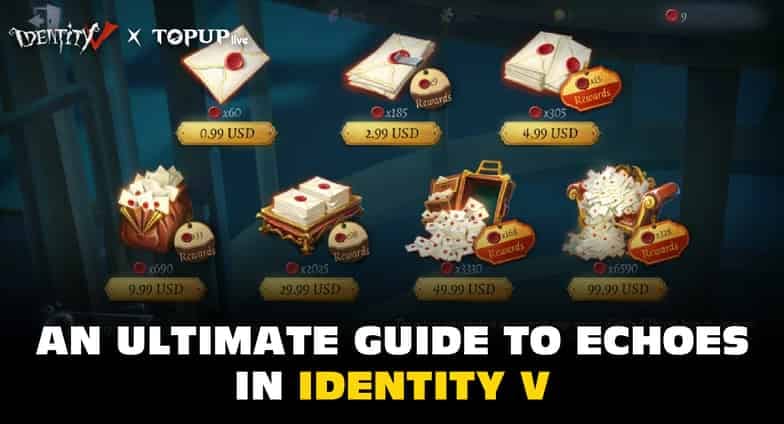
The portal's price edge is real. But the in-game bonus you'd give up by skipping the store is smaller than people fear, because store billing hands you the same bonus structure.
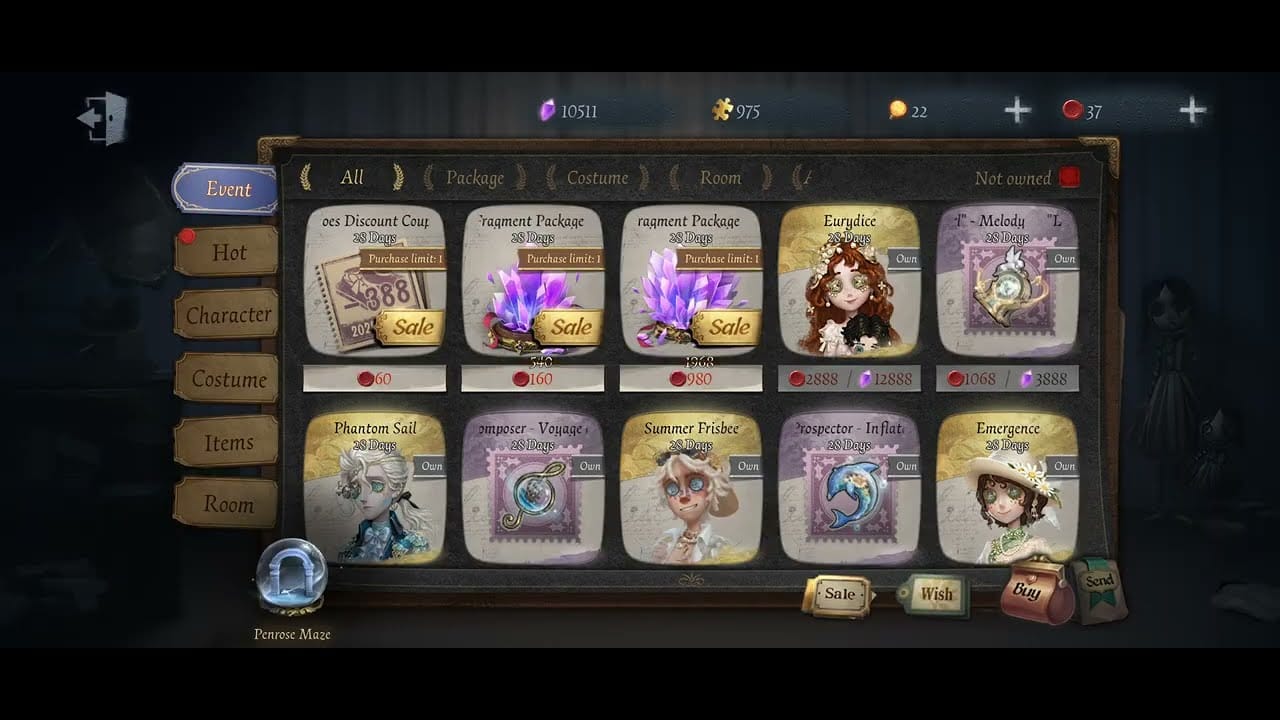
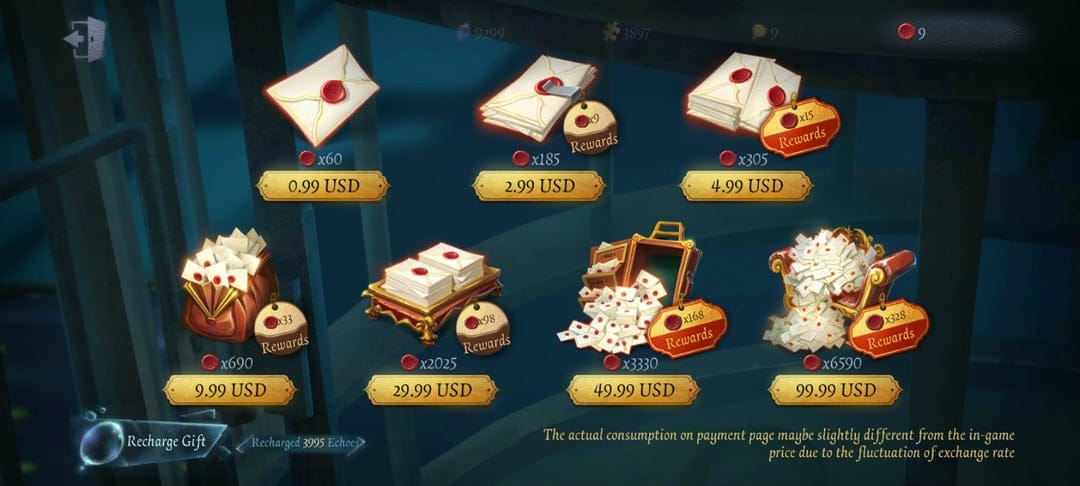
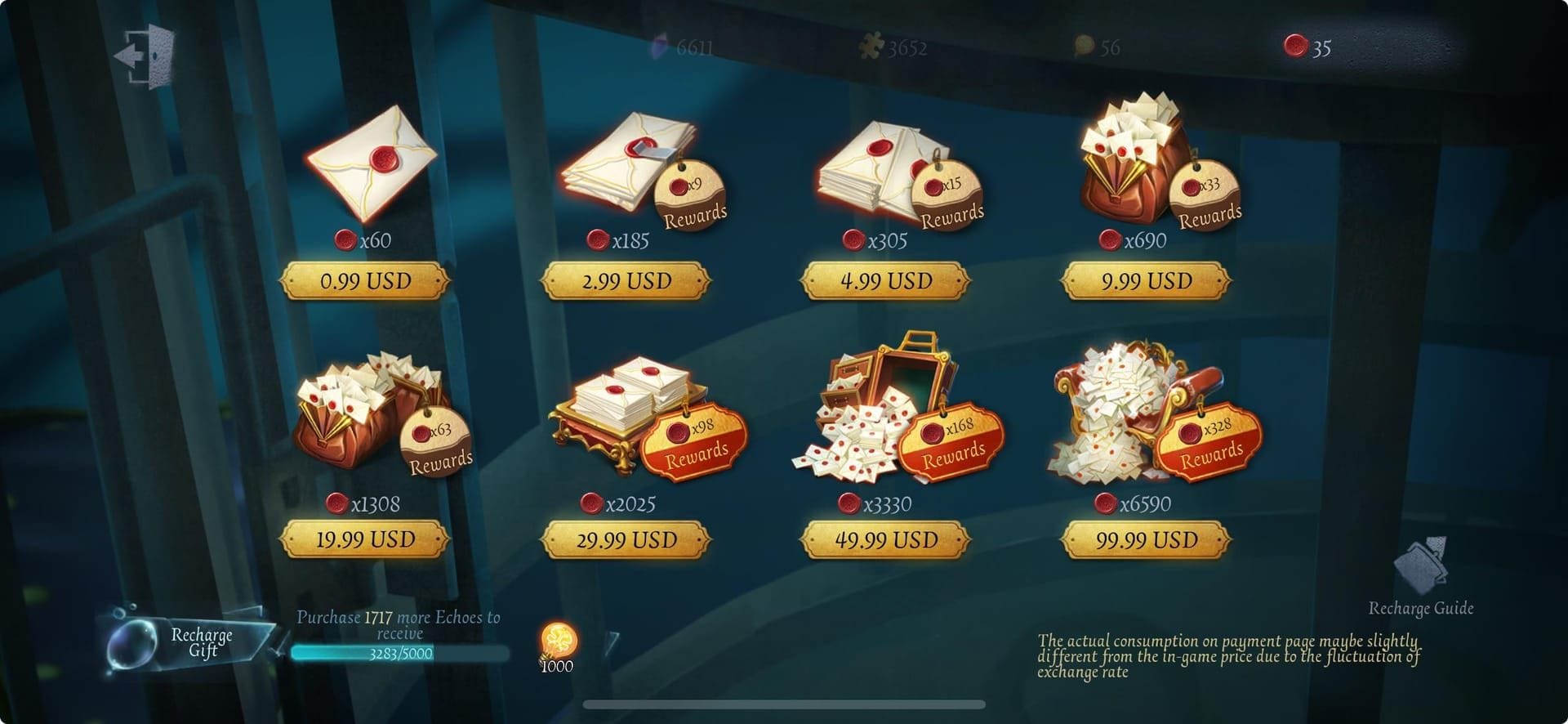
Start from the official baseline. The $9.99 pack drops 759 Echoes, 690 base plus 69 bonus, which lands at roughly $0.013 per Echo, per the Fandom wiki. The fuller ladder:
| Price (USD) |
Base |
Bonus |
Total Echoes |
$/Echo |
| $0.99 |
60 |
6 |
66 |
$0.015 |
| $9.99 |
690 |
69 |
759 |
$0.01312 |
| $29.99 |
2,025 |
202 |
2,227 |
$0.01347 |
Source: Identity V Wiki - Fandom (2026)
Look at the $9.99 tier. Cheapest per Echo of the three. The $29.99 "value" pack is actually worse per Echo. A genuine trap. Bigger doesn't mean cheaper here, so don't reflex-grab the biggest tier thinking you saved.
Now GCash. That same 690+69 pack ran around 440 PHP on SEAGM for PH buyers, per r/IdentityV. And price threads on that subreddit keep finding the GCash-on-portal route undercuts in-app Google Play or Apple billing for the identical pack. Figures, since store billing stacks platform margin on top. The portal shaves it off.
What caught my eye the first time I lined them up was that PHP gap. Honest caveat though. Both routes credit the same on-account bonus, so you're comparing price, not quantity. The portal saves you pesos. It doesn't get you more Echoes per pack.
Deciding where to actually pull the trigger? Checking the live portal price against your in-app total is the one habit worth keeping. A player-ID route like Identity V Echoes top up lets you see the GCash price before committing, with nothing but your User ID.
Scenario 3: The first-purchase bonus most guides miss
Method choice can change your total Echoes, not just the price. Almost no PH guide flags this.
First-purchase bonuses in Identity V can fire separately per payment platform. The official NetEase top-up site offers more bonus Echoes than in-game buys, per NetEase GamesClub. The channel you pick is itself a variable in how many Echoes you walk off with. A first buy through one billing path doesn't always burn the first-buy bonus tied to another.
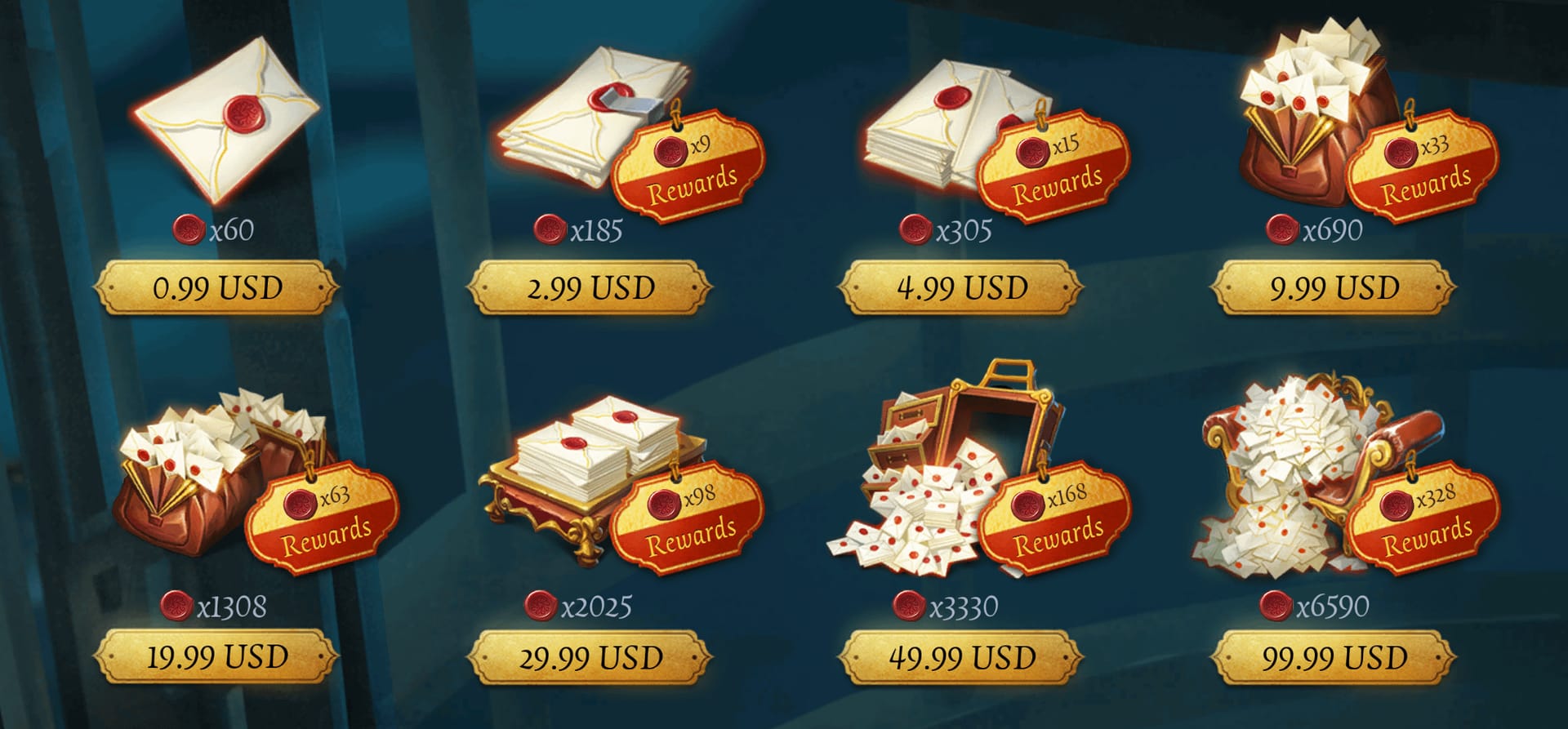
So if you're planning more than one purchase, don't waste your very first top-up on the smallest micro-pack out of caution. The first-purchase bonus usually scales with pack size, so a tiny $0.99 opener leaves the bigger bonus rotting on the shelf. My call: bank that first-buy bonus on a pack you were buying anyway, the $9.99 per-Echo sweet spot, instead of "testing" with the 66-Echo pack and torching the one-time multiplier.
Now the murky part. I won't quote a hard bonus percentage, because no official figure splits it per platform in a way I can cite. What's confirmed is the direction. Official-channel bonuses beat in-game, per the source above. So eyeball the exact uplift on the payment screen before you confirm. Don't trust a number from any guide, mine included.
Scenario 4: When GCash says no
The decline that threw me wasn't "no money." It was a card limit firing while the wallet still held balance. That one mechanic explains a slice of the "GCash not working on Identity V" threads.
GCash limits scale hard by verification tier, and that's the usual culprit behind a blocked top-up:
| Tier |
Monthly Incoming |
Daily Outgoing |
Monthly Outgoing |
| Basic |
5,000 |
None |
5,000 |
| Verified |
100,000 |
100,000 |
None |
| Fully Verified |
1,000,000 |
500,000 |
1,000,000 |
Source: GCash Help Center (2026)
A fully verified account carries a PHP 1,000,000 monthly incoming limit, a basic verified one PHP 100,000, per the GCash Help Center. For Echoes packs, even the $29.99 tier, you're nowhere near those ceilings. So a decline at small pack sizes almost never traces to the monthly cap. It traces to one of three things:
- Empty wallet — the obvious one. Fund your GCash wallet first. Paying straight from balance means the pack price has to be sitting there, per GCash Help guidance for PH players.
- Verification tier blocking the flow. A Basic account hits walls a Verified one sails past. Verify before you blame the game.
- A linked-card limit firing despite wallet funds. This is the hidden one. A GCash linked-card charge can decline even with a wallet balance showing, if the card's own limit is hit. Mid-spenders pushing larger packs through a GCash-linked debit card get bitten here, because the charge runs against the card, not the wallet, per GCash Help.
The fix list is short. Check your GCash balance and limits, confirm the right Player ID and Server, and ping the portal's support for a failed payment, per SEAGM's troubleshooting guidance. Good news: no widespread GCash failures turned up across community results after the 2026 patches. So a decline today is almost always your account state, not a platform outage.
For mid-spenders, here's my take. If a linked-card charge keeps choking at the size you want, switch that single buy to pay straight from wallet balance. Sidesteps the card-limit mechanic completely.
Scenario 5: The mistake that actually loses your account
Every other failure in this guide costs you minutes. This one costs you the account. The only scenario I'd call a hard stop.
Two pitfalls run the show, and neither is a payment error:
Wrong server/region. Pick the wrong server or region at top-up and the Echoes land on a different account, per multiple r/IdentityV threads and portal warnings. The misdelivery nobody warns you about. Your User ID plus your Server (PH/Asia for PH accounts) has to match your in-game login server, or the currency just won't show up where you expect. I'd argue this is the single biggest top-up risk for Filipino players, bigger than the payment method. Check the server dropdown twice before paying. There's no easy reversal once Echoes hit the wrong account.
OTP / credential sharing. Never hand your OTP or login to any "seller," per community consensus across Reddit and Facebook groups. The bright line: a legitimate top-up needs only your Player ID and Server. Never your password. Never an OTP. Never login access. The second anyone asks for your login, walk, no matter how official they look. Sharing a player ID alone is low-risk. Sharing login or an OTP is how accounts vanish.
And keep the receipts. Save both the GCash transaction record and the portal's confirmation. That paper trail is your only real leverage for a refund or dispute, per community advice on r/IdentityV. Without it you've got nothing to escalate.
The route I'd hand each kind of PH player
No single answer fits everyone. Here's the call by profile, plus a matrix so you can spot yourself fast.
| Profile |
Best route |
Card needed |
Delivery |
Why |
| First-timer, no card |
GCash → Google Play, in-game buy |
No |
Instant after payment |
Trusted billing wall; a bad payment just declines, never misfires |
| Low-spender, wallet only |
GCash on player-ID portal |
No |
Instant |
Cheapest per peso; pays straight from wallet balance |
| Mid-spender, larger packs |
Portal or store; wallet over card |
Optional |
Instant |
Avoids the linked-card decline mechanic |
Sources: SEAGM (2026); Joytify (2026); GCash Help Center (2026)
The portal flow is five steps, per SEAGM and Joytify guides. Enter User ID and Server, pick your pack, choose GCash, scan the QR or confirm in-app, and the Echoes credit instantly. Delivery on these GCash routes lands right after payment confirmation. So if your Echoes haven't shown inside a couple of minutes, that's a server-mismatch flag, not a "still processing" one.
For a nervous first buyer, the GCash-via-Google-Play route is the most underrated option in the PH scene. It dodges card requirements entirely while keeping you inside familiar billing. Past that first buy, the player-ID portal on GCash is the better default. Cheaper per peso, instant, never asks for more than User ID and Server. And one point worth repeating: chasing the absolute cheapest reseller is a worse gamble than picking the wrong server, and both matter less than the rule that nobody legitimate ever asks for your login.
Frequently Asked Questions
Can I top up Identity V Echoes with GCash without any credit card?
Yes, and that's the whole draw for PH players. Both the store route (link GCash inside Google Play) and player-ID portals like SEAGM take GCash with no card, paying straight from wallet balance, per r/IdentityV and SEAGM (2026). A card only enters if you deliberately route through a GCash-linked debit card for higher limits, which most Echoes packs never require.
How long should I wait before deciding my Echoes top-up failed?
Delivery is instant after payment confirmation on supported GCash routes, per SEAGM and Joytify (2026). If nothing's arrived in a couple of minutes, don't shrug it off as "still processing." Check whether you picked the right Server first, since a region mismatch ships Echoes to a different account instead of queuing them. That's the likelier cause than a slow payment.
Why does my GCash decline on Identity V even though I have a balance?
The usual hidden cause is a GCash-linked card hitting its own limit while your wallet still shows funds, per GCash Help Center (2026). The charge runs against the card, not the wallet. Switch that buy to pay straight from wallet balance. Still stuck? Confirm your verification tier, because a Basic account hits walls a Verified one clears.
Is it actually risky to give a top-up site my player ID?
Sharing your Player ID and Server alone is low-risk. It's all a legitimate top-up needs. The danger is login credentials or an OTP. Community consensus on r/IdentityV (2026) is blunt: never hand those over, however official a "seller" looks. Any request for your password or OTP is an automatic scam signal.
Can I get a refund if my Echoes never show up?
Your leverage rides entirely on receipts. Save both the GCash transaction record and the portal's confirmation, per community advice on r/IdentityV (2026). With those, you can dispute through the portal's support, per SEAGM's troubleshooting guidance. Without them, there's barely anything to escalate. And if the Echoes landed on a wrong account from a server mismatch, recovery gets far harder, so prevention beats refunds here.






Comments