Coins bought on iPhone die on Android — busted
This is the panic-button fear, and it's nonsense. The coins are account-bound, welded to your UID, not to the handset or the storefront you swiped your card at. One UID handles top-up and balance access on both operating systems, per the cross-checked 2026 guides from BitTopup and Enjoygm. Swap phones, log into the same account, the wallet's untouched.
What doesn't make the trip is the payment relationship. Apple ID receipts, iOS purchase history, refund eligibility, all of that stays bolted to Apple's side. This is the line nearly every top result skips over: the coins belong to the account, the transaction record belongs to whichever store rang you up. Buy a 90,000-coin pack for $17.99 on iOS, per the Apple App Store listing, and those coins surface on Android no problem. You just can't lean on Google to refund an Apple charge, and that iOS receipt is never showing up in your Play history.
The "partially locked coins" rumor is people logging into the wrong account, not some phantom lock in the system. VERDICT: busted.
Reinstall and log in — true, but the order is the whole game

Reinstalling and signing back in works if the account was linked first. That little conditional is everything, and "just reinstall" waltzes right past it.
Here's the gear turning underneath. TAKA lets you register with a mobile number or email, per a 2026 agency walkthrough. Do that and your UID is anchored to something you can re-type on any device, any time. Play as a guest, though, never binding an email or phone or social provider, and your account effectively only exists inside that one iPhone install. Wipe it, move to Android, and there's no key left to unlock anything. The balance isn't gone. It's stranded on an account you can't physically reach anymore.
Community guides keep flagging the guest state as the dangerous lane on any device switch and tell you to link right away to lock the UID down. " The platform almost never torches a balance. People bolt the door and toss the key.
Corrected sequence, then: link first, switch second. Never the reverse. VERDICT: qualified, true only when the linking happens up front.

The pre-switch checklist I'd actually run
Before you go anywhere near a factory reset, do this inside the iOS app:
- Open your profile (tap the Me icon) and copy the numeric UID, the 8–10 digit ID under your username, per the Enjoygm recharge steps.
- Bind an email or phone if you haven't. Used a social login at signup? Note which one (Google, Apple, Facebook, whatever you tapped).
- Screenshot your balance and, if it's showing, your purchase history. Dirt-cheap insurance, and it hands you something solid to wave at support later if numbers go sideways.
That third step eats ten seconds and has settled more disputes than any slick recovery trick going.
"Logging in is logging in" — busted, the provider is a trap

The ugliest way to "lose" coins after a switch isn't even a bug. It's logging into Android with a different social provider than the one you started with.
Say you signed up through Google originally, then tap "Continue with Facebook" on the fresh Android phone. TAKA can happily conjure a brand-new, empty account. Your coins are safe and sound on the original Google-linked UID. But you're now glaring at a zero balance that feels exactly like deletion. That duplicate-account mess is precisely why jotting down your original login method earns its keep.
Fix is dull and dependable: log in with the same credential you used on iOS. Not sure which one? Check whether the UID on the new phone matches the number you copied. Different UID means you've landed on a duplicate, so log out and try the other provider before you spend a dime. VERDICT: busted, the login method carries weight, it's not interchangeable.
Android top-ups are cheaper, so always buy there — qualified

There's a genuine price gap and it does tilt toward Android. But in-app it's slimmer than the headlines crow about, and the fat savings sit off-store entirely.
The gap comes from store commissions, not TAKA. Apple's standard in-app cut is 30%, sliding to 15% for developers under $1M through the Apple Small Business Program. Google's service fee runs 15% for most developers under $1M, with a few reduced tiers in 2026, per Google Play developer support. Lower platform fees on Android can shave the effective price of identical coins a touch. On a small in-app pack, though, we're talking pennies, not a windfall.
The real delta lives in third-party top-up channels that skip store commissions altogether. Community pricing snapshots peg those at roughly 30–38% under in-app, with one Enjoygm figure citing up to 38% off. A small pack bundling around $1.06 third-party against the heftier in-app sticker is the sort of gap that stacks up if you recharge with any regularity.
| Top-up route |
Typical price advantage |
Delivery |
What you need |
| In-app (iOS) |
Standard; up to 30% commission baked in |
Instant–5 min |
Apple ID |
| In-app (Google Play) |
Standard; lower 15–20% fee |
Instant–5 min |
Google account |
| Third-party (UID-based) |
~30–38% cheaper |
1–5 min |
UID + server code |
Source: BitTopup and Enjoygm 2026 guides, with commission rates per Apple and Google developer docs (2026).
Where I land: the in-app iOS-versus-Android gap is real but petty enough that convenience should call that shot, not loose change. The price conversation only gets worth your time at the channel decision, store versus web/UID, not the OS underneath. VERDICT: qualified, Android nudges ahead in-app, but the savings that matter are off-store.
Right after a switch, the in-app store is the worst place to recharge — busted
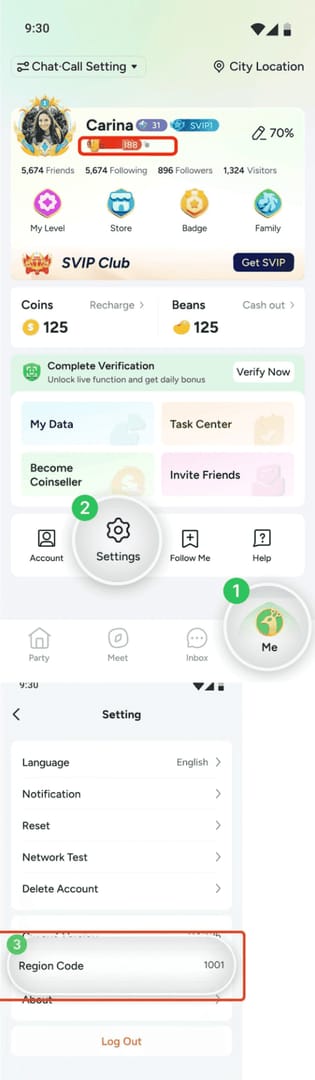
Immediately post-switch, the built-in store is often the lousiest first move, and almost nobody flags it.
The reason's simple. That store ties your purchase to whatever account is signed into the device, and fresh off a switch, that's the exact relationship most likely to be misconfigured: wrong Google account, region mismatch, a payment method that never carried over. A UID-based top-up dodges the whole mess. Punch in your numeric ID and server code, pay, and coins drop onto the account in 1–5 minutes no matter which store login is active. Routing by UID instead of store credential, it's structurally tougher to misfire on a freshly switched phone, and it happens to be where the commission savings hide.
Flow's short:
- Copy your UID from your profile (same number off the checklist).
- Pick your channel, enter the UID plus server code. Global is commonly 1001, per the BitTopup guide.
- Pay, then sit tight 1–5 minutes for delivery.
If you're sizing up where to recharge on the new Android handset, TAKA Live Coins top up through a UID-based service is one route that sidesteps the store-account mismatch wholesale, handy in exactly this post-switch stretch.
Just confirm the balance loaded before you buy anything. VERDICT: busted, UID/web routing beats the in-app store right after a switch.
Missing coins aren't gone — run the checklist first
Coins gone AWOL after a switch are almost never deleted coins. Work this order before you panic-buy:
- Confirm the account. Hold the UID on your Android app against the number you copied on iOS. Match means the right account, the balance ought to be there. Mismatch means a duplicate spun up by the wrong login provider (see above), so log out and try your original credential.
- Check the login method. Used email or phone at signup? Re-enter exactly that. Social logins have to match the original provider, no substitutions.
- Don't re-buy "to be safe." Costliest blunder going. Buy again on Android before confirming the original balance is reachable and you've now paid twice with the first wallet still unsolved. Verify the link, then spend.
- File a ticket if the UID matches but the balance is off. Reach TAKA at contact@aginmeta.com, per the store listings, with your UID and that pre-switch balance screenshot. The screenshot is the whole reason step three exists.
Guest accounts with no linked credential and no saved UID, though? Recovery's genuinely rough. There's no clean way to prove you own an unlinked account. That isn't a recovery flow, it's a cautionary tale about treating guest login as anything past temporary. VERDICT: busted, missing usually means misrouted, and the checklist drags it back.
What to actually do
Link the account on iOS before you so much as glance at the new phone. Email or phone is plenty, just bind something and note the provider. Copy the UID, screenshot the balance. On Android, sign in with the same credential, confirm the UID lines up, and only then recharge. For the top-up itself, a UID/web route ducks store-account headaches and runs cheaper than in-app anyway. The iOS-versus-Android in-app gap is too thin to sweat. Guest players, this one's for you: link right now, before any real money changes hands.
Frequently Asked Questions
Does my TAKA coin balance transfer automatically when I switch to Android?
There's no "transfer" step at all, because the balance never moved in the first place. It's pinned to your UID. The instant you log into the same linked account on Android, the existing balance is already showing. The only way it "doesn't transfer" is logging into a different account than the one holding your coins.
What happens to my coins if I uninstall the TAKA app on my iPhone?
Nothing, assuming the account's linked. Uninstalling clears the app, not your server-side wallet, and the balance stays with your UID until you log back in somewhere. The real danger is uninstalling a guest account with no email, phone, or social binding, because you've just deleted the only door you had.
Can I keep using my old iOS purchase history for refunds on Android?
No. Refunds and receipts follow the store you paid through, not your TAKA account. An iOS purchase is Apple's to handle and won't surface in Google Play, and Google can't refund it. The coins those purchases bought work fine on Android. The transaction stays Apple's.
Is topping up on a guest account ever safe?
Treat it as strictly temporary. A guest top-up means real money parked on an account with no credential to recover it. One wipe, switch, or stray logout and you've got no easy proof of ownership. Link an email or phone before any guest top-up, no exceptions.
My UID matches but the balance still looks wrong — what now?
Email support at contact@aginmeta.com with your UID and a screenshot of the pre-switch balance. A matching UID paired with a wrong balance is the one case actually worth escalating, since it rules out the duplicate-account and wrong-login causes behind most "missing coins" reports, and that screenshot gives support something concrete to reconcile against.











Comments