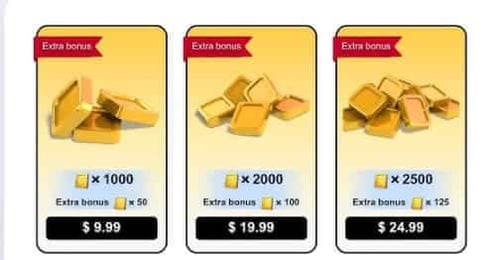

How to Top Up Merge Kingdoms Gold Using Player ID
Adding Gold to your Merge Kingdoms balance through VGTopup takes only a few quick steps. Because the process uses your unique Player ID, you never have to share account passwords or login credentials.
Follow these steps to complete your purchase:
- Select the amount of Merge Kingdoms Gold you want to add to your account from the available packages listed on the product page.
- Enter your Merge Kingdoms Player ID into the required input field.
- Double-check your Player ID to ensure all numbers and letters match your in-game profile.
- Click the purchase button to proceed to the live checkout screen.
- Choose your preferred payment method from the available options shown for your region.
- Complete the payment transaction.
- Open or restart the Merge Kingdoms app on your mobile device to verify that your new Gold balance has been credited.
Where to Find Your Merge Kingdoms Player ID in the App
Your Player ID is a unique account identifier that directs purchased Gold straight to your kingdom without requiring sensitive login data.
To locate your Player ID inside the game:
- Launch the Merge Kingdoms application on your mobile device.
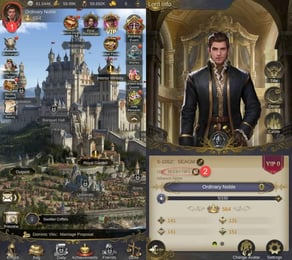
- Tap your player avatar or the settings gear icon located in the corner of your main kingdom screen.
- Open the profile or account information window.
- Look for the line labeled Player ID or User ID, which consists of a unique alphanumeric string.
- Tap the copy icon next to your ID or write down the characters exactly as shown.
- Paste this ID into the Player ID field on the VGTopup product page before checking out.
Always double-check the ID before completing payment. Copying and pasting directly from the game reduces the risk of typographical errors.
Why Choose VGTopup for Merge Kingdoms Gold Recharges
VGTopup provides a straightforward, player-focused platform for purchasing in-game resources. When you recharge Merge Kingdoms Gold here, you get a clean and secure transaction flow designed around player safety and speed.
Key reasons to use VGTopup include:
- No Passwords Required: Transactions only require your public Player ID. Your account login credentials, passwords, and linked social media accounts remain completely private.
- Direct In-Game Crediting: Gold is added directly to your account balance without requiring manual gift card redemption codes or voucher inputs.
- Live Checkout Transparency: Pricing, processing details, and available payment methods are displayed clearly at checkout without hidden platform fees.
- Global and Regional Access: The platform supports multiple currencies and payment channels suited to players around the world in 2026.
- Responsive User Interface: Designed for quick navigation whether ordering from a desktop computer or directly from your mobile browser.
Strategic Uses of Gold: Speeding Up Merges and Buying Chests
Gold serves as the primary premium resource in Merge Kingdoms, allowing you to bypass resource bottlenecks, expand land, and obtain rare items. Allocating your Gold wisely helps you build higher-tier buildings and complete resource chains faster.
| In-Game Action | Primary Benefit | Recommended Strategy |
|---|---|---|
| Land Expansion | Clears blocked tiles to create open board space | Prioritize early to avoid overcrowded merge grids |
| Rare & Epic Chests | Delivers high-tier merge pieces and blueprints | Buy during special reward events to maximize drops |
| Timer Acceleration | Instantly finishes long construction and production queues | Save for high-level structures with multi-hour timers |
| Marketplace Purchases | Fills specific missing items in high-level merge chains | Purchase single items needed to complete level 5+ merges |
| Energy & Resource Refills | Restores action stamina for gathering raw materials | Use during limited-time competitive kingdom events |
Expanding Kingdom Territory
Merge grids fill up rapidly as you uncover new chains of flora, buildings, and specialized units. Unlocking premium land plots with Gold gives you the free tiles needed to stage complex five-item merges rather than inefficient three-item combinations.
Purchasing High-Tier Chests
The in-game store offers specialty chests containing advanced building blocks, rare creature eggs, and tool upgrades. Opening these chests gives you an immediate jump on long merge trees, skipping early-stage resource gathering.
Bypassing Production Timers
High-level production buildings and resource generators require extended wait times before producing new items. Spending Gold allows you to skip these cooldowns immediately, keeping your merge progress moving during active play sessions.
Payment Options and Delivery Process for Merge Kingdoms
VGTopup supports a wide selection of payment channels to accommodate players across different regions. When you proceed to checkout, the system automatically presents the available payment processors for your location, including major credit and debit cards, digital wallets, and regional payment gateways.
All payment processing is handled through encrypted connections to protect your billing details. Once your payment confirmation is received by our system, your order enters processing immediately. The purchased Gold is sent straight to your Merge Kingdoms account via your Player ID. You do not need to wait for physical codes or enter long serial numbers in third-party redeem portals.
Frequently Asked Questions About Merge Kingdoms Gold Purchases
How do I locate my Merge Kingdoms Player ID?
Open Merge Kingdoms on your device and tap your profile avatar or the settings gear on the main screen. Your unique Player ID will appear on the profile panel. Use the copy button to save it to your clipboard for checkout.
Do I need to provide my password or account login details to top up?
No. VGTopup only requires your in-game Player ID to deliver Gold. You will never be asked for your account password, email login, or social media access credentials.
How quickly is Merge Kingdoms Gold credited to my account?
Gold orders are processed immediately upon successful payment confirmation. In most cases, the Gold appears in your in-game balance shortly after completing checkout. If the game is already running, restart the app to refresh your balance.
What can Gold be used for in Merge Kingdoms?
Gold can be used to unlock premium land plots, purchase rare and epic chests in the in-game shop, accelerate construction and production timers, and buy specific missing items to complete high-tier merge chains.
What should I do if I entered an incorrect Player ID during checkout?
If you realize you entered the wrong Player ID, check your order status immediately. If the order has already been processed by the system, transactions delivered to an active account cannot be reversed. If the order is still pending, reach out to customer support with your order number and correct Player ID right away.
Can I buy Merge Kingdoms Gold for a friend using their Player ID?
Yes. You can send Gold to any player by entering their unique Player ID in the input field during checkout. The Gold will be delivered directly to their account once payment is complete.
Select Denomination
Tax, payment fees and eligible coupons are calculated at checkout.
| Package | Price |
|---|---|
| 1 Gold | USD 0.85 |
| 5 Gold | USD 4.27 |
| 30 Gold | USD 25.38 |
| 50 Gold | USD 42.31 |
| 100 Gold | USD 84.61 |