
Ace Racer Tokens Top Up: Premium In-Game Currency Guide
Ace Racer Tokens represent the premium currency in NetEase's arcade racing title, Ace Racer. Drivers use Tokens to acquire high-tier vehicles, activate blind box draws, purchase exclusive driver outfits, and unlock advanced performance parts for their favorite cars.
Acquiring Tokens allows you to participate in limited-time Supply Crates and Speedfest Gacha pools. These events feature licensed hypercars, concept racers, legendary liveries, and vehicle blueprints needed to upgrade machine capabilities beyond standard limits. While everyday gameplay awards basic currencies through race finishes and daily challenges, Tokens remain the primary key for unlocking rare car blueprints, premium cosmetics, and season pass tracks.
On VGTopup, you can complete your Ace Racer Tokens top up directly using only your User ID and Zone ID. The process does not require account passwords or private login credentials, keeping your NetEase gaming profile safe while ensuring direct delivery straight to your account balance.
Ace Racer Currency System: Tokens vs. Gold vs. Gift Cards
Ace Racer features multiple currencies and resources designed for specific garage management and customization features. Understanding how Tokens interact with other in-game resources helps you plan your upgrades efficiently.
| Currency / Resource | Primary Source | Primary Uses |
|---|---|---|
| Tokens | Direct Top-Up / Recharge | Blind Box draws, Gacha supply crates, premium car blueprints, exclusive outfits, special events |
| Gift Cards | Progression, Events, Conversions | Direct store purchases, standard vehicle blueprint exchange, premium track passes |
| Gold | Races, Career Mode, Daily Missions | Basic car leveling, ECU module installation, component calibration |
| Parts & Blueprints | Crates, Events, Ranked Matches | Upgrading specific vehicle ranks, car ultimate tier enhancements |
Tokens provide the highest level of spending flexibility. Players can directly convert Tokens into Gift Cards or use them directly in premium blind boxes where rare tier vehicles and exclusive manufacturer tracks become available during seasonal 2026 campaigns.
Supported Ace Racer Servers and Zone ID List
To ensure accurate token delivery to your garage, Ace Racer splits its global player base into dedicated regional server clusters. Each regional cluster is categorized by a specific Zone ID and Server ID.
Review the supported regions below before placing your order on VGTopup:
| Server Region | Zone ID Name | Server ID Code |
|---|---|---|
| Japan | JAPAN_A | 10001 |
| Japan | JAPAN_B | 10501 |
| Korea | KOREA_A | 10011 |
| Korea | KOREA_B | 10511 |
| Asia | ASIA_A | 10021 |
| Asia | ASIA_B | 10521 |
| North America | NORTH AMERICA_A | 10031 |
| North America | NORTH AMERICA_B | 10531 |
| Europe | EUROPE_A | 10041 |
| Europe | EUROPE_B | 10541 |
When submitting your order, you must select the exact Zone ID assigned to your account. Selecting an incorrect server cluster will delay token delivery or prevent the system from matching your driver profile.
How to Find Your Ace Racer User ID and Zone ID
Finding your account credentials in Ace Racer takes only a few seconds inside the game client. Follow these steps:
- Launch Ace Racer on your mobile device or emulator.
- Tap your Avatar Profile icon located in the upper-left corner of the main lobby screen.
- Select the Personal Info tab.
- Your User ID (a numeric string) is displayed clearly beneath your driver name. Tap the copy icon next to your ID to copy it to your clipboard.
- Check the server name displayed on your profile or on the game login screen (such as ASIA_A, NORTH AMERICA_B, or EUROPE_A) to determine your correct Zone ID.
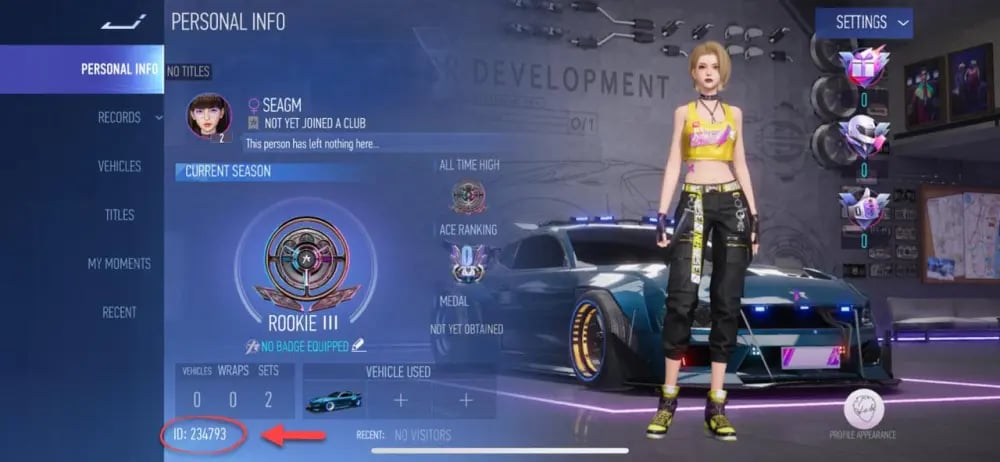
Always double-check that your copied User ID matches the numbers shown in your Personal Info panel before proceeding to checkout.
How to Top Up Ace Racer Tokens on VGTopup
Refilling your token balance on VGTopup is straightforward and requires only public profile identifiers:
- Select Denomination: Browse the Ace Racer product listing and pick the token package you want to purchase. Live pricing and available denominations are shown directly on the checkout page.
- Enter Account Information: Paste your numeric User ID into the designated field.
- Select Your Zone ID: Open the Zone ID dropdown menu and choose the server cluster corresponding to your account (e.g., ASIA_A, JAPAN_A, EUROPE_A).
- Proceed to Payment: Select your preferred payment method and confirm the transaction details.
- Check Balance In-Game: Once the order completes, open Ace Racer to verify your updated Token balance in the garage lobby.
Account Safety: 100% UID-Based Direct Recharge
Security is essential when purchasing in-game assets. VGTopup operates using a direct credit system that only requires your User ID and Zone ID:
- Zero Password Requirements: You never need to share your game password, social media logins, NetEase account details, or verification codes.
- No Account Handover: Your profile stays active on your personal device at all times without risky third-party logins.
- Direct System Delivery: Purchased Tokens are credited straight to your character ID through official direct-topup mechanics.
- Validation Protection: If your User ID and Zone ID do not match on the game server, order processing halts automatically to protect against lost funds, allowing our support team to verify the correct details with you.
Why Buy Ace Racer Tokens on VGTopup
VGTopup provides a specialized platform built for international mobile gamers seeking reliable direct recharges:
- Full Global Zone ID Support: Every regional server cluster—including Japan, Korea, Asia, North America, and Europe—is supported across all sub-servers (A and B clusters).
- Transparent Real-Time Pricing: All token packs and bundle prices update live on the checkout screen with no hidden fees or extra conversion charges.
- Instant Direct Processing: Automated processing delivers your Tokens straight to your driver account right after payment verification.
- Dedicated Customer Support: Our help center is available to assist with order verification, zone selection checks, and account inquiries.
Frequently Asked Questions
How do I find my Ace Racer User ID and Zone ID?
Open Ace Racer and tap your avatar profile in the top-left corner of the lobby. Go to the Personal Info menu. Your User ID is the numeric code listed under your character name. Your Zone ID corresponds to the server cluster you selected on the title screen (such as ASIA_A, EUROPE_A, or NORTH AMERICA_A).
What can I buy with Ace Racer Tokens?
Ace Racer Tokens let you purchase premium Supply Crate draws, vehicle blind boxes, exclusive legendary car blueprints, driver cosmetics, liveries, and seasonal Speedfest battle pass upgrades. Tokens can also be converted into Gift Cards for direct store purchases.
Do I need to share my game password to top up Ace Racer Tokens?
No. VGTopup uses a direct top-up system that only requires your public User ID and Zone ID. You will never be asked for your password, email login, or verification codes.
Which servers and zones are supported for Ace Racer top-ups?
All major global regions are supported, including JAPAN_A (10001), JAPAN_B (10501), KOREA_A (10011), KOREA_B (10511), ASIA_A (10021), ASIA_B (10521), NORTH AMERICA_A (10031), NORTH AMERICA_B (10531), EUROPE_A (10041), and EUROPE_B (10541).
What should I do if I selected the wrong Zone ID or entered an incorrect User ID?
If you realize that you entered an incorrect User ID or selected the wrong Zone ID, contact VGTopup customer support immediately with your order number and the correct account details. If the order has not yet been processed by the system, our team can update the information for you.
How long does it take to receive Ace Racer Tokens after checkout?
Tokens are credited directly to your Ace Racer account shortly after payment confirmation. After completing your purchase, restart your game client or check your lobby balance to see your updated Token count.
Select Denomination
Tax, payment fees and eligible coupons are calculated at checkout.
| Package | Price |
|---|---|
| 65 Tokens (60 + 5 Bonus) | USD 0.63 |
| Ace Racer-270 (250 + 20) Tokens | USD 2.56 |
| Ace Racer-740 (680 + 60) Tokens | USD 6.41 |
| Ace Racer-1300 (1180 + 120) Tokens | USD 11.54 |
| Ace Racer-3180 (2880 + 300) Tokens | USD 29.38 |
| Ace Racer-6530 (5880 + 650) Tokens | USD 57.57 |