
Silver and Blood Top Up: Instant Moonflow UID Recharge
Moonflow serves as the premium currency in Silver and Blood, granting players access to essential progression items, character summoning resources, and limited-time bundles. Purchasing Moonflow allows you to expand your roster of heroes, secure vital equipment upgrades, and participate in high-value game events without delays.
VGTopup provides a direct, secure method to complete your Silver and Blood top up. By utilizing direct in-game User ID (UID) and Server routing, transactions credit directly to your game profile without requiring password sharing or private account credentials. Review the live product options on this page to select your desired Moonflow amount and complete your order.
Understanding Moonflow and Moon Tears in Silver and Blood
Silver and Blood uses a dual-currency system to manage its premium store and progression economy. Understanding how these currencies interact helps you maximize the value of your recharge.
- Moonflow: This is the direct paid currency acquired through external recharge services and in-game purchases. Moonflow remains in your account balance until you convert it or spend it directly on premium bundles, cosmetic outfits, and VIP packs.
- Moon Tears: Moonflow converts directly into Moon Tears at a 1:1 ratio. Moon Tears represent the core summoning currency required to draw top-tier characters on event and standard recruitment banners. They are also used to reset daily dungeon attempts and buy vital enhancement materials.
Currency Comparison and Utility
| Currency Type | Acquisition Method | Primary In-Game Purpose |
|---|---|---|
| Moonflow | Direct UID purchase on VGTopup | Converted 1:1 to Moon Tears, direct purchase of exclusive bundles |
| Moon Tears | Converted 1:1 from Moonflow or earned in-game | Hero recruitment summons, stamina replenishment, daily resource resets |
| Resource Packs | Purchased using Moonflow | Direct hero progression materials, skill books, equipment blueprints |
By securing Moonflow in advance, you can immediately convert it to Moon Tears the moment a new banner launches, ensuring you never miss time-limited recruitment periods.
How to Top Up Silver and Blood Moonflow on VGTopup
Completing a Silver and Blood recharge on VGTopup takes only a few moments. Follow these straightforward steps to complete your purchase:
- Select the Moonflow Denomination: Browse the available Moonflow packs on this page and choose the amount that fits your current in-game goals.
- Enter Your User ID and Server: Type your numeric Silver and Blood User ID and your active Server into the designated input fields.
- Proceed to Checkout: Click the purchase button to advance to the payment selection screen.
- Complete the Payment: Choose your preferred payment option from the live checkout menu and finalize the transaction.
- Receive Your Moonflow: Once your order processes, Moonflow is credited directly to your Silver and Blood account balance.
Live pricing and denomination availability are always updated directly on the checkout screen. Make sure your game client is closed or refreshed after payment to see the updated Moonflow balance.
How to Find Your Silver and Blood User ID and Server
To ensure your recharge arrives without delay, you must provide your exact User ID and Server region. You can locate both details directly within your player profile in the game client.
- Open the Silver and Blood application on your mobile device or official PC client.
- Tap your Player Avatar icon located in the upper-left corner of the main lobby screen.
- Open your profile page. Below your player nickname, you will see your numeric User ID and your current Server name.
- Tap the small Copy icon next to your User ID to copy the number directly to your clipboard.
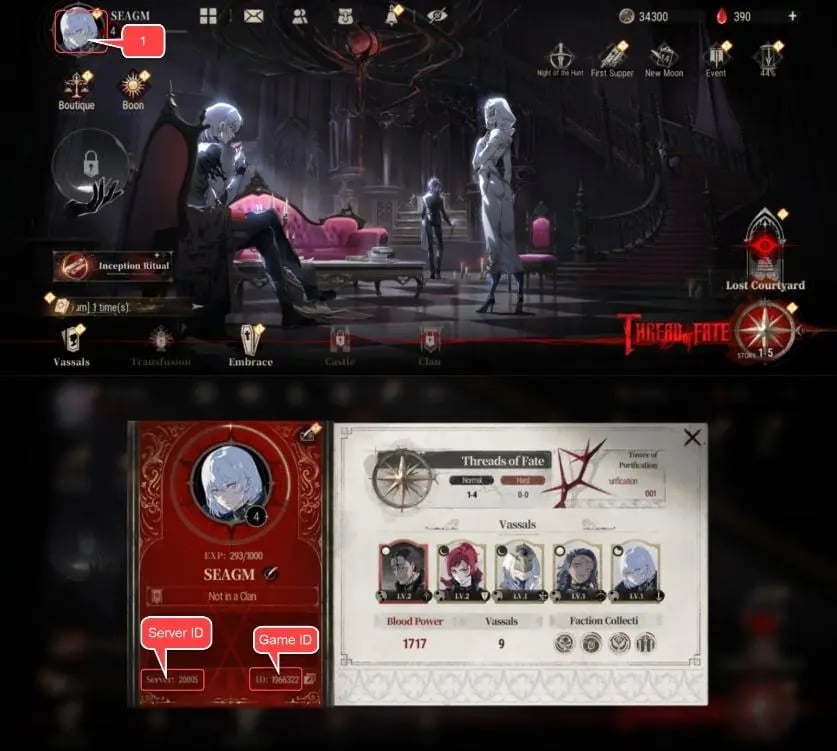
Double-check that both your copied User ID and the selected Server match exactly before placing your order on VGTopup.
Safe Top-Up Without Account Password Sharing
Account security is critical when purchasing mobile game currencies. Many third-party sellers request direct account login credentials, which creates significant risks including unauthorized account access, data loss, or game policy violations.
VGTopup eliminates these risks by operating exclusively through a direct UID delivery system:
- Zero Password Requirements: You never need to provide your game password, linked email, social media login, or secondary verification codes.
- No Account Takeover: You retain full control of your Silver and Blood account throughout the entire transaction.
- Official Delivery Pipeline: Currency is injected via standard direct-to-ID routing, keeping your profile compliant with game rules.
This player-first structure ensures your private personal data remains safe while delivering the Moonflow you need directly to your profile.
Top-Up Troubleshooting: Verifying Server and User ID Before Checkout
Because top-up deliveries process automatically based on the profile data you submit, entering incorrect information can cause fulfillment delays or misdirected currency. Keep these practical troubleshooting tips in mind before and after checkout:
- Prevent Typos with Copy-Paste: Always use the in-game copy button next to your User ID rather than typing the numbers manually.
- Verify Your Exact Server: If you play on multiple servers or alternate accounts, check your active server on the login screen to ensure the currency lands on your primary character.
- What to Do if You Entered the Wrong ID: If you realize you entered an incorrect User ID or Server, contact VGTopup customer support immediately with your order reference number. If the order has not yet been processed through the system, support staff can correct the profile data for you.
- Delivery Refresh: If your order shows as completed but your Moonflow has not appeared, restart the Silver and Blood app completely to force a server sync with your game balance.
Why Choose VGTopup for Your Silver and Blood Recharge
VGTopup is built to provide global mobile gamers with a reliable, straightforward digital marketplace. When you purchase Moonflow here, you gain access to several distinct service advantages:
- Accurate UID Routing: Automated processing ensures your order routes directly to the correct character profile on your specified server.
- Live, Transparent Pricing: Product pricing is displayed clearly at checkout without hidden platform fees.
- Flexible Payment Methods: Choose from a wide selection of global and localized payment channels tailored to your region.
- Dedicated Support Assistance: If you encounter any questions regarding your order status or account fields, our support team is available to assist you.
Frequently Asked Questions
What is Moonflow used for in Silver and Blood?
Moonflow is the premium currency in Silver and Blood. You can convert it into Moon Tears for character summoning banners, spend it directly on high-value progression bundles, or use it to unlock special cosmetic skins and store items.
How do I find my Silver and Blood User ID and Server?
Open Silver and Blood and tap your player profile avatar in the top-left corner of the main lobby. Your numeric User ID and your active Server name will be displayed right under your character name. Use the copy icon next to the User ID to copy it cleanly.
Do I need to provide my game account password to top up Moonflow?
No. VGTopup only requires your in-game User ID and Server to deliver your purchase. You should never share your account password, email credentials, or verification codes with anyone.
How does Moonflow convert to Moon Tears in-game?
Moonflow converts into Moon Tears at a direct 1:1 ratio. You can perform this conversion directly in the in-game store or recruitment screen whenever you initiate a summon draw without sufficient Moon Tears.
What should I do if I entered the wrong User ID or Server during checkout?
Contact VGTopup customer support immediately with your order number. If the transaction has not yet been dispatched to the game server, our team can help update your details to ensure the Moonflow reaches your correct profile.
Can I top up Silver and Blood for a friend?
Yes. Because the top-up process only requires a User ID and Server, you can buy Moonflow for friends or guildmates by entering their player ID and server information at checkout.
Select Denomination
Tax, payment fees and eligible coupons are calculated at checkout.
| Package | Price |
|---|---|
| 499 + 20 Bonus Moonflow | USD 3.88 |
| 519 Moonflow | USD 5.19 |
| 999 + 40 Bonus Moonflow | USD 7.66 |
| 1039 Moonflow | USD 10.40 |
| 1999 + 80 Bonus Moonflow | USD 15.35 |
| 2079 Moonflow | USD 20.80 |
| 2999 + 135 Bonus Moonflow | USD 23.04 |
| 3134 Moonflow | USD 31.21 |
| 5499 + 275 Bonus Moonflow | USD 41.93 |
| 5774 Moonflow | USD 57.22 |
| 7999 + 400 Bonus Moonflow | USD 60.35 |
| 8399 Moonflow | USD 83.24 |
| 29999 + 1500 Bonus Moonflow | USD 232.65 |
| 59999 + 3000 Bonus Moonflow | USD 493.62 |