What the crypto camp gets right
USDT solves problems for Jawaker's core MENA audience. As a stablecoin pegged to the dollar, the value you send is the value that arrives. Your balance won't swing 8% between confirmation and delivery.
The cross-border angle matters more than Western players appreciate. Card declines, currency conversion spreads, and regional payment friction push many MENA players toward crypto out of necessity. USDT moves the same way whether you're in Cairo or Casablanca, and Tether runs it across multiple chains, including TRC20 on Tron and ERC20 on Ethereum, per Tether's supported-protocols page.
On the right network, it's fast and cheap. A TRC20 transfer confirms in 3–5 minutes and costs a dollar or two, according to Godex.io. A player who tops up often skips the friction of fishing out a card every time. The first time I priced a TRC20 send against what my bank wanted in conversion fees, the on-chain route looked like the adult choice.
The crypto camp has the cost, stability, and access argument. They overreach on the word safe.
Why the card-payment camp won't back down

Their strongest point: crypto payments are irreversible. Jawaker's terms state purchases are final and non-refundable, per Jawaker's terms. A card payment at least gives you a bank dispute as a last resort. Send USDT to the wrong address or a fraudulent seller, and you can't call your bank. The money is gone the moment the block confirms.
That irreversibility flips the usual buyer logic. With cards, you shop aggressively on price because a chargeback protects you. With USDT, vetting who you're paying matters more than squeezing the last riyal off the rate. This is a different risk profile, not a strictly worse one.
The card camp also flags a failure mode the speed crowd skips: a wrong-network send. USDT exists on multiple chains. Send TRC20 tokens to a provider expecting ERC20, or to an address that doesn't support the chain you used, and the funds can sit stranded with no automatic refund, a pattern flagged often in scam discussions on r/CryptoScams. "Instant" crypto turns into a multi-day recovery ordeal, or a permanent loss. On that one axis, a card wins.
The card camp goes wrong treating crypto risk as built-in rather than avoidable. Most horror stories trace back to two correctable mistakes: wrong network, or unvetted seller. Fix those, and the risk gap narrows.
TRC20 versus ERC20: the choice that decides your bill
For nearly every Jawaker top-up, TRC20 is the correct network, and it's not close. The fee math runs against ERC20.
| Network |
Typical fee |
Confirmation time |
Use it for |
| TRC20 (Tron) |
$1–2 |
3–5 minutes |
Almost all Jawaker top-ups |
| ERC20 (Ethereum) |
$30–35+ |
15+ minutes during congestion |
Effectively never, for small token buys |
Source: Godex.io blog and TradersUnion (2026)

Sit with that gap. According to TradersUnion, an ERC20 transfer can cost up to 30–35 USDT in network fees during congestion, while the same value on TRC20 moves for a dollar or two. On a modest token bundle, an ERC20 fee can rival or exceed the tokens themselves. You'd pay a $30 toll to deliver a $20 package.
Speed leans the same way. That same fee research clocks TRC20 at 3–5 minutes against 15-plus for a congested Ethereum block. ERC20 runs slower and costlier for this use.
ERC20 makes sense only if your USDT already sits on Ethereum and moving it to Tron would cost more than eating the gas, or if your provider accepts ERC20 alone. Both are edge cases. For a fresh top-up, fund a TRC20 wallet and never look back. The network you send on must match the network your provider expects. That single match separates a five-minute delivery from a stranded transfer.
From your wallet to in-game tokens
Jawaker doesn't accept crypto directly. The official store runs on card payments and vouchers tied to your Player ID, per Jawaker's shop. No "pay with USDT" button exists. A USDT top-up always routes through a third party: a crypto-funded gift-card service, or a top-up provider that takes USDT and credits your account.
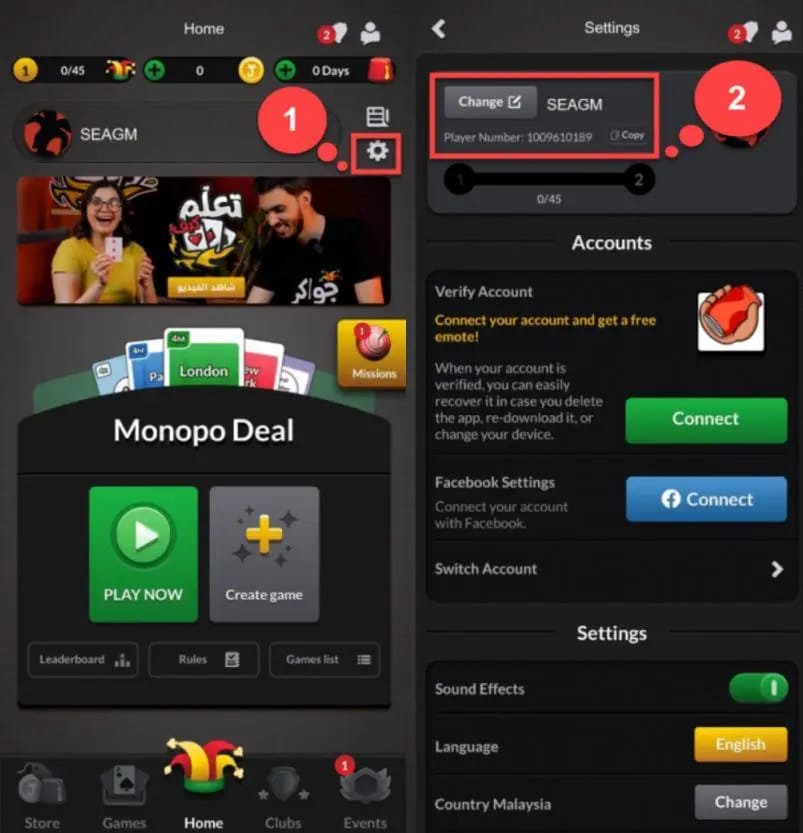
The gift-card route is the most documented. According to Bitrefill, the workflow runs three clean steps:
- Pull your Player ID from the Jawaker app settings. Players overlook this step most often, and it's where lost tokens are born. Credit the wrong ID and your tokens land in a stranger's account with no recovery.
- Buy a Jawaker token gift card with USDT on a trusted service.
- Redeem the code on Jawaker's redeem page.
A direct top-up provider that asks for your Player ID and credits tokens straight to the account follows a similar sequence, but the verification burden shifts onto picking a legit seller (more on that next). Enjoygm describes the same Player-ID-driven delivery model for third-party token purchases, per Enjoygm.
Two rules wrap around whichever route you take. First, double-check the Player ID character by character before confirming. Copy-paste beats typing. Second, save the transaction hash (TXID) the moment you send. That string is your only enforceable proof the payment happened. A screenshot of your wallet balance proves nothing on-chain; a provider's support team and a blockchain explorer can both verify a TXID.
For a transparent look at how a direct USDT route handles that Player-ID confirmation step before you commit funds, you can compare a verified option like Jawaker Tokens top up against your in-app voucher path and decide which feels safer. Disclosure: that's VGTopup's own page, and this article publishes there, so weigh it as one option among several rather than a verdict.
How to read a seller before you hand over irreversible money

With no chargeback, vetting the provider is the safety system. Apply this split before you send a single USDT.
Green flags, proceed:
- A public, persistent storefront or page, not a profile that only DMs you
- Explicit Player-ID confirmation before you pay, so the delivery target is locked
- A stated, supported network, written as TRC20 plainly
- Clear total cost: the quoted rate, any spread, and the network fee, itemized
- A visible support channel that survives past the sale
Red flags, stop the transaction:
- A rate far below market. A "too cheap" price isn't a deal, it's the bait. Most ultra-low USDT offers exist to take your irreversible payment and vanish.
- Contact only through private DMs, with pressure to move fast
- Refusal to confirm your exact Player ID up front
- Vague or shifting payment addresses
- No way to reach anyone after you'd have paid
That hidden-cost point deserves its own beat. Some providers quote an attractive "rate" that conceals a spread separate from the network fee. Your true cost is rate + spread + gas. A seller who shows only the headline rate and buries the spread isn't always a scammer, but they're hoping you skip the addition. Do the addition.
My read for first-timers: pay a small premium for a vetted, public provider rather than chasing the cheapest on-chain self-route. The dollars you'd save price-shopping are the same dollars at risk when an irreversible payment goes wrong. Price-shopping USDT top-ups inverts normal buyer logic, because the cheapest option carries the highest danger.
When the tokens don't show: tracking and recovery
If tokens don't land, do not fire off a second payment. Work the proof you saved.
Start with the transaction hash. Paste the TXID into the matching blockchain explorer, Tronscan for TRC20 or Etherscan for ERC20, and read the status. Three outcomes:
- Confirmed, correct address: the chain did its job. The problem sits on the provider's delivery side. Contact their support with the TXID, your Player ID, and the timestamp. A real support channel earns its keep here.
- Pending: give it the network's normal window, 3–5 minutes for TRC20 per Godex.io's confirmation timing, longer if Ethereum is congested. Don't panic-send.
- Confirmed, but wrong network or wrong address: the hard case. Funds sent on a network the recipient doesn't support can sit stranded with no automatic refund. Recovery depends on the receiving party's goodwill and technical ability, which is why network choice and address accuracy aren't optional.
Keep three things from every top-up: the TXID, the Player ID you submitted, and a screenshot of the provider's stated network and address at the time of purchase. That bundle lets support, or you, reconstruct what happened. Jawaker's purchases-are-final stance means the platform won't reverse a third-party crypto payment, so your leverage sits with the provider, and runs only as strong as your records.
Where the evidence points
USDT is a solid way to fund Jawaker tokens, conditional on discipline you control. The crypto camp wins on cost and access; the card camp wins on the safety net. The synthesis: send TRC20, vet the seller harder than the price, lock the Player ID, and bank the TXID. Do those four things and the "crypto is risky" objection mostly evaporates, because the risk was procedural all along.
What I'd commit to, by player type:
First-time crypto user, scam-averse: Use a public, vetted provider that confirms your Player ID before payment, even at a slight premium. Skip the cheapest listing. Your goal isn't the best rate, it's a clean first transaction that doesn't teach you about irreversibility the hard way.
Crypto-comfortable player chasing value: Fund a TRC20 wallet, compute total cost as rate + spread + gas, then compare providers. The $30-ish you avoid by refusing ERC20 dwarfs any rate difference between two legit TRC20 sellers, so optimize network first, rate second.
One belief both camps underrate: a Player-ID slip, not network choice, causes most actually-lost tokens. Network mistakes are loud and rare; a mistyped Player ID is silent and routine. Confirm it twice.
If a top-up goes sideways, the order of operations is fixed. Read the TXID on an explorer first, contact the provider second, accept that the platform won't chargeback you third. That sequence, more than any rate hunt, separates a smooth crypto top-up from a regret.
Frequently Asked Questions
Is it actually safe to buy Jawaker tokens with crypto, or am I gambling?
It's safe when you control three variables: correct network (TRC20), a vetted public provider, and a confirmed Player ID. The real exposure isn't crypto itself; payments are irreversible and Jawaker treats purchases as final per its terms, so there's no bank dispute to fall back on. Get the procedure right and the gamble largely disappears. Cut corners on the provider and you're exposed.
What's the minimum I need before I can even start a USDT top-up?
A crypto wallet holding USDT on the network your provider supports (TRC20 in nearly all cases), your Jawaker Player ID pulled from app settings, and enough extra USDT to cover the network fee. Budget the $1–2 TRC20 cost cited by Godex.io. First-time crypto users should also note you can't pay Jawaker directly; the official store only takes cards and vouchers per Jawaker's shop, so a third party is always involved.
Which network is cheapest, and is there ever a reason to use ERC20?
TRC20 is cheapest by a wide margin, $1–2 versus $30–35+ on ERC20, per TradersUnion. The only sane reason to use ERC20 is if your USDT already sits on Ethereum and bridging it to Tron would cost more than the gas you'd save, or if a provider only accepts ERC20. For a fresh top-up, that's almost never the situation.
My tokens haven't arrived — what do I do first?
Don't resend. Paste your transaction hash into Tronscan (TRC20) or Etherscan (ERC20) and check status. If it shows confirmed to the correct address, the chain delivered and the issue is the provider's; contact support with the TXID, Player ID, and timestamp. If it's still pending, wait out the network window. If it confirmed to a wrong or unsupported address, recovery depends on the receiving party, since stranded funds carry no automatic refund.
Can I get my money back if a USDT top-up goes wrong?
Realistically, no, not through Jawaker. Crypto payments are irreversible and Jawaker's terms make purchases final, so there's no chargeback path the way a card offers. Your only recourse is the provider's own support, and that works only if you saved the transaction hash. This is why vetting the seller beforehand matters more than shaving a few cents off the rate.











Comments