
Habi Coins Top Up: Features and In-App Utility
Habi is a popular voice chat and interactive social platform where users meet friends, host live audio rooms, and join community party activities. Habi Coins are the official premium currency used throughout the app to interact with creators and customize your personal profile.
Completing a Habi Coins top up unlocks essential features across the platform:
- Virtual Gifting: Send animated gifts ranging from modest tokens of appreciation to room-wide luxury gift animations to support your favorite audio room hosts.
- Leaderboards and Supporter Badges: Gifting coins increases your user contribution rank, placing your name on room leaderboards and displaying exclusive supporter badges next to your handle.
- Profile Customization: Purchase dynamic avatar frames, custom microphone ring effects, unique chat bubbles, and special entrance effects that announce your arrival when entering a voice room.
- Interactive Voice Room Activities: Join host-led mini-games and social party features that require coin participation.
Coins recharged through VGTopup are tied directly to your unique Habi account, allowing seamless access whether you use the iOS or Android version of the app.
How to Find Your Habi UID
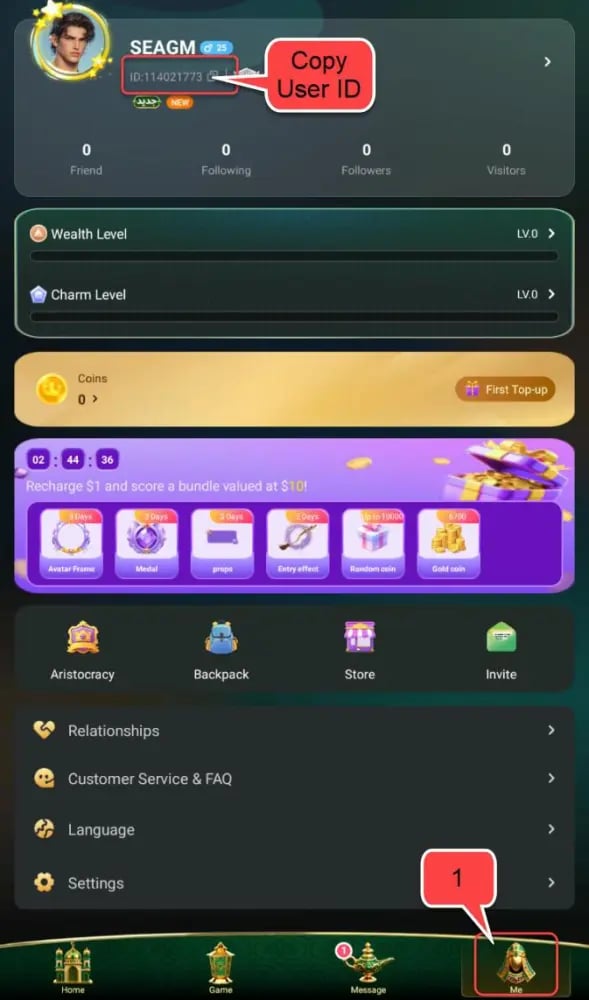
To ensure your coins credit instantly to your account, you only need to provide your numeric Habi UID. Follow these steps to find your UID inside the app:
- Open the Habi app on your mobile device.
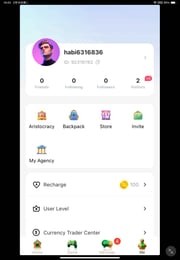
- Tap the Profile or Me icon located in the bottom navigation bar.
- Look directly beneath your avatar and nickname. You will see an alphanumeric string labeled ID: followed by a sequence of numbers.
- Note the numeric digits or tap the copy button next to your ID.
Make sure to enter only the numeric digits when submitting your order. Do not include the letters "ID:" or any surrounding spaces.
Step-by-Step Guide to Top Up Habi Coins on VGTopup
Recharging your Habi account on VGTopup is fast, reliable, and requires zero account passwords. Follow these quick steps to place your order:
- Select Your Package: Browse the available Habi Coins denominations on the page and select the amount you want.
- Enter Your Habi UID: Type or paste your numeric Habi UID into the required input field. Double-check the number to avoid crediting an incorrect account.
- Select Your Payment Method: Pick your preferred payment option from the secure checkout screen.
- Confirm and Pay: Review your order details and complete the transaction. Current prices and currency conversions are clearly displayed at checkout.
- Check Your In-App Balance: Once payment confirms, the coins credit directly to your Habi profile. Open your app wallet to confirm your new total.
Account Safety: 100% Password-Free UID Delivery
Account security is essential when buying in-app currency online. Unlike services that require account credentials or login verification codes, VGTopup uses direct UID delivery:
- Zero Passwords Required: You never need to provide your Habi password, email login, or third-party social credentials.
- No Account Sharing: Your private chats, contact lists, and personal settings stay completely private and secure.
- Safe Account Status: Direct UID crediting follows standard top-up mechanisms, keeping your account free from unauthorized login warnings or temporary account locks.
Supported Payment Options and Multi-Currency Checkout
VGTopup supports global voice chat users by offering a broad selection of trusted international and regional payment methods. You can complete your transaction using major credit cards, debit cards, digital wallets, and local payment gateways tailored to your region.
All pricing is calculated live at checkout with complete transparency. You will always see the exact cost in your chosen currency before confirming payment, with no hidden platform fees.
Delivery Time and How to Check Your Habi Coin Balance
Orders submitted on VGTopup are processed automatically upon successful payment clearance. Coins are typically credited to your Habi account within moments.
To check your updated balance:
- Launch the Habi app.
- Go to your Profile tab.
- Open the Wallet or Coins section to view your current balance.
- If your balance does not update immediately, swipe down to refresh the profile screen or restart the application to force a server sync.
You can also monitor the delivery status of your order directly within your VGTopup user dashboard.
Troubleshooting Common Top Up and UID Errors
Use this quick reference guide if you encounter any difficulties during your recharge:
| Issue | Likely Cause | Solution |
|---|---|---|
| Coins not visible in app | Network sync delay or cached data | Restart the Habi app or pull down on your Wallet page to refresh server data. |
| Wrong UID submitted | Typo during checkout | Contact VGTopup support immediately with your order number before fulfillment completes. |
| Payment marked pending | Verification delay from payment provider | Allow a few minutes for bank confirmation, or check your payment provider statement. |
| Format error at checkout | Included "ID:" prefix or spaces | Enter only the numeric digits of your Habi UID into the order field. |
If you need further assistance with your transaction, VGTopup customer support is ready to help verify your order status and resolve any issues.
Frequently Asked Questions
What are Habi Coins used for in the Habi app?
Habi Coins are the primary currency used inside the Habi voice chat app. Users spend coins to send animated virtual gifts to room hosts, purchase dynamic avatar frames and chat bubbles, unlock exclusive entrance animations, and participate in interactive room activities.
How do I find my Habi UID for recharging?
Open the Habi app and tap on your Profile icon in the bottom menu. Your numeric UID is displayed directly beneath your profile picture and nickname. Copy the numbers only and paste them into the UID field on VGTopup.
Do I need to share my Habi password to top up Coins?
No. VGTopup only requires your numeric Habi UID to process the recharge. You should never share your account password, SMS verification codes, or linked social media login details.
How long does it take for Habi Coins to arrive after purchase?
Coins are dispatched automatically once your payment is confirmed. Most orders reflect in your Habi wallet shortly after completing the checkout process.
What should I do if I submitted the wrong Habi UID?
Because top-up orders process quickly, double-checking your UID before payment is crucial. If you notice an error, contact VGTopup customer support immediately with your order details. If the order has not yet been processed, support can update the delivery information for you.
Can I buy Habi Coins for both iOS and Android accounts?
Yes. Your Habi UID is universally linked to your account regardless of the mobile operating system you use. Coins recharged through VGTopup will appear on your account on both Android and iOS devices.
What should I do if my Habi Coins balance does not update immediately?
If your coins do not display immediately after purchase, close the Habi app completely and reopen it. You can also go to your profile wallet and swipe down to refresh the screen. If your balance still does not update, verify your order status on your VGTopup dashboard or contact customer support.
Select Denomination
Tax, payment fees and eligible coupons are calculated at checkout.
| Package | Price |
|---|---|
| 6,700 Habi Coins | USD 0.66 |
| 33,535 Habi Coins | USD 3.29 |
| 67,435 Habi Coins | USD 6.62 |
| 203,030 Habi Coins | USD 19.94 |
| 337,175 Habi Coins | USD 38.25 |
| 674,350 Habi Coins | USD 66.44 |
| 1,348,700 Habi Coins | USD 132.24 |