Play 1: E-wallet straight to your Player ID — best all-round value
Start here. Pay with an e-wallet on a direct flow that asks for nothing but your Player ID. PayPal handles it. So do GCash, DANA, OVO, ShopeePay. No card anywhere in the chain, and the diamonds bolt onto your account, not some device or login session.
The steps are quick:
- Find your Player ID (open Free Fire MAX, tap the avatar top-left; the numeric ID sits under your name).
- Drop that ID into the top-up flow and let it pull your nickname to confirm the account.
- Pick a pack.
- Pay with your wallet (PayPal or a local one).
- Watch the diamonds land. Delivery's instant on direct sites like SEAGM and Lootbar once payment confirms, per Lootbar.
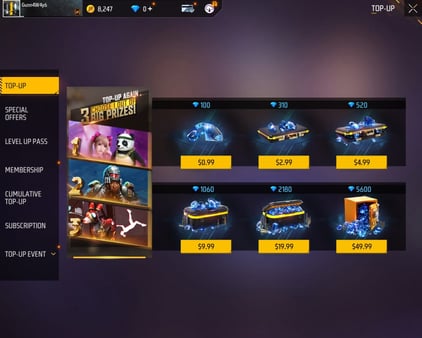
As of June 2026, Lootbar charges $0.93 for a 100+10 pack, $2.63 for 310+31, $4.40 for 520+52. What you actually care about is the cost per diamond, and it gets better the bigger you go. The 5,600+560 tier at $41.72 is the cheapest per-diamond deal on the board.
| Pack |
Base |
Bonus |
Price (USD) |
~$/diamond |
| Small |
100 |
10 |
$0.93 |
$0.0085 |
| Medium |
310 |
31 |
$2.63 |
$0.0077 |
| Large |
520 |
52 |
$4.40 |
$0.0077 |
| XL |
5,600 |
560 |
$41.72 |
$0.0068 |
Source: Lootbar Free Fire Top Up (2026-06) [tier4]. The $/diamond column is calculated from those prices.
Now the part that matters. Some wallet and UPI flows slip past the platform markup baked into in-app store pricing. That's exactly why the player-ID route can tie or beat the native store for no-card players. An item4gamer walkthrough calls PayPal and local wallets the cheapest practical path for wallet users, and the per-diamond figures above back it up.
Works when your wallet's funded and your region supports the rail. Fails when you fat-finger the Player ID. There's no undo button. Read the nickname before you pay.
Play 2: UPI, PhonePe, or a plain bank transfer
In a UPI market? This is the smoothest no-card option there is, and India sits cheapest of the lot. India runs UPI and EasyPaisa-style rails directly; Indonesia and the Philippines lean on local wallets, per Garena Topup Center.
The regional price gap is real, and it's worth eyeballing before you decide your home store is gouging you:
| Country |
Local price (per 100 💎) |
~USD |
| India |
₹84 |
$0.96 |
| Indonesia |
Rp15,500 |
$0.95 |
| Philippines |
₱50 |
$0.88 |
| Brazil |
R$9.90 |
$1.80 |
Source: Bittopup Regional Pricing 2026 (2026-06) [tier4].
That's roughly a 2x spread between the Philippines and Brazil on the same 100 diamonds, per Bittopup. Looks tempting. Don't VPN-hop to grab it. Play 6 covers why.
A bank-transfer or UPI checkout follows the same Player-ID sequence as Play 1. You just pick UPI/PhonePe/bank at payment. Delivery stays instant on the direct sites.
Works when you're paying your own region's currency on your own rail. Fails when a price looks "too cheap" because it's a foreign listing you can't legitimately pay into.
Play 3: Diamond pins and vouchers — lock the price, gift the diamonds
People sleep on diamond pin codes, and gifting isn't the only reason to use them. A pin is a redeemable code. Buy it now, redeem it whenever. So you can freeze today's price and cash it in after a hike lands, a small but genuine edge if you suspect a regional price bump is coming.
The redemption flow:
- Buy the pin/voucher with any no-card method (wallet, gift-card balance, carrier).
- Open the redemption page or in-game code field.
- Type the code.
- Diamonds (or the voucher reward) hit the linked account.
Prepaid-only players, this pairs cleanly with Play 4. Fund a pin off gift-card balance and you've pulled off a 100% card-free buy. Pins are also the tidy way to gift diamonds to someone whose payment options are tighter than yours.
Works when you're gifting or hedging a price change. Fails when the seller's sketchy. A dead or pre-used code is the oldest voucher scam going.
Play 4: Gift cards and Google Play / App Store balance
No card, no wallet either? Gift cards and store balance are your lane. Load up a prepaid Google Play balance (or App Store balance), then spend it on diamonds, or turn it into a pin. A G2A feature calls the Google Play balance route the safe option for prepaid-only players precisely because it keeps card details out of the deal entirely.
There's a slower path that's actually free, and it's legit, so it earns a mention. Reward apps like Google Opinion Rewards drip Play Store credit you can funnel into diamonds, per a Lapakgaming guide. It won't bankroll a 5,600 pack this decade. But for an F2P player, it's real currency from a real source, which is more than any "generator" can say.
One mechanic to respect: buying through Google Play balance keeps you inside the in-app store, where pricing can carry the platform markup the wallet routes sometimes dodge. So balance-funding buys you access, not the lowest cost per diamond.
Works when you've got no other rail and want zero card exposure. Fails when you assume store-balance is cheapest. It's the most accessible, not the cheapest.
Play 5: Carrier billing is fast, and you pay for that speed
Charge it to your phone bill or SIM load and the diamonds show up in seconds. No card, no wallet, nothing. Carrier billing via SIM load on Codashop is the quickest card-free method, though community reports flag a per-diamond markup baked right in, per a community guide.
That markup is the catch. You're handing the operator a convenience fee stacked on top of the diamond price, and for budget players it quietly bleeds value pack after pack. My read: save carrier billing for the one-off you can't miss, a flash event that's about to close, and run everything routine through Play 1 or Play 2. Convenience has a price tag. It's just rarely worth the premium when a wallet sits one tap over.
Works when speed beats price and you're buying occasionally. Fails when it becomes your habit. The markup piles up across every top-up.
Generators are a trap, and so is VPN region-hopping
Two moves cost players accounts, not just cash.
First, "free diamond generator" tools. No legitimate top-up conjures diamonds out of nowhere, and Garena's own support flatly warns that unauthorized methods risk bans, per Garena Support. Genuinely free diamonds come from two places only: in-game events and reward-app credit (Play 4). Everything else is a data harvest or a ban with your name on it.
Second, VPN-switching regions to snatch those cheaper India/Philippines prices. The gap exists. So does the risk, and community reports tie region-hopping to suspensions. You'd be betting your account to shave under a buck off 100 diamonds. Bad trade. I wouldn't recommend it to anyone who's poured hours into their profile.
The scam tells are always the same. A seller asking for your account password (real top-ups need only the Player ID). Prices that undercut every market by some impossible margin. Any flow nagging you to switch off security or log in on their page. Legit top-ups never want your login.
Your first top-up bonus doesn't care how you paid
The biggest-value purchase any Free Fire MAX player ever makes is the first top-up bonus, and the confusion bleeding people free skins is whether it still fires when you pay outside the app. It does. That bonus is tied to your account, not your payment method. A qualifying buy through a wallet or Player-ID flow triggers it exactly like an in-app purchase.
Garena's events page spells out that first top-up events hand over free skins and/or extra diamonds on a qualifying buy, per Garena Free Fire Events. One way to blow it: buy an amount that lands below the event's required threshold. Events set a minimum, and a tiny purchase that misses it torches your single shot at the best diamonds-per-dollar reward in the whole game.
So plan the order. Before any routine top-up, check the live first-top-up event's threshold, hit exactly that or more on your opening buy, grab the skin, then go back to chasing the best cost per diamond on later purchases. If you do one thing from this article, do this.
The methods, side by side:
| Method |
Needs card? |
Speed |
Value |
Best for |
| E-wallet + Player ID |
No |
Instant |
Strong |
Most no-card players |
| UPI / PhonePe / bank |
No |
Instant |
Strong (region-dependent) |
India & UPI markets |
| Diamond pin / voucher |
No |
Near-instant |
Good (price-lock) |
Gifting, hedging |
| Gift card / store balance |
No |
Instant |
Fair (accessibility) |
Prepaid-only players |
| Carrier billing |
No |
Fastest |
Weakest (markup) |
One-off urgent buys |
Source: synthesized from Lootbar (2026-06), SEAGM (2026), Garena Topup Center (2026), and the community guide cited above; value judgments are editorial.
What I'd actually run
Lead with the e-wallet or UPI Player-ID flow. For the F2P and low-spender crowd this article's written for, it's the best balance of cost, speed, and safety, and the per-diamond figures prove it. There's a fair argument worth naming: one camp swears third-party player-ID sites win on price and PayPal support, the other says the official Garena center with local wallets is safest against bans. Both are right inside their own lane. Official for maximum peace of mind, player-ID flows for price and convenience. The real deciding factor isn't the channel. It's discipline. Verify the Player ID, pay in your own region, never cough up a password.
Prepaid-only players, the gift-card-into-pin combo (Plays 3 and 4) is your clean route. Drawn to carrier billing's speed? Use it sparingly and know what you're paying for it.
Disclosure: this piece runs on VGTopup, itself a player-ID top-up platform, so weigh the take accordingly and compare a couple of channels before you commit. Want to price the wallet and UPI route against your in-app store? You can Free Fire MAX Diamonds top up with just your Player ID and see the cost per diamond for yourself first.
Frequently Asked Questions
Can I top up Free Fire MAX using only my Player ID?
Yes. Direct top-up flows need nothing but your numeric Player ID to attach diamonds to the account, no login, no password. Always let the page show your in-game nickname before you pay. That confirmation is your one defense against firing diamonds at a stranger's ID over a typo.
Do I still get the first top-up bonus if I pay on a third-party site?
You do. The bonus is account-bound, not payment-bound, so a qualifying player-ID purchase triggers it just like an in-app buy, per Garena's events terms. The lone catch is the event threshold: a purchase under the stated minimum won't qualify, so size your first buy to clear it on purpose.
What's the cheapest way to top up Free Fire diamonds without a card?
Cost per diamond drops as packs scale; Lootbar's 5,600+560 tier at $41.72 beats the small packs outright. Regionally, the Philippines (₱50 per 100, ~$0.88) and Indonesia (~$0.95) sit cheapest, per Bittopup. But only pay in your own region's currency. Chasing foreign pricing by VPN risks suspension.
How long do diamonds take to arrive after top-up?
Direct sites like SEAGM and Lootbar deliver instantly once payment confirms. Carrier billing's near-instant too. If diamonds don't show inside a few minutes, it's almost always a pending payment confirmation on the wallet side, not a failed top-up. Wait it out before re-buying.
No. Garena support warns that unauthorized methods risk bans, and no legitimate tool fabricates diamonds. The only genuinely free diamonds come from in-game events and reward-app credit like Google Opinion Rewards converted to Play Store balance, which is real currency from a real source.








Comments