
Complete Farlight 84 Diamonds Top Up Guide
Farlight 84 Diamonds are the core premium currency used to acquire premium content across both mobile and PC platforms. Whether you want the latest 2026 Battle Pass, exclusive Hero skins, weapon finishes, or specialized vehicle wraps, Diamonds give you direct access to the store inventory.
VGTopup provides an automated system for your Farlight 84 Diamonds recharge. Transactions process directly through your numerical User ID (UID), ensuring that you receive your currency in your account balance without sharing account credentials or login passwords.
What Are Farlight 84 Diamonds and How Are They Used?
Diamonds allow players to unlock cosmetics, functional progression passes, and event-exclusive items. Because Farlight 84 features full cross-progression between mobile devices and PC, any Diamonds added to your account become accessible across all linked devices.
| Item Category | In-Game Utility | Diamond Application |
|---|---|---|
| Battle Pass | Seasonal progression track | Purchase the Premium Pass or Pass levels to unlock 2026 seasonal rewards. |
| Hero Outfits | Cosmetic character skins | Buy Legendary and Epic character skins directly from the store. |
| Weapon Skins | Firearm aesthetics & effects | Acquire unique weapon wraps, kill broadcast effects, and inspect models. |
| Vehicle Wraps | Vehicle customization | Equip customized paint jobs for buggies, hoverbikes, and air vehicles. |
| Supply Chests | Capsule and gacha events | Open timed lottery crates for rare cosmetics and emote bundles. |
Using Diamonds for the seasonal Battle Pass returns progression rewards, XP boosts, and select amounts of in-game currency as you complete daily and weekly challenges.
How to Locate Your Farlight 84 UID in the Game Profile
To complete a recharge on VGTopup, you only need your numerical User ID (UID). Follow these simple steps inside the game client to locate and copy it correctly:
- Launch Farlight 84 on your PC or mobile device and log into your game account.
- In the main lobby, look at the top-left corner of the screen and click on your Player Avatar.
- The Profile Summary window will open, displaying your username, level, and player statistics.
- Locate your UID, which is a numerical sequence displayed right below or next to your player name.
- Click the small Copy icon next to the UID number to copy it to your clipboard.
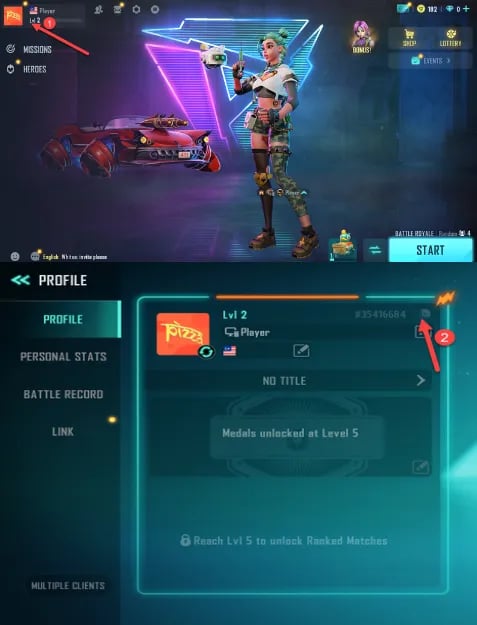
Make sure to copy the numeric ID directly from the game to avoid typing mistakes during checkout.
Step-by-Step Guide to Buy Farlight 84 Diamonds on VGTopup
Placing an order on VGTopup is straightforward and requires no account passwords:
- Select Diamond Amount: Browse the available Farlight 84 Diamond denominations on the live product page and choose your preferred pack.
- Enter Your UID: Paste your numerical User ID into the designated
UIDfield. Double-check the number to ensure accuracy. - Review Order Pricing: Check the live checkout total. VGTopup displays clear pricing and available payment channels suited for international players.
- Complete Payment: Select your preferred payment option and confirm the transaction.
- Check Balance In-Game: Once the payment clears, the Diamonds credit directly to your Farlight 84 account balance. Launch or refresh the game to use your new balance.
Security Benefits of UID-Only Top-Ups with Zero Password Sharing
Account safety is a top priority when purchasing digital game currency. Traditional account-sharing methods require users to share email addresses, social logins, or game passwords, which exposes profiles to unauthorized access, accidental security locks, or credential theft.
VGTopup uses direct server crediting via your public UID. This provides multiple security advantages:
- No Credential Exposure: You never provide your login password, secondary authentication codes, or linked social media accounts.
- No Risk of Account Takeover: Because no third party logs into your account, your personal settings, friend lists, and inventory remain untouched.
- Cross-Platform Safety: Crediting through UID ensures compatibility whether you play through Steam, standalone PC clients, Android, or iOS.
- Clean Transaction Records: Orders correspond directly to official system top-up channels, keeping your account in good standing.
Delivery Process and How to Verify Received Diamonds
After completing checkout on VGTopup, the system processes your request automatically:
- System Verification: The order system matches your entered UID with the server database.
- Direct Balance Injection: The purchased Diamond package credits directly to your Farlight 84 balance.
- Verifying in the Client: Open Farlight 84. Look at the top-right corner of the main lobby menu where your Diamond counter is displayed. Your balance will reflect the new amount.
- In-Game Mail Check: Certain event promotions or bonus Diamonds may arrive via your in-game mailbox. Check the mail tab if you participated in a specific bundle promotion.
If your game is running while you complete the order, restart the game client or play a quick training round to refresh your server profile data.
Troubleshooting Common Transaction and UID Errors
If you experience any delay or issue during your top-up, use the following troubleshooting steps:
- Balance Not Updating Immediately: Restart the Farlight 84 application. Client-side caching can sometimes delay visual balance updates until the game reconnects to the game servers.
- Mismatched UID Entry: If you entered an incorrect UID during checkout, immediately reach out to VGTopup customer support with your transaction order ID. If the order has not yet been processed by the automated system, support can help update the destination ID.
- Payment Completed but Order Pending: Check your payment provider to confirm funds were successfully deducted. High traffic periods can occasionally cause brief queue times. Keep your order confirmation email handy.
- Cross-Platform Sync Inquiries: If you purchased Diamonds on mobile and do not see them on PC, ensure both devices are logged into the exact same account profile and linked to the same UID.
Frequently Asked Questions
How do I find my Farlight 84 User ID (UID)?
Open Farlight 84 and tap your player avatar in the top-left corner of the lobby screen. Your numerical UID appears directly under your player nickname. Click the copy icon next to the number to paste it accurately during checkout.
Do I need to provide my Farlight 84 account password to top up?
No. VGTopup only requires your player UID. You will never be asked for your account password, email access, or two-factor verification codes.
How long does it take for Farlight 84 Diamonds to arrive after payment?
Diamonds are credited directly to your account immediately after payment confirmation. In rare instances of network delay, restarting your game client will update your displayed balance.
Can I use the purchased Diamonds across both mobile and PC versions?
Yes. Farlight 84 supports full cross-platform progression. As long as your PC and mobile devices use the same account linked to your UID, your Diamonds and unlocked items will be available across all platforms.
What in-game items can I purchase with Farlight 84 Diamonds?
Diamonds can be used to unlock the seasonal 2026 Battle Pass, Hero character skins, weapon camos, vehicle skins, supply chests, and limited-time store bundles.
What should I do if I entered the wrong UID during checkout?
If you realize you submitted the wrong UID, contact the VGTopup customer support team immediately with your order number. Prompt communication allows the support staff to check the status of your order before it gets dispatched to the server.
Select Denomination
Tax, payment fees and eligible coupons are calculated at checkout.
| Package | Price |
|---|---|
| 80 Diamonds | USD 0.67 |
| 100 Diamonds | USD 0.80 |
| 165 Diamonds | USD 1.24 |
| 220 Diamonds | USD 1.83 |
| 330 Diamonds | USD 2.39 |
| 880 Diamonds | USD 6.37 |
| 2,240 Diamonds | USD 16.54 |
| 4,700 Diamonds | USD 33.10 |