
Blood Strike Top Up: Direct Gold and Pass Recharge on VGTopup
Blood Strike is a tactical first-person battle royale where loadout preparation, agile movement, and gunplay precision decide every match. Gold serves as the premium currency in Blood Strike, giving you direct access to top-tier weapon blueprints, weapon stash vouchers, striker skins, and seasonal Strike Passes.
VGTopup provides an instant UID-based recharge service for Blood Strike Gold and Strike Passes. By entering your unique Player ID, your balance updates directly in your game account without requiring your login credentials. Review the live checkout catalog on VGTopup to choose your desired Gold pack or pass tier, select your server, and get ready for your next deployment.
How to Top Up Blood Strike Gold and Strike Pass on VGTopup
To complete your Blood Strike recharge, follow these clear steps:
- Select Your Item: Browse the product listings on VGTopup and choose your desired Gold bundle, Strike Pass Elite, or Strike Pass Premium.
- Enter Your Player ID: Input your numeric Blood Strike Player ID accurately into the required field.
- Select Your Server: Choose the designated server (Blood Strike) from the dropdown selection.
- Proceed to Checkout: Click the purchase button to view available regional and international payment options.
- Complete the Transaction: Finalize the payment. Your Gold or Strike Pass will be credited directly to your in-game profile via direct UID top-up.
Always verify your Player ID before submitting payment to ensure prompt delivery.
How to Locate Your Blood Strike Player ID
Finding your Player ID inside the game client takes only a few seconds. Follow these steps to locate and copy it directly:
- Launch Blood Strike on your mobile device or PC client.
- From the main lobby screen, tap your Avatar / Profile icon in the top-left corner.
- Open the User Profile tab.
- Look directly beneath your in-game name to find your numeric Player ID.
- Tap the small Copy icon next to the number to copy your ID directly to your clipboard.
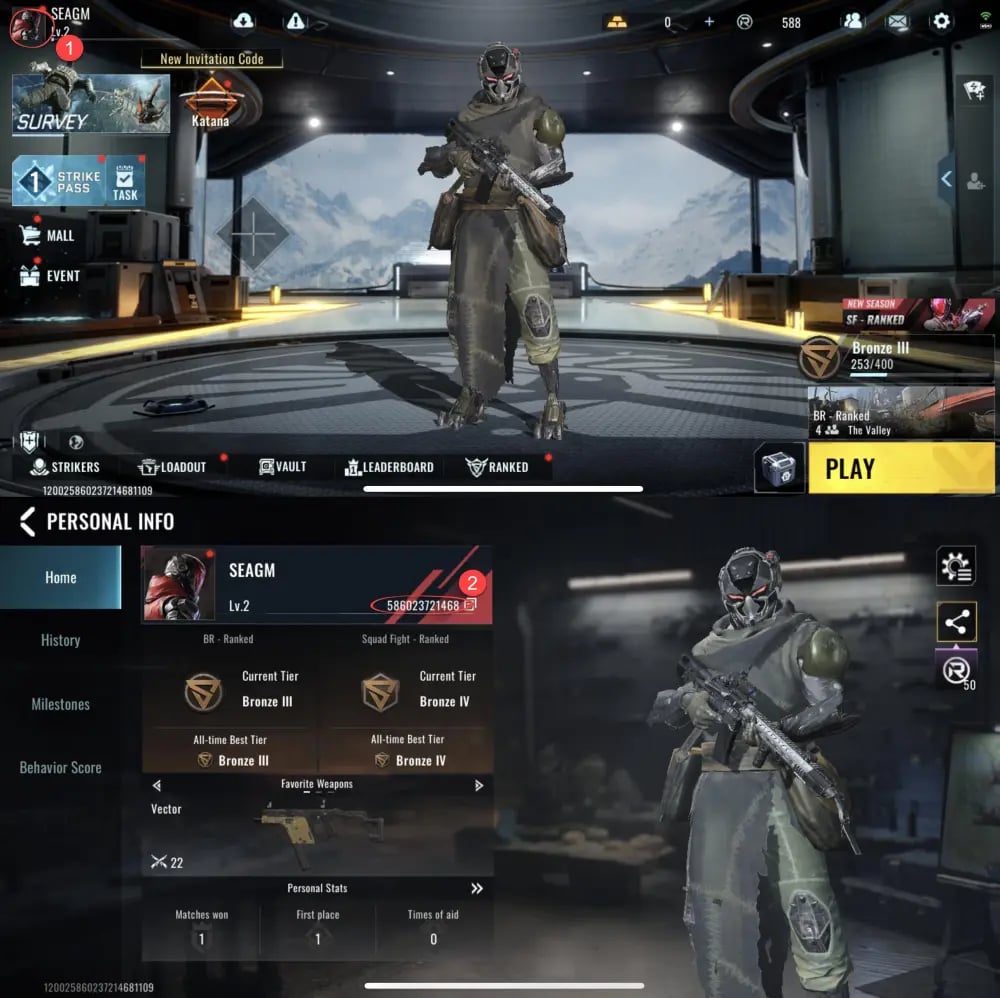
Pasting the copied ID directly into the VGTopup field eliminates manual typing errors and guarantees that your Gold goes to the correct profile.
Blood Strike Strike Pass: Elite vs. Premium Comparison
The Strike Pass is the primary seasonal progression system in Blood Strike, rewarding players with exclusive Striker skins, Legendary weapon camos, execution animations, and Gold rebates as they level up. Depending on your progression goals, you can choose between Strike Pass Elite and Strike Pass Premium.
| Feature | Free Pass | Strike Pass Elite | Strike Pass Premium |
|---|---|---|---|
| Base Tier Rewards | Standard basic items & crates | Full access to all premium tier rewards | Full access to all premium tier rewards |
| Instant Tier Advance | None (Start at Tier 1) | None (Progress from current tier) | Instant +20 Tier Skip bonus |
| Exclusive Skin Unlocks | None | Unlocks seasonal Striker skin line | Unlocks seasonal Striker skin line + bonus variant |
| Season XP Boost | Base XP progression | +10% Season XP gain | +25% Season XP gain |
| Gold Rebate Potential | No rebate | 100% Gold return upon full pass completion | 100% Gold return upon full pass completion |
| Bonus Supply Vouchers | Limited | Standard pass distribution | Instant bonus Stash vouchers upon purchase |
Selecting Strike Pass Elite gives you full access to seasonal rewards as you play, while Strike Pass Premium gives you an immediate head start with 20 unlocked tiers and accelerated XP progression for faster completion.
What Can Blood Strike Gold Be Used For in 2026?
In 2026, Blood Strike continues to expand its arsenal, tactical operators, and cosmetic customizations. Having a reserve of Gold gives you full control over how you gear up:
- Strike Pass Upgrades: Activate the Elite or Premium track to unlock seasonal weapons, character outfits, and enough rebate Gold to fund future passes.
- Legendary & Ultra Weapon Blueprints: Acquire high-tier weapon blueprints with custom inspection animations, unique muzzle flashes, and distinct visual attachments.
- Striker Character Unlocks & Skins: Customize your favorite tactical operators with exclusive combat uniforms, helmets, gloves, and tactical execution finishers.
- Weapon Stash Vouchers & Lucky Draws: Participate in limited-time thematic crates and lucky spin pools to obtain rare melee weapons, holographic sights, and specialized vehicle wraps.
- Profile Customization & Utilities: Purchase custom nameplates, calling cards, tactical spray tags, and rename cards to maintain your squad identity.
Safe and Password-Free UID Top-Up Explained
Security is a critical factor when topping up gaming currencies. VGTopup uses direct UID delivery, which connects directly to the game distribution servers through your public Player ID.
- No Passwords Required: You never need to share your game password, Google account, Apple ID, or social logins.
- Zero Risk of Account Takeover: Because no credentials are exchanged, your account remains completely secure in your hands.
- Direct In-Game Delivery: Once your order is processed, the game system automatically adds the Gold balance or activates the Strike Pass on your account.
- Official Server Protocol: Orders are fulfilled using direct game server routing, ensuring safe transactions that comply with platform standards.
Troubleshooting Blood Strike Top-Up Delivery Issues
If you have completed your payment on VGTopup and are waiting for your Gold or Strike Pass, keep these troubleshooting steps in mind:
- Restart the Game Client: Sometimes the in-game display needs a fresh connection to reflect updated balances. Close Blood Strike completely, restart it, and check your profile header.
- Check Your In-Game Mail: Certain items, bonus vouchers, or pass tokens are delivered directly to your in-game mailbox rather than credited directly to the counter. Open the Mail tab in the lobby to claim any pending attachments.
- Verify Player ID Accuracy: Check your order confirmation on VGTopup. Ensure the Player ID entered matches the ID on your profile screen.
- Check Payment Status: Confirm that your payment provider has fully cleared the transaction. Pending bank authorizations may slightly delay order fulfillment.
- Contact VGTopup 24/7 Support: If your balance does not update, reach out to the customer support team on VGTopup with your Order ID and Player ID for fast verification.
Why Buy Blood Strike Gold on VGTopup?
VGTopup offers a straightforward platform designed for mobile and PC shooters. Here is why players use VGTopup for Blood Strike:
- Simple UID-Only Flow: Enter your Player ID, pick your bundle, and check out without logging into third-party interfaces.
- Clear Pricing on Checkout: Check exact rates, bundle choices, and active pass packages directly on the live checkout screen.
- Broad Payment Methods: Pay using your preferred regional or global payment methods safely.
- Dedicated Customer Service: Friendly support agents are available around the clock to assist you with order status, UID verification, or billing inquiries.
Frequently Asked Questions
How to buy gold in Blood Strike?
To buy Gold in Blood Strike, select your desired Gold amount on VGTopup, enter your numeric Player ID, choose the server, and complete your payment. The Gold is sent directly to your account.
How do I find my Blood Strike Player ID?
Open Blood Strike, tap your profile avatar in the upper-left corner of the lobby screen, and open the User Profile tab. Your numeric Player ID is displayed under your name. Use the copy button next to it to copy the exact digits.
What is the difference between Strike Pass Elite and Strike Pass Premium?
Strike Pass Elite unlocks the paid reward track, letting you earn all premium skins, camos, and Gold rebates through standard play. Strike Pass Premium includes all Elite benefits plus an instant 20-tier skip, a larger season XP boost, and bonus introductory items.
Do I need to provide my Blood Strike password to top up?
No. VGTopup only requires your numeric Player ID and server selection. You never need to share passwords, login codes, or linked social media accounts.
How long does it take to receive Blood Strike Gold after purchase?
Orders processed via direct UID delivery are sent to your account promptly once payment is verified. If you are in-game during the transaction, restart the application to refresh your balance.
What should I do if my Blood Strike top up does not arrive?
First, restart the game client and check your in-game mailbox for unclaimed rewards. If the balance remains unchanged, check your VGTopup order history to verify your Player ID, then contact the 24/7 VGTopup support team with your order details.
Select Denomination
Tax, payment fees and eligible coupons are calculated at checkout.
| Package | Price |
|---|---|
| Ultra Skin Lucky Chest | USD 0.37 |
| 100 + 5 Gold | USD 0.68 |
| Level Up Pass | USD 1.49 |
| 300 + 20 Gold | USD 1.96 |
| Strike Pass Elite | USD 2.96 |
| 500 + 40 Gold | USD 3.27 |
| Strike Pass Premium | USD 6.44 |
| 1000 + 100 Gold | USD 6.53 |
| 2000 + 260 Gold | USD 12.98 |
| 5000 + 800 Gold | USD 32.33 |