
Free Fire MAX Diamonds Top Up: Essential In-Game Currency
Free Fire MAX Diamonds serve as the premium currency required to unlock the most sought-after content in Garena Free Fire MAX. From exclusive character bundles and weapon skins to the seasonal Booyah Pass, diamonds grant you direct access to premium customization and tactical upgrades across all game modes.
While gold can be accumulated through regular matches and daily missions, elite cosmetic upgrades, weapon crates, and premium event rewards require diamonds. Acquiring diamonds through VGTopup allows you to obtain the exact amount you need for upcoming events, limited-time collaborations, and prize spins without any unnecessary account credentials.
Cross-Sync: Using Diamonds Across Free Fire and Free Fire MAX
Free Fire MAX is built with Firelink technology, enabling complete synchronization with the standard Free Fire version. Because both game clients connect to the same central Garena server architecture, your account profile, inventory, and currency balances are completely shared.
Key aspects of cross-version diamond sync include:
- Unified Diamond Balance: Any diamonds added to your account via your User ID (UID) reflect immediately whether you log in through standard Free Fire or Free Fire MAX.
- Shared Inventory Access: Cosmetics, weapon skins, and characters purchased with diamonds in Free Fire MAX can be equipped and used when playing the standard client, and vice versa.
- Synchronized Progression: Booyah Pass tiers, event milestones, and spin counters advance identically across both applications.
This cross-sync structure guarantees that your top-up on VGTopup benefits your account regardless of which client version you prefer to play on daily.
Step-by-Step: How to Recharge Free Fire MAX Diamonds with User ID
To top up diamonds on VGTopup, you only need to provide your in-game User ID (UID). Follow these simple steps to place your order:
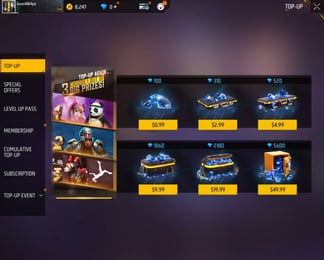
- Select Your Diamond Denomination: Review the available diamond packs on the VGTopup product page and select the amount you wish to purchase. Current pricing and active package options are displayed directly on the live checkout interface.
- Enter Your User ID: Type your Free Fire MAX User ID into the designated input field. Double-check the digits to prevent sending diamonds to an incorrect account.
- Proceed to Checkout: Select your preferred payment method from the available checkout options.
- Confirm Payment: Complete the payment transaction. Once processed, the order will be sent to the server queue.
- Check Your In-Game Balance: Open Free Fire MAX and check your diamond count at the top of the main lobby screen. Your new balance will reflect directly in your wallet.
How to Find Your Free Fire MAX User ID (UID)
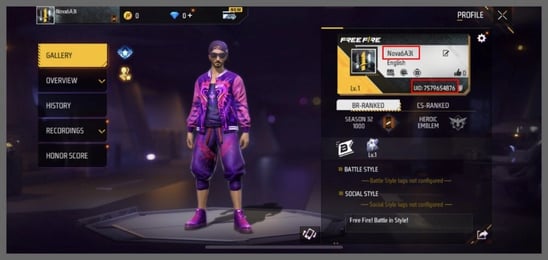
Locating your Free Fire MAX User ID takes only a few seconds within the game client. Your UID is a unique string of 8 to 11 numerical digits tied specifically to your player profile.
Follow these steps to locate and copy your UID:
- Launch Free Fire MAX on your mobile device or emulator.
- Tap your Player Banner / Avatar located in the top-left corner of the main lobby screen.
- In the profile overview window, select the Basic tab.
- Locate the UID number displayed below your nickname.
- Tap the Copy icon next to the number to copy your UID directly to your device clipboard.
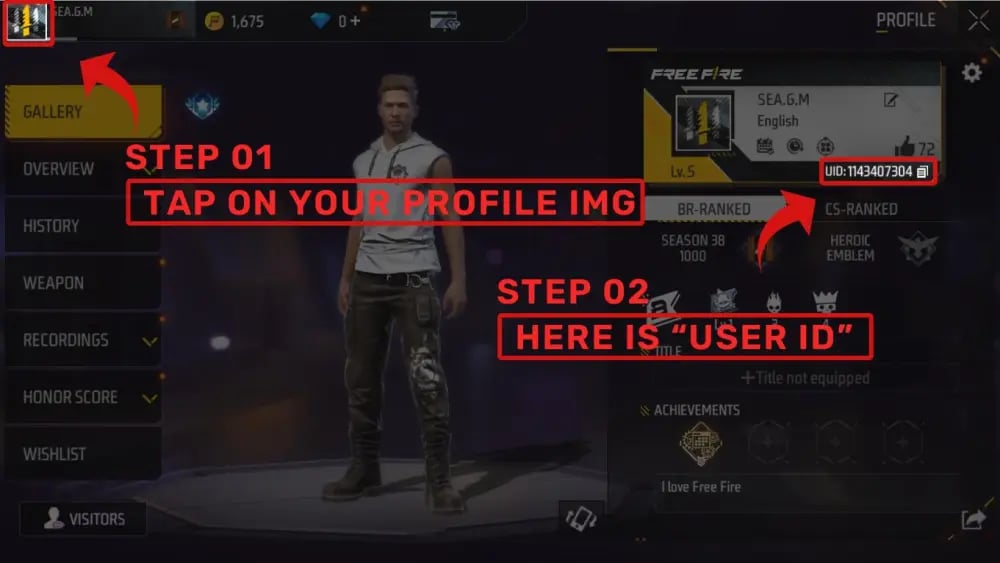
Paste this copied UID directly into the order field on VGTopup to ensure absolute accuracy before completing your purchase.
Safe and Direct Top-Up: Why Passwords Are Never Needed
Account safety is essential when purchasing in-game currency. VGTopup operates using direct server-to-account crediting, which requires only your public Player UID.
Here is why UID-only top-ups protect your account:
- Zero Login Sharing: You never need to provide your Garena, Google, Facebook, Apple, Twitter, or VK credentials. Your login details remain strictly private.
- Protection from Account Theft: Because you never share passwords or authentication tokens, your account cannot be compromised or unauthorized changes made.
- No Risk of Third-Party Flagging: Direct UID crediting delivers legitimate diamond top-ups that process through official server delivery systems without violating terms of service.
Never share your password, OTP codes, or linked social media logins with anyone offering diamond top-ups. A legitimate top-up service only requires your numerical UID.
Best In-Game Uses: Booyah Pass, Characters, and Luck Royale
Maximizing the value of your Free Fire MAX Diamonds requires smart allocation across available game features. The table below details how diamonds are utilized in-game:
| Feature / Item | Diamond Purpose | Key Advantage |
|---|---|---|
| Booyah Pass | Seasonal tier progression & premium track unlock | Exclusive themed character bundles, legendary gun skins, and vehicle skins |
| Luck Royale | Diamond Royale, Weapon Royale, and Incubator spins | High-rarity cosmetic sets, animated weapon finishes, and token redemptions |
| Character & Pet Unlocks | Direct store purchase and skill slot access | Tactical advantages through active/passive abilities and pet battle support |
| Limited-Time Events | Special web events, mystery shops, and token wheels | Deeply discounted bundles, collaboration items, and exclusive emotes |
| Store Cosmetics & Crates | Fashion items, weapon loot crates, and rename cards | Account personalization, stat-boosted weapon variants, and name customization |
Strategic Spending Tips
- Unlock the Booyah Pass Early: Purchasing the premium Booyah Pass early in the season grants access to exclusive mission tracks, helping you claim all tier rewards before the season concludes.
- Save for Mystery Shops and Discount Events: Special discount events appear periodically, allowing you to secure character bundles, weapon crates, and elite vouchers at reduced diamond costs.
- Focus on Meta Character Abilities: If you compete in ranked Battle Royale or Clash Squad, invest diamonds in versatile characters whose active abilities support your preferred playstyle.
Troubleshooting Diamond Delivery and Balance Refresh
Diamond deliveries initiated through VGTopup are dispatched promptly. If you do not see your updated balance immediately after payment confirmation, follow these troubleshooting steps:
- Restart the Game Client: Completely close Free Fire MAX and remove it from your device recent apps menu, then reopen the game to trigger a fresh balance sync with the server.
- Check the In-Game Mailbox: In some regional servers, bonus diamonds or event-related currency packages are distributed directly via in-game mail rather than added instantly to the top header.
- Inspect the Top-Up Event Tab: If you made a purchase during an active in-game top-up event, visit the Event center to manually claim milestone rewards associated with your recharged diamonds.
- Verify Your Submitted UID: Review your VGTopup order receipt to confirm that the UID entered matched your in-game profile number without missing or transposed digits.
- Contact Support: If the diamonds have not arrived after a short period, reach out to VGTopup customer support with your order number, payment reference, and User ID for prompt assistance.
Frequently Asked Questions
How to recharge diamonds in Free Fire MAX?
To recharge diamonds, select your preferred diamond bundle on VGTopup, input your Free Fire MAX User ID into the form, and proceed through checkout. Once your payment is verified, the diamonds will be credited directly to your in-game account.
Where can I find my Free Fire MAX User ID?
You can find your User ID by opening Free Fire MAX and tapping your profile avatar in the upper-left corner of the main lobby. In the Basic tab, your UID is displayed directly beneath your player nickname. Tap the copy icon next to it to copy the number.
Do Free Fire MAX Diamonds work in standard Free Fire?
Yes. Free Fire and Free Fire MAX share account data and balances via Firelink. Any diamonds credited to your UID are accessible and usable across both game versions.
Do I need to share my password to top up Free Fire MAX Diamonds?
No. VGTopup only requires your numerical User ID. You should never share your account password, email login, or security codes.
What can I buy with Free Fire MAX Diamonds in 2026?
In 2026, diamonds can be used to unlock the seasonal Booyah Pass, spin for rare items in Luck Royale and Token Wheels, purchase active and passive character abilities, buy pets, obtain legendary weapon skins, and acquire limited-edition collaboration cosmetics.
How soon will the Diamonds reflect in my Free Fire MAX account?
Diamonds are credited directly to your UID upon payment verification. In most cases, the balance updates immediately. Simply restart the game client if your balance does not refresh on the lobby screen right away.
Select Denomination
Tax, payment fees and eligible coupons are calculated at checkout.
| Package | Price |
|---|---|
| 210 Diamonds | USD 1.93 |
| 530 Diamonds | USD 4.80 |
| 1080 Diamonds | USD 9.60 |
| 2200 Diamonds | USD 19.20 |