

PUBG Mobile UC Top Up: Direct and Instant Account Recharge
Unknown Cash (UC) serves as the primary premium currency in PUBG Mobile, allowing players to access exclusive weapon finishes, custom vehicle skins, mythic outfits, and the seasonal Royale Pass. VGTopup provides a direct PUBG Mobile UC top up service that credits UC straight to your account balance using only your numeric Player ID.
By avoiding account logins and password requests, VGTopup ensures your game account stays secure while eliminating unnecessary checkout steps. Select your desired UC bundle, confirm your Player ID, and complete your purchase. Real-time rates and package selections are always shown directly on the live checkout interface.
How to Top Up PUBG Mobile UC with Player ID
Recharging UC on VGTopup requires only a few clear steps:
- Select Your UC Package: Browse the available UC denominations on the VGTopup product page and pick the amount you need for your in-game goals.
- Enter Your PUBG Mobile Player ID: Type or paste your exact numeric Player ID into the input field. Do not use your in-game nickname or special characters.
- Verify Your Details: Double-check that the numeric ID entered matches your in-game profile to ensure the credit is routed to the correct account.
- Proceed to Checkout: Choose your preferred payment option from the available checkout methods and complete the transaction.
- Receive Your UC: Once payment is processed, the UC is delivered straight to your PUBG Mobile account balance automatically. Launch the game or restart your client to view your updated balance.
How to Find Your PUBG Mobile Numeric Player ID
Your PUBG Mobile Player ID is a unique sequence of numbers assigned to your profile upon account creation. Unlike your character name, which can be modified using rename cards, your Player ID remains permanent.
Follow these steps to locate and copy your Player ID inside the game:
- Launch PUBG Mobile on your mobile device and log in to your account.
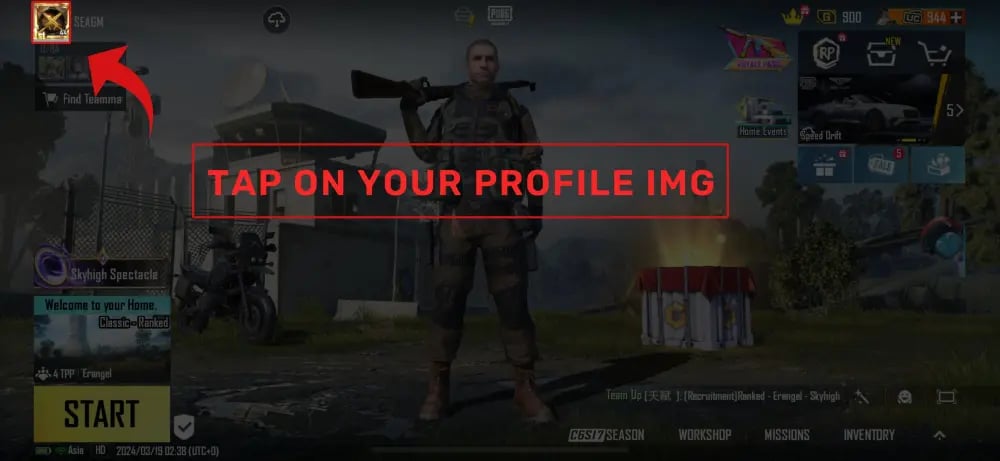
- In the main lobby screen, tap your Profile Avatar located in the top-left corner.
- Your profile page will open. Select the Main Info tab.
- Look below your profile picture and nickname to find your numeric Player ID (UID).
- Tap the Copy icon directly next to the numbers to copy the ID to your clipboard.
Always use the copy function rather than typing the numbers manually. This prevents misplaced digits that could lead to delivery delays.
PUBG Mobile UC Pricing and Value Breakdown 2026
Different in-game events and cosmetics require varying amounts of UC. Below is an overview of how standard UC amounts correspond to common in-game purchases in 2026:
| UC Package Tier | Primary In-Game Use | Value Overview |
|---|---|---|
| 60 UC | Daily first-draw discounts, basic crate opening | Entry-level package for small event tasks |
| 300 + 25 UC | Standard Royale Pass access | The baseline amount needed for standard seasonal progression |
| 600 + 60 UC | Royale Pass unlock + bonus event spins | Standard seasonal choice with leftover UC for spins |
| 1,500 + 300 UC | Elite Pass Plus unlock | Instantly grants tier skips and exclusive pass cosmetics |
| 3,000 + 850 UC | Lucky Spin draws and Mythic Forge material runs | Mid-tier package for weapon skin upgrade attempts |
| 6,000 + 2,100 UC | Upgradable firearms (Lab items) & Mythic outfits | High-volume pack offering the greatest bonus UC ratio |
Note: Exact currency rates and promotional bonuses vary by region. Check the live VGTopup checkout screen for up-to-date pricing and bonus UC allocations.
What You Can Unlock with UC: Royale Pass, Crates, and Character Upgrades
Acquiring UC opens up the full range of PUBG Mobile customization and progression systems:
- Royale Pass & Elite Pass Plus: Upgrading your seasonal pass grants access to tiered rewards, including seasonal outfits, weapon finishes, emote packs, and UC rebate points that help fund future passes.
- The Lab (Upgradable Weapon Skins): Advanced weapon skins, such as the Glacier M416 or seasonal firearm themes, require UC to spin for materials, paint, and upgrade components to unlock custom kill effects, loot crates, and broadcast alerts.
- Mythic Forge & Lucky Spins: High-tier mythic outfits, X-Suits, and vehicle collaborations are obtained through event-specific draw pools powered by UC.
- Treasures & Classic Crates: Direct crate openings provide access to character appearances, companion pets, and premium voice packs.
- Room Cards & Renaming Tokens: Players organizing custom tournaments or updating clan rosters can buy custom room cards and name change vouchers directly from the in-game shop.
Safe and Secure UC Delivery: Direct Credit Without Account Password
Account safety is a critical priority when purchasing game currency. VGTopup relies entirely on direct Player ID routing.
- No Login Credentials Required: You never need to supply your game password, linked social media credentials (Twitter, Facebook, Google Play, Apple ID), or two-factor verification codes.
- Zero Risk of Unauthorized Access: Because your login details are never shared, your personal inventory, account settings, and linked data remain under your direct control.
- Clean Direct Delivery: UC purchased through VGTopup is processed directly to your balance, preventing account flags or third-party credential compromises.
To ensure uninterrupted delivery, always verify your Player ID before confirming your order. If you notice a typo prior to payment completion, cancel the prompt and re-enter the correct numeric ID on the VGTopup product page.
Common PUBG Mobile UC Top-Up Questions and Troubleshooting
How do I recharge UC for PUBG Mobile?
To recharge UC, choose your desired bundle on VGTopup, input your numeric Player ID in the designated box, and proceed to payment. Once the transaction completes, the UC is sent directly to your in-game balance.
How can I find my PUBG Mobile Player ID?
Open PUBG Mobile and tap your profile avatar in the upper-left corner of the lobby. Switch to the Main Info tab. Your numeric Player ID is displayed right next to your profile picture. Tap the copy icon beside it to copy the numbers accurately.
Do I need to share my PUBG Mobile account password to top up UC?
No. Recharging through VGTopup requires only your public numeric Player ID. You should never share your account password, email login, or verification codes with any top-up service.
How much UC does the PUBG Mobile Royale Pass cost?
The standard Royale Pass upgrade typically costs 360 UC, while the Elite Pass Plus (which includes instant rank boosts and exclusive cosmetic perks) costs 960 UC. Check the in-game RP menu for any active seasonal discounts or voucher rebates.
How long does it take for PUBG Mobile UC to reflect in my account?
Delivery occurs automatically upon payment verification. In most cases, UC appears in your in-game balance within a few moments. If the balance does not update right away, restart your PUBG Mobile game client to refresh the server connection.
What should I do if I entered the wrong PUBG Mobile Player ID?
If you realize an error before completing payment, return to the checkout page and correct the Player ID field. If payment has already been completed for an incorrect but valid numeric ID, the system delivers the UC to that account immediately and the transaction cannot be reversed. If you entered an invalid ID format that fails fulfillment, contact the 24/7 VGTopup customer support team with your order number for assistance.
Select Denomination
Tax, payment fees and eligible coupons are calculated at checkout.
| Package | Price |
|---|---|
| 60 UC | USD 0.78 |
| 300 + 25 Bonus UC | USD 3.93 |
| 600 + 60 Bonus UC | USD 7.87 |
| ELITE PASS | USD 8.65 |
| 1500 + 300 Bonus UC | USD 19.68 |
| ELITE PASS PLUS | USD 21.24 |
| 3000 + 850 Bonus UC | USD 39.37 |
| 6000 + 2100 Bonus UC | USD 78.74 |
| 12000 + 4200 Bonus UC | USD 157.49 |
| 18000 + 6300 Bonus UC | USD 236.24 |
| 24000 + 8400 Bonus UC | USD 314.99 |
| 30000 + 10500 Bonus UC | USD 393.74 |