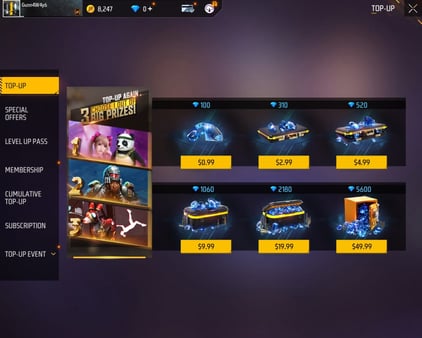
Need diamonds for a character unlock or Booyah Pass after you lock these in? Free Fire MAX Diamonds on VGTopup credit your Player ID with no account login.
Free Fire Max Headshot Sensitivity by RAM (August 2026)
Updated on 2026-08-06: refreshed General / Red Dot ranges for 2GB–4GB phones on the current 0–200 scale, plus fire-button size and display presets that keep Clash Squad aim stable.
Copy the row that matches your phone first. Then move one slider at a time in Training.
Device RAM | General | Red Dot | 2x Scope | 4x Scope | Sniper Scope | Free Camera |
|---|
2GB | 175–185 | 160–170 | 200 | 200 | 200 | 120–130 |
3GB | 168–175 | 150–160 | 200 | 200 | 200 | 120–126 |
4GB | 160–170 | 145–155 | 190–200 | 190–200 | 190–200 | 115–125 |
Tune by your RAM
Low RAM (2GB): push General / Red Dot up so a short drag still reaches head level when the phone hitches.
Mid RAM (3GB): start at 170 / 155 for Clash Squad drag fights.
4GB: drop General a few points if sprays climb over the head on 90Hz / High FPS.
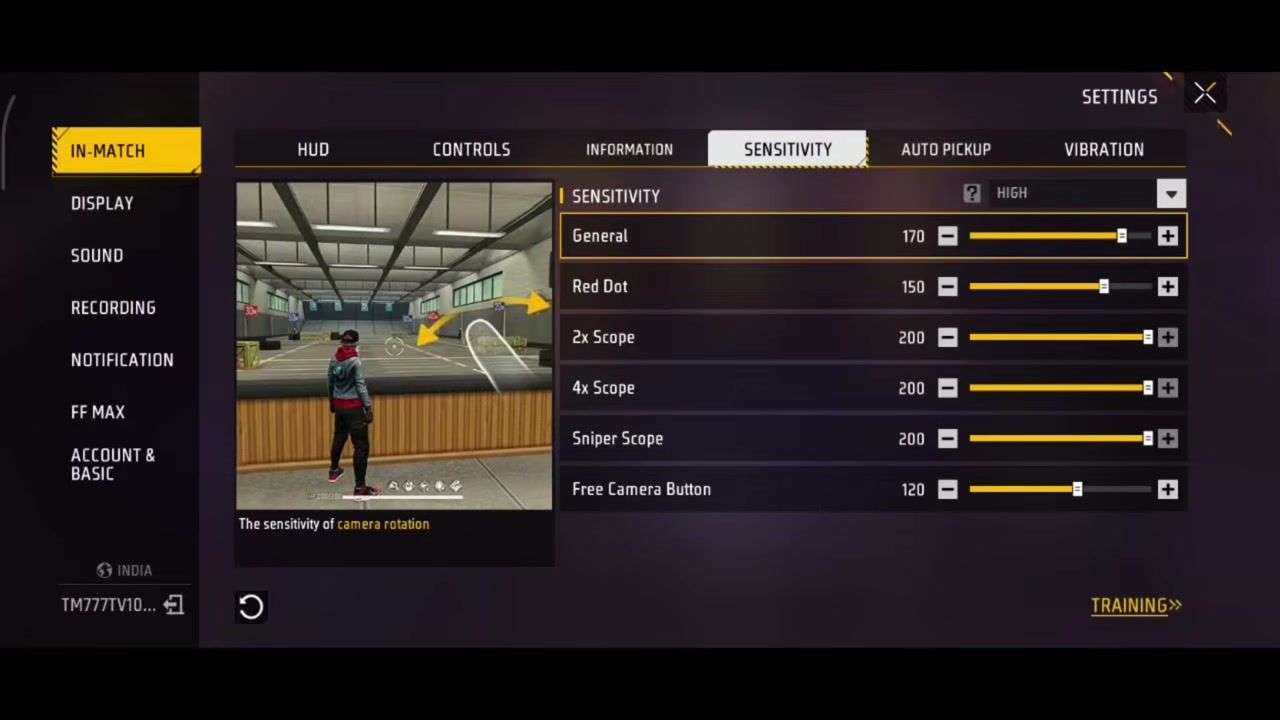
Core Clash Squad baseline (3GB)
Setting | Value |
|---|
Preset | HIGH |
General | 170 |
Red Dot | 155 |
2x Scope | 200 |
4x Scope | 200 |
Sniper Scope | 200 |
Free Camera Button | 126 |
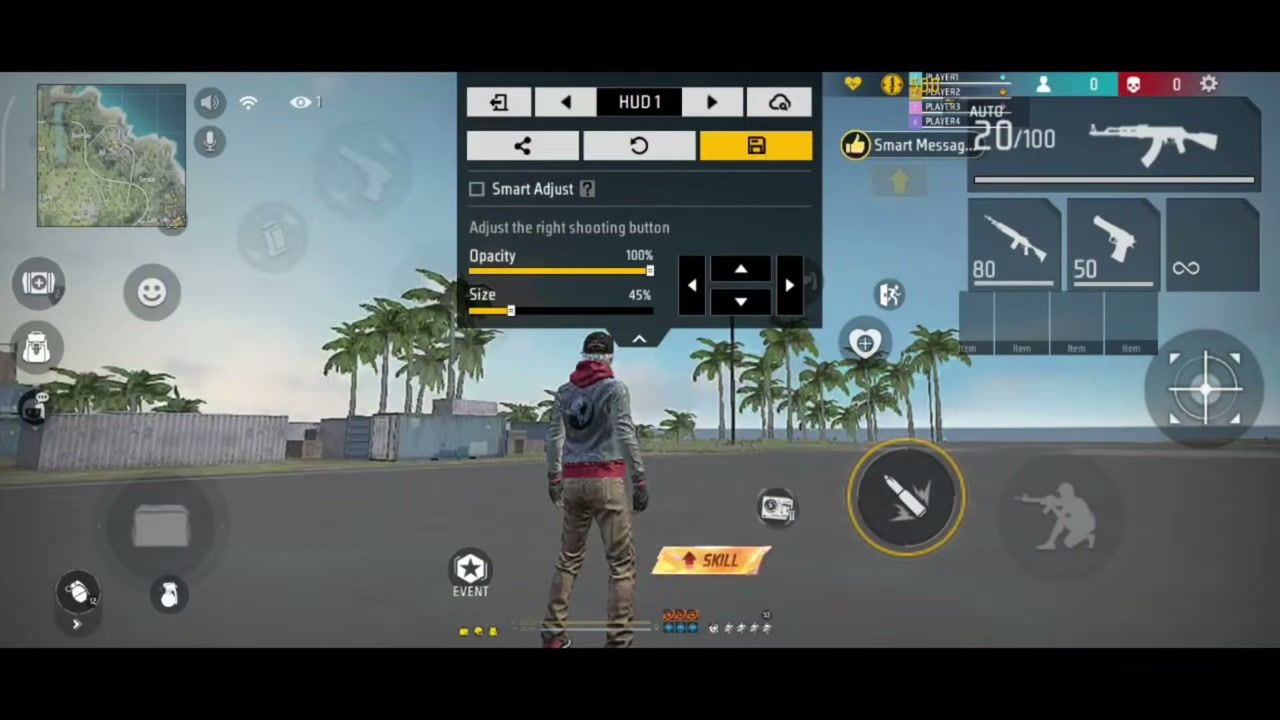
Right fire button | 44–45% size, 100% opacity |
Display Settings That Keep Aim Responsive
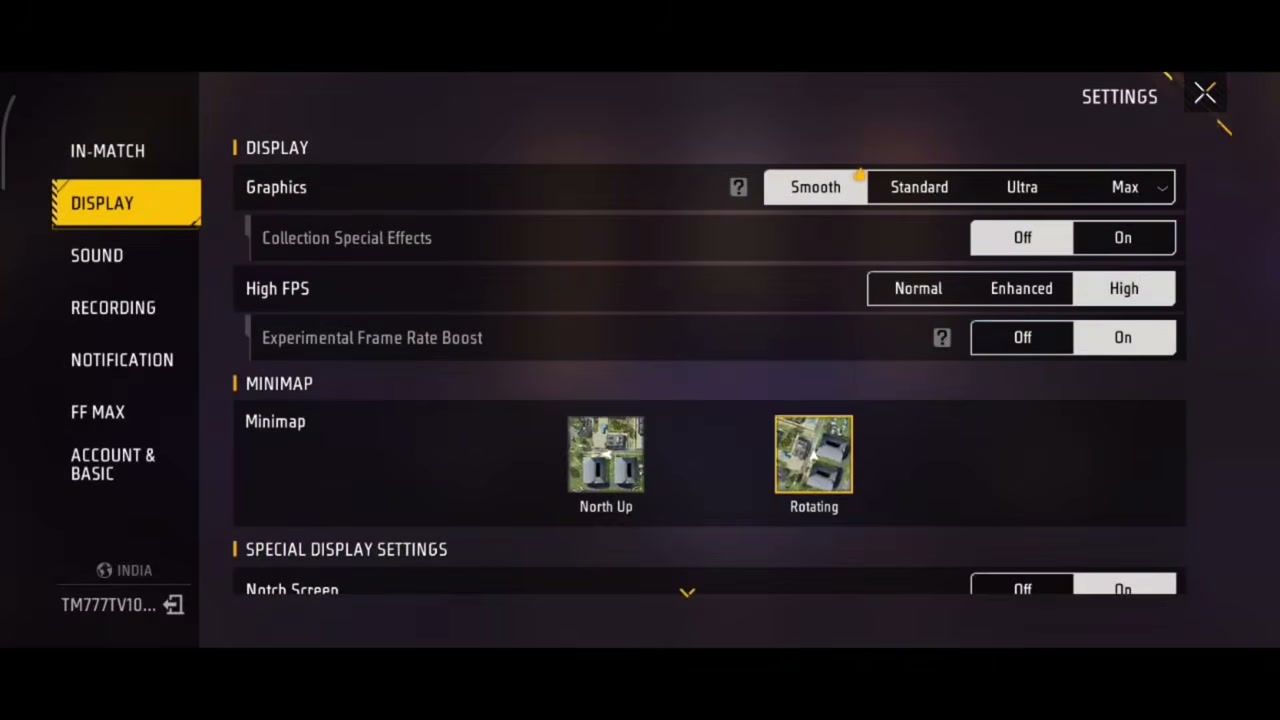
Sensitivity only helps if the frame rate holds. On 2GB–4GB phones, trade visuals for FPS.
Display option | Recommended | Why it matters for headshots |
|---|
Graphics | Smooth | Cuts GPU load so aim tracks clean |
High FPS | High | Faster aim response in close fights |
Experimental Frame Rate Boost | On | Extra headroom on mid phones |
Collection Special Effects | On | Keep if your phone stays cool |
Minimap | Rotating | Faster direction reads in CS |
Notch Screen | On | Stops HUD clipping on notched phones |
The game may warn that High FPS can heat the phone or add lag. On a 2GB handset, leave Experimental Boost Off and keep High FPS on Enhanced if the warning shows up mid-match.
Controls and Aim Assist Setup
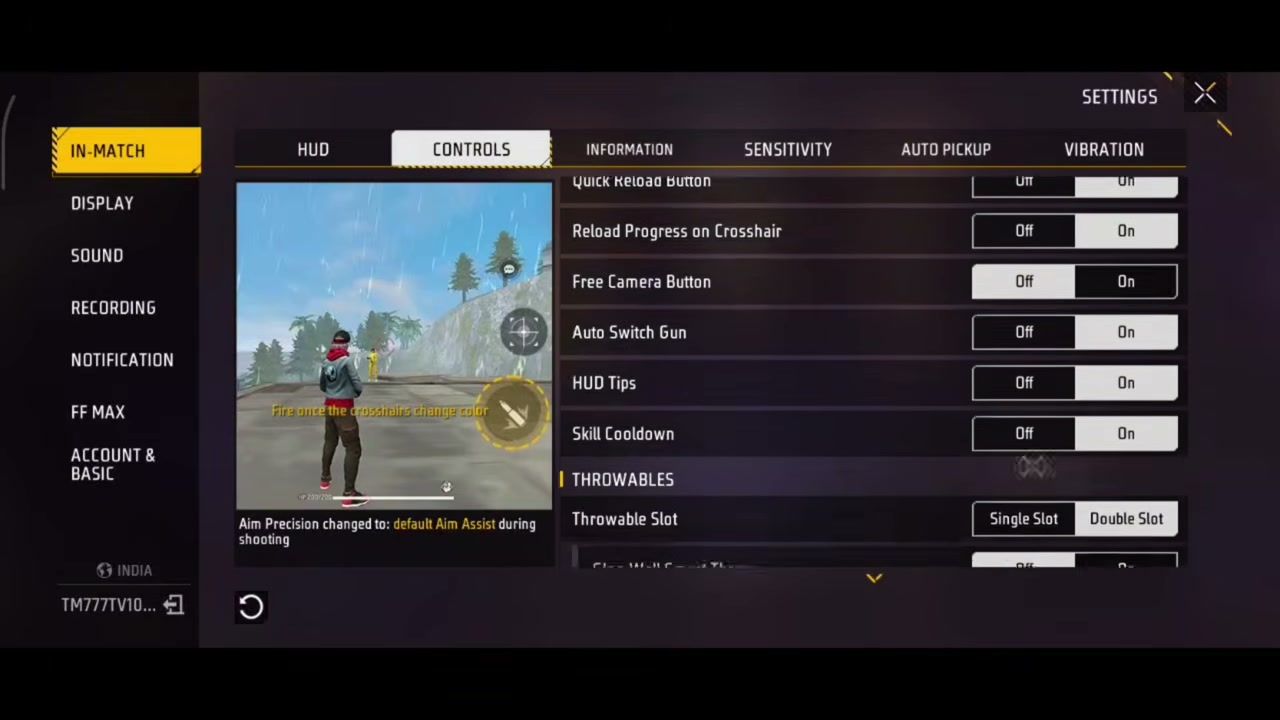
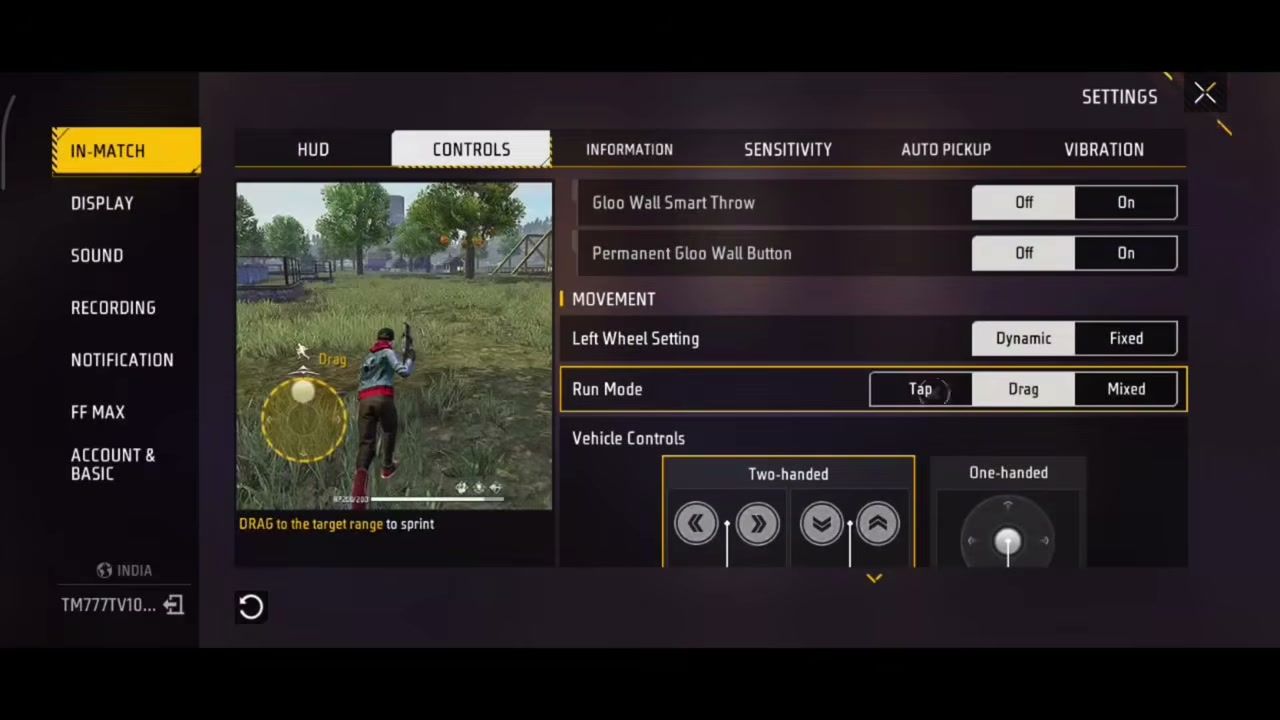
Open Settings → In-Match → Controls and match these:
Aim Precision: Default Aim Assist during shooting
Quick Reload Button: On
Reload Progress on Crosshair: Off
Free Camera Button: On
Auto Switch Gun: Off
HUD Tips / Skill Cooldown UI: Off (less clutter)
Throwable Slot: Single Slot
Gloo Wall Smart Throw: On
Permanent Gloo Wall Button: On
Left Wheel: Fixed
Run Mode: Drag
Vehicle Controls: Two-handed
Fire when the crosshair color shifts. That color change is the aim-assist window you want for close SMG and shotgun taps in Clash Squad.
How to Apply Free Fire Max Headshot Sensitivity
Step 1: Open Free Fire MAX → Settings → In-Match → Sensitivity. Pick the HIGH preset, then type the numbers from the RAM table above.
Step 2: Switch to HUD → HUD 1 → Custom. Set the right fire button to about 45% size and 100% opacity, then place it where your thumb can drag upward without lifting.
Step 3: Set Display to Smooth + High FPS (see table). Save, then enter Training.
Step 4: Practice a chest-to-head drag with UMP / MP5 and M1887. If the crosshair overshoots, cut General by 3–5. If it stops on the chest, raise General by 3–5.
Step 5: Queue Clash Squad Ranked and test for 5–10 rounds before you change anything else. Pair the aim fix with a character combo that fits CS burst so the gunfights match your build.
How to Get More Consistent Headshots (and Diamonds)
FAQ
What is the best Free Fire Max headshot sensitivity in 2026?
For most 3GB phones on the 0–200 scale, start with General 170, Red Dot 155, scopes at 200, and Free Camera at 126. 2GB phones need higher General / Red Dot. 4GB phones can sit lower if the spray climbs.
Does Free Fire Max sensitivity change by RAM?
Yes. Lower RAM phones hitch more, so a higher General / Red Dot value compensates for the lag between thumb and camera. High-end phones need less compensation or the same drag flies past the head.
Keep the right fire button near 44–45% size and full opacity. That size leaves room to drag upward while you hold fire, which is the core of the chest-to-head motion in Clash Squad.
Should I use Smooth graphics for headshots?
Yes on 2GB–4GB devices. Smooth graphics plus High FPS cuts frame drops that throw off aim. If the phone overheats, drop Experimental Frame Rate Boost first, then High FPS to Enhanced.
Is auto headshot a hack in Free Fire Max?
No. What people call “auto headshot” is aim assist plus high General / Red Dot sensitivity and a fire-button layout that lets you drag into the head. It still needs practice; the settings only shrink the miss window.
Conclusion
Lock the Free Fire Max headshot sensitivity settings that match your RAM, pair them with Smooth + High FPS and a 45% fire button, then tune General in Training until the drag stops on the head. Check back after major OB updates for table tweaks. When you need diamonds for the next unlock, top up Free Fire MAX on VGTopup with your Player ID only.





Comments