
PUBG: New State Top Up for Fast In-Game Crediting
Acquiring NC (New State Cash) allows you to unlock exclusive Survivor Pass tiers, purchase custom weapon crates, and obtain futuristic vehicle skins in PUBG: New State. VGTopup provides an instant UID-based recharge solution that sends NC directly to your account. You do not need to share your login credentials, passwords, or linked social media accounts to complete an order.
Select your desired NC package, enter your in-game User ID, and proceed through checkout to receive your balance directly inside your game client.
What is PUBG: New State NC and How to Use It
NC is the official premium currency of PUBG: New State (also recognized as New State Mobile). Unlike standard in-game BP (Battle Points), NC is required to access premium store offerings and limited-time events.
Key uses for PUBG: New State NC include:
- Survivor Pass Activation: Purchase the Premium Pass or Premium Plus Pass each season to earn exclusive character outfits, weapon patterns, and profile cosmetics.
- Crates and Lucky Spins: Open specialized weapon crates and royal chests featuring upgradable firearms with custom hit effects and kill-feed announcements.
- Vehicle Customization: Unlock modern vehicle wraps designed specifically for Troi, Erangel 2051, and other featured battlegrounds.
- Upgrade Materials: Acquire upgrade tokens and weapon crafting components to customize the cosmetics and visual tiers of your signature firearms.
- Direct Item Store: Purchase standalone character cosmetics, emotes, parachutes, and lobby animations directly from the rotating in-game shop.
PUBG: New State NC vs. PUBG Mobile UC: What You Need to Know
Players frequently confuse PUBG: New State with PUBG Mobile because both are battle royale mobile titles from Krafton. However, they run on completely separate game engines, servers, and economies. Purchasing currency for one game will not credit your account in the other.
Review this comparison before completing your order to ensure you are purchasing the correct currency:
| Feature | PUBG: New State (New State Mobile) | PUBG Mobile |
|---|---|---|
| In-Game Currency | NC (New State Cash) | UC (Unknown Cash) |
| Game Environment | Futuristic 2051 maps, drone store, green flare guns | Classic maps and themed seasonal modes |
| Player Identifier | User ID (found in game profile summary) | Character ID / Numeric UID |
| Balance Transfer | Cannot be transferred to PUBG Mobile | Cannot be transferred to PUBG: New State |
| VGTopup Top-Up Field | Enter User ID | Enter Character ID / Player ID |
If you play PUBG: New State, purchase NC on this page. If you play classic PUBG Mobile, you must purchase UC on its dedicated store page.
How to Find Your PUBG: New State User ID
To ensure your NC delivers to your account without delay, you must provide your exact User ID. Follow these steps on your mobile device to locate and copy your ID:
- Launch PUBG: New State on your mobile device and log in to your account.
- In the main lobby screen, tap your Profile Icon / Avatar located in the top-right corner.
- Stay on the Basic Info / Summary tab.
- Locate your User ID listed under your player name and level.
- Tap the small Copy Icon next to the User ID string to save it directly to your clipboard.
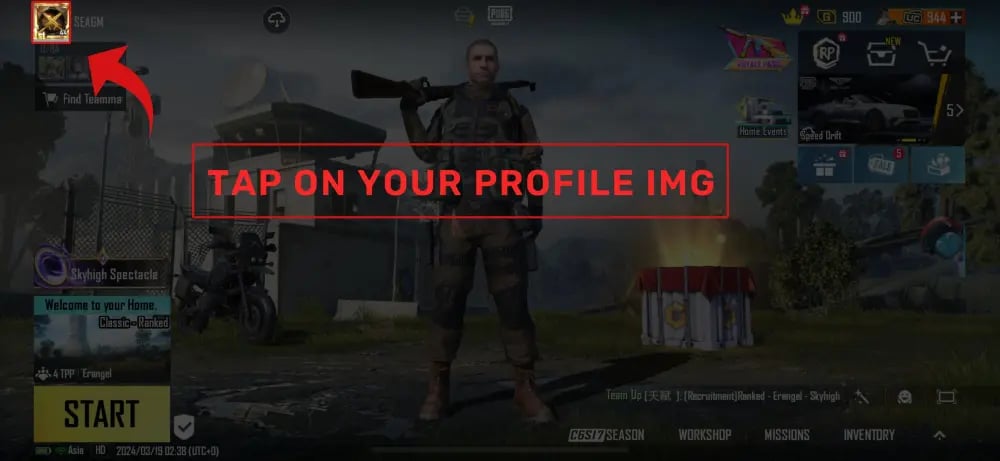
Double-check that the copied string matches your in-game profile before pasting it into the checkout field on VGTopup. Providing an incorrect ID may cause your NC to credit another player's account.
Step-by-Step Guide: How to Top Up PUBG: New State NC on VGTopup
Recharging your balance on VGTopup requires only a few simple steps:
- Select the NC Package: Choose the denomination of PUBG: New State NC you want to add to your balance.
- Enter Your User ID: Paste your copied User ID into the input field labeled Please Enter User ID.
- Review the Order: Check the live price and verify your ID entry.
- Complete Payment: Select your preferred checkout channel and finalize the transaction.
- Check Your In-Game Balance: Open or restart PUBG: New State. Your NC balance will reflect the new credit in the upper-right corner of the main lobby.
Why Choose VGTopup for PUBG: New State Top-Ups
VGTopup offers a direct, player-focused service built for speed, security, and convenience:
- Password-Free Security: You only submit your public User ID. VGTopup will never ask for your email login, social passwords, or verification codes.
- Direct System Crediting: Orders are processed through automated systems that deliver NC directly to your account immediately after payment confirmation.
- Transparent Live Pricing: The exact cost is clearly displayed on the product page so you always know your total before paying.
- Global Account Compatibility: Our direct top-up system works across all official regional game servers supported by PUBG: New State.
- Responsive Customer Support: If you encounter any issues during checkout or have questions regarding delivery status, VGTopup customer service is available to assist.
Payment Methods and Instant UID Delivery Verification
VGTopup supports multiple regional and international payment options, enabling players worldwide to complete orders quickly. Current pricing and available checkout methods are displayed live on the order screen.
After completing payment, the delivery system validates your User ID and credits your NC. To confirm receipt:
- Return to the PUBG: New State main lobby.
- Check the NC counter in the upper-right corner.
- If the total has not updated immediately, restart the application to refresh your account data from Krafton's servers.
Frequently Asked Questions
Is PUBG: New State still active in 2026?
Yes. PUBG: New State (New State Mobile) is fully active in 2026. The game continues to receive periodic balance patches, seasonal Survivor Passes, ranked resets, and new weapon custom kits.
How do I find my PUBG: New State User ID?
Tap your profile avatar in the upper-right corner of the lobby screen. Your User ID is displayed under your account name on the basic information tab. Tap the copy icon next to it to paste it into the checkout field.
What is the difference between NC in PUBG: New State and UC in PUBG Mobile?
NC (New State Cash) is the currency exclusively used in PUBG: New State, while UC (Unknown Cash) belongs exclusively to PUBG Mobile. They are completely separate games with independent economies; currency purchased for one game cannot be used in or transferred to the other.
Do I need to provide my account password to top up NC?
No. VGTopup only requires your in-game User ID. You never need to share passwords, secondary security codes, or linked social media logins.
What should I do if my NC does not appear in my account immediately?
First, restart the PUBG: New State application to force a fresh server sync. If the currency still does not appear after a few minutes, check your VGTopup order history to confirm the transaction status, then reach out to customer support with your Order ID and User ID for verification.
Can I top up PUBG: New State NC for another player or friend?
Yes. Simply enter your friend's User ID into the input field during checkout instead of your own. Once payment is complete, the NC will be credited directly to their in-game account.
Select Denomination
Tax, payment fees and eligible coupons are calculated at checkout.
| Package | Price |
|---|---|
| 300 NC | USD 0.79 |
| 1500 + 80 NC Bonus | USD 4.00 |
| 3600 + 250 NC Bonus | USD 9.60 |
| 9300 + 930 NC Bonus | USD 24.64 |
| 15000 + 1800 NC Bonus | USD 39.23 |
| 30000 + 5000 NC Bonus | USD 80.01 |