"Gift balance not enough" is a tier mismatch, not a broken wallet
Gift coins and bought coins are the same currency sitting in your wallet, but they show up through different doors, and that little distinction is what's behind nearly every "why is my gift balance not enough" search. Gifting sends free coins to a friend without docking anything from the sender, per Miniclip support. It's a generosity feature, capped and daily, reachable through Facebook or mobile. Coins from friends plus whatever you claw out of free sources all flow into one pile. The game honestly doesn't care where a coin was born once you sit down at a table.
What it cares about is the buy-in. Entry scales with table tier. London's cheap, and every room up the chain wants more. By the time you hit the marquee high-stakes stuff (the Sydney and Las Vegas end), the cost to walk in runs into the millions. Free coins from gifting and ads just don't stretch that far, which is the flat consensus across r/8BallPool. That's the entire story behind the error. Nothing glitched. You're trying to stroll into a room that costs more than your free income can cover.
This is also why the "it's pay-to-win" line bugs me. You can climb an enormous distance on free coins alone if you stick to tables your balance can actually feed. The wall only shows up when you reach for rooms built around big-spender buy-ins. So really, the message is the game nudging you toward either a cheaper table or a top up. That fork is exactly where you should stop and think before grabbing your card.
Topping up inside the app, and checking it actually landed
Safest default is the in-game store, billed straight through your platform account. The flow's short. On Android, open the shop, pick a coin pack, pay through Google Play. On iOS it's the same loop via the App Store. If you'd rather skip the in-app store, the official partner route is Codashop, where you punch in your Unique ID, choose a pack, and pay, per Codashop, partnered with Miniclip for direct coin and cash top-ups. Both drop coins onto the same account. The only difference is the checkout door you walked through.
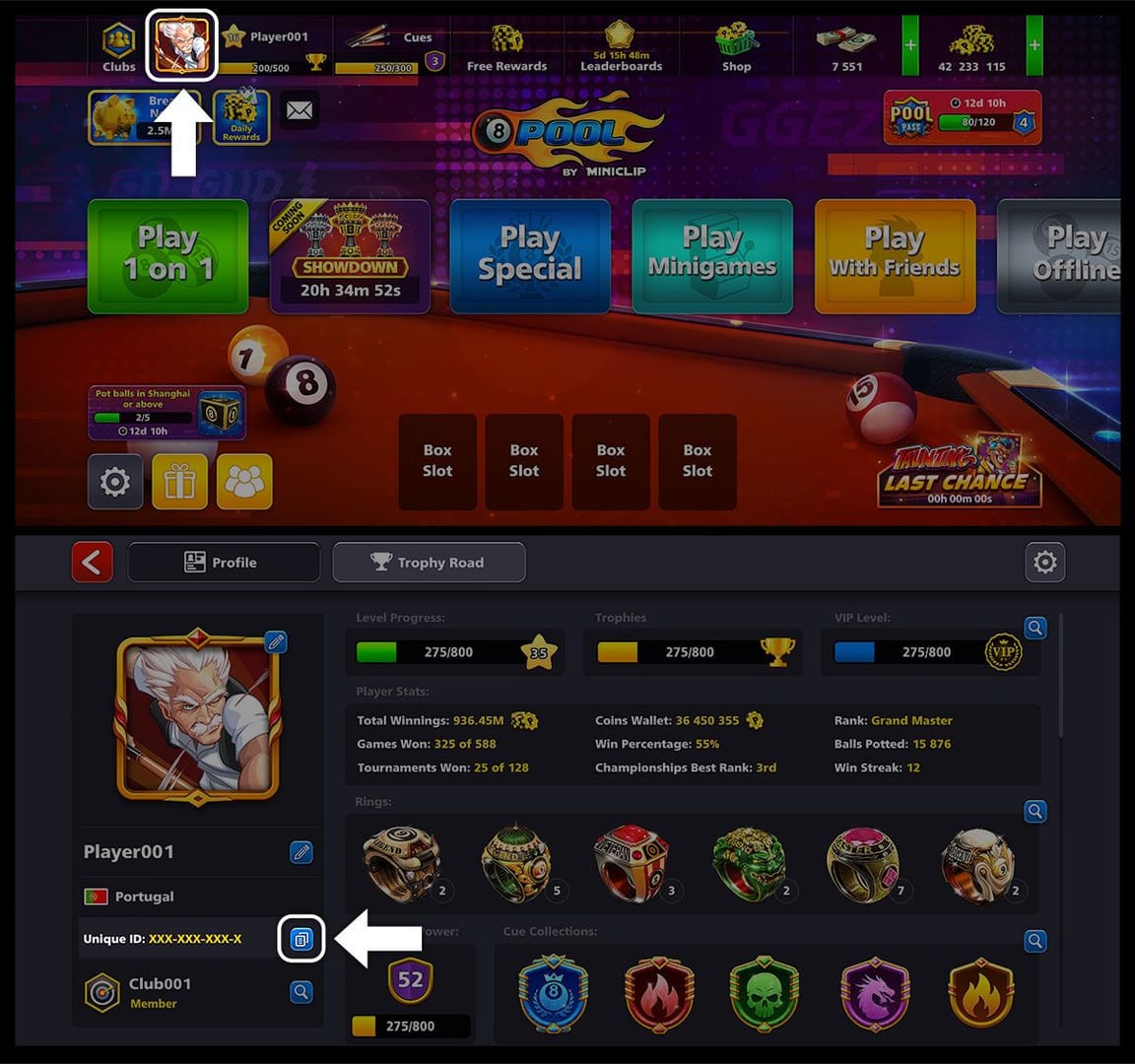
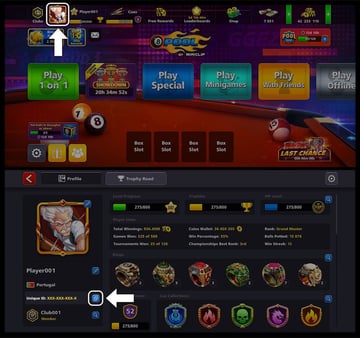
A couple of hard-won notes from someone who's stared at this exact screen. Your Unique ID is the account tag the off-app route needs, so copy it precisely. One wrong digit and your coins go to a total stranger instead of you. And after any purchase, confirm the balance ticked up before you do anything else. Most of the time it's instant. When it isn't, don't panic-buy a second pack assuming the first one evaporated. That's a documented trap, and I'll circle back to it.
I keep the buying decision split from the buying mechanics because the how is trivial and the which is where cash gets torched. So before you tap a single pack, look at what each one actually buys you.
The cheapest pack is the worst deal, and here's the proof
The smallest pack is the weakest value on the board, and the store's own pricing rats it out. Run coins-per-pound across the tiers and the curve climbs steeply.
| Pack |
Coins |
Price (GBP) |
Coins per £1 |
VIP points |
| Stack |
23,000 |
£1.79 |
~12,800 |
200 |
| Pile |
60,000 |
£4.49 |
~13,400 |
500 |
| Wallet |
130,000 |
£8.99 |
~14,500 |
1,000 |
| Stash |
295,000 |
£17.99 |
~16,400 |
2,000 |
| Heap |
920,000 |
£44.99 |
~20,400 |
5,000 |
| Vault |
2,300,000 |
£89.99 |
~25,600 |
10,000 |
Source: 8 Ball Pool official shop (2026)
The Stack gives you roughly 12,800 coins per pound. The Vault? About 25,600 per pound, twice the value just for buying higher up. Every step up the tiers nudges coins-per-unit better, which is the penalty baked right into the small packs. The App Store ladder mirrors it: a Pile of Coins listed around $4.99 for roughly 52,000 coins, per the Apple App Store listing, sits in the same low-value neighbourhood as the GBP Stack and Pile.
My read after pricing these out: the genuine sweet spot for most people sits in the middle of the ladder, the Wallet or Stash. You get a real coins-per-pound bump over the bottom packs without dumping whale money into a Vault you might never burn through. The Heap and Vault win the raw efficiency contest, sure, but they only make sense if you actually live in high-stake rooms often enough to spend that hoard.
The real money-loser isn't buying coins. It's buying the smallest pack over and over. Three Stacks across a month cost you more than one Stash and leave you with fewer coins to show for it. If you're spending at all, plan one bigger top up rather than a string of impulse taps. And before checkout, compare where you buy: pricing varies by region and currency, per Codashop, so the same pack isn't the same price everywhere. For players who want pack rates lined up side by side before committing, third-party options exist too. The 8 Ball Pool top up through VGTopup (which publishes this guide) is one such route worth a glance alongside the official store. The disclosure matters, so weigh it on price like any other channel. Whatever door you pick, the value logic above holds: skip the bottom rungs.
That gap also reframes the whole free-coin question, because if grinding could realistically replace a top up, none of this pricing would matter.
Free coins are a bridge, not a strategy
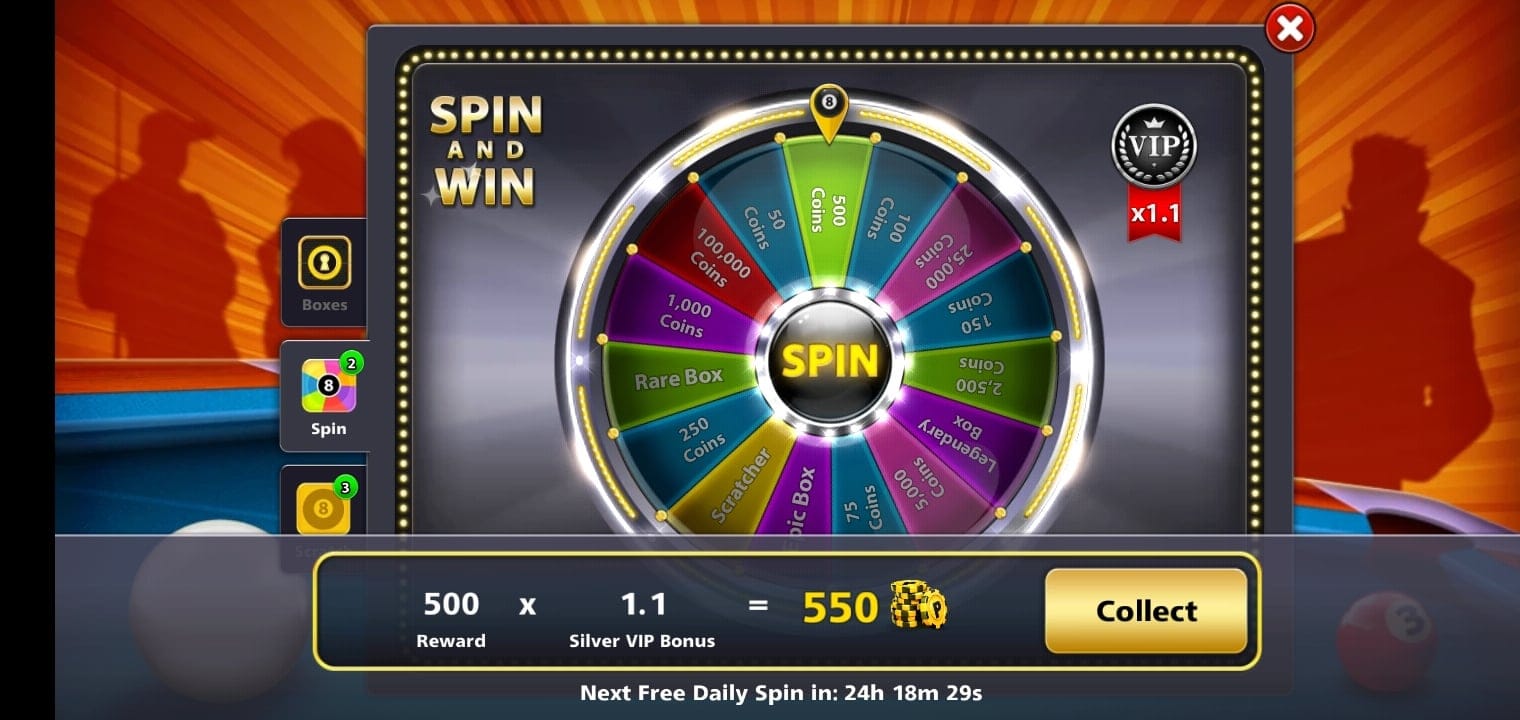
Free sources are real and absolutely worth claiming, but they can't carry high-tier play, and the figures show why. Rewarded video ads pay 150 coins each, per a 2026 YouTube tutorial on free coins. Spin & Win often hands you 100–150 coins per spin, per community reports gathered across StackExchange and Reddit threads from 2021 onward. Daily rewards and in-game events drop free coins, cash, and boxes on a rotating basis, per the official 8 Ball Pool daily-rewards news.
Now stand that next to a buy-in. The top rooms cost millions of coins to walk into, and r/8BallPool is blunt about gifting and ads coming up short there. Do the arithmetic: at 150 coins a video, covering a single million-coin buy-in would take thousands of ad views. Even a generous run of spins and daily logins barely scratches a high-stakes entry fee. The break-even isn't close. For a Sydney-or-above grind, the time you'd sink into free coins dwarfs the price of one mid pack.
This is where I split the advice by who you actually are:
- Pure F2P, bridging a small gap: Lean fully on daily rewards, Spin & Win, rewarded video and gifting. For lower tables this genuinely works. The community F2P playbook is exactly this stack of free sources, zero spend required.
- Low-spender chasing value: Don't grind for the high tables. One Wallet or Stash top up buys more table time than weeks of ad-watching, at far better coins-per-pound than nibbling small packs.
- High-stake regular: Free coins are pocket change against your buy-ins. A planned Heap-or-Vault top up, timed to a doubler event if one's live, is the sane supply line.
One mechanic quietly guts free-coin hoards: a single loss at a high tier can wipe a whole stockpile in one rack, because entry scales so steeply. I've watched players grind for days, jump two tiers on a confidence high, and lose the lot on one ugly break. Don't haul a hard-earned free balance into a room that can erase it in a single game.
If you do top up and something looks wrong afterward, the next part is the bit most guides skip clean over.
When the top up doesn't go through
Coins not credited after you paid is the panic moment, and the worst possible move is buying again. Before you assume a scam or a vanished payment, run the recovery path. A Restore Purchases option lives in the app settings for exactly this, recovering coins that look missing after a transaction, per a 2026 JustAnswer support response. Failed transaction syncs are a known reason coins look "lost" but aren't; Restore Purchases forces the account to re-check the platform receipt.
The sequence I'd follow, in order:
- Wait and refresh. Close and reopen the app. Most delays are a sync lag, not a failure.
- Run Restore Purchases from settings before you spend another penny.
- Check the platform receipt. Google Play or the App Store will tell you whether the charge actually completed.
- Contact Miniclip support with your Unique ID and the receipt if coins still haven't shown.
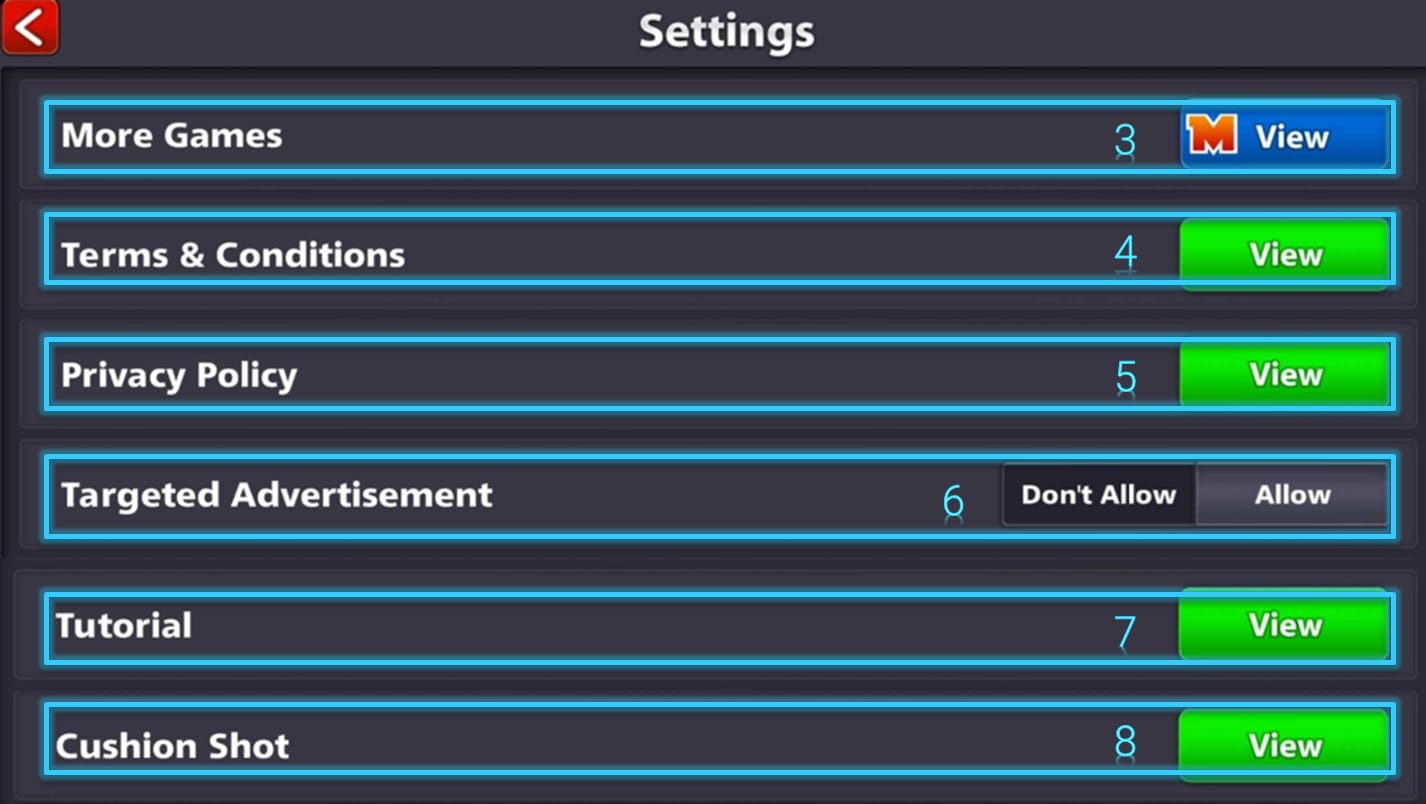
That order matters because step two clears the most common case at zero cost. Buying a second pack to "fix" a missing first one is exactly how players accidentally pay twice. The "8 ball pool coins disappeared after top up" search is overwhelmingly a sync hiccup, not theft. Treat it as recoverable until support says otherwise.
Which leaves one last question: given all of this, when's topping up actually the smart move?
Buy rarely, buy bigger
Top up when a table you genuinely want to play sits permanently past your free income, and when you do, buy bigger than feels comfortable rather than smaller. The logic threads through everything above. Free coins handle lower rooms forever. They can't fund high-stakes play in any reasonable timeframe. And the store actively punishes small, frequent buys with worse coins-per-pound.
So the disciplined play: stay F2P at tables your balance feeds, and when you decide a higher room's worth it, make one planned mid-or-large top up instead of a drip of Stacks. Time it to a doubler or limited-time offer if one's running. Some coin offers stack with doubler events, which can flip which pack is the best value that particular week, so the "best" pack isn't carved in stone. Compare the channel on price, region differences included, before you tap. That's the whole strategy. Spend smart, not often.
Frequently Asked Questions
Why does 8 Ball Pool say my gift balance is not enough?
Because the table you're trying to enter costs more coins than your free balance holds. Gift and free coins comfortably cover lower rooms, but entry fees climb steeply by tier, and the top rooms run into the millions. It's a table-tier mismatch, not a glitch. Drop to a cheaper room or top up.
What's the cheapest way to get coins that's still good value?
Cheapest per coin, not per purchase. The smallest pack gives around 12,800 coins per £1 while the largest gives roughly 25,600, per the official shop. Buying one mid-to-large pack beats stacking small ones every single time. And before checkout, compare your region's pricing, since values vary by country, so the same pack costs differently across markets.
Can I just grind enough free coins instead of buying them?
For lower tables, yes. Daily rewards, Spin & Win (100–150 coins per spin), rewarded videos (150 coins each) and gifting keep F2P players going indefinitely. For high-stake rooms, no. The buy-ins are too large; you'd watch thousands of ads to fund one entry. Grinding bridges small gaps, not big ones.
My coins didn't appear after I paid. What now?
Don't buy again. Reopen the app first, since most cases are a sync delay. Then run Restore Purchases from settings, which recovers coins missing after a failed transaction sync, per a 2026 JustAnswer response. Check your Google Play or App Store receipt to confirm the charge completed, and only contact Miniclip support with your Unique ID if coins still haven't landed.
Is it safe to top up coins outside the in-app store?
The official off-app route is Codashop, partnered with Miniclip and adding coins directly via your Unique ID. The key safety step anywhere off-app is entering that ID correctly, because a wrong digit sends coins to the wrong account. Stick to recognised channels, double-check the ID, and keep your receipt no matter where you buy.










Comments