
Soul Chill Crestal Top Up: In-App Currency and Features
Soul Chill Crestals serve as the primary premium currency across the Soul Chill voice chat and social community platform. Users utilize Crestals to send interactive animated gifts to broadcasters, support chat room hosts, customize profile displays, and unlock distinct social privileges. Whether participating in live audio parties, hosting themed group chats, or entering regional community events, having an available balance of Crestals ensures uninterrupted interaction across all platform features.
When you top up Crestals on VGTopup, the balance credits straight to your designated user account. You do not need to link external accounts or share sensitive credentials to complete an order. Simply providing your numerical User ID (UID) allows the system to direct the Crestal package straight to your profile.
How to Top Up Soul Chill Crestal on VGTopup
Completing a Soul Chill Crestal recharge on VGTopup takes only a few moments. Follow these straightforward steps to place your order:
- Select Your Crestal Package: Review the available Crestal denominations on the live product catalog and choose the quantity you wish to purchase.
- Input Your Account UID: Type your Soul Chill numerical User ID into the designated input box. Double-check the number to prevent delivery delays.
- Select Your Payment Channel: Choose your preferred payment option from the checkout screen. Real-time rates and localized payment options update automatically.
- Confirm and Pay: Review your order details and complete the transaction through the secure checkout gateway.
- Receive Your Crestals: Once the payment completes, your Crestals are credited directly to your Soul Chill account balance.
How to Find Your Soul Chill UID
To ensure your Crestals reach the correct account, you must enter your exact Soul Chill User ID. You can locate your UID directly within the mobile application by following these steps:
- Launch the Soul Chill app on your iOS or Android device.
- Tap the Me (Profile) tab located in the bottom right corner of the main screen.
- Locate your profile avatar and display name at the top of the screen.
- Find the label UID directly beneath your display name, followed by a sequence of numbers.
- Tap the Copy icon next to the numerical string to copy your UID directly to your clipboard.
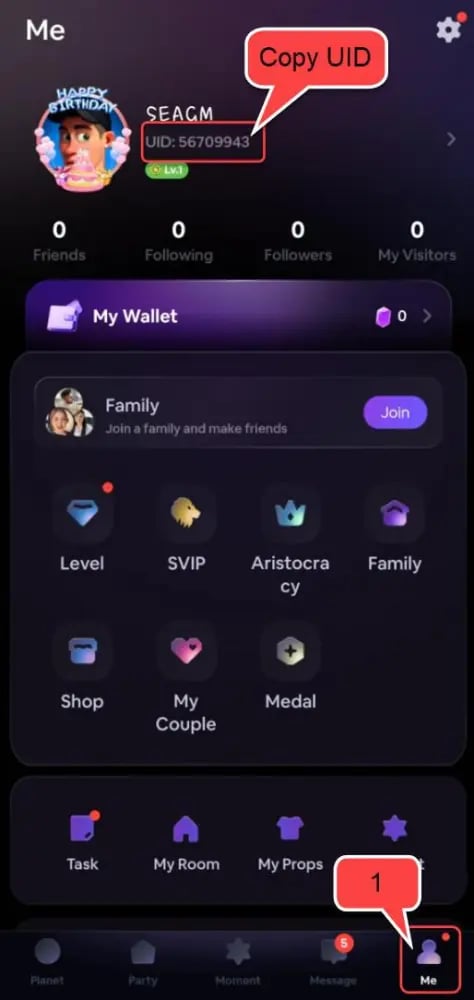
Paste the copied UID into the input field on VGTopup before confirming your purchase.
Account Safety: Password-Free UID Recharge
Account security is essential when purchasing digital goods online. VGTopup operates on a strict direct-to-UID delivery framework designed to keep your personal data secure:
- Zero Password Requirements: You will never be asked for your Soul Chill password, email verification code, or social login credentials.
- No Account Sharing: Your account remains strictly in your hands. There is no need to grant temporary access to third-party operators.
- Encrypted Transactions: Every transaction is processed through encrypted payment channels to safeguard personal financial information.
- Direct System Delivery: Orders are fulfilled directly to the specified UID, ensuring reliable order tracking from payment confirmation to delivery.
Crestal Utility and In-App Perks
Soul Chill Crestals give users access to a wide range of social features across public and private voice rooms. Here is an overview of how Crestals function inside the app:
| Feature / Utility | Crestal Usage | In-App Benefit |
|---|---|---|
| Voice Room Gifting | Send dynamic 2D and 3D animated gifts | Boosts host popularity rankings and displays special chat room banners. |
| Room Customization | Purchase exclusive room themes and sound effects | Distinguishes your hosted voice rooms and draws more community visitors. |
| VIP Badges & Frames | Unlock monthly VIP tier statuses | Grants profile frames, exclusive entrance animations, and top chat placement. |
| Chat Bubble Effects | Activate custom message designs | Customizes text appearance in busy voice room chat streams. |
| Community Events | Enter official seasonal 2026 competitions | Supports team battles, seasonal tournaments, and leaderboards. |
Payment Options and Delivery on VGTopup
VGTopup supports an array of flexible payment solutions suited for customers worldwide. Depending on your region, you can select credit cards, debit cards, digital wallets, or localized online banking methods.
Exact item prices, processing details, and available payment gateways are displayed live on the checkout interface. Because inventory and exchange rates adjust based on region and package size, always refer to the live checkout selector for current pricing before finalizing your order.
Once payment processing completes, the order enters automated fulfillment. The Crestals are sent straight to the Soul Chill system using your specified UID, allowing you to return to your voice rooms without unnecessary waiting periods.
How to Verify Your Crestal Balance and Troubleshooting
After completing your purchase on VGTopup, you can confirm your updated Crestal balance directly inside the Soul Chill mobile application:
- Open Soul Chill.
- Go to the Me tab.
- Tap on Wallet or My Crestals to view your real-time total.
Troubleshooting Tips
- Balance Not Updating Immediately: If your new balance does not show right away, fully close the Soul Chill app and reopen it to force a server refresh.
- Mistyped UID: If you suspect you entered an incorrect UID during checkout, immediately reach out to VGTopup customer support with your transaction order number. If the order has not yet been processed by the automated delivery queue, support staff can assist in correcting the destination ID.
- Payment Confirmation Delays: If your payment went through but your order status on VGTopup remains pending, verify that your payment provider completed the deduction, then refresh your VGTopup order tracking page.
Frequently Asked Questions
How do I find my Soul Chill UID for top up?
Open the Soul Chill app, tap the Me icon in the bottom right corner, and look right below your username. Your numerical UID is listed there with a copy button next to it. Tap the copy button and paste the number directly into the UID field on VGTopup.
Do I need to share my Soul Chill password to buy Crestals?
No. VGTopup requires only your Soul Chill UID to process the recharge. You should never share your account password, email login, or verification codes with anyone.
What can I purchase with Soul Chill Crestals in the app?
You can use Crestals to send animated gifts to room hosts, purchase unique profile frames and chat bubbles, unlock VIP membership perks, customize voice room effects, and participate in special in-app events.
How long does it take for Soul Chill Crestals to appear in my account?
Crestals are typically delivered shortly after payment confirmation. Once the transaction completes on VGTopup, the currency is credited directly to your Soul Chill UID.
What should I do if I entered the wrong Soul Chill UID during top up?
Contact VGTopup customer support immediately with your order ID and the correct UID. If the delivery system has not already completed the dispatch to the wrong UID, our team will assist in redirecting the package.
Are Soul Chill Crestals and Soul Chill Crystals the same currency?
Yes. Within the Soul Chill community, users often refer to Crestals interchangeably as crystals or Crestal currency. Both terms represent the same primary in-app currency used for gifting, badges, and room customization.
Select Denomination
Tax, payment fees and eligible coupons are calculated at checkout.
| Package | Price |
|---|---|
| Soul Chill Crestal*2160 | USD 3.40 |
| Soul Chill Crestal*4450 | USD 7.01 |
| Soul Chill Crestal*13700 | USD 21.57 |
| Soul Chill Crestal*23500 | USD 37.00 |
| Soul Chill Crestal*48300 | USD 76.05 |