

TAKA Live Coins Top Up: Direct In-App Currency for Livestreams & Chat
TAKA Live Coins are the primary digital currency inside the TAKA Live entertainment and voice party platform. With Coins loaded into your account wallet, you can interact directly with your favorite broadcasters, send visual gifts in active rooms, participate in multi-guest voice panels, and access exclusive platform benefits.
VGTopup provides a direct top-up service that credits your TAKA Live account balance using only your numeric Player ID. You do not need to share login passwords or link third-party social profiles. Simply enter your Player ID, pick your coin bundle from the live list above, and complete your purchase. Your coins are credited straight to your in-app wallet balance so you can get back to your favorite live streams immediately.
Key In-App Features Fueled by TAKA Live Coins
Using TAKA Live Coins gives you full access to the interactive ecosystem of the TAKA app. Here are the main ways players and viewers use their coin balance:
- Sending Animated Virtual Gifts: Support broadcasters during live video and audio streams. Sending gifts triggers on-screen animations, increases the room's popularity score, and places your profile at the top of the room's contributor leaderboard.
- Unlocking VIP & Noble Status: Spend coins to activate Noble privilege tiers. Noble members enjoy distinct badge frames, custom chat bubble styles, prioritized entry notifications when entering any room, and special entrance vehicles.
- Interactive Voice Party Games: Join interactive community games hosted in audio rooms, such as Ludo, spin wheels, and lucky draws, using your coin balance for round entries.
- Direct Messaging & Profile Spotlight: Send special greetings and boost your account visibility across community discover feeds.
How to Find Your TAKA Live Player ID (UID)
To ensure your recharge reaches your specific profile without delay, you need your unique numeric Player ID. Follow these steps on your mobile device:
- Open the TAKA Live app on your phone.
- Tap the Profile / Me icon located in the bottom right corner of the main navigation bar.
- Look beneath your profile picture and nickname at the top of the screen.
- You will see ID: followed by a sequence of numbers (e.g.,
12345678). - Tap the small Copy icon next to your ID to copy it directly to your clipboard.
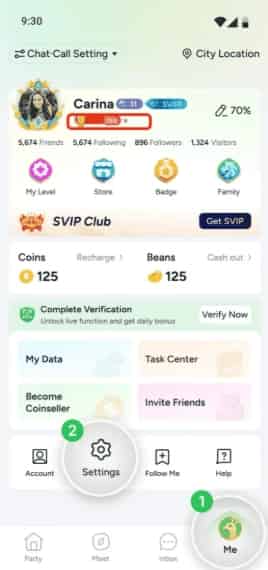
Double-check the copied digits before submitting your order to prevent sending currency to an incorrect account.
How to Top Up TAKA Live Coins on VGTopup
To recharge your account balance on VGTopup, follow this simple walkthrough:
- Select Your Coin Package: Browse the denomination options listed above on this page and choose the coin amount you want.
- Enter Your Player ID: Paste your numeric TAKA Live Player ID into the designated input field.
- Confirm Account Details: Verify that the Player ID entered matches the digits shown in your TAKA profile.
- Proceed to Checkout: Choose your preferred payment option from the available checkout methods and click Buy Now.
- Receive Your Balance: Once your payment completes, the coins are processed and delivered directly into your TAKA Live wallet balance. Open the app to view your updated total.
TAKA Live Coins vs. Beans: Understanding the Difference
New users often wonder how Coins relate to Beans within the TAKA Live ecosystem. While both represent platform value, they serve distinct roles for viewers and creators.
| Feature | TAKA Live Coins | TAKA Live Beans |
|---|---|---|
| Primary Role | Consumer currency for spending | Creator earnings from received gifts |
| How to Obtain | Purchased through direct top-up | Received when viewers send live gifts |
| Main Use | Buying gifts, games, VIP ranks, room entries | Exchanging for coins or withdrawing earnings |
| Account Eligibility | Available to all registered users | Accumulated by active broadcasters & hosts |
| Transferability | Spent inside rooms and chat features | Managed in the creator payout dashboard |
Broadcasters can convert their earned Beans into Coins internally, but regular viewers top up Coins directly to support hosts, send room gifts, and unlock platform perks.
Account Safety: UID Top-Ups with No Passwords Required
Security is a top priority when recharging digital currencies. VGTopup uses an ID-based system for all TAKA Live Coin orders. This approach keeps your account protected at all times:
- No Password or Social Logins: You never have to share your TAKA Live password, phone login verification code, Google account, or Apple ID.
- No Account Access Required: Your profile remains fully in your possession throughout the transaction.
- Verified Delivery Route: Coins are credited to your official user ID through direct processing channels.
Keep your personal credentials private and never disclose your login passwords or SMS verification codes to anyone online.
Troubleshooting TAKA Live Coin Top-Up Issues
If you experience any delay or difficulty seeing your new balance, check these common items:
- Refresh Your Profile: Close the TAKA Live app completely from your recent apps switcher and reopen it. Check your balance under Profile > My Wallet.
- Check Player ID Accuracy: Ensure you entered your exact numeric ID without extra spaces, letters, or punctuation.
- Review Order Status: Check your VGTopup order history page to confirm that the transaction has finished processing.
- Contact Support: If your balance does not update after verifying your Player ID, reach out to the VGTopup customer support team with your order number and Player ID for assistance.
Frequently Asked Questions
How to buy TAKA Live Coins?
Select the coin bundle you want on the VGTopup product page, enter your numeric TAKA Live Player ID, choose your payment option, and complete the order. Your coins are credited straight to your account wallet.
Where can I find my TAKA Live Player ID?
Open the TAKA Live app, tap the Profile (Me) tab at the bottom right, and check the numeric ID displayed right below your profile avatar and username.
Do I need to provide my TAKA Live password for top-up?
No. VGTopup only requires your public Player ID. We will never ask for your account password, email access, or verification codes.
What can I do with TAKA Live Coins?
TAKA Live Coins allow you to send animated gifts to room hosts, join voice party tables, buy interactive game entries like Ludo, and unlock VIP/Noble privileges with custom badges and effects.
Can I exchange Beans for TAKA Coins?
Yes. Broadcasters who receive gifts earn Beans, which can be exchanged for Coins within the app settings. Viewers looking to recharge directly can buy Coins directly through VGTopup.
How long does it take for TAKA Live Coins to appear in my account?
Top-ups are processed through direct ID delivery immediately after payment verification. In most cases, your coins appear in your TAKA Live wallet balance shortly after completing checkout.
Select Denomination
Tax, payment fees and eligible coupons are calculated at checkout.
| Package | Price |
|---|---|
| Taka Coins*10000 | USD 0.91 |
| Taka Coins*20000 | USD 1.83 |
| Taka Coins*50000 | USD 4.57 |
| Taka Coins*100000 | USD 9.15 |
| Taka Coins*150000 | USD 13.72 |
| Taka Coins*200000 | USD 18.30 |
| Taka Coins*500000 | USD 45.74 |
| Taka Coins*1000000 | USD 91.48 |
| Taka Coins*1500000 | USD 137.21 |
| Taka Coins*2000000 | USD 182.95 |