
Mico Coins Top Up: What Are Mico Coins and What Are They Used For?
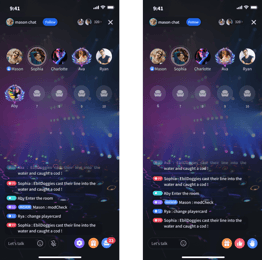
Mico Live is an international social entertainment platform where creators, streamers, and viewers connect across live video streams, voice party rooms, and real-time interactive chats. Mico Coins serve as the official digital currency inside the Mico ecosystem. They allow users to access premium features, support broadcasters, and engage directly in community activities.
When you top up Mico Coins, your balance enables several core interactions:
- Virtual Gifting: Send dynamic, animated gifts during live streams to show appreciation to your favorite creators.
- PK Battle Contributions: Boost streamers during competitive PK battles by sending gifts that contribute directly to their match score.
- VIP Perks and Chat Badges: Stand out in crowded broadcast rooms with entrance effects, custom nameplates, and exclusive profile frames.
- Voice Room Interactions: Use coins to start interactive games, request songs, or send special effects in multi-guest voice chat rooms.
- Direct Messaging Enhancements: Unlock special chat privileges and private messaging options with popular broadcasters.
Keeping a healthy coin balance ensures you never miss a critical moment during 2026 live streaming events, limited-time broadcaster challenges, or PK tournament finals.
Benefits of Topping Up Mico Coins for 2026 Live Streams and PK Battles
Live broadcasting on Mico is centered around community engagement and high-energy competition. Mico Coins give you direct influence over the broadcast experience:
- Lead the Broadcaster Leaderboards: High-tier virtual gifts place you on daily, weekly, and monthly fan contributor rankings. Broadcasters recognize and highlight their top supporters consistently.
- Turn the Tide in Live PK Battles: PK battles are time-sensitive matchups where two streamers compete for the highest gift value. Sending gifts in the final seconds of a PK match gives your favored host the points needed to win.
- Unlock Exclusive Room Entrances: Premium room entry animations announce your arrival whenever you join a popular live room, making you immediately visible to both the host and the audience.
- Access 2026 Seasonal Events: Mico hosts recurring in-app seasonal celebrations and talent contests throughout 2026. Participating in these events often requires active coin usage to vote for contestants and unlock exclusive commemorative profile items.
Mico Coin Features and Interaction Overview
| Feature / Interaction | Coin Usage Purpose | In-App Benefit |
|---|---|---|
| Standard Live Gifts | Support daily content creation | Displays chat notification and raises streamer popularity |
| PK Battle Boosts | Contribute points during matches | Helps streamer win PK rounds and ranks you on battle scoreboards |
| Luxury Animated Gifts | Trigger full-screen visual effects | Maximum stream visibility and unique audio-visual callouts |
| VIP Frames & Badges | Profile customization | Permanent or timed aesthetic badges displayed next to your username |
| Voice Party Gifts | Audio room engagement | Activates sound effects and interactive room mini-games |
Step-by-Step Guide: How to Top Up Mico Coins with Mico ID
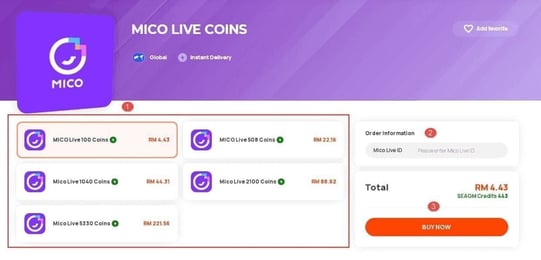
Recharging Mico Coins on VGTopup is simple and requires only your numerical account ID. Follow these steps to complete your purchase:
- Select Your Coin Package: Browse the live product listing on VGTopup and choose the number of Mico Coins you wish to purchase.
- Enter Your Mico ID: Type your unique numerical Mico ID into the required player field. Ensure you double-check the digits to prevent sending coins to the wrong account.
- Review the Order: Check the coin quantity and the final price shown on the checkout screen.
- Choose a Payment Method: Select your preferred payment option from the available checkout choices.
- Complete Payment: Finalize the transaction. Once the payment is verified, your Mico Coins will be credited directly to your Mico Live account balance.
How to Find Your Mico ID in the Mico Live App
Your Mico ID is a unique numeric identifier assigned to your account upon registration. It is distinct from your profile nickname, which can be changed at any time. Entering the correct numeric ID is essential for successful delivery.
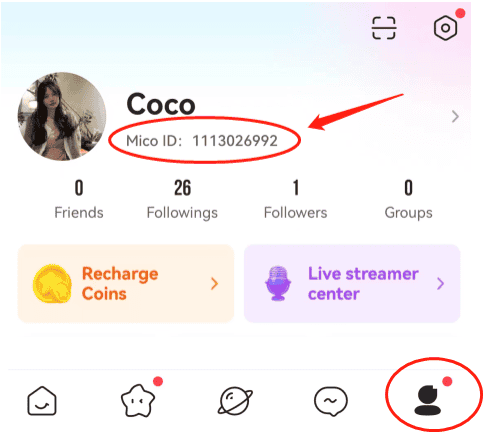
To find your Mico ID on your mobile device:
- Open the Mico Live app on your phone or tablet.
- Tap the Profile / Me tab located in the bottom-right corner of the home screen.
- Look at your user card at the top of the profile page, directly beneath your profile picture and nickname.
- Locate the line displaying ID: XXXXXXXX (a series of numbers).
- Tap the copy icon next to your ID to copy it directly to your clipboard, or carefully write down the digits before entering them on VGTopup.
Note: Do not enter your display nickname, email address, or phone number in the player field. Only the numerical Mico ID can receive direct coin top-ups.
Safe and Secure Mico Recharge: Why No Password Is Ever Required
Account safety is a top priority when purchasing digital currencies online. VGTopup uses a direct ID-based delivery system that requires zero sensitive login credentials.
- No Account Passwords Needed: You never have to share your Mico password, Facebook login, Google credentials, or Apple ID.
- No Third-Party Logins: Our system does not require access to your personal messages, contacts, or private account settings.
- Protection Against Phishing: Services asking for your private account credentials put your account at risk of unauthorized access or bans. Top-ups on VGTopup only require your public Mico ID.
- Encrypted Transactions: Every transaction is processed through secure, industry-standard encrypted payment gateways to safeguard your billing details.
Accepted Payment Methods for Mico Coins on VGTopup
VGTopup provides a variety of payment methods to make your purchase convenient, regardless of your location. The platform supports widely accepted international payment options as well as local payment solutions tailored to different regions.
Available payment options typically include major credit and debit cards, secure e-wallets, and regional online banking services. All available methods, applicable processing options, and live currency rates are displayed clearly at the checkout screen before you confirm your order.
Troubleshooting Common Mico Coin Delivery Questions
If you have completed your top-up order and want to verify your balance, keep these troubleshooting tips in mind:
- Restart the Mico App: If your new coin balance does not appear immediately, close the Mico Live app completely from your device task manager and reopen it to force a server refresh.
- Check the In-App Wallet: In the Mico app, tap Me > Wallet / My Coins to view your updated balance and transaction history.
- Verify Order Status on VGTopup: Check your VGTopup order history to confirm that your transaction was successfully processed.
- Contact 24/7 Support: If your balance does not update after a short period, reach out to the VGTopup customer support team with your Order ID and Mico ID for prompt assistance.
Frequently Asked Questions
Where can I buy Mico Coins recharge safely online?
You can buy Mico Coins safely online directly on VGTopup. The process is fully secure, requires only your numerical Mico ID, and offers multiple payment options with 24/7 customer service.
How do I find my Mico ID for top-up?
Open the Mico Live app, tap the Me icon in the bottom-right corner, and find your numeric ID displayed beneath your profile picture and nickname.
Do I need to share my Mico account password to recharge coins?
No. You never need to share your account password, phone verification codes, or third-party login details. VGTopup only requires your public Mico ID to send coins to your balance.
What are Mico Coins used for on Mico Live?
Mico Coins are used to purchase animated virtual gifts for streamers, support creators in PK battles, activate VIP chat badges and entrance effects, and unlock premium interactive features in voice party rooms.
How long does it take for Mico Coins to be credited to my account?
Mico Coin top-ups on VGTopup are processed automatically upon successful payment. The coins are typically credited to your Mico account balance shortly after the transaction is finalized.
Can I send Mico Coins to a friend using their Mico ID?
Yes. Enter your friend's numeric Mico ID in the player field instead of your own. Once the payment is completed, the coins will be delivered directly to their Mico Live account.
What should I do if I entered the wrong Mico ID during checkout?
Because top-up deliveries are processed automatically to the provided ID, always verify your numeric Mico ID before completing payment. If you realize an error occurred before payment processing finishes, contact VGTopup 24/7 customer support immediately with your order details.
Select Denomination
Tax, payment fees and eligible coupons are calculated at checkout.
| Package | Price |
|---|---|
| 445 Mico Coins | USD 3.57 |
| 500 Mico Coins | USD 4.01 |
| 900 Mico Coins | USD 7.21 |
| 1,100 Mico Coins | USD 8.81 |
| 2,200 Mico Coins | USD 17.62 |
| 2,730 Mico Coins | USD 21.86 |
| 3,300 Mico Coins | USD 26.43 |
| 4,400 Mico Coins | USD 35.23 |
| 5,500 Mico Coins | USD 44.05 |
| 5,700 Mico Coins | USD 45.65 |
| 6,600 Mico Coins | USD 52.86 |
| 7,700 Mico Coins | USD 61.69 |
| 8,550 Mico Coins | USD 68.48 |
| 8,800 Mico Coins | USD 70.48 |
| 11,000 Mico Coins | USD 88.09 |
| 22,000 Mico Coins | USD 176.19 |
| 33,000 Mico Coins | USD 264.28 |
| 55,000 Mico Coins | USD 440.47 |