
Auto Chess Top Up: Fast, Secure Donuts Delivery
Auto Chess stands as the definitive strategy battler where positioning, economy management, and tactical unit synergy decide every match. While tactical mastery wins rounds on the board, Donuts serve as the core premium currency that lets you personalize your entire battlefield presence. From unlocking the latest seasonal Senior Chess Pass to acquiring custom Chess Players, exclusive board arenas, and dynamic strike effects, having a direct supply of Donuts ensures you never miss time-limited cosmetics.
VGTopup provides an efficient Auto Chess recharge service designed specifically for global mobile commanders. By operating on a direct User ID input model, VGTopup eliminates the need for password sharing or third-party login handoffs. Select your required Donut denomination, enter your account ID, and complete your order through our live checkout system.
What Are Auto Chess Donuts and How to Use Them
Donuts are the primary premium currency in Auto Chess. Unlike standard Candies or cookies that accumulate through daily quests and battle rewards, Donuts provide direct purchasing power across the high-tier cosmetic store and seasonal events.
Donuts can be used for:
- Senior Chess Pass Activation: Upgrade the standard seasonal track to the Senior Pass to claim exclusive Chess Player models, custom boards, extra Candies, and avatar frames.
- Gacha and Mystery Boxes: Roll for limited-edition mythic Chess Players, courier variants, and themed damage effects.
- Board Arenas: Replace the default checkerboard with animated, responsive arenas featuring unique lighting and background animations.
- Custom Damage and Teleport Effects: Add personal flair when eliminating opponent units or knocking rivals out of the lobby.
- Chat Bubbles and Emotes: Display expressive tactical reactions during preparation phases and combat rounds.
Auto Chess Pass and Premium In-Game Items Overview
The seasonal Auto Chess Pass delivers the highest progression value for active players. Each season features both a free tier and a premium Senior Chess Pass tier. Investing Donuts into the Senior Pass unlocks milestone rewards every few levels, offering a steady stream of items that would cost significantly more if purchased individually.
| Item Category | Primary In-Game Purpose | Acquired Via |
|---|---|---|
| Senior Chess Pass | Unlocks premium seasonal reward tracks and exclusive skins | Direct Donut Purchase |
| Chess Player Skins | Customizes your in-game avatar and lobby commander | Store / Seasonal Gacha |
| Battlefield Arenas | Replaces map terrain with animated custom themes | Donuts / Senior Pass |
| Damage Effects | Visual animations triggered when dealing player damage | Gacha / Event Store |
| Gacha Vouchers | Currency for rolling limited seasonal prize pools | Donut Exchange |
Benefits of Topping Up with User ID vs Account Sharing
Account safety is critical when purchasing game currencies. Many peer-to-peer marketplaces require buyers to hand over login credentials, social media passwords, or authentication codes so an unknown seller can log into the game client. This exposes accounts to security flags, unauthorized spending, and permanent bans from the game operator.
VGTopup uses direct User ID crediting. Because the top-up only requires your public account identifier, your login details remain completely private.
| Security Feature | VGTopup Direct ID Top Up | Peer-to-Peer Account Sharing |
|---|---|---|
| Password Requirement | None (100% Password-Free) | Requires sensitive login info |
| Account Risk | Zero risk of account theft | High risk of unauthorized access |
| Verification Codes | No 2FA prompts or login approvals | Requires constant seller coordination |
| Process Speed | Automated delivery queue | Delayed by seller availability |
| Platform Safety | Compliant direct crediting | Violates developer terms of service |
How to Find Your Auto Chess User ID
To ensure your Donuts reach the correct account, locate your numeric User ID inside the game client before checking out. Follow these steps:
- Launch Auto Chess on your mobile device.
- Tap your Avatar Profile Icon located in the top-left corner of the main lobby screen.
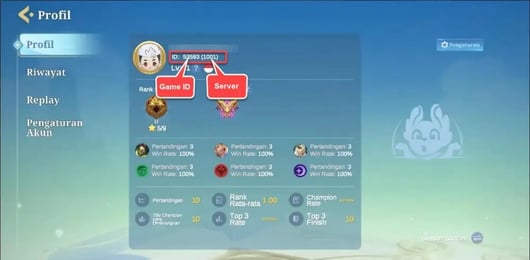
- On your Profile Overview page, locate the User ID displayed below your player name and current rank.
- Tap the Copy icon next to the ID string to copy it directly to your clipboard.
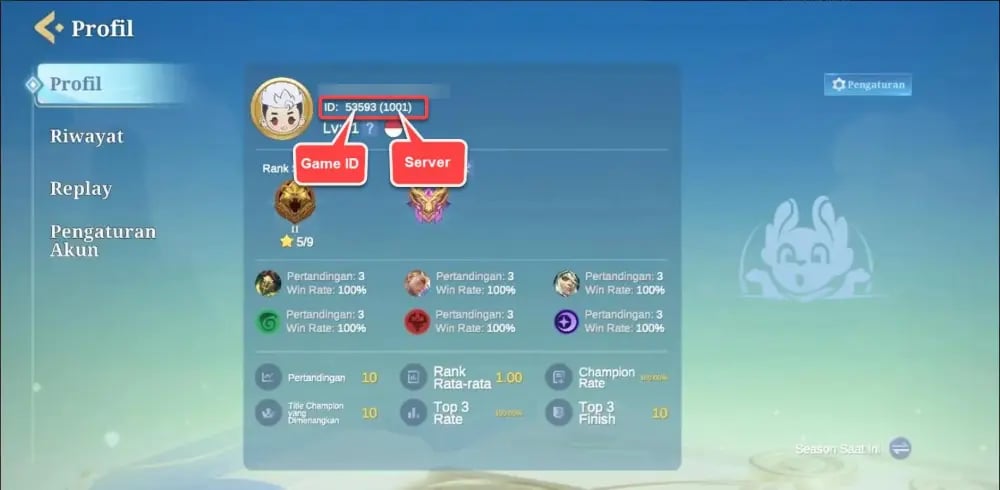
Double-check that you paste the exact ID without leading or trailing spaces into the order field on VGTopup.
How to Top Up Auto Chess Donuts on VGTopup
Recharging your Auto Chess balance on VGTopup is simple and takes just a few steps:
- Select Your Pack: Browse the available Donut denominations on the live product page and pick the bundle you need.
- Enter Your User ID: Paste your copied Auto Chess User ID into the designated input field.
- Proceed to Checkout: Review your order details and select your preferred payment method on the secure checkout screen.
- Receive Your Currency: Once payment confirmation completes, your Donuts are credited directly to your Auto Chess account.
Delivery Time and What to Do If Donuts Are Delayed
Orders placed on VGTopup enter an automated dispatch queue immediately upon successful payment. Under normal network conditions, currency reflects on your balance within moments.
If your Donuts do not appear immediately, follow this troubleshooting checklist:
- Restart the Game Client: Completely close Auto Chess from your device's background apps and reopen it. A fresh server handshake forces the balance counter to sync.
- Check In-Game Mailbox: Certain event-linked Donut bundles or bonus rewards arrive via the in-game system mail tab rather than directly into the numerical counter.
- Verify Your User ID: Check your order confirmation receipt to confirm that the entered User ID matches your profile exactly.
- Contact Support: If the balance has not updated after restarting, reach out to VGTopup customer support with your order number and User ID for prompt verification.
Frequently Asked Questions
What is an Auto Chess User ID and where do I find it?
Your Auto Chess User ID is a unique account identifier assigned to your profile. You can find it by tapping your avatar in the upper-left corner of the main lobby. The ID is displayed right under your username, accompanied by a quick-copy icon.
Do I need to share my Auto Chess password to top up Donuts?
No. VGTopup never asks for your password, social login, or security verification codes. All recharges are completed using only your public User ID.
What can I buy with Donuts in Auto Chess in 2026?
In 2026, Donuts can be spent on the latest Senior Chess Pass, limited-time commander skins, interactive battlefield arenas, custom combat animations, gacha tokens, and avatar frames in the in-game shop.
How long does delivery take after completing the Auto Chess top-up?
Donut top-ups are processed automatically after payment confirmation. In most cases, the currency updates on your account shortly after the transaction is cleared.
Can I buy Auto Chess Donuts for a friend using their User ID?
Yes. You only need your friend's valid Auto Chess User ID. Enter their ID at checkout on VGTopup, select the desired Donut bundle, and the currency will be delivered directly to their profile.
What should I do if my Auto Chess Donuts do not show up immediately?
First, restart your Auto Chess mobile app to refresh the server connection. Next, check your in-game mailbox for any attached items. If the balance remains unchanged, contact VGTopup support with your order details for assistance.
Select Denomination
Tax, payment fees and eligible coupons are calculated at checkout.
| Package | Price |
|---|---|
| 1,000 Chess Pass Points | USD 0.67 |
| 60 Donuts | USD 0.84 |
| 81 Donuts | USD 1.03 |
| Long Vacation Pack | USD 1.67 |
| 330 Donuts | USD 4.10 |
| 559 Donuts | USD 6.17 |
| Senior Pass | USD 7.54 |
| 680 + 68 Bonus Donuts | USD 8.39 |
| 931 Donuts | USD 10.27 |
| Yi Sun-sin Character | USD 13.42 |
| Senior Pass Deluxe | USD 15.93 |
| 1,280 + 128 Bonus Donuts | USD 16.78 |
| 1,862 Donuts | USD 20.54 |
| Misty Sea of Clouds Skin | USD 37.75 |
| 3,509 Donuts | USD 41.06 |
| 3,280 + 328 Bonus Donuts | USD 41.95 |
| 5,389 Donuts | USD 61.59 |
| 6,480 + 648 Bonus Donuts | USD 83.89 |
| 8,886 Donuts | USD 102.64 |