
8 Ball Pool Top Up: Get Coins and Cash Instantly
Take command of every table from Downtown London Pub to the high-stakes tables of Berlin and Venice. Running out of Coins or Cash limits your ability to enter prestigious tournaments, purchase top-tier cues, and recharge cue powers. An 8 Ball Pool top up on VGTopup delivers resources straight to your account, giving you the balance needed to play without interruptions.
VGTopup provides a direct recharge service requiring only your 8 Ball Pool User ID. You never have to share passwords, verify login codes, or hand over account credentials. Choose your package, input your Unique ID, and receive your Coins and Cash directly in your game profile.
How to Top Up 8 Ball Pool Cash and Coins Using User ID
Refilling your in-game balance on VGTopup is simple and quick. Follow these steps to complete your purchase:
- Select the desired Coin, Cash, or bundle pack from the product list above.
- Enter your 8 Ball Pool User ID (Unique ID) in the designated input field.
- Verify that your UID numbers match your in-game profile.
- Click the purchase button to proceed to the checkout screen.
- Select your preferred payment method and finalize the transaction.
- Open 8 Ball Pool on your mobile device or web browser to confirm your updated balance.
Exact package prices, current specials, and local currency rates are displayed live on the checkout screen before you pay.
Where to Find Your 8 Ball Pool User ID (UID)
To ensure your purchased Coins and Cash arrive in the correct account, you must provide your exact numeric Unique ID. Follow these steps inside the 8 Ball Pool app:
- Launch 8 Ball Pool on your iOS or Android device.
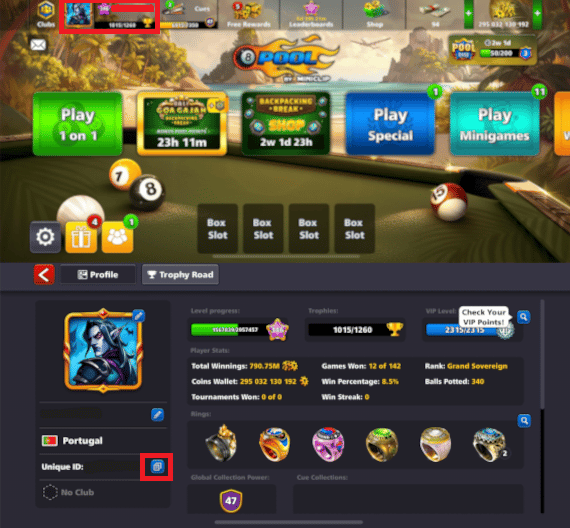
- Tap your profile picture (avatar) located in the upper-left corner of the main home screen.
- A window will open displaying your full profile, current ranking, and win percentage.
- Look at the top right of your profile card to locate the field marked Unique ID.
- Your UID is a numerical sequence (such as 123-456-789-0).
- Note down or copy these digits carefully to paste them into VGTopup.
Ensure that you enter the raw numbers without extra spaces or symbols so the automated delivery system can identify your profile immediately.
8 Ball Pool Currency Guide: Coins vs. Cash vs. VIP Points
Understanding how different currencies function in 8 Ball Pool allows you to optimize your purchases and build a stronger inventory.
| Currency / Resource | Primary In-Game Purpose | How to Acquire |
|---|---|---|
| Pool Coins | Table buy-ins, tournament fees, standard cue maintenance | Winning matches, minigames, direct top up |
| Pool Cash | Opening boxes instantly, purchasing Legendary Cues, match retries | Direct top up, level-up milestones |
| VIP Points | Unlocking higher VIP Club tiers and permanent account multipliers | Earned automatically with every top up purchase |
Pool Coins
Coins serve as the foundational economy of 8 Ball Pool. Every match, from beginner tables like Sydney and Moscow to high-roller arenas like Cairo, Shanghai, and Berlin, requires an entry fee paid in Coins. Winning matches doubles your wager, but a losing streak can deplete your wallet. Having a reserve of Coins ensures you never drop back to low-tier tables due to an empty balance.
Pool Cash
Cash is the premium currency in 8 Ball Pool. It gives you access to the most valuable assets in the game, including Legendary Surprise Boxes, Rare Cue Boxes, and Epic Cue Boxes. Cash also lets you retry special limited-time win-streak challenges if you lose a match, allowing you to secure exclusive event rings without starting from scratch.
VIP Points and Tier Progression
Every time you top up on VGTopup, your account earns VIP Points. These points contribute toward your overall VIP Club rank (Bronze, Silver, Gold, Platinum, Diamond, and Black Diamond). Higher VIP levels grant permanent benefits, including:- Multipliers on free Coin rewards from hourly timers.- Bonus Coins when purchasing select in-game packs.- Multipliers on Cue Collection power points.- Exclusive VIP avatars, frames, and chat packs.
Unlocking and Upgrading Legendary Cues, Surprise Boxes, and Pool Passes
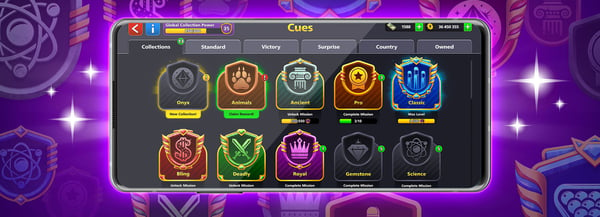
Investing your Pool Cash into Legendary Cues provides substantial competitive advantages on the table. Standard cues consume Coins for recharges and lose stats when depleted. Legendary Cues offer major performance upgrades:
- Zero Recharge Fees: Legendary Cues do not cost Coins to recharge, saving you hundreds of thousands of Coins over long play sessions.
- Coin Return on Losses: Depending on how many Legendary Cues you own, losing a match returns a percentage of your table buy-in fee (up to 100% refund capability across collected sets).
- Bonus Experience Points: Every victory awards extra XP, accelerating your level progression and unlocking higher table tiers faster.
- Maximized Stat Attributes: Legendary Cues feature superior ratings in Aim, Force, Spin, and Time, giving you greater precision and extra seconds to plan complex bank shots.
Use your topped-up Cash to purchase Legendary Surprise Boxes from the in-game store. Collecting cue pieces unlocks cues such as the Archangel, Valkyrie, Excalibur, and Firestorm.
Account Safety: Safe 8 Ball Pool Recharges Without Account Passwords
Account safety is a top priority when purchasing digital currencies. VGTopup uses direct UID delivery, ensuring your login details remain strictly private:
- No Passwords Required: You only need to enter your public User ID. VGTopup will never ask for your Miniclip password, Facebook login, Google Play credentials, or Apple ID.
- No Account Sharing: Your account stays in your hands. You do not need to log out or give access to third-party operators.
- Safe Transaction Protocol: Orders are credited through standard account identification systems, preserving your account standing and progress without risk of account suspension.
Keep your personal credentials private and use direct User ID fulfillment for your peace of mind.
Troubleshooting Delivery and Refreshing In-Game Balances
If you have completed your purchase on VGTopup and your new Coin or Cash balance does not reflect instantly, follow these quick troubleshooting steps:
- Check Order Status: Verify on your VGTopup order page that the transaction shows as completed.
- Restart the Game App: Force-close the 8 Ball Pool application from your device's app switcher. Relaunch the game to establish a fresh connection to the game servers.
- Force a Balance Refresh: Play a match on a low-tier table (such as London Downtown) or open a free daily Spin & Win. Any server-side data exchange forces the game client to update your displayed currency balance.
- Check Network Connection: Switch between Wi-Fi and mobile data to ensure your connection is not caching old profile data.
- Contact Support: If your balance does not update after following these steps, contact VGTopup customer support with your Order Number and User ID for prompt verification.
Frequently Asked Questions
How do I find my 8 Ball Pool User ID?
Tap your profile picture in the top-left corner of the 8 Ball Pool home screen. Your Unique ID is displayed in the upper right section of your profile card as a series of numbers.
Do I need to share my account password to top up 8 Ball Pool?
No. VGTopup only requires your numeric User ID to deliver Coins and Cash. Never share your game password or login credentials with anyone.
What is the difference between 8 Ball Pool Coins and Cash?
Coins are used primarily for table entry fees, tournament buy-ins, and basic cue recharges. Cash is the premium currency used to buy Legendary Surprise Boxes, continue win-streak events, and unlock high-tier cues.
How quickly will the Cash or Coins be added to my 8 Ball Pool account?
Orders are processed systematically upon payment verification. In most instances, your balance updates immediately after restarting your 8 Ball Pool application.
Can I buy 8 Ball Pool Cash for a friend using their User ID?
Yes. As long as you enter your friend's correct User ID during the order process, the Coins or Cash will be credited directly to their profile.
Will I receive VIP points when I top up 8 Ball Pool on VGTopup?
Yes. Topping up balances on your account contributes toward your VIP Club progression, helping you climb through Bronze, Silver, Gold, Platinum, Diamond, and Black Diamond tiers.
What should I do if my 8 Ball Pool top up does not appear immediately?
Close the game completely and reopen it. If the balance has not updated, play a quick practice match or claim a free spin to force a server synchronization. You can also reach out to VGTopup customer support with your order ID.
Select Denomination
Tax, payment fees and eligible coupons are calculated at checkout.
| Package | Price |
|---|---|
| Golden Spin | USD 0.68 |
| 20 Cash | USD 1.35 |
| 20,000 Coins | USD 1.35 |
| 3 Golden Shots | USD 1.35 |
| Pool Coda Bundle | USD 3.27 |
| 50 Cash | USD 3.37 |
| 52,000 Coins | USD 3.37 |
| 110 Cash | USD 6.78 |
| 112,000 Coins | USD 6.78 |
| 250 Cash | USD 13.56 |
| 256,000 Coins | USD 13.56 |