The real time-sink in a repeat buy isn't tapping "pay." It's finding and re-confirming your imo ID, a 7–10 digit numeric code that is not your username and not your phone number, per the BitTopup IMO Diamond Recharge Guide 2026. Nail that field and everything after it is muscle memory.
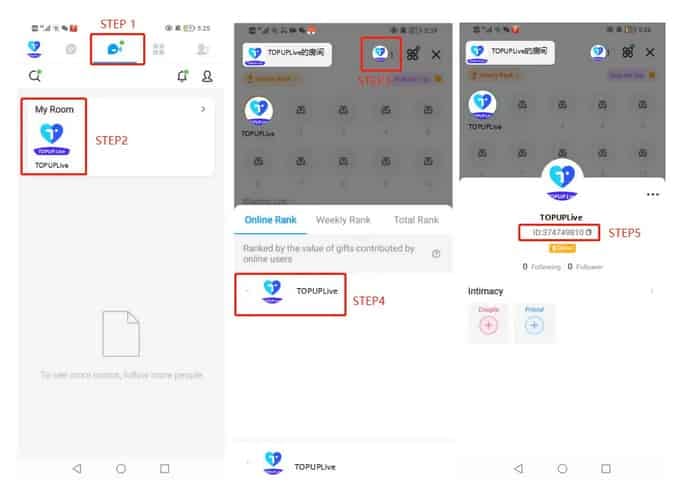
Pulling the ID fresh: open imo → Me tab → My Room (button up top center) → tap your avatar in the upper right → Online Rank → copy the numeric string under your nickname. That's the canonical path the guide lays out. Learn it once and you'll never dig for the number again.
Now the part where diamonds quietly vanish. Re-typing that ID by hand on every purchase is the most avoidable mistake in the whole flow, and wrong-ID entry accounts for roughly 40% of delivery failures, according to BitTopup's 2026 testing. A typo doesn't bounce the order back to you. It routes the diamonds to whatever real account owns the number you mangled, and those almost never come back. The diamonds follow the entered ID, no exceptions.
So the genuinely fast method isn't speed-typing. It's deleting the typing:
- Pull your previous order from history (next section says exactly where it hides).
- Confirm the saved ID matches the one on your avatar screen right now.
- Re-select the identical package and pay.
Two of those three steps are verification. On purpose.
For the player who just wants their usual pack back: save the ID so it auto-fills, then the only job on every repeat is to glance, not type, before paying.
Three ledgers hold your history, and you're checking the wrong one
Your imo Diamonds records can sit in up to three separate ledgers, and they don't all report the same thing. Knowing which one answers your actual question kills the panic early.
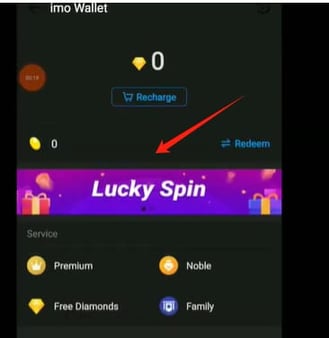
Inside the app, follow Me → imo Wallet → transaction history (or the diamonds/beans icon), per the BitTopup IMO Diamonds Not Received Guide. That's the authoritative log of what actually credited to your balance. On a third-party top-up site, the history sits in your provider account, and that's the ledger proving you paid, order number attached. The third record is your email or SMS receipt, which I'd trust more than either, honestly, because it's timestamped, can't be silently re-synced behind your back, and survives even when you're locked out of an app session.

| Where to look |
What it proves |
Key fields exposed |
| imo Wallet → transaction history |
Diamonds actually credited to your balance |
Balance change, timestamp |
| Provider account (top-up site) |
Payment went through; order exists |
Order number, imo ID used, package, amount |
| Email / SMS receipt |
Completed, time-stamped confirmation |
Order number, package, timestamp |
Source: BitTopup IMO Diamonds Not Received Guide and IMO Official FAQ (2021–2026)
A trap lives in those timestamps. Receipt times often render in the provider's timezone, not yours, so an order you placed twenty minutes back can read like it's from "the future" or a different day, which makes it look missing when you scan in-app history. Cross-check the order number, never the clock. That number is the constant tying all three ledgers together, and it's the one field worth screenshotting after every single buy. If support ever enters the picture, that string turns a guessing game into a thirty-second lookup.
For anyone whose receipt got swallowed by a notification void: the provider-account order list is your fastest recovery, since the order number there pulls everything else along with it.
Match the package before you trust that it's the same tier

Re-ordering the same tier is simple enough, but "same" earns a real check, because imo's catalog runs wide. We're talking 10 diamonds at roughly $0.20 all the way up to a 41,700-diamond pack near $800, per the BitTopup IMO Diamond Recharge 2026 Complete Guide. Packages and the currency they're priced in can drift by region, so last month's tier isn't guaranteed to occupy the same slot today.
One ceiling bites big spenders: the daily recharge cap is 10,000 diamonds, per that same guide. If your "repeat" is a heavy top-up, you might have to spread it across days rather than firing one oversized order the system won't honor in full.
Web versus in-app is a money question, not a convenience one. Third-party web top-ups frequently undercut in-app pricing, with 2026 guides reporting savings in the 38–60% range per BitTopup's tracking. The in-app route (Me → imo Voice → My Diamonds → Recharge, per the IMO Official FAQ) is the simplest path and credits in minutes, but that simplicity costs you at the register. Price the same pack both ways and the gap on the web side is what jumps out first.
The true "fast" unlock is saving your payment method. On most third-party platforms, storing the card alongside a saved ID collapses the next buy into a one-tap re-order, which is the documented behavior on platforms like GamsGo and BitTopup in 2026. Without both stored, a "repeat" is exactly as slow as your first time. For disclosure, that same saved-ID, saved-payment flow is how a platform like imo Diamonds top up runs repeat orders: confirm the ID auto-filled correctly, then pay.

A clean re-buy sequence:
- Open the last order, note the package and currency.
- Confirm that exact tier still exists at the same price today.
- Verify the saved ID matches your current avatar screen.
- Pay, then watch the wallet. 95% of deliveries on BitTopup land in under 5 minutes per its 2026 data, and most third-party orders credit within minutes after payment, according to platforms like Enjoygm and GamsGo.
For the repeat buyer chasing true one-tap speed: save both ID and payment, since anything less just reruns the slow first-time flow.
When a repeat stalls, read the status before you touch pay again
A stalled order is where money gets lost twice: first to the stall, then to the panic re-pay. The fix is reading the status right and refusing to retry until history tells you to.
| Status |
What it actually means |
Right next action |
| Pending |
Payment captured, delivery not yet synced |
Wait, then re-check history — do not re-pay |
| Completed |
Diamonds credited to the entered ID |
Verify balance; you're done |
| Failed |
Payment didn't go through |
Safe to retry, ideally with saved ID |
| Refunded |
Charge reversed |
Re-order fresh if you still want the pack |
Source: BitTopup IMO Diamonds Not Received Guide (2026)
Pending is the dangerous one. It's usually already captured your payment and is just waiting on delivery to sync, and it tends to clear itself within minutes. Re-paying on that status is the documented cause of duplicate charges, per the BitTopup 2026 fix guide. The order number stays constant the whole time, which is precisely why a re-check beats a re-pay. You're watching the same order resolve, not a lost one.
Your best duplicate-charge insurance is the thing most guides skip: order history itself. Before any retry, open the provider ledger and check whether the order number from your stalled attempt already reads completed or still pending. If it's sitting there, you've already paid, and retrying just bills you twice for one delivery. Open history first, every time. That's the method.
If diamonds truly haven't shown after a reasonable wait, work the fixes in order: restart the app, clear cache, re-check wallet history. Still missing past 30 minutes? Contact support with your payment receipt in hand. That's the escalation path, and it's where your screenshotted order number earns its keep. One caution on trusting in-app history alone: a recent order may not have synced to the wallet yet, so a "missing" entry there is no proof the payment failed. Check the provider ledger and receipt before you conclude anything.
For anyone glaring at a frozen "pending": wait, re-check the order number in history, and keep your finger off "pay." The retry is the trap, not the cure.
The repeat-buy routine I'd actually run
The fastest reliable repeat top-up isn't the one with the fewest taps. It's the one with a verify-point welded onto every step. Speed-first advice gets people their diamonds 95% of the time and torches the other 5% on misrouted buys nobody refunds.
My standing routine, sorted by player type:
- Casual re-buyer (same small pack, now and then): save the imo ID so it auto-fills, glance to confirm it before paying, screenshot the order number. Done.
- Frequent / high-volume spender: save ID and payment for one-tap orders, but honor the 10,000-diamond daily cap and split large buys across days. Open history before any retry, because at your volume one double-charge erases a lot of saved time.
- The just-got-burned-once player: never hand-type the ID again. Verify the saved ID against your live avatar screen each time, and treat the email receipt as your real proof of purchase ahead of in-app history.
The order number is the thread running through all of it: your duplicate-charge insurance, your support fast-pass, your timezone tiebreaker. Capture it once per purchase and most of what can go sideways simply can't.
Frequently Asked Questions
How do I know diamonds went to the right account and not someone else's?
Open imo Wallet → transaction history and confirm the balance actually moved once the order reads completed. Since diamonds credit to the imo ID entered at checkout rather than your logged-in session, a balance that didn't budge while the order says "completed" usually means a mistyped ID shipped them elsewhere. Catch it by matching the ID on your receipt against the number on your Online Rank screen.
Can I get a refund if the same top up failed twice?
A "failed" status means no payment went through, so there's typically nothing to refund and you can safely retry. The actual refund risk is a duplicate charge from re-paying on "pending," which is exactly why checking the order number in your provider history before retrying matters. If you do spot two completed charges for one delivery, contact support with both receipts and the matching order numbers.
Why does my recent order look missing in the app even though I paid?
Two reasons. A just-placed order may not have synced to imo Wallet yet, so in-app history lags behind your real payment. And receipt timestamps often display in the provider's timezone, which can make a fresh order look like it landed on another day. Verify against the order number in your provider account or email instead of scanning by time.
Can I save my imo ID for faster repeat top ups?
Yes, and it's the single biggest speed and safety upgrade available. Saving the ID kills the hand-typing that's tied to roughly 40% of delivery failures, per BitTopup's 2026 testing. Pair it with a saved payment method for genuine one-tap re-buys; without both stored, a "repeat" purchase drags exactly as slow as your first.
Can I repeat the exact same diamond package I bought before?
Usually, but confirm before you assume. imo's catalog runs from about 10 diamonds ($0.20) to 41,700 ($800) per BitTopup's 2026 guide, and both packages and pricing currency can vary by region, so last month's tier may sit in a different slot or price today. Pull up the old order, then match the package and currency against the current store before paying.
What unlocks topping up a different account if I need to?
imo gates recharging for another account until yours is established: the account must be registered for more than 15 days and have recharged more than 10 diamonds, per the IMO Official FAQ. For straightforward repeat buys on your own account that condition doesn't apply. It only gates topping up someone else's ID.







Comments