



Lita Coins Top Up: Fast and Direct Delivery
Lita connects gamers around the world with skilled teammates, gaming partners, and vocal talents. Whether you want to climb ranked ladders in competitive multiplayer games or relax in voice rooms, Lita Coins serve as the platform currency that makes it happen. You use coins to book gaming sessions, request voice coaching, send interactive virtual gifts, and reward your favorite companion players.
VGTopup provides an instant and secure way to complete your Lita Coins top up directly to your account. By using only your numeric Lita User ID (UID), you receive your coins without sharing sensitive login details or waiting through complicated verification steps. Select your coin pack, enter your UID, and get back to your gaming sessions without delay.
What You Can Unlock with Lita Coins
Lita Coins give you full access to premium social and gaming services across the platform. With coins in your balance, you can book experienced teammates across dozens of popular titles, participate in party chatrooms, and support content creators.
| Service / Feature | Purpose | Required Currency |
|---|---|---|
| Duo Queuing & Rank Push | Hire high-tier players to team up in competitive matches | Lita Coins |
| Game Coaching & Analysis | Book 1-on-1 training and replay reviews with skilled mentors | Lita Coins |
| Voice Room Audio Gifts | Send interactive animated effects and gifts during group chats | Lita Coins |
| Private Voice Calls | Order 1-on-1 voice companion sessions and audio messages | Lita Coins |
| Creator Tipping | Reward talented creators, singers, and entertaining streamers | Lita Coins |
Duo Queuing and Competitive Teammates
If you play team-dependent titles like Mobile Legends: Bang Bang, PUBG Mobile, Valorant, Free Fire, or League of Legends: Wild Rift, random matchmaking can be frustrating. With Lita Coins, you can browse verified companion profiles, check their win rates and audio introductions, and book them by the hour or by the match to ensure reliable team coordination.
1-on-1 Game Coaching
Improve your mechanical skills, map awareness, and game sense by hiring seasoned players for personalized coaching. Many high-ranked players on Lita offer targeted training sessions, replay reviews, and real-time guidance during live matches, all payable with Lita Coins.
Interactive Virtual and Audio Gifting
In Lita voice chatrooms and live audio parties, coins let you send animated gifts to room hosts and participants. These gifts display special visual animations, play custom sound effects, and boost your room activity ranking.
How to Find Your Lita UID in the Mobile App
To recharge your account, you only need to provide your numeric Lita UID. Follow these simple steps inside the mobile app to locate and copy it:
- Open the Lita app on your mobile device.
- Tap the Account (or Me) icon located at the bottom right corner of the navigation bar.
- Look near the top of your profile screen, directly below your profile picture and display nickname.
- You will see a numeric string marked as ID: or UID:.
- Tap the small copy icon next to the number to copy your UID directly to your clipboard.
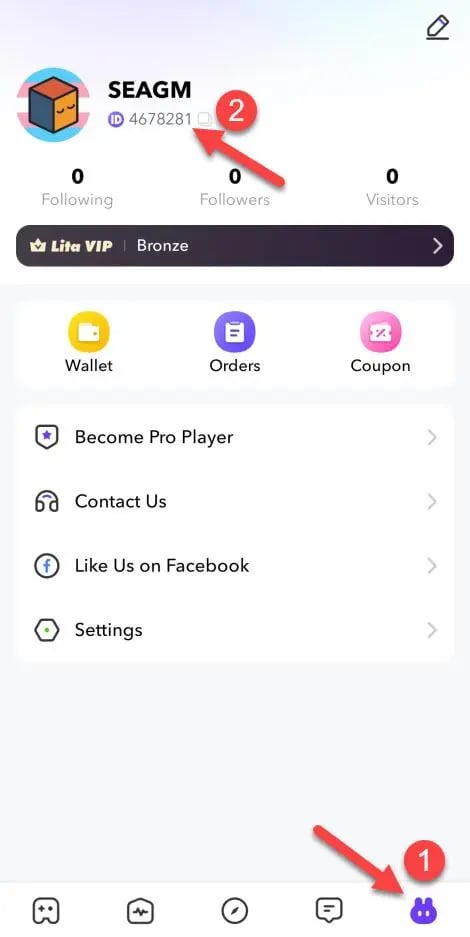
Tip: Always use the in-app copy button rather than typing the number manually to avoid typos that could send coins to another user.
Step-by-Step Guide: How to Buy Lita Coins on VGTopup
Recharging your Lita wallet takes only a few moments. Follow this straightforward process to complete your order:
- Select Your Coin Package: Choose the specific amount of Lita Coins you want from the denomination list above.
- Enter Your Lita UID: Paste your numeric UID into the designated input field.
- Review Your Information: Check that the pasted ID matches your profile in the app.
- Proceed to Checkout: Choose your preferred payment method from the available local and global options.
- Complete the Payment: Finalize the payment through our encrypted checkout gateway.
- Receive Your Coins: Your Lita Coins will credit automatically to your in-app account balance within moments.
Account Security: Safe UID-Only Top Ups Without Passwords
Account safety is essential when purchasing digital gaming currencies. VGTopup operates on a strict UID-only fulfillment model designed to keep your personal data and gaming credentials completely secure.
- No Passwords Required: You never need to enter your Lita password, email access codes, or social media login credentials (such as Google, Facebook, or Apple ID).
- Zero Risk of Account Takeover: Because our system only requires your public numeric ID, your account security remains under your complete control at all times.
- Protected Personal Data: Your private messages, companion booking history, and personal contact lists inside Lita remain private.
- Encrypted Checkout: Every transaction processed on VGTopup uses standard SSL encryption protocols to secure your billing details.
Global Payment Options and Instant Delivery Verification
VGTopup supports an extensive range of regional and international payment methods, ensuring you can recharge your balance conveniently no matter where you play. You can choose from credit cards, debit cards, popular digital e-wallets, and localized instant payment systems.
Live pricing, currency conversions, and available package discounts are calculated dynamically on the checkout screen. Because our fulfillment system connects directly with balance delivery networks, verified orders process automatically around the clock. You can monitor your purchase in real time through your VGTopup order history page.
Troubleshooting Delayed Lita Coin Balance Updates
While most coin deliveries happen almost immediately, network delays or app caching can sometimes cause a temporary delay. If your updated coin balance does not appear right away, use the following troubleshooting steps:
- Force-Close and Restart the Lita App: The app often caches old balance numbers on your screen. Completely close Lita from your background app switcher and reopen it to force a fresh data sync from the server.
- Verify the Submitted UID: Check your VGTopup order confirmation email or order history screen. Make sure the numeric UID you submitted matches the ID on your active profile.
- Check Payment Status: Verify that your payment provider completed the charge and that your order status on VGTopup shows as complete.
- Log Out and Log In: In rare cases, refreshing your active session by logging out and logging back into your Lita account resolves local display glitches.
- Contact Customer Support: If your balance has not updated after a few minutes, reach out to the VGTopup customer support team with your order number. Our team will verify the delivery status and assist you promptly.
Frequently Asked Questions About Lita Coins Top Up
Where can I find my Lita UID to top up coins?
Open the Lita mobile app and tap the Account or Me tab at the bottom right of the screen. Your numeric UID is displayed near the top, directly underneath your avatar and username. Tap the copy icon next to the number to copy it to your clipboard.
Do I need to share my Lita login password to recharge coins?
No. Recharges on VGTopup require only your public numeric UID. You should never share your account password, email credentials, or verification codes with anyone.
How long does it take for Lita Coins to arrive after checkout?
Orders are processed through an automated delivery system. In most cases, your coins appear in your Lita balance within moments after your payment is confirmed.
What can I use Lita Coins for in the Lita app?
Lita Coins let you order gaming companion sessions, hire players for duo ranking, schedule game coaching, send animated audio gifts in voice chatrooms, and order customized voice messages from your favorite creators.
Can I buy Lita Coins for a friend using their UID?
Yes. Because our system only requires a valid numeric UID, you can send Lita Coins directly to a friend by entering their UID in the input box during checkout.
What should I do if my Lita Coin balance does not update?
Start by force-closing the Lita app and reopening it to refresh your profile balance. If the coins still do not show, check your VGTopup order receipt to confirm that the UID submitted was correct, then contact our 24/7 customer support team for fast order verification.
Select Denomination
Tax, payment fees and eligible coupons are calculated at checkout.
| Package | Price |
|---|---|
| 300 Lita Coins | USD 2.42 |
| 600 Lita Coins | USD 4.63 |
| 1,000 Lita Coins | USD 7.57 |
| 2,000 Lita Coins | USD 14.84 |
| 5,000 Lita Coins | USD 32.35 |
| 10,000 Lita Coins | USD 64.66 |






























































