
Crystalfall Top Up: Get Delta Coins and Packs Direct to Account
Delta Coins serve as the primary premium currency in Crystalfall. Players use Delta Coins to unlock exclusive character cosmetics, upgrade tactical gear, purchase battle supplies, and obtain limited seasonal passes. Having an active reserve of Delta Coins ensures that you can acquire newly released outfits, support items, and progression boosters as soon as they become available.
VGTopup provides an efficient direct recharge system for Crystalfall players worldwide in 2026. Instead of dealing with complicated regional store restrictions or third-party account log-ins, you can top up Delta Coins directly to your account using only your in-game User ID. Select your chosen pack from the catalog above to view live pricing and complete your recharge.
How to Find Your Crystalfall User ID
To ensure your Delta Coins are delivered to the correct account, you must enter your exact Crystalfall User ID (UID) during checkout. Follow these simple steps to locate your UID in the game client:
- Open Crystalfall on your device and log into your account.
- Tap or click on your Player Avatar / Profile icon located in the top-left corner of the main lobby screen.
- Open the Profile Info or Account Settings tab.
- Locate your User ID (UID) displayed beneath your player nickname.
- Click the Copy icon next to your UID or write down the numeric string accurately.
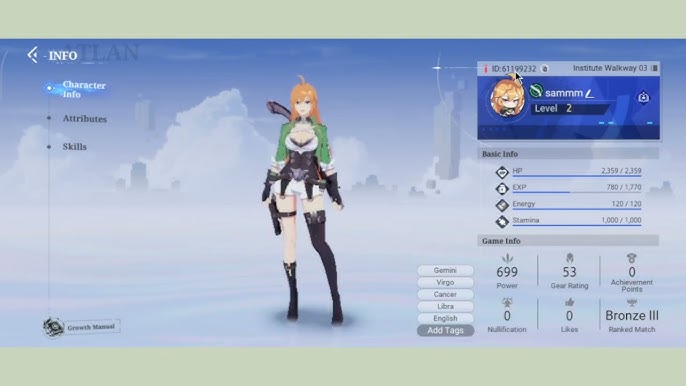
Double-check that the copied User ID matches your account before proceeding to payment. Entering an incorrect UID may cause delivery delays or send the recharge to another player's profile.
Step-by-Step Guide to Top Up Crystalfall on VGTopup
Recharging your Crystalfall balance on VGTopup is straightforward and takes only a couple of minutes:
- Select Currency Amount: Choose your preferred Delta Coins package or in-game item bundle from the product list above.
- Enter Your User ID: Paste your Crystalfall User ID into the designated input field.
- Review Your Selection: Confirm your chosen package and ensure the User ID numbers are accurate.
- Select Payment Method: Choose from the available secure payment options shown during checkout.
- Complete Checkout: Follow the on-screen instructions to finalize your payment.
- Receive Delta Coins: Once the payment is verified, your Delta Coins will be automatically credited to your in-game account balance.
| Feature | VGTopup Recharge Specification |
|---|---|
| Game Title | Crystalfall |
| Delivery Method | Direct UID Top Up (No Password) |
| Required Information | Crystalfall User ID (UID) |
| Applicable Platforms | All official game platforms and operating systems |
| Order Tracking | Real-time order status page on VGTopup |
| Customer Support | 24/7 dedicated support team |
Why Top Up via User ID is 100% Safe (No Password Required)
Account safety is the top priority for every gamer. Recharging Crystalfall on VGTopup requires only your public User ID. Here is why this method provides complete peace of mind:
- Zero Password Sharing: You never need to reveal your account password, email credentials, or two-factor authentication (2FA) codes to anyone.
- No Account Handover: Your account remains strictly in your hands. You do not need to let third-party operators log into your client.
- No Risk of Account Takeover: Because authentication credentials are never processed or stored, your personal profile data and inventory remain completely secure.
- Authorized Direct Crediting: Direct UID recharges send the selected currency straight to your player profile through secure game server endpoints.
Supported Payment Methods for Crystalfall Recharges
VGTopup supports an extensive array of localized and international payment solutions to make purchasing Delta Coins straightforward for players worldwide in 2026. Available options include major credit and debit cards, secure e-wallets, online banking gateways, and regional direct payment channels.
Live transaction fees, available regional currencies, and final checkout totals are clearly calculated and displayed on the payment selection screen before you confirm your purchase. Choose the option that best suits your location and convenience.
Troubleshooting and Delivery Verification for Crystalfall Orders
If your Delta Coins do not reflect in your balance immediately after completing your order, use the following troubleshooting checklist:
- Restart the Game Client: Completely exit Crystalfall and relaunch the application. This forces the client to synchronize your balance with the game servers.
- Check Your In-Game Mailbox: Some promotional bundles, bonus packs, or special event items are sent directly to your in-game mail system rather than added straight to the top balance counter. Open your mailbox and claim any pending attachments.
- Verify Your Order Status: Check the order tracking dashboard on VGTopup to confirm that your payment has completed processing.
- Check Your Entered User ID: Review your order receipt to make sure there was no typo in the User ID entered during checkout.
- Contact 24/7 Support: If your order status shows completed but your balance remains unchanged after restarting, reach out directly to VGTopup customer support with your Order Number and User ID for immediate assistance.
Frequently Asked Questions
What is my Crystalfall User ID and where do I find it?
Your Crystalfall User ID is a unique numeric identifier assigned to your account. You can find it by tapping your profile avatar in the top-left corner of the main menu screen. Your UID is listed in the profile summary tab directly beneath your player name.
Do I need to share my account password to top up Crystalfall?
No. You never need to provide your password, login credentials, or verification codes. Top ups on VGTopup only require your public User ID to send Delta Coins directly to your account.
How long does it take for Delta Coins to arrive after payment?
Under normal operating conditions, Delta Coins are credited directly to your account shortly after payment verification is confirmed. In rare instances of game server maintenance, processing may take slightly longer.
What payment methods can I use to buy Crystalfall top ups?
VGTopup supports a wide range of global and regional payment options, including major bank cards, international e-wallets, and localized instant transfer channels. All currently available payment methods and applicable currencies are displayed at checkout.
What should I do if my Delta Coins are not credited immediately?
First, restart your game client to refresh your server connection and check your in-game mailbox. If the currency is still missing, check your order status on VGTopup and contact the 24/7 customer support team with your order details.
Can I top up Crystalfall for a friend using their User ID?
Yes. You can purchase Delta Coins or gift packs for friends or guildmates by entering their Crystalfall User ID in the UID field during the checkout process. Ensure that you have entered their exact UID before finalizing payment.
Select Denomination
Tax, payment fees and eligible coupons are calculated at checkout.
| Package | Price |
|---|---|
| 100 Crystalfall Credits | USD 8.11 |
| 200 Crystalfall Credits | USD 16.21 |
| Iron Founder Pack | USD 24.31 |
| Bronze Founder Pack | USD 48.61 |
| Silver Founder Pack | USD 81.01 |
| Gold Founder Pack | USD 194.42 |