Player ID, username, display name — three jobs, not one
Most of the jitters around topping up come down to a single muddle. People picture their account as one undifferentiated lump of "login stuff," then freeze when a top-up form wants any slice of it. Let me pull the pieces apart, because each one does something totally different.
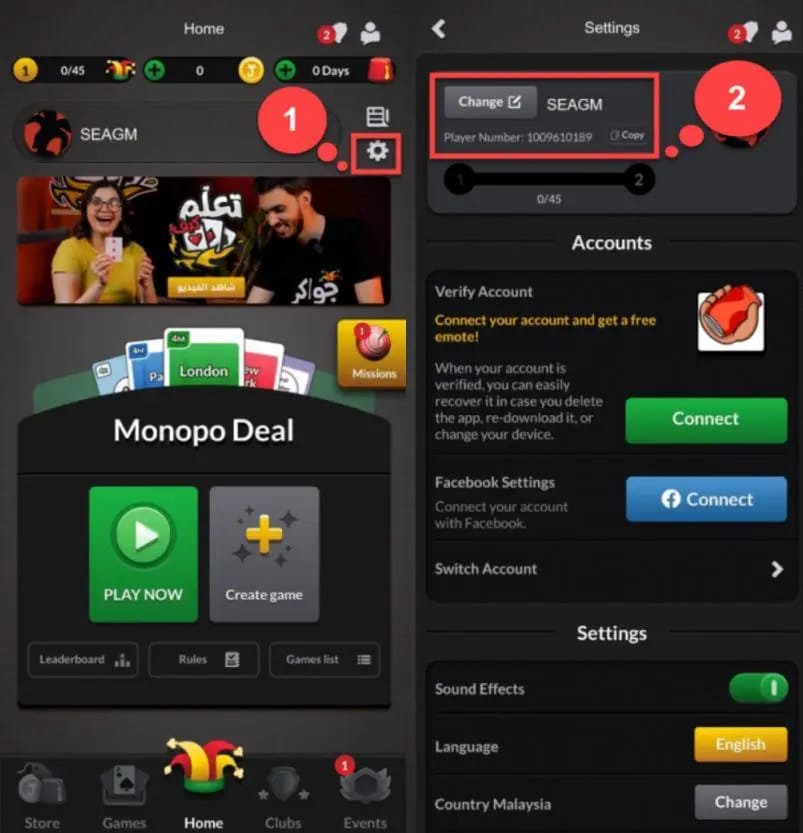
The Player ID (Jawaker also writes it as Player Number) is your account's permanent numeric address. It's how the redemption system steers tokens home. Your username is the handle you type to sign in. The display name is the nickname people read at the table, and this is the bit that trips folks up: display names can repeat. Two players can both be "Abu Khalid." Only the Player ID is promised unique, which is the whole reason every legit top-up flow keys off the ID and ignores the nickname.
| Identifier |
What it does |
Safe to share for top-up? |
| Player ID (Player Number) |
Routes tokens to your account |
Yes — it's the intended input |
| Username |
Logs you in |
No |
| Password |
Authenticates you |
Never |
| OTP / one-time code |
Authorizes a login or change |
Never |
Source: Cardni Top-up Guide (2026); SEAGM and Eneba support articles (2026)
The Cardni Top-up Guide calls the Player ID the identifier top-up services require, separate from both the login handle and the nickname. Skim the SEAGM, Eneba, and Razer Gold docs and the instruction reads the same every time: enter the Player Number, and no honest service ever reaches for a password or OTP. When four unrelated providers land on one rule, that's not a fluke. It's how the redemption plumbing was built.
Here's my read. The ID-only model is the security feature. Your ID names the destination; it doesn't unlock anything. Telling someone your house number doesn't hand them your keys. That one distinction melts most of the worry I see scrolling past in chat, and the leftover slice is where the actual teeth are. More on that shortly.
Finding it on iPhone, Android, and the web
Good news. No platform-specific labyrinth waits for you. The gear/settings route holds steady across iOS, Android, and app versions, per aggregated guidance from more than ten top-up provider walkthroughs (2026). You're not memorizing three procedures. Just one.
Inside the app (iPhone, iPad, Android, whichever) you tap the gear or settings icon to crack open the menu, find the Player Number sitting under your profile info, and copy it straight off. Done, per the Jawaker Shop Offers Page. I braced for some rearranged layout the first time I checked an iPad after a week glued to my phone. Same icon, same slot, same digits.
The web and desktop side bends a little, since you're aiming at redemption rather than just peeking at your profile. Copy the ID out of app settings, then carry it over to the official redemption page at jawaker.com/en/code, the entry point that keeps surfacing across top-up guides (2026). The ID is the bridge between app and browser. No need to re-pull it on every surface.
One newer twist worth filing away. Jawaker shipped a revamped social profile, and the official wording from Jawaker Helpshift spells it out: "You can now fully customize your profile by: Adding a short bio; Copying your player ID." So if the number won't show in the old spot, pop open the social profile section. There's a dedicated copy control living there now, and that button does more than save you a few taps, which leads straight into the part almost every guide breezes past.
The typo that ships your tokens to a stranger
If you walk away with one idea, make it this: the dicey moment in topping up isn't the payment screen. It's keying the ID by hand. A wrong digit won't bounce back to you. It hands your tokens to whatever real account owns that number, and per multiple top-up site warnings (2026), nobody's refunding you once they touch down somewhere else.
This is the failure mode nobody hammers hard enough. People steel themselves against some elaborate breach, then quietly fumble a single character. Tokens travel purely by the numeric ID. That's exactly why a correct ID still delivers even after you renamed your display name yesterday, and just as much why a wrong one delivers flawlessly to the wrong person. The system does precisely what you fed it.
So copy-paste. Every time. Hand-typing flirts with the homoglyph trap (0 vs O, 1 vs l, 5 vs S), and Jawaker handed you a copy control specifically so you never have to bet on which character your eyes caught. Use it. EnjoyGM's walkthrough (2025) lays out the verification step plainly: double-check the pasted value against what's on your screen before you submit anywhere. I run one boring ritual without fail. I paste the ID into the form, flick back to my profile, and eyeball the last three digits side by side. Two seconds. Cheapest insurance in this whole process.
For a low-spender snagging one small pack, this stings even more than it would a whale. A misrouted purchase hurts the same regardless of pack size, but buying once a month leaves you fewer chances to shrug off a mistake.
What actually happens after you enter the ID
Submit your Player ID into a redemption flow and tokens land directly on the account tied to that ID, routed through the official system at jawaker.com/en/code, confirmed by Jawaker's own shop and redemption setup (2026). No login on your end. No handshake with your password. The ID is the address; the platform does the steering internally.
Which is why the "but don't I need to prove it's me?" reflex points the wrong way. You aren't signing in to receive tokens. You're telling the system where to drop them. Authentication (proving you're you) and identification (saying which account) are deliberately separate layers. A top-up only ever brushes the identification one. That's the reason no password or OTP belongs in the flow, and any process demanding them has wandered into territory it has no business touching.
Officially, both the first-party Jawaker store and third-party top-ups run on the Player ID alone, and the delivery rail is identical on both. Community comparisons (EnjoyGM, SEAGM, 2026) note third-party channels often come in cheaper while passing through the same ID-based system. When I'm deciding where to buy, that's the real calculus: same delivery, same ID input, price is the only moving piece. Disclosure: VGTopup is one such third-party option where you supply the ID only, no password, no login, and the question there reduces to price, since the delivery method doesn't budge. If you want to top up Jawaker Tokens that route, the ID-only flow is exactly what everything above predicts.
Red flags that mean close the tab
The non-negotiable line this whole guide enforces: a top-up needs your Player ID and a payment method. That's the list. The second any "service" or "agent" steps over it, you walk.
The specific things that should kill the conversation, drawn from KXZ Solutions and Cardni safety guidance (2026):
- Any request for your password. No legitimate reason exists. Not one.
- Any request for an OTP or one-time code to "speed up" or "confirm" delivery. An OTP authorizes account access, so handing it over is handing over your account.
- Any prompt to log in with your Jawaker credentials on a third-party page. You don't sign in to receive tokens; you provide an ID. A login box buried in a top-up flow is a phishing surface.
- A request to top up by username or display name instead of ID. Treat it with suspicion. The ID is the canonical, unique identifier; nicknames aren't. A service that won't key on the ID either misunderstands the system or is nudging you somewhere unsafe.
Now the contrarian bit. "Be careful sharing your ID," the advice plastered everywhere, slightly misses. The ID by itself is harmless. It's a destination address, not a key. The genuine threat is a phishing request dressed up as an ID request, where the OTP or password ask gets smuggled in alongside. Cardni and KXZ both trace the same root cause: account theft circles back to shared credentials, never shared IDs. Don't burn your caution on the harmless part. Pour all of it onto the line that reads credentials.
What I'd do differently next time
Replaying that session in my head, the thing I'd swap is the order I explained it. I opened with "here's where the ID is" when I should've opened with "here's what you'll never be asked for." Finding the number takes thirty seconds. The judgment about what to refuse is what actually shields your account. Walking a fresh player through it today, I'd start with the red flags, then point at the gear icon, then drill the copy-paste habit until it's pure reflex. Locate the ID, paste don't type, verify the last digits, refuse anything past ID-plus-payment. That sequence hasn't let down a single person I've handed it to.
Frequently Asked Questions
Where do I find my Jawaker player ID if it's not showing in the usual spot?
Open the new social profile section in settings. Jawaker dropped a dedicated "Copy your player ID" control in there, per Helpshift (2026). If the number won't appear below your profile info in the old layout, the revamped profile is where it now lives, copy button included, so you never have to squint the digits off-screen.
Can someone hack my account with just my Player ID?
No. The ID names your account; it doesn't unlock access. Think house number, not key. Account theft consistently traces back to shared passwords or OTPs, not shared IDs, per Cardni and KXZ safety guidance (2026). Handing over the ID alone for a top-up is genuinely safe. The fear around it confuses identification with authentication.
Is my Jawaker ID the same on iOS and Android?
Yes. It's bolted to your account, not your device, so it reads identical across iPhone, iPad, Android, and web. No platform-specific quirks in the find method either; the gear-icon path holds steady across app versions, per aggregated provider guidance (2026). Hop between devices all you like. The number stays put.
Why didn't my tokens arrive after I topped up?
The overwhelmingly common culprit is a mistyped ID sending tokens to a real but wrong account, with no refund possible once they've landed, per multiple top-up site warnings (2026). Before blaming the platform, re-check the exact ID you submitted against your profile. Tokens travel purely by the number. A correct ID delivers even after a display-name change, and a wrong one delivers cleanly to a stranger.
Do I ever need to log in on a top-up page?
Never. You provide your Player ID and you pay. That's the entire legitimate input. A login box or credential prompt inside a top-up flow is a phishing surface, since receiving tokens only touches the identification layer, not authentication. Both official and third-party channels deliver through the same ID-based system, per EnjoyGM and SEAGM comparisons (2026); none of them want your password.











Comments