
Mobile Legends: Bang Bang Top Up with Player ID and Server ID
To complete a Mobile Legends: Bang Bang top up on VGTopup, you only need your in-game User ID and Server ID. Account passwords or login authentications are never required. Follow these steps to complete your diamond recharge:
- Select your target diamond pack, Weekly Diamond Pass, or Twilight Pass from the product catalog above.
- Input your numeric Player ID into the first input box.
- Input your Server ID (the 4 to 5-digit number in brackets) into the second input box.
- Review the package details and proceed to checkout.
- Select your payment method and complete the transaction.
- The diamonds or pass privileges will be credited directly to your Mobile Legends account instantly.
Prices and active currency promotions are displayed live in the selection menu above.
How to Find Your MLBB Player ID and Server ID
Your account credentials consist of two distinct numerical strings located in your personal profile screen.
- Launch Mobile Legends: Bang Bang on your device.
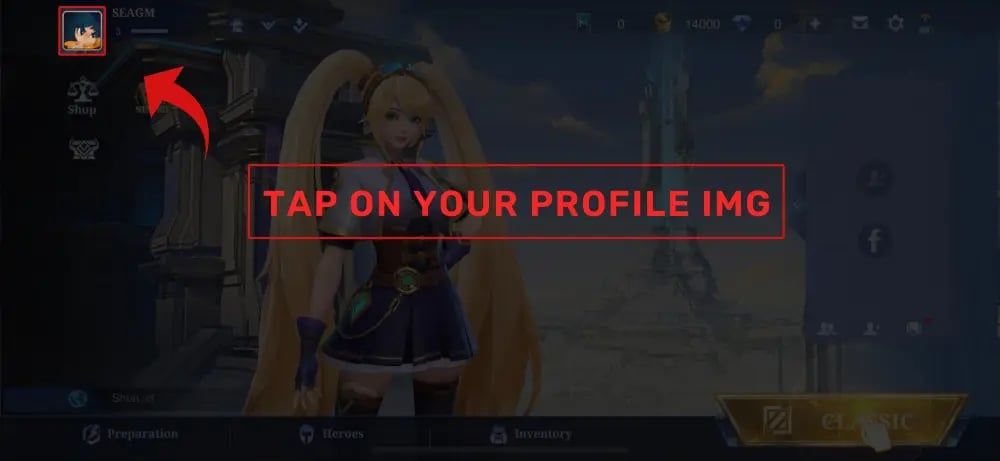
- Tap your profile avatar in the upper-left corner of the main lobby.
- Stay on the default Basic Info tab.
- Look directly below your character level and in-game nickname on the right side of the avatar display.
- You will see an entry structured like:
ID: 12345678 (1234). - The first segment outside the parentheses (
12345678) is your Player ID (also called User ID). The numbers inside the parentheses (1234) represent your Server ID (or Zone ID).
Be careful not to invert these values when filling out your order fields.
Base Diamonds vs Bonus Diamonds: Qualifying for MLBB Recharge Events
Mobile Legends frequently hosts limited-time recharge tasks such as Premium Supply events, Aspirants, The King of Fighters (KOF), and seasonal recharge milestone draws. Understanding how diamond packages are calculated is critical for reaching these milestone tiers.
- Base Diamonds: The primary diamond quota of a package. Only Base Diamonds count toward in-game event recharge milestones and VIP/Starlight progress bars.
- Bonus Diamonds: Free extra diamonds included with specific package tiers. These are credited straight to your balance for general shop spending, but they do not count toward event point milestones.
| Package Category | In-Game Event Milestone Value | Usable for In-Game Shop Draws |
|---|---|---|
| Base Diamonds | Counts 100% toward event recharge tasks | Yes |
| Bonus / Extra Diamonds | Does not count toward event tasks | Yes |
| Weekly Diamond Pass (Initial) | Counts as ~80-100 Base Diamonds (event specific) | Yes |
| Daily Claim Pass Diamonds | Does not count toward event recharge milestones | Yes |
Always check the live breakdown on the checkout tile to ensure your Base Diamond amount satisfies the specific requirement of your active in-game recharge event.
MLBB Weekly Diamond Pass and Twilight Pass Rewards Breakdown
Purchasing specialized passes provides scheduled resource distribution for players looking to maximize diamond efficiency throughout the month.
Weekly Diamond Pass (WDP)
- Immediate Grant: Instant base diamonds credited to your account upon purchase.
- Daily Distribution: Receive diamonds and Weekly Diamond Pass Choice Bundles via your in-game mailbox every day for 7 days.
- Stacking Limitation: You can hold a maximum active duration of 70 days (up to 10 Weekly Diamond Passes stacked). If your active remaining duration exceeds 70 days, the game server will reject additional pass top-ups until the timer drops below the threshold.
- Starlight Progress: Weekly Diamond Pass subscriptions also grant weekly Starlight points to boost your monthly battle pass level.
Twilight Pass
- Provides immediate tickets and unlocks milestone rewards as your account level increases.
- Grants exclusive permanent skin rewards, avatar borders, and hero fragments.
- A one-time progressive purchase per account cycle.
Account Safety: Why No-Login ID Top-Ups Protect Your MLBB Account
Account safety is essential when purchasing gaming currencies online. Traditional top-up methods that demand login credentials, social media linking, or Moonton account passwords expose players to account compromise, unauthorized equipment logins, and security verification locks.
VGTopup uses direct player identification routing:* No Passwords Required: We only request your public Player ID and Server ID.* No Account Sharing Risks: You never disclose your login email, Moonton password, or verification codes.* Zero Third-Party Login Triggers: Because the top-up is processed through direct server transmission to your public ID, your game client does not trigger suspicious device change flags or temporary IP bans.
Why Choose VGTopup for Your MLBB Diamonds
- Direct ID Processing: Top up your account accurately using only your User ID and Server ID.
- Transparent Breakdown: Package listings separate base diamonds from bonus values so you know exactly what qualifies for recharge events.
- Worldwide Server Support: Compatible with international server regions across Southeast Asia, North America, Europe, Latin America, and the Middle East.
- Streamlined Checkout: Direct payment paths without mandatory platform wallet conversions.
Troubleshooting Delivery Delays and Incorrect Server ID Inputs in 2026
If you experience an issue with your top-up, check the following common causes:
- Inverted ID Fields: The most frequent customer error is entering the 4-digit Server ID in the Player ID box and the 8-to-10-digit Player ID in the Server ID box. Double-check your confirmation receipt.
- Pass Quota Exceeded: If you try to purchase a Weekly Diamond Pass while already holding 10 active passes (70 days), the system will fail to credit the pass. Wait until your pass duration drops to 63 days or fewer before renewing.
- Server Maintenance Delays: During major seasonal patch updates and new hero releases, Moonton game servers may queue inbound API transactions. Restart your game client and check your in-game mail tab.
- Cached Profile Display: In some instances, your diamond counter in the top bar will not update immediately. Opening the in-game Shop or entering a classic/ranked lobby forces the client to refresh its balance cache from the server.
Frequently Asked Questions
How to recharge in Mobile Legends: Bang Bang?
Select the diamond denomination you want on VGTopup, type in your Player ID and Server ID, choose your payment method, and complete the purchase. The diamonds will transfer straight to your game account without requiring a password.
Where can I find my MLBB Player ID and Server ID?
Tap your avatar in the upper-left corner of the MLBB main menu to open your profile. Under the Basic Info tab, you will see ID: XXXXXXXX (YYYY). The first set of numbers is your Player ID, and the four or five digits inside the parentheses is your Server ID.
Is MLBB banned from third-party recharges?
Direct ID-based recharges that use official game UID processing do not violate game terms because they do not require account sharing, unauthorized client modifications, or credential transfers. Your account remains secure since no login access is granted.
Do bonus diamonds count toward MLBB recharge benefit events?
No. In-game recharge milestone events (such as Premium Supply or Aspirants draws) only count Base Diamonds. Bonus diamonds listed as free additions do not advance recharge event milestones.
How many Weekly Diamond Passes can I buy at once?
You can stack up to a maximum of 10 Weekly Diamond Passes at one time, which equals 70 days of active daily rewards. Any purchase attempt that pushes the remaining duration over 70 days will be rejected by the game system.
What should I do if my Mobile Legends diamonds do not arrive immediately?
First, completely close and restart the Mobile Legends app to refresh your account data. Next, verify in your VGTopup order history that your Player ID and Server ID were entered in the correct order. If your diamonds have not arrived after restarting, contact VGTopup customer support with your order number.
Select Denomination
Tax, payment fees and eligible coupons are calculated at checkout.
| Package | Price |
|---|---|
| 50 + 5 Diamonds | USD 0.87 |
| Weekly Pass | USD 1.74 |
| 150 + 15 Diamonds | USD 2.57 |
| 250 + 25 Diamonds | USD 4.27 |
| 500 + 65 Diamonds | USD 8.58 |
| 1000 + 155 Diamonds | USD 17.21 |
| 1500 + 265 Diamonds | USD 25.72 |
| 2500 + 475 Diamonds | USD 42.94 |
| 5000 + 1000 Diamonds | USD 85.74 |