
SEGA Football Club Champions RB Top Up Guide & Overview
SEGA Football Club Champions puts you in complete control of building, training, and managing an elite soccer franchise. In this competitive management simulation, RB serves as the core premium currency required to expand your club's capabilities and secure top-tier talent. Whether you need to sign world-class players during high-stakes transfer windows or upgrade your stadium facilities, having an adequate balance of RB keeps your club ahead of the competition.
What You Can Purchase with RB
RB provides immediate utility across multiple club management operations:
- Scouting and Player Transfers: Acquire superstar players, sign prospect wonderkids, and secure limited-edition scout packages during seasonal transfer events.
- Staff Recruitment: Hire top-tier tacticians, fitness trainers, medical experts, and analytical coaches to maximize your squad's matchday form.
- Club Infrastructure and Facilities: Expand training grounds, enhance youth academies, and upgrade stadium capacity to increase club revenue.
- Stamina and Recovery Items: Keep key players fresh for league fixtures, cup tournaments, and PvP ladder matches without long fatigue cooldowns.
- Special Event Entry Passes: Unlock premium event ladders, ranked tournament entries, and exclusive seasonal campaign rewards.
How to Top Up SEGA Football Club Champions RB on VGTopup
To recharge your account without delays, follow these simple steps on VGTopup:
- Select Your RB Amount: Choose the desired RB bundle from the live product list on the page.
- Provide Your Player ID: Enter your numeric SEGA Football Club Champions Player ID in the designated input field.
- Review Order Details: Double-check your Player ID to ensure accurate fulfillment.
- Proceed to Checkout: Select your preferred payment method and complete the transaction.
- Receive Your RB: Once payment clears, the RB bundle is processed directly to your account. Launch the game to confirm your updated balance or claim the items from your in-game Gift Box.
How to Find Your SEGA Football Club Champions Player ID
Your Player ID is the unique account identifier used to route your RB package directly to your club profile. You do not need to share login credentials or linked social accounts.
Follow these steps to find your Player ID:
- Launch SEGA Football Club Champions on your device.
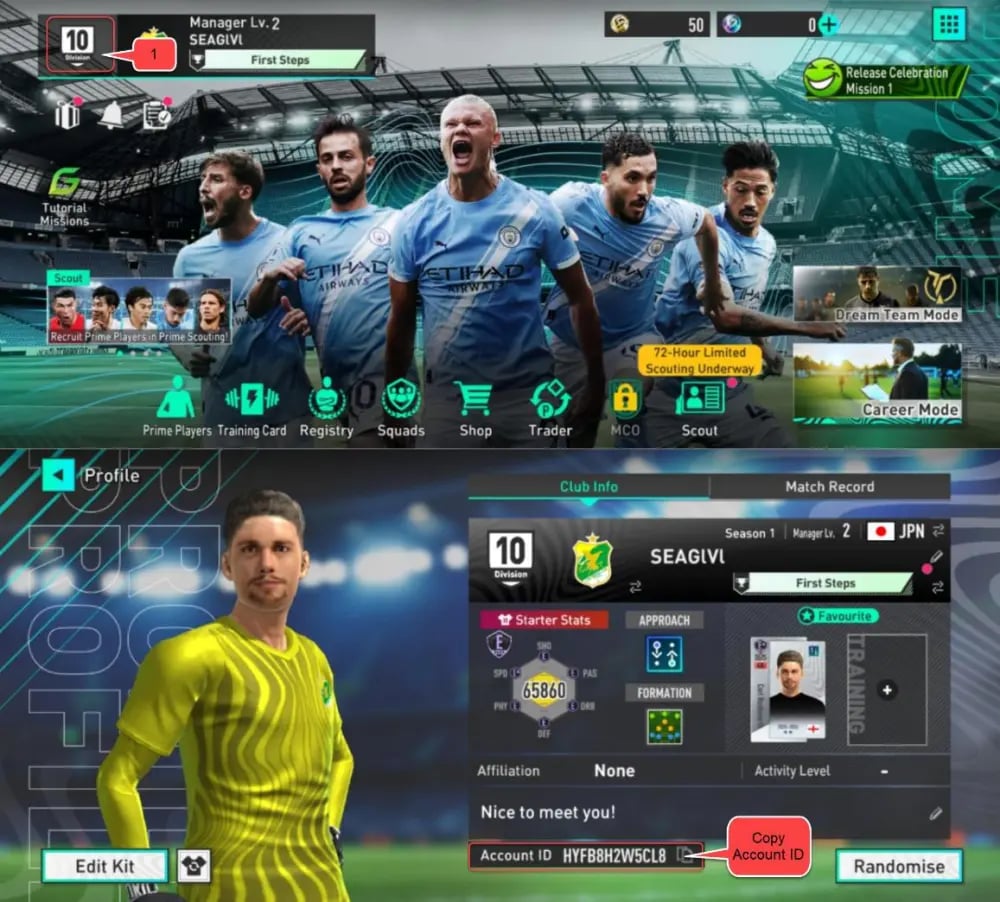
- Tap your Manager Profile avatar icon located in the upper-left corner of the main dashboard.
- Open the Account Info or Profile Details tab.
- Locate your Player ID (a sequence of numeric digits).
- Tap the Copy button next to your ID to paste it directly into your order form.
Platform Compatibility and Cross-Platform RB Balance
SEGA Football Club Champions supports multi-platform cross-play and cross-progression across mobile devices, PC, and consoles when linked to a unified SEGA ID. Understanding how your RB balance transfers across systems ensures smooth management of your club resources.
| Platform / Operating System | Account Linking Requirement | RB Balance Sync | In-Game Delivery Location |
|---|---|---|---|
| Android | SEGA ID / Google Play | Fully synced on linked SEGA ID | Direct Balance or Gift Box |
| iOS (iPhone/iPad) | SEGA ID / Apple ID | Fully synced on linked SEGA ID | Direct Balance or Gift Box |
| PC / Steam | Linked SEGA ID | Fully synced on linked SEGA ID | Direct Balance or Gift Box |
| Console Platforms | Linked SEGA ID | Fully synced on linked SEGA ID | Direct Balance or Gift Box |
Note: Always link your mobile profile to your SEGA ID before switching between devices so your RB balance and squad progression remain unified.
Why Choose VGTopup for SEGA Football Club Champions Recharges
VGTopup provides a streamlined, secure platform designed specifically for football management gamers worldwide.
- Player ID Direct Delivery: You never have to share your game password, SEGA ID login, or secondary authentication codes. All transactions process solely through your public Player ID.
- No P2P Chat Required: Unlike peer-to-peer marketplaces that require manual buyer-seller messaging or manual account handovers, VGTopup handles your order through direct system fulfillment.
- Global Payment Options: Multiple secure payment gateways are available at checkout, allowing international players to select regional payment methods with transparent pricing.
- Multi-Language Interface: Clear navigation and simple order forms support players from all competitive leagues worldwide.
Safe Checkout Advantages: Zero Password Sharing
Account safety is essential when investing time and effort into your squad. Many online sellers ask for full login details, exposing your club to potential security risks, unauthorized changes, or account restrictions.
VGTopup eliminates these risks by strictly utilizing direct Player ID fulfillment:
- No Credentials Transferred: Your email address, linked passwords, and private authentication keys remain completely confidential.
- Zero Risk of Unauthorized Account Access: Your club roster, transfer market listings, and tactical setups cannot be altered by third parties.
- Full Policy Compliance: Player ID top-ups utilize standard remote delivery methods, keeping your account safe from suspicious login alerts triggered by foreign IP addresses.
Troubleshooting: Missing RB Packs and Incorrect Player ID
If your RB balance does not update immediately after completing checkout, follow these diagnostic steps:
- Check Your In-Game Gift Box: In some game updates, premium currency bundles arrive as an inbox attachment rather than updating the balance bar directly. Open your in-game mailbox/Gift Box and tap Claim All.
- Restart the Game Client: Completely close the SEGA Football Club Champions application and relaunch it to refresh your server connection and sync with updated database records.
- Verify Your Order Confirmation: Check your VGTopup order receipt to confirm that the transaction status shows completed.
- Incorrect Player ID Handling: If you entered an incorrect Player ID during checkout, contact VGTopup customer support immediately with your transaction reference number and the correct Player ID. If the order has not yet been processed by the automated system, support can correct the destination ID.
Frequently Asked Questions
What is RB used for in SEGA Football Club Champions?
RB is the premium currency in SEGA Football Club Champions. It is used to scout elite soccer players, hire tactical managers, sign specialized staff, upgrade club facilities, refill energy for league fixtures, and enter exclusive ranked cup tournaments.
How do I find my SEGA Football Club Champions Player ID?
Open the game and tap your Manager Profile icon in the top-left corner of the home screen. Your numeric Player ID will be displayed on your profile card. Tap the copy icon next to the number to copy it to your clipboard.
Do I need to share my game password to top up RB on VGTopup?
No. VGTopup only requires your numeric Player ID to deliver your RB package. You will never be asked for your password, verification codes, or SEGA ID login credentials.
Where will my RB appear after completing the top-up?
Depending on server processing, your RB will either reflect directly in your top currency balance or arrive inside your in-game Gift Box / Mailbox. If it is sent to your inbox, simply tap the claim button to add it to your balance.
Can RB purchased on mobile be used when playing on PC or console?
Yes, as long as your mobile game profile is linked to the same master SEGA ID used on your PC or console platform. Linked accounts share club progression, squad rosters, and unlocked currency across all supported systems.
What should I do if I enter the wrong Player ID during checkout?
If you realize you submitted an incorrect Player ID, contact VGTopup support immediately with your order ID and the correct numeric Player ID. Support can update the details if the order is still pending processing.
Select Denomination
Tax, payment fees and eligible coupons are calculated at checkout.
| Package | Price |
|---|---|
| RB Set B | USD 1.38 |
| RB Set C | USD 6.04 |
| RB Set D | USD 14.10 |
| RB Set E | USD 23.24 |
| RB Set F | USD 46.34 |
| RB Set F x3 | USD 147.47 |
| RB Set F x5 | USD 244.44 |