
Party Star Diamonds Top Up: In-App Currency and Uses
Party Star is an interactive mobile social community featuring group voice chat rooms, casual mini-games, karaoke, and live audio broadcasting. Within the platform, Party Star Diamonds serve as the primary premium currency required to access premium social features, support room hosts, and customize your profile presence.
When you top up Party Star Diamonds, you can exchange them for a variety of digital assets and interactions inside the app:
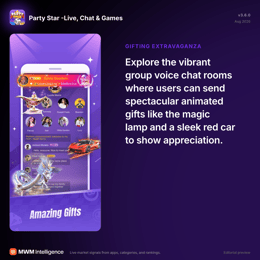
- Virtual Gifts and Tipping: Send standard, animated, and full-screen luxury gifts to broadcasters, party hosts, or friends sitting on room mic slots.
- Interactive Mini-Games: Use your balance to participate in party room activities, lucky draws, and community board games.
- Room Customization: Rent or purchase customized party room themes, sound effects, and pinned broadcast banners.
- Profile Enhancements: Equip special avatar frames, chat bubble skins, and unique profile name tags to distinguish your account in active voice channels.
Top up your balance on VGTopup to keep your account loaded for every social event and live stream.
Party Star Diamonds vs Coins Terminology Explained
Depending on the region, app version, or community slang, players often use the terms Diamonds and Coins interchangeably. Understanding how these currencies operate helps avoid confusion during checkout.
| Currency Term | Primary Role | How It Is Acquired | Key In-App Applications |
|---|---|---|---|
| Diamonds | Primary premium top-up currency | Direct purchase via UID top up on VGTopup | Buying luxury gifts, entry effects, VIP levels, and avatar decorations |
| Coins | Alternative label / secondary balance | Event rewards or direct denomination packs | Sending casual chat gifts, playing room games, tipping creators |
| Gift Points / Beans | Host earnings / revenue balance | Received when other users send gifts to your mic | Converted by streamers or redeemed according to in-app rules |
When you select a recharge package on VGTopup, the credited Diamonds immediately reflect in your overall spending wallet, allowing you to buy gifts, upgrade perks, or unlock exclusive privileges across all voice rooms.
How to Find Your Party Star UID
To ensure your recharge reaches the correct account, you only need to provide your unique Party Star User ID (UID). You do not need to share your login credentials or phone number.
Follow these steps to locate your Party Star UID:
- Open the Party Star application on your mobile device.
- Tap the Profile icon located in the bottom right corner of the navigation bar.
- Your profile page will display your avatar, nickname, and account details.
- Locate the UID number displayed directly underneath your profile nickname.
- Tap the Copy icon next to the UID number to copy it to your clipboard.
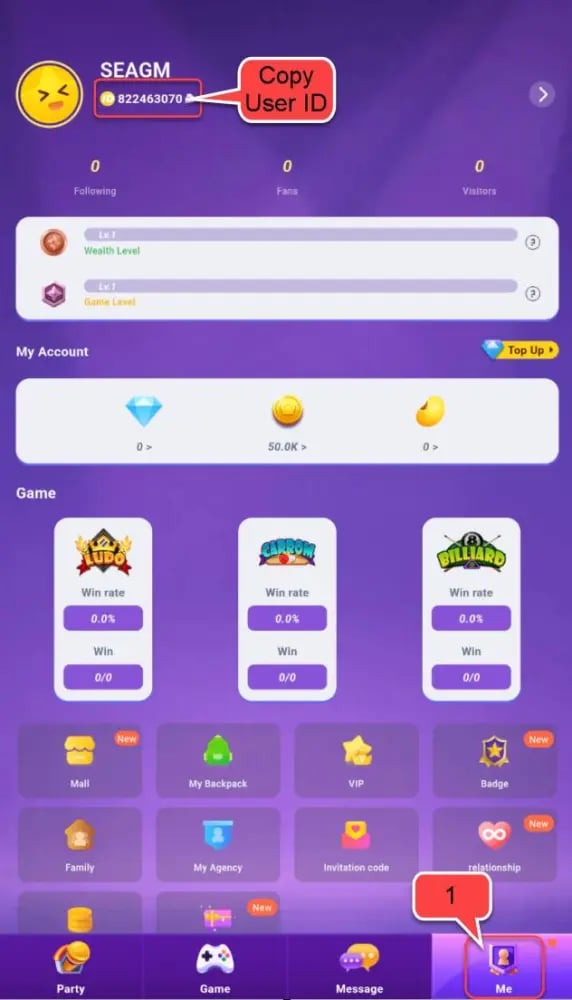
Double-check that the copied number matches your in-app profile before proceeding with your order.
How to Complete a Party Star Diamonds Recharge on VGTopup
Refilling your Party Star account on VGTopup is straightforward and requires only a few clicks. Because the process is passwordless, your account remains secure throughout the transaction.
- Select Your Package: Review the available Party Star Diamonds denominations on the product page and select the amount you wish to purchase. Current package rates and active offers are always displayed on the live checkout interface.
- Enter Your User ID: Paste your Party Star UID into the required input field. Take a moment to verify that every digit is accurate.
- Select Your Payment Method: Choose your preferred payment option from the available secure checkout methods.
- Confirm and Pay: Complete the payment verification. Once approved, the system processes your order and credits the Diamonds directly to your Party Star account.
- Check Your In-App Balance: Open Party Star, head to your profile or wallet section, and confirm that your updated Diamond balance is ready to spend.
In-App Perks: Unlocking VIP Badges, Entry Effects, and Animated Gifts
Recharging Diamonds gives you access to high-tier social features that enhance your visibility across party rooms. High-value interactions not only support your favorite creators but also elevate your personal standing on community leaderboards.
Exclusive Room Entry Effects
When you enter a popular voice room, standard users appear quietly in the room visitor log. Users with active premium effects trigger dynamic entrance animations, such as luxury sports cars, flying dragons, or private jets, accompanied by distinct sound cues and banner notifications that alert everyone in the room.
VIP Status Levels and Badges
Accumulating and spending Diamonds contributes directly to your VIP level. Higher VIP tiers grant distinct perks:- Custom Name Plates: Distinctive colored text and golden frames in public room chat.- Mic Slot Rings: Special glowing rings around your avatar when speaking on stage.- Anti-Kick Protection: Protection against casual room kicks or mutes in public party rooms.- Profile Cards: Animated background cards showing off your VIP tier to visiting users.
Full-Screen Animated Gifts
Standard gifts show small animations over a speaker's avatar, but luxury Diamond gifts trigger screen-wide visual effects for all room participants. These gifts award high charisma points to the recipient and display global system announcements across the entire app, highlighting your generosity.
Safe and Passwordless Account Recharge on VGTopup
Account safety is essential when purchasing digital currencies online. VGTopup uses a direct UID top-up system, which protects your personal data from unauthorized access.
- Zero Password Sharing: You will never be asked for your Party Star password, social login tokens, email access, or two-factor authentication codes. All transactions require only your public UID.
- Encrypted Checkout: Every transaction on VGTopup is protected with standard data encryption, ensuring your payment details and identity stay confidential.
- Direct In-Game Delivery: Orders are fulfilled directly to your server profile, eliminating the need to redeem third-party codes or trade items inside the game.
- Global Access: You can top up your Party Star account from anywhere in the world using international and local payment methods available on our platform.
Troubleshooting and Order Status Verification
If you completed a purchase but have questions about your delivery, follow these basic troubleshooting steps:
- Restart the App: Close Party Star completely from your device's multitasking menu, then reopen it. This forces the app to refresh your wallet balance from the server.
- Verify Order Status on VGTopup: Check your order history in your VGTopup account to confirm that your transaction was successfully approved and completed.
- Double-Check UID Entry: Ensure that the UID submitted during checkout belongs to your active account and does not contain extra spaces or missing digits.
- Contact Customer Support: If your Diamonds have not reflected after a few minutes, reach out to the VGTopup customer support team. Provide your order number and Party Star UID, and a representative will investigate your transaction immediately.
Frequently Asked Questions About Party Star Top Up
What are Party Star Diamonds used for?
Party Star Diamonds are the primary in-app currency used to send virtual gifts, tip broadcasters, buy animated room entrance effects, upgrade VIP tiers, unlock custom avatar frames, and participate in interactive party mini-games.
How do I find my Party Star UID for top up?
Open the Party Star app, tap the Profile icon in the bottom right corner, and locate the numeric UID displayed beneath your nickname. Tap the copy icon next to the number to copy it for your order.
Do I need to share my Party Star password to recharge Diamonds?
No. VGTopup only requires your public Party Star UID to process your Diamond recharge. You should never share your account password, email access, or verification codes with anyone.
How long does it take to receive Party Star Diamonds after payment?
Once your payment is confirmed, the Diamonds are credited directly to your Party Star account balance through our automated system. In most cases, the balance updates shortly after transaction approval.
Can I top up Party Star Diamonds for a friend using their UID?
Yes. You can purchase Diamonds for friends, family, or room hosts by entering their Party Star UID in the player field during checkout on VGTopup.
What should I do if my Party Star Diamonds have not arrived?
First, restart your Party Star app to refresh your profile balance. If the currency still does not show, verify that your payment succeeded and contact VGTopup customer support with your order ID for quick assistance.
Is it safe to buy Party Star Diamonds online via VGTopup?
Yes. VGTopup provides an encrypted checkout environment and processes all orders using direct UID crediting, keeping your personal account information and login credentials completely safe.
Select Denomination
Tax, payment fees and eligible coupons are calculated at checkout.
| Package | Price |
|---|---|
| 3,500 Diamonds | USD 3.40 |
| 7,520 Diamonds | USD 7.31 |
| 11,750 Diamonds | USD 11.43 |
| 23,500 Diamonds | USD 22.85 |
| 47,000 Diamonds | USD 45.70 |
| 70,500 Diamonds | USD 68.56 |
| 94,000 Diamonds | USD 91.41 |
| 117,500 Diamonds | USD 114.26 |
| 200,000 Diamonds | USD 194.49 |
| 500,000 Diamonds | USD 486.22 |