The one rule that stops most account theft: ID only, never your password
If everything else here slips your mind, hold onto this. A legitimate Xena Live top-up wants your UID and nothing past it. Some folks will insist that handing over more details "verifies" the buy and feels safer, but it's the reverse. Coins get credited to an account by its public identifier alone, so any checkout page fishing for your game login password is harvesting credentials. No gray area there.
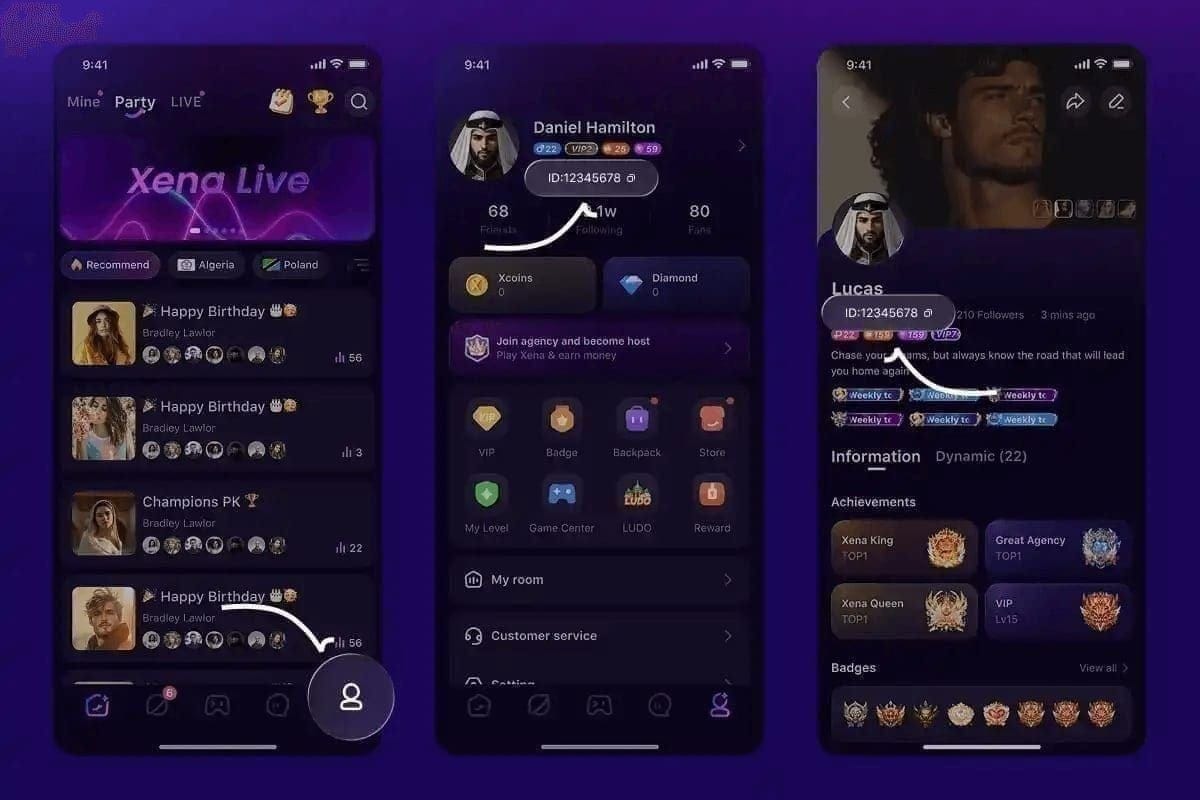
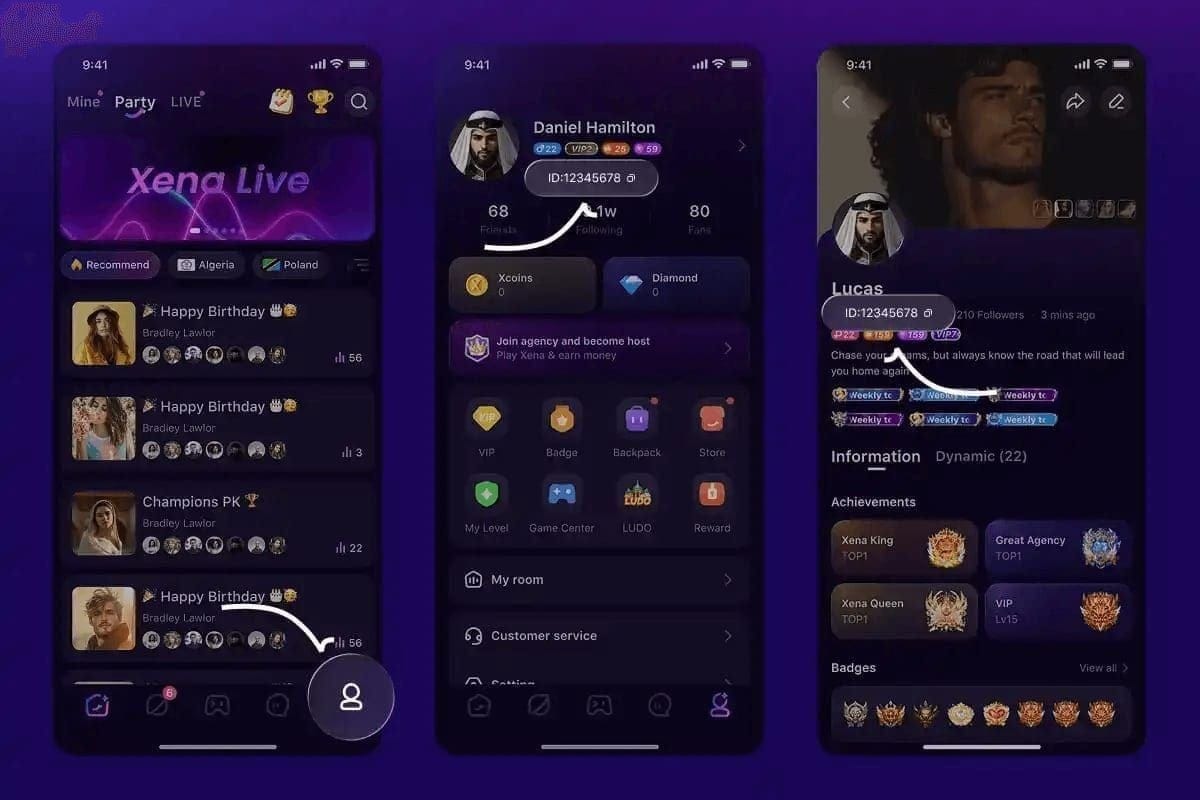
And pinpointing the right number matters, because the game shows two. Per the Codashop Xena Live page, you open the app, tap your profile down in the bottom right, and read the UID under your username, not the "Show ID". Punching in the Show ID instead of the UID is the single most common reason a top-up just quietly fails, a slip flagged across community guides including BitTopup's 2026 walkthrough.
The safety logic is plumbing, not faith. Codashop runs as an official partner ("Codashop has partnered with Mobile Alpha Limited to offer official XENA LIVE items top ups," per its own product page), which means the coins travel through a sanctioned channel keyed to your UID. No password ever changes hands, so even a hijacked checkout can't grab your account. A safety note on Enjoygm lays the same rule out flat: stick to UID-only platforms, never type a password. That's the whole defense, and it works.
PayPal's dispute trail fits the undelivered-coin case better than a raw card
PayPal is the lower-risk way to fund a digital top-up, and the reason is the paper trail rather than the logo. Now, the fair pushback: a credit card has its own chargeback rights, so why route through PayPal at all? Because card networks often classify digital currency as "goods received" the second a charge clears, which happens to be the exact dispute bucket where undelivered coins get rejected. PayPal's framework was built to plug that hole.
Per PayPal Buyer Protection, updated January 26, 2026, the program covers eligible items "including some intangibles," and its terms add that "PayPal's Purchase Protection program may result in coverage for the full purchase price" of a qualifying order. For small recharges that line earns its keep: digital-goods micropayments up to roughly $9.99 (AUD equivalent in PayPal's own wording) may qualify for a simplified refund route. Most casual coin packs sit smack in that band.
Now the timing detail almost nobody states outright, and it's the one holding everything up: Buyer Protection runs on a filing window. Miss it and the safety net is gone no matter how clean your claim looks. So the urge to "wait and see if the coins eventually show" is the trap. Track delivery actively. If a top-up that should land in minutes is still missing after an hour, open a support ticket first, then escalate to a PayPal dispute well inside that window rather than at the eleventh hour.
| Funding path |
Undelivered-coin protection |
Typical speed |
Key cost factor |
Reversal route |
| PayPal |
Buyer Protection covers some intangibles (per PayPal, Jan 2026) |
Minutes after approval |
3–4% conversion spread if auto-converted |
Dispute → claim inside filing window |
| Credit card direct |
Often coded "goods received"; weaker for digital |
Minutes |
Card's own FX (often cheaper than PayPal's) |
Chargeback, slower, easier to deny |
| PayPal balance |
Same Buyer Protection |
Minutes |
No card FX if balance is in store currency |
Dispute |
Source: PayPal Buyer Protection (2026) and PayPal Consumer Fees (2026).
My read: for a security-minded F2P player making a first small purchase, PayPal through an official-partner storefront is the route I'd take every time. The dispute trail is worth more than the handful of cents in FX you might claw back going card-direct.
Where players quietly bleed money: the currency-conversion toggle
The fattest hidden cost in a PayPal top-up isn't the platform's markup. It's the conversion you breeze past without reading. Reasonable objection: 3–4% on a $9.99 pack is pocket lint. Sure, for a single buy. But for a mid-spender recharging every month, that spread piles up into actual cash, and it's completely dodgeable.
At checkout, PayPal will often offer to do the currency conversion for you at its own rate, that same margin above mid-market noted earlier. Your card issuer will frequently convert tighter if you let it handle the job. So the move is to hunt for the "conversion options" or "see currency conversion" link on the PayPal confirmation screen and flip from PayPal's conversion to your card's wherever the choice surfaces. Thirty seconds of clicking shaves the most reliable overpay in the whole flow.
The platform-side savings are the louder number, though. Third-party UID storefronts price coins well below in-app rates. Per the Enjoygm Xena Live page, a 67,500-coin pack ran $7.64 against a $9.99 official estimate in 2026, roughly 24% less, and a 1,000,000-coin pack landed at $113.33 versus $149.99, about 25% off.
| Pack Size |
Enjoygm Price |
Official Est. |
Savings |
| 67,500 Coins |
$7.64 |
$9.99 |
24% |
| 202,500 Coins |
$22.94 |
$29.99 |
24% |
| 1,000,000 Coins |
$113.33 |
$149.99 |
25% |
Source: Enjoygm Xena Live page (2026).
Stack the two effects and the order of operations gets obvious. The ~20–25% storefront gap swamps the 3–4% FX spread, so picking a cheaper UID storefront counts for far more than fretting over conversion. Still, scoop both up. Choose the storefront for the big cut, then toggle FX for the small one. If you want to line packs up and pay with PayPal using nothing but your UID, you can top up Xena Live Coins and compare per-pack pricing before you commit. Treat that as one option to price-check against, not marching orders.
Most "PayPal not working" failures are self-inflicted, not fraud
When a Xena Live top-up payment dies, the cause is almost always sitting on the account side, not the platform. Tempting to read a decline as a scam siren and run. But PayPal's own help docs name the usual suspects, and "the site stole your money" isn't on the list. Per PayPal's payment-declined guidance for 2026, the common culprits are a bank decline, account limits, or an outdated card on file.
So here's the failure taxonomy that actually gets you unstuck:
- Bank or card decline — the issuer blocked it. Fix: confirm the card hasn't expired, then approve the charge in your banking app or call the issuer to whitelist the merchant.
- Account limits / unverified PayPal — new or unverified accounts carry caps. Fix: finish PayPal's verification (link and confirm a bank or card) before retrying. This clears a big chunk of "mystery" declines.
- Region mismatch (the silent one) — your PayPal account country doesn't line up with the storefront's accepted region. It's a hidden region lock tied to your PayPal account, not the game, and it fails quietly behind a vague error. Fix: make sure your PayPal locale and the storefront region agree.
- Wrong identifier — not a payment failure at all, but it wears the costume of one. Entering Show ID instead of UID means the payment clears yet coins never land. Fix: re-check the UID before paying.
The point worth internalizing: the real risk in this whole process was never PayPal declining a charge. It's a phishing page mimicking a real checkout, and a reused password handed straight to it. A clean PayPal decline is irritating. It isn't a breach. Treat declines as a checklist, not an alarm.
A legitimate Xena Live storefront gives itself away in the first thirty seconds. The objection here is that "official partner" badges can be forged, which is fair, so don't trust the badge, trust the behavior. The tell that can't be faked is what the checkout asks of you.
Run this quick check before paying:
- Identifier only. It asks for your UID and never your game password. Anything sniffing for your Xena login is a credential trap.
- Named partnership you can verify. Codashop, for one, publicly states its Mobile Alpha Limited partnership, and that's checkable against the official channel.
- PayPal as a genuine option at checkout. PayPal is accepted across UID-only storefronts including Codashop, Enjoygm, and Joytify for Xena top-ups in 2026, per multiple platform listings, and its presence routes you under Buyer Protection.
- Honest delivery claims with a receipt. Joytify cites delivery "typically within minutes or under 60 seconds" via direct API; Enjoygm describes a four-step flow (select pack, enter UID, choose PayPal, pay) wrapping up in minutes. Instant-delivery claims like these usually hold; when they don't, the fix is a support ticket, not a snap dispute.
For the international player sweating a region or currency mismatch, the practical order is: verify your PayPal account country first, confirm the storefront serves that region, then size the pack. The US pricing examples above (20–25% under in-app, per the Enjoygm and Joytify snapshots) are the figures I can source straight. For UK, EU, and Southeast Asian buyers the structure still holds, third-party UID storefronts undercut in-app, but exact local deltas aren't published cleanly, so price-check in your own currency rather than assuming the US gap copies over one-to-one.
What I'd actually do before tapping pay
Pull your UID right off the profile screen, confirm your PayPal account is verified and matched to your region, pick a UID-only storefront with a verifiable partner and a visible PayPal button, then at the confirmation screen switch off PayPal's currency conversion if your card converts cheaper. Save the email receipt and transaction ID. That record matters more than which pack you grabbed, since it's what fuels a dispute inside the filing window if coins ever stall. Wait the few minutes for delivery; ticket first, dispute second.
Frequently Asked Questions
Is it actually safe to use PayPal for Xena Live Coins?
Yes, on a UID-only official-partner storefront where you never share a password. The extra layer over a raw card is the dispute trail: PayPal Buyer Protection covers some intangibles per its January 2026 terms, which lines up with the undelivered-coin scenario card networks so often reject. The one thing that makes it unsafe is typing your game login instead of just your UID.
Why did my PayPal payment for Xena Live Coins fail?
Usually a bank decline, an account limit, or an outdated card, the three PayPal's own 2026 help docs list first. The sneaky fourth is a region mismatch between your PayPal account country and the storefront, which fails behind a vague error. And a "failure" where money clears but coins don't is almost always Show ID entered in place of the UID.
Does PayPal Buyer Protection really cover in-game currency?
It can. The policy covers eligible items "including some intangibles," and small digital-goods micropayments up to roughly $9.99 may qualify for a simplified refund, per PayPal's 2026 Buyer Protection terms. Coverage isn't automatic for every case, so keep the receipt and transaction ID, and file inside the dispute window. Let it lapse and you forfeit the protection outright.
How long should a PayPal top-up take to arrive?
Minutes, often under one. Joytify cites under 60 seconds via direct API; Enjoygm describes delivery in minutes after a four-step PayPal checkout. If coins haven't landed after about an hour, open a support ticket before escalating. Disputing within the first few minutes, before delivery completes, is the move that risks getting a transaction or account flagged for nothing.
What's the cheapest safe way to buy, and where do people overpay?
Pick a UID-only storefront. Third-party packs ran roughly 20–25% under in-app pricing in 2026 per Enjoygm's snapshot, which is the big lever. The quiet overpay is PayPal's own currency conversion at a 3–4% spread above mid-market; toggle it to your card's conversion at checkout if that runs cheaper. Storefront choice saves far more than the FX tweak, but grab both anyway.









Comments