
Shadowverse Worlds Beyond Top Up: Direct In-Game Crystals
Shadowverse: Worlds Beyond brings competitive digital card battles, deck customization, and interactive lobby worlds together. Building top-tier competitive decks and acquiring exclusive cosmetic items requires Crystals, the premium in-game currency. A Shadowverse Worlds Beyond top up provides direct access to card packs, battle passes, leader skins, and avatar accessories.
VGTopup offers a direct player-to-account top-up service. You can recharge your Crystal balance quickly without sharing passwords or sensitive login credentials. Simply provide your account Link or ID, pick the Crystal pack that fits your deck-building plans, and receive your balance directly in your game profile.
What Are Shadowverse Worlds Beyond Crystals and In-Game Uses
Crystals function as the primary premium resource across all game modes in Shadowverse: Worlds Beyond. Unlike standard rupies and vial crafting materials earned through matches, Crystals provide access to exclusive summons and premium store items.
- Card Pack Summons: Purchase the latest expansion card packs to expand your collection for Rotation and Unlimited formats.
- Daily Discount Packs: Unlock the daily 50-Crystal single-draw pack for discounted legendary and gold card access.
- Battle Pass Activation: Purchase premium season battle passes to collect high-value card sleeves, exclusive leader skins, bonus vials, and pack tickets.
- Leader Skins and Emotes: Buy animated leader models, voice lines, and victory poses for your favorite classes.
- Lobby Avatar Customization: Customize your 3D World Hub avatar with outfits, accessories, and emotes.
- Tournament and Arena Passes: Enter special Grand Prix events and take-two draft formats without expending standard challenge tickets.
Difference Between Paid and Unpaid Crystals in Shadowverse Worlds Beyond
Shadowverse: Worlds Beyond separates Crystals into Paid and Free (Unpaid) balances. Understanding this distinction ensures you manage your resources effectively.
| Feature / Item Type | Paid Crystals | Unpaid (Free) Crystals |
|---|---|---|
| Acquisition Source | VGTopup direct recharge / Store purchase | In-game events, rank rewards, story chapters |
| Daily 50-Crystal Single Summon | Yes | No |
| Guaranteed Legendary Pack Banners | Yes | No |
| Standard Card Pack Summons | Yes | Yes |
| Season Premium Battle Pass | Yes | Yes |
| Store Leader Skins & Hub Cosmetics | Yes | Yes |
Paid Crystals purchased through VGTopup count fully toward all paid-only banner restrictions, daily discounted pulls, and special promotional summons.
How to Find Your Shadowverse Worlds Beyond Account Link and ID
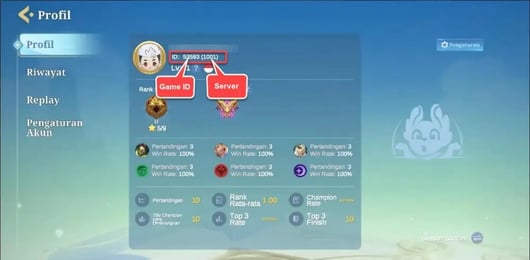
To ensure your Crystals arrive on the correct account, locate your unique player Link or ID inside the game client.
- Launch Shadowverse: Worlds Beyond on your PC or mobile device.
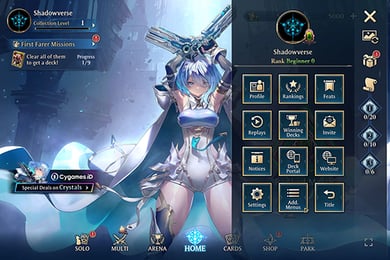
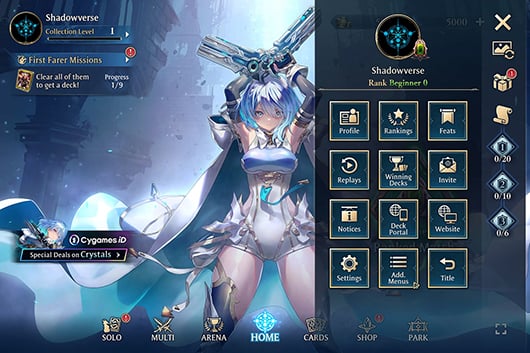
- From the main menu or World Hub lobby, open the Menu (gear icon) located in the upper-right corner.
- Select Profile or Account Details.
- Locate your User ID / Link displayed near your player name and rank badge.
- Copy the ID or link string so you can paste it directly into the order form.
Always double-check your entered Link and ID before proceeding to payment to prevent delivery delays.
How to Top Up Shadowverse Worlds Beyond Crystals on VGTopup
Recharging your account on VGTopup requires only a few clear steps:
- Select Your Crystal Bundle: Review the available Crystal amounts and choose the pack you need.
- Enter Your Account Information: Input your Shadowverse: Worlds Beyond Link or ID into the player field.
- Review Order Details: Confirm the pack denomination and verify that your account Link is accurate.
- Proceed to Checkout: Check the live price and choose your payment method on the checkout screen.
- Confirm and Receive: Complete the transaction. Open Shadowverse: Worlds Beyond to check your updated Crystal balance.
Best Crystal Value Packs and Card Set Recommendations for 2026
Maximizing your Crystal expenditure helps build meta-ready competitive decks faster. Follow these strategic recommendations for 2026:
- Prioritize the Premium Battle Pass: If you play regularly, the seasonal Battle Pass provides the highest return on investment. It grants card packs, legendary crafting materials, vials, and exclusive leader cosmetics across its tier rewards.
- Utilize Daily Discount Draws: Spend 50 Paid Crystals daily on current expansion packs instead of purchasing bulk packs at full price. This stretches your Crystal pool and builds card collection volume over the season.
- Target Core Expansion Sets: Focus your purchases on the newest active 2026 card sets to ensure long-term viability in Rotation format competitions.
- Save for Guaranteed Legendary Promotions: Keep a reserve of Paid Crystals ready for limited-time banners that guarantee specific class cards or animated leader cards.
Account Safety: Why Passwordless ID Top-Up Protects Your Account
Protecting your player data and collection value is essential. Traditional account-sharing top-up methods expose players to security threats, credential leaks, and platform bans.
- Zero Password Submission: VGTopup never requests your game password, linked email codes, or social media logins. Top-ups process strictly through your public player Link and ID.
- No Data Tampering: Direct ID recharges deposit Crystals straight to the server balance without modifying game files, cloud saves, or profile ownership settings.
- Safe Across All Platforms: Whether you play on PC, iOS, or Android, ID-based fulfillment maintains full compliance with standard account integrity rules.
Troubleshooting and Delivery Confirmation
Crystal deliveries process automatically once payment clears. If your balance does not refresh immediately, follow these checks:
- Restart the Game Client: Completely exit Shadowverse: Worlds Beyond and restart the game. This forces the client to sync with the server database.
- Check the In-Game Present Box: Some promotional items or bonus Crystal bundles appear in the present/mailbox tab on the main menu.
- Verify Your Entered Link: Confirm the player ID matches the profile string on your active device.
- Contact Support: If your order status is completed but your balance has not updated after a few minutes, reach out to VGTopup customer support with your order number for fast assistance.
Frequently Asked Questions
How do I top up Crystals in Shadowverse: Worlds Beyond?
Select the desired Crystal denomination on VGTopup, input your in-game Link or ID, and complete payment. The Crystals will be credited directly to your Shadowverse: Worlds Beyond account balance.
Do I need to share my account password to top up on VGTopup?
No. VGTopup uses a direct ID recharge method. You only provide your public player Link or ID. Never share your password or security verification codes.
Where can I find my Shadowverse: Worlds Beyond Link or ID?
Open the game, go to the main Menu, select Profile, and copy your displayed User ID/Link from the player information panel.
What is the difference between paid and unpaid Crystals in Shadowverse: Worlds Beyond?
Paid Crystals come from direct purchases and can be used on all store items, including daily 50-Crystal single pulls and exclusive guaranteed legendary card packs. Unpaid Crystals are earned through in-game rewards and cannot be used for paid-only summon banners.
How do I get more cards in Shadowverse: Worlds Beyond?
You can obtain cards by opening card packs with Crystals or rupies, spending card pack points for specific target cards, opening Battle Pass rewards, and crafting missing cards using vials in the deck creation menu.
Can I transfer data and Crystals from original Shadowverse to Worlds Beyond?
Shadowverse: Worlds Beyond is an independent game with its own card pool, meta systems, and economy. While specific legacy crossover rewards and profile bonuses apply based on your original Shadowverse achievements, in-game Crystals and card collections do not transfer directly between the two separate titles.
Select Denomination
Tax, payment fees and eligible coupons are calculated at checkout.
| Package | Price |
|---|---|
| First Farer Box | USD 1.31 |
| 490 Crystals | USD 6.52 |
| 990 Crystals | USD 13.05 |
| Starter Bundle | USD 14.21 |
| 1,500 Crystals | USD 19.58 |
| 2,600 Crystals | USD 32.63 |
| Deckboost Bundle | USD 32.63 |
| Special Deckboost Bundle | USD 32.63 |
| 5,500 Crystals | USD 65.25 |
| Crystals + Visage Bundle | USD 65.25 |