
What Is Marvel Mystic Mayhem Top Up & How It Works
A Marvel Mystic Mayhem top up is a direct recharge service that adds premium currencies like Dreamgems and Dreamstones straight to your game account. Marvel Mystic Mayhem combines tactical RPG strategy with iconic Marvel characters fighting Nightmare-corrupted dream dimensions. Progressing through campaign stages, high-difficulty dream rifts, and competitive events requires summoning heroes, ranking up character skills, and equipping mystic gear.
Premium currencies accelerate your progression by allowing you to pull top-tier heroes, refresh daily dungeon stamina, and purchase exclusive progression bundles. When you top up Marvel Mystic Mayhem on VGTopup, the process is completely direct-to-account. You only need to provide your in-game User ID (UID). There is no need to share your account password, email login, or third-party authentication credentials. Once your payment clears on the checkout page, the system transmits your purchased items directly to your game profile.
How to Find Your Marvel Mystic Mayhem User ID
Finding your Marvel Mystic Mayhem User ID takes only a few seconds inside the game client. Make sure to copy the exact string of numbers to ensure your recharge arrives without delay.
- Open Marvel Mystic Mayhem on your mobile device or emulator and log in.
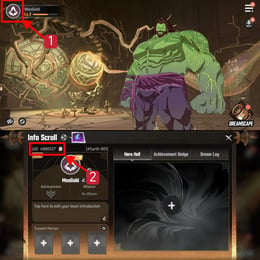
- In the main game lobby, tap your Avatar Profile icon located in the top-left corner of the screen.
- Open the Basic Info or Player Profile tab.
- Locate your User ID (UID) displayed directly beneath your player nickname.
- Tap the Copy icon next to your UID string to copy the numbers to your clipboard.
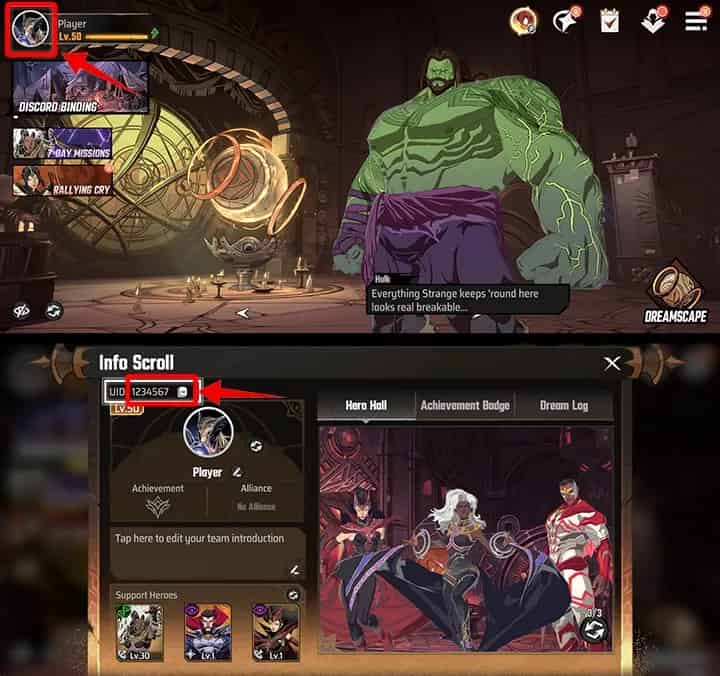
Paste this copied UID into the User ID field on VGTopup before checking out. Always verify that the numbers match your in-game profile exactly.
Step-by-Step Guide to Recharge Marvel Mystic Mayhem on VGTopup
Recharging your Marvel Mystic Mayhem balance on VGTopup is straightforward. Follow these steps to complete your purchase:
- Choose Your Package: Browse the available Marvel Mystic Mayhem product listings on VGTopup. Select the exact amount of Dreamgems, special bundles, or pass options you wish to buy.
- Enter Your User ID: Paste your in-game UID into the required input field. Double-check the numbers to avoid sending items to an incorrect account.
- Review Your Order: Confirm that the selected package and User ID are correct.
- Proceed to Checkout: Select your preferred payment method on the live checkout screen. VGTopup supports multiple secure local and international payment channels with real-time pricing.
- Complete Payment: Follow the on-screen prompts to finalize your transaction.
- Receive Your Items: Once the transaction completes, your Dreamgems or packages are delivered straight to your Marvel Mystic Mayhem account. Relaunch or refresh your game to view your updated balance.
Marvel Mystic Mayhem In-Game Packages: Dreamgems, Dreamstones, and Passes
Marvel Mystic Mayhem offers different types of in-game resources designed for specific upgrade and summoning needs. The table below outlines the core packages available for recharge:
| Package / Currency Type | In-Game Utility | Primary Use Cases |
|---|---|---|
| Dreamgems | Core premium currency | Hero recruitment banners, stamina refreshes, and store bundles |
| Dreamstones | Summoning tokens | Targeted character recruitment and limited-time banner pulls |
| Monthly Supply Pass | Daily progressive reward | Immediate initial Dreamgems plus daily log-in currency distributions |
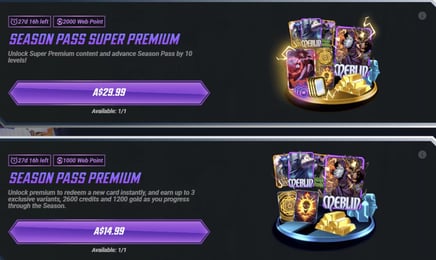
| Battle / Season Pass | Tiered milestone unlocks | Exclusive hero skins, ascension materials, and premium gear chests |
| Ascension Bundles | Character progression packs | Mystic catalysts, gold supplies, and skill upgrade books |
Selecting the right package depends on your immediate tactical goals. If a limited-time hero banner is active, direct Dreamgems and Dreamstones provide immediate summoning power. If you are building a long-term roster, monthly passes provide steady daily currency over 30 days.
Why Choose VGTopup for Marvel Mystic Mayhem Recharges
VGTopup provides a secure, efficient platform built specifically for mobile and online gamers. Here is why players use VGTopup for their Marvel Mystic Mayhem recharges:
- Account Safety Guaranteed: You never need to surrender your account passwords or personal login tokens. Recharges require only your public User ID, keeping your account completely secure.
- Automated Direct Delivery: Orders enter an automated processing pipeline immediately after checkout, ensuring prompt crediting to your game account.
- Transparent Live Pricing: VGTopup displays clear, real-time rates on the checkout page with no hidden processing fees. You can view prices in your local currency before confirming payment.
- 2026 Updated Compatibility: The catalog is updated to match the latest 2026 Marvel Mystic Mayhem game versions, ensuring all newly released packs and regional servers are supported.
- Dedicated Customer Support: If you ever have a question regarding order status or need help verifying your UID, responsive customer support agents are ready to assist you.
Troubleshooting Common Top-Up Errors & Account Sync Issues
If you experience any delays or issues after placing your order, use this troubleshooting checklist:
- Restart the Game App: In many cases, the game client caches your previous balance. Close Marvel Mystic Mayhem completely from your background applications and launch it again to trigger a server refresh.
- Check In-Game Mailbox: Certain promotional bundles, bonus materials, or pass activations are delivered directly to your in-game mailbox instead of adding immediately to your top balance bar. Check your inbox and tap claim.
- Verify UID Accuracy: If your balance has not updated after several minutes, check the order receipt on VGTopup. Ensure the UID submitted matches your profile. If you notice a typo, contact VGTopup support immediately with your order number.
- Check Game Server Maintenance: During scheduled developer maintenance or major version updates, game servers temporarily pause incoming third-party deliveries. Your top up will process automatically as soon as server maintenance concludes.
Marvel Mystic Mayhem Top Up FAQs
How do I find my User ID in Marvel Mystic Mayhem?
Open Marvel Mystic Mayhem and tap your player profile avatar in the upper-left corner of the lobby screen. Your User ID is displayed under your player name. Tap the copy icon next to the number string to copy it directly.
Do I need to provide my account password to top up Marvel Mystic Mayhem on VGTopup?
No. VGTopup only requires your in-game User ID (UID). You never have to share your game password, Google account, Apple ID, or social media login details.
What in-game items or currencies can I purchase for Marvel Mystic Mayhem?
You can purchase Dreamgems, Dreamstone packs, monthly supply passes, battle passes, and special progression resource bundles depending on current in-game availability.
How long does it take for Dreamgems to arrive in my Marvel Mystic Mayhem account?
Under normal operating conditions, Dreamgems are credited directly to your account shortly after payment confirmation. If the balance does not display right away, restart your game client to sync with the server.
What should I do if I entered the incorrect User ID during checkout?
If you enter the wrong User ID, contact VGTopup customer support right away with your order number and the correct UID. If the order has not yet been processed by the automated delivery system, support can assist in correcting the details.
What payment methods are supported for Marvel Mystic Mayhem recharge?
VGTopup supports various secure payment gateways, including credit and debit cards, digital e-wallets, and localized online banking options. Available payment methods and currency conversions are displayed on the live checkout page.
Select Denomination
Tax, payment fees and eligible coupons are calculated at checkout.
| Package | Price |
|---|---|
| 60 Dreamstone | USD 0.66 |
| 300 Dreamstone | USD 3.33 |
| 600 Dreamstone | USD 6.63 |
| 1200 Dreamstone | USD 13.28 |
| 3000 Dreamstone | USD 33.08 |
| 6000 Dreamstone | USD 66.29 |