What diamonds actually buy, if you're brand new
Diamonds are the premium currency. They open up the Go Go Pass, exclusive costumes, weapon skins, upgrade materials, and limited-time events, per Codashop. That's the entire spend surface. There's no secret real-money-only lane lurking behind them either. Anything cosmetic or progression-flavored priced in diamonds can also be paid for with promo diamonds you earn or claim, which the Magic Chess Official Facebook says behave exactly like the regular kind against skin and chessboard costs.
So your first purchase isn't really buying power. It's buying options. The Go Go Pass alone runs 1,750 Diamonds by Codashop's figures, and that single number tells you plenty: the headline pass costs more than the $9.99 pack hands you. Hold onto that gap. It shapes every branch below.
Confirm your player ID before any money moves
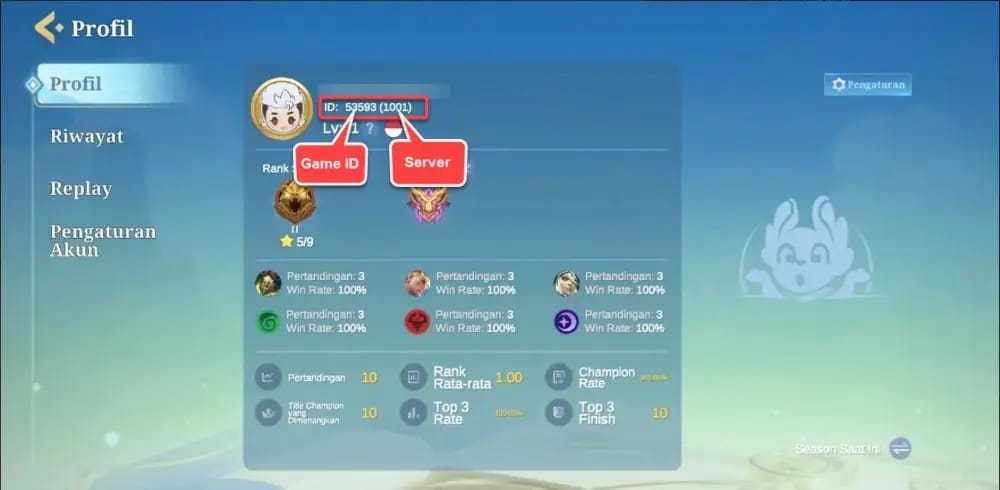
The step nearly every guide buries isn't which pack to grab. It's locking in your player ID and server/zone before a single cent leaves your account. Top up on the wrong server or fat-finger the ID, and your diamonds touch down on an account you can't open, with no tidy refund once delivery "succeeds." Every serious third-party guide flags this.
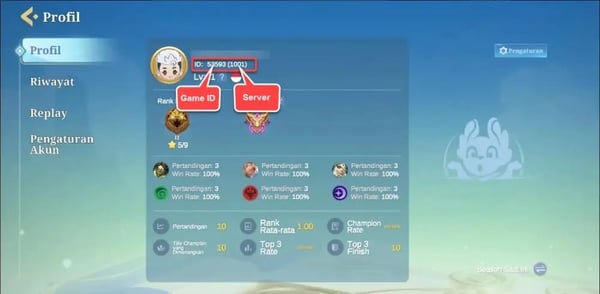
Pulling the ID takes a few seconds. Log in, tap your avatar in the upper-left corner, and read off the Player ID plus the Server/Zone number sitting right there. Jot both down. That's the only data a legit ID platform needs, and the only data it has any business asking for.
Why isn't this optional? Flip your server or region after a top-up and you can maroon those diamonds on the wrong account entirely. In-app diamonds and ID top-up diamonds drop into the same wallet, sure, but only when the destination account lines up. Miss the server by one digit and congratulations, you just bankrolled a stranger.
Quick verification before any payment:
- Open the game, tap your avatar (upper-left).
- Note the Player ID exactly as shown.
- Note the Server/Zone number, the part people skip.
- Match both against the checkout screen before you confirm.
No matter the channel or the budget, ID plus server verification is the single move that heads off the priciest blunder in this whole process.
Zero risk, sticker price? Go in-app
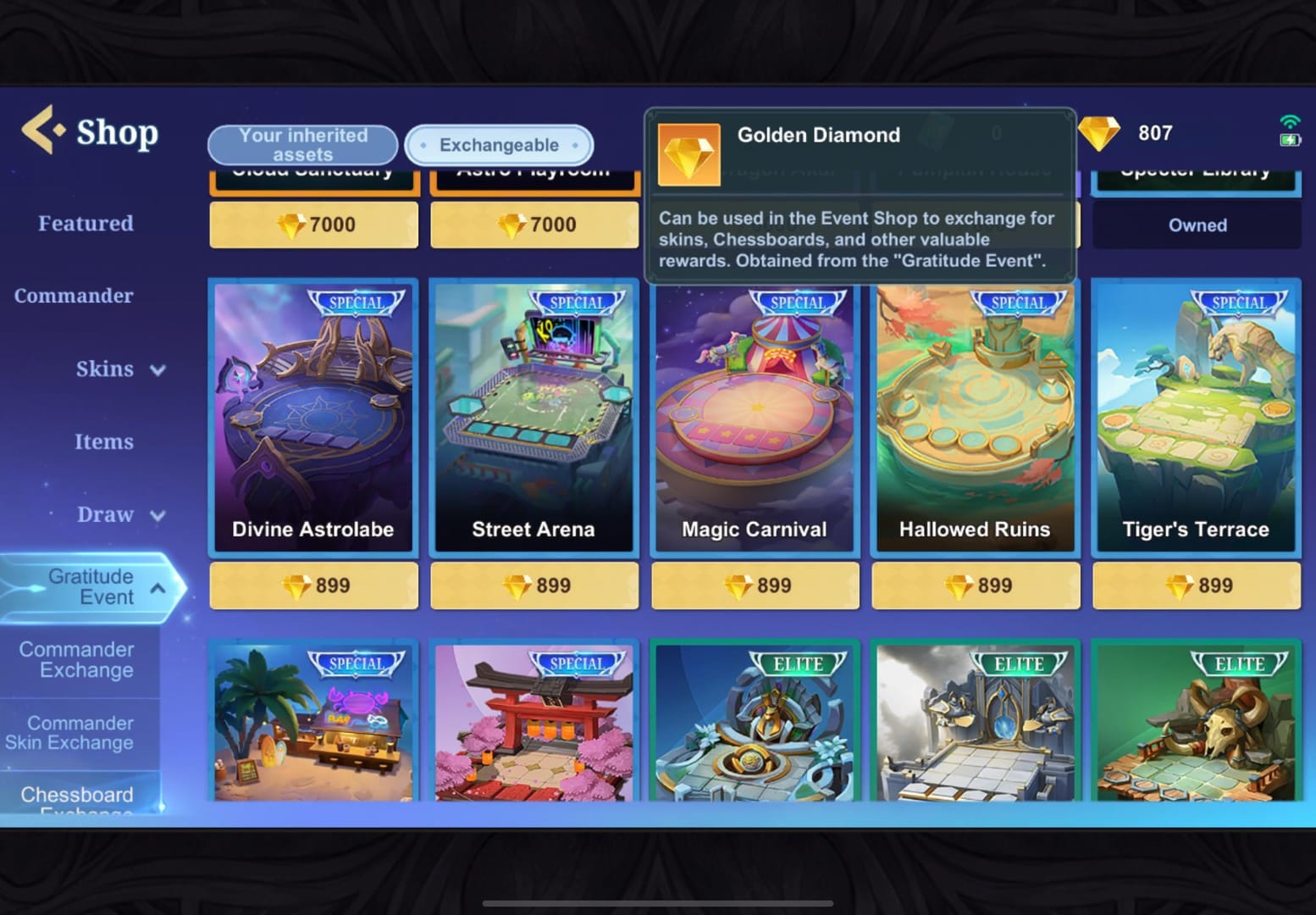
The official in-app route is the safest default going. Open the shop or the Pass menu, pick a diamond pack, and pay through Google Play or the App Store, per the Apple App Store listing. No third party ever touches the money. Your Apple or Google account runs the transaction, so refunds and disputes route through channels you already lean on.
US App Store pricing is published and steady:
| Pack |
Diamonds |
Price (USD) |
Cost per diamond |
| Small |
50 |
$0.99 |
~$0.0198 |
| Medium |
150 |
$2.99 |
~$0.0199 |
| Large |
250 |
$4.99 |
~$0.0200 |
| XL |
500 |
$9.99 |
~$0.0200 |
| XXL |
1,000 |
$19.99 |
~$0.0200 |
| Mega |
5,000 |
$99.99 |
~$0.0200 |
Source: Apple App Store Magic Chess Go Go US (2026). Cost-per-diamond is my calculation from the listed prices.
Look at what those numbers admit. Before any bonus, the per-diamond cost barely budges across tiers, roughly two cents a diamond from the $0.99 pack clear up to $99.99. That's weird. In most gacha economies the jumbo pack is wildly cheaper per unit. Here the official ladder is nearly flat. So for a first-timer there's almost no raw-value penalty for buying small. The lever isn't pack size. It's the bonus.
Risk-averse and indifferent to price? Buy in-app, and since the tiers run nearly flat per diamond, grab the smallest one that fires the bonus first.
The first-purchase bonus is the only lever worth caring about

This is the spicy heart of the whole piece, and I'll plant a flag: for a fresh account, the smallest pack that trips the first-recharge bonus is the highest-value diamond buy you'll ever make in this game, sweeter value-per-dollar than the $99.99 mega pack. Why? The first-recharge 2x bonus lands on the 50/150/250/500 Diamond tiers, per Smile.one.
Here's what doubling does to your cost-per-diamond:
| Base tier |
Base diamonds |
Bonus |
Total |
Effective cost/diamond* |
| 50D |
50 |
50 |
100 |
~$0.0099 |
| 150D |
150 |
150 |
300 |
~$0.0100 |
| 250D |
250 |
250 |
500 |
~$0.0100 |
| 500D |
500 |
500 |
1,000 |
~$0.0100 |
Source: Smile.one / Razer Gold (2026) for bonus totals; effective cost calculated against US App Store base prices.
*Effective cost slides to roughly a penny per diamond on bonused tiers, against the flat ~$0.02 on the $99.99 Mega pack, which carries no first-recharge bonus.
So the $9.99 (500D) pack with its first-purchase bonus hands you 1,000 total diamonds. Same count as the 1,000-diamond XXL pack that runs $19.99 with no bonus. You're walking away with the XXL payload at the XL price. That's exactly why I'd never watch a new player drop $99.99 cold.
Now the buried mechanic most guides squash into one throwaway line: the bonus applies once per tier, and follow-up buys snap back to normal, per the docs Smile.one and Razer Gold publish. That wording matters. It hints you might be able to claim the doubling on the 50D, and the 150D, and the 250D, and the 500D, stacking four separate bonuses instead of one flat freebie. If that reading holds on your account, the value-maxxing first session isn't a single pack. It's walking up each bonus-eligible tier once before any of them revert.
I'd file that under the rosy interpretation and check it live on a small tier before committing real cash to the bigger ones. The upside's big enough that five minutes of testing pays for itself.
One more wrinkle: a Codashop Instagram post from February 2026 suggests the first-recharge bonus resets periodically for everyone. If you topped up months back and the doubling's sitting in your store again, it isn't a glitch. Claim it.
Chasing value? Claim the first-recharge double on the smallest eligible tier first, test whether it stacks per tier, and never buy a no-bonus mega pack on day one.
A third-party deal looks cheaper? Run the numbers first
ID top-up through a third party is genuinely safe when the platform's reputable and only wants your ID and server, and I'll shove back on the "in-app is the only safe way" line, because it's lazy. Codashop lays out its own model plainly: "Simply enter your User ID and Zone ID, select the value of Diamonds... instantly delivered." Legit delivery, partnered and verified, and frequently faster or a touch cheaper than the in-app store. Codashop US lists 55–6,000 Diamonds across roughly $0.94–$94.99.
The safety argument actually has two honest sides. The App Store and Google Play sit at the top because the transaction's direct. Partnered platforms like the one above deliver identical diamonds, occasionally cheaper, with the same instant drop. My read: both are safe so long as you stay on verified rails. The danger was never "third-party," it's "unlisted and unverified."
So now the scam arithmetic kicks in. A diamond's worth about two cents at official rate. Any offer pricing diamonds way under that, outside a published first-recharge promo, is suspicious on its face, because the seller has no honest supply that cheap. Reports in the MCGG Facebook group note only certain partners (they name SEAGM and UniPin as officially partnered) earn trust, and that non-partnered bargains carry real non-delivery risk.
The brightest red line is credential-based. Any platform or "booster" asking for your password instead of your player ID gets rejected, no debate. ID-only top-ups physically can't compromise your account, because the platform never holds access. Password-sharing hands over the entire account, and no honest top-up needs your login. That's not a caution. It's a hard rule.
For transparency: this guide's published by VGTopup, which is itself an ID-based platform. If you'd rather pay by player ID, Magic Chess: Go Go Diamonds top up is one option that follows the safe pattern, ID and server only, never your password. Weigh it like any other channel, against the cost-per-diamond figures above and the credential rule.
Comparison-shopping third parties? Confirm the platform's partnered, confirm it asks only for ID plus server, and treat any below-two-cents-per-diamond offer outside a real promo as bait.
The cross-region gap is real, but don't chase it
Regional pricing does swing, and the published figures back it. Codashop SG lists 40–4,100 Diamonds at roughly S$0.95–S$93.20, and Codashop PH runs 5–6,042 Diamonds from about ₱5.32 to ₱5,054. The US App Store's 50D pack at $0.99 has a lower local-currency equivalent in markets like the Philippines, per the cross-listing between the App Store and Codashop PH.
But my flat call for a first-timer: skip the VPN hop. Whatever you'd save on a $0.99 to $9.99 first pack is loose change in absolute terms, and region-switching drags in account-risk plus the same server-mismatch trap that strands diamonds. A few cents aren't worth funding the wrong account or knotting up your store region. Buy where you actually live, claim your bonus, move on.
If you're sitting in a cheaper-pricing market, checkout already rewards you. But no first-timer should region-switch to shave pennies off a small pack.
The decision matrix, by player profile

| Your profile |
Recommended first move |
Why |
| Day-1 beginner (first-ever purchase) |
Claim the first-recharge 2x on the smallest eligible tier before any larger buy |
Doubling halves effective cost to ~$0.01/diamond; per Codashop/Smile.one this is the day-1 value play |
| Low-spender (one small pack) |
Weekly Card ($1.99, or $1.89 on Codashop US) or a small bonused tier for steady diamonds |
Lowest sustained cost; per Codashop the weekly cadence beats one-off small buys |
| Cautious F2P testing a minimal top-up |
Smallest verified top-up through an official partner (in-app, or a partnered ID platform) |
Confirms the flow works on a tiny stake; community guidance flags partnered channels only |
| Value-maximizer |
Walk each bonus-eligible tier once (test per-tier stacking) before any non-bonus pack |
Bonus applies per tier, not once total, per Smile.one/Razer, potential to stack four doublings |
You paid but the diamonds never showed
Legit channels deliver instantly, since a correct ID gets near-immediate fulfillment. So when diamonds don't land, work the problem in order instead of panic-buying a second time:
- Re-check your Player ID and Server/Zone against the receipt. The classic "missing diamonds" case usually isn't fraud, it's a correct payment dropped onto a mistyped ID or the wrong server. If they don't match, your diamonds did arrive. Just on somebody else's account.
- Confirm the transaction actually closed. In-app, dig through your Google Play or App Store purchase history for a charge and a transaction ID. On an ID partner, pull up the order status and confirmation email.
- Hold your proof. Save the transaction ID, order number, and timestamp. That's your dispute ammo.
- File through the channel you paid. In-app charges dispute through Apple or Google directly, which is a built-in perk of the official lane. A partnered platform runs its own support off your order ID.
So here's the recovery truth: if the ID and server checked out and the platform's verified, delivery is the platform's problem and you've got a paper trail. Hand a password to a "booster," though, and there's no recourse. Which loops you right back to the one rule worth tattooing on your buying habits.
Frequently Asked Questions
Does the first-purchase bonus come back, or is it truly once per account?
Once per tier, but not bolted shut forever. That February 2026 Codashop Instagram post suggests the first-recharge bonus resets periodically for everyone, so if you topped up ages ago and spot the doubling offered again in your store, it's a real returning promo, not a display bug. Claim it on a small tier.
If I top up in-app on iPhone and later by player ID, do diamonds pool together?
They can drop into the same wallet, since both routes credit the account tied to your Player ID and server. The snag is bonus eligibility, not the wallet. The first-recharge doubling's tracked per account and per tier, so claiming it in-app might burn that tier's bonus for a later ID-based buy. Confirm the ID matches before you mix channels.
Is the Weekly Card better than just buying a diamond pack?
For a true low-spender, yeah. Codashop lists it at $1.99 (or $1.89 on Codashop US), and it drips out daily diamonds rather than dumping a one-off lump. If your ceiling's a couple bucks a week, the recurring card stretches further than a lone small pack. If you only ever want one purchase, skip it and take the bonused tier.
What's the cheapest legitimate way to get diamonds without risking my account?
The smallest first-recharge tier, claimed once. It pulls effective cost down to about a penny per diamond per the Smile.one/Razer bonus figures, versus ~two cents at standard rate. Nothing legit beats it. Any offer pricing diamonds far below two cents outside a published promo has no honest supply chain holding it up. Treat it as non-delivery risk.
Can switching to a cheaper region's pricing get me banned or lose diamonds?
The bigger, concrete hazard isn't a ban, it's stranding diamonds. Flip your server or region after a top-up and the purchase can land on the wrong account entirely, with no clean refund. The price gaps between US, SG, and PH listings are real but small in absolute terms on a first pack, and not worth tangling your account over as a first-timer. Buy in your real region.







Comments