
Marvel Rivals Top Up: What Are Lattices and In-Game Uses
Marvel Rivals delivers intense superhero team combat where coordination, strategy, and personal style take center stage. To fully customize your favorite Marvel heroes and villains, you need Lattices, the premium in-game currency. Lattices give you direct access to the latest seasonal cosmetics, premium Battle Pass tracks, legendary hero skins, special MVP victory animations, custom voice lines, emotes, and spray bundles.
Whether you main heavy vanguard heroes like Magneto and Hulk, dynamic duelists like Spider-Man and Iron Man, or essential strategists like Luna Snow and Loki, topping up Lattices allows you to personalize their appearance for every match. Limited-time event drops and featured item shop rotations also require Lattices, making an account balance ready for whenever your favorite character receives an exclusive costume.
Recharging on VGTopup gives you a direct, safe way to credit Lattices straight to your Marvel Rivals account without leaving your setup or dealing with complicated redemption codes.
How to Top Up Marvel Rivals Lattices on VGTopup
Topping up your Marvel Rivals account on VGTopup is simple, direct, and secure. Follow these clear steps to complete your Lattice order:
- Select Your Desired Package: Review the available Lattice packs listed on the live product catalog and pick the quantity you wish to purchase.
- Enter Your Marvel Rivals User ID: Type your numeric User ID (UID) into the designated account field. Double-check the digits to ensure accurate delivery.
- Proceed to Secure Checkout: Click the purchase button to advance to the checkout screen. Current prices and order summaries are displayed transparently before payment.
- Choose Your Payment Method: Select your preferred payment option from the available checkout choices and complete the transaction.
- Receive Your Lattices: Once payment processing finishes, your Lattices are sent directly to your Marvel Rivals account. Launch or restart your game client to verify your updated balance.
Where to Find Your Marvel Rivals User ID
Your Marvel Rivals User ID (UID) is the unique identifier tied to your player profile. Because VGTopup uses direct UID delivery, finding and entering your correct UID ensures that your purchased Lattices arrive in your account without delays.
Follow this visual walkthrough to locate your User ID in the game client:
- Launch Marvel Rivals on your PC (Steam or Epic Games Store), PlayStation 5, or Xbox Series X/S.
- In the main menu lobby, locate and click on your Player Avatar / Profile Icon in the top section of the screen.
- Open the Profile Summary or Career Overview tab.
- Your numeric User ID is displayed directly beneath your username and player level.
- Copy the numeric string or carefully write it down to paste into the order field on VGTopup.
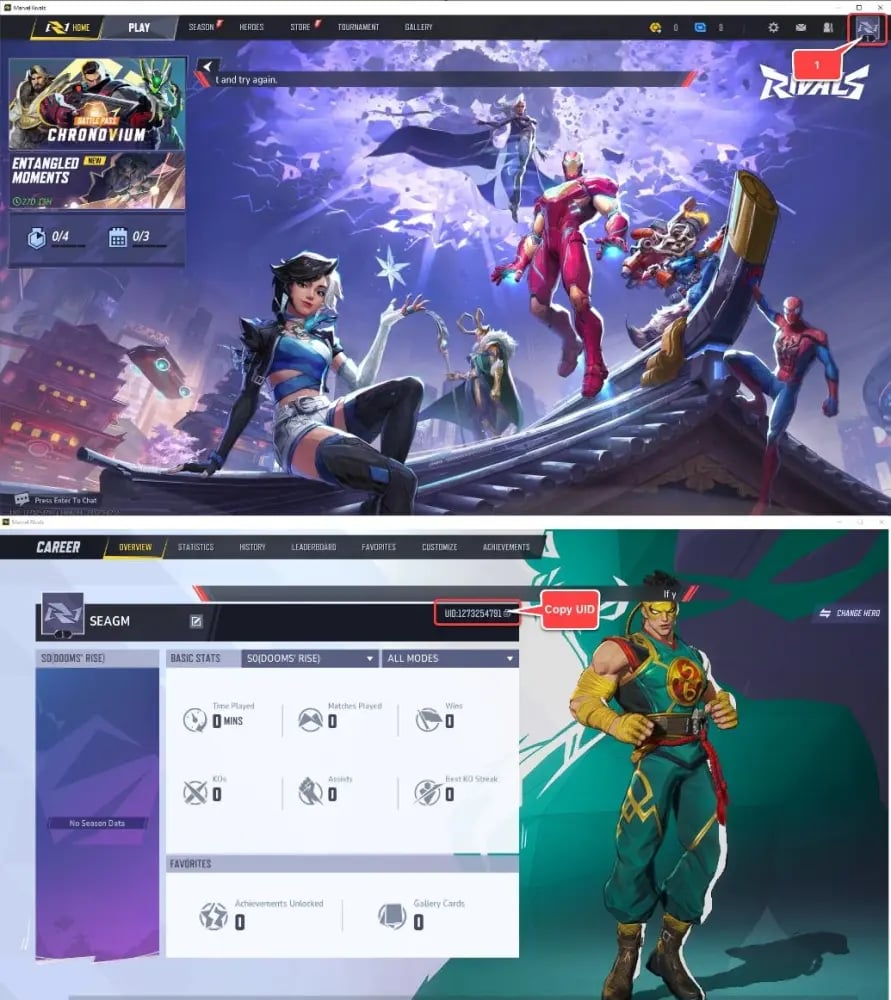
Make sure to enter the exact numbers shown on your profile. You do not need to provide your username, email address, or console gamertag—only the numeric User ID is required.
Lattices vs Units: Marvel Rivals Currency Guide
Marvel Rivals features distinct in-game currencies designed for different reward structures. Understanding how Lattices and Units work helps you manage your account resources effectively.
| Currency | How to Obtain | Primary Uses | Cross-Platform Sharing |
|---|---|---|---|
| Lattices | Real-money top-up on VGTopup | Premium Battle Pass, exclusive store bundles, converting to Units | Bound to your linked game UID |
| Units | Daily quests, battle rewards, Lattice conversion | Standard cosmetic gallery, character sprays, profile nameplates | Bound to your linked game UID |
Lattices serve as the primary premium currency. While Units can be gathered through consistent gameplay, seasonal challenges, and achievements, high-tier legendary outfits and premium seasonal reward tracks require Lattices. When you need additional Units quickly for standard store unlocks, you can also convert your purchased Lattices directly within the in-game shop interface.
Unlocking the Marvel Rivals Battle Pass and Hero Skins
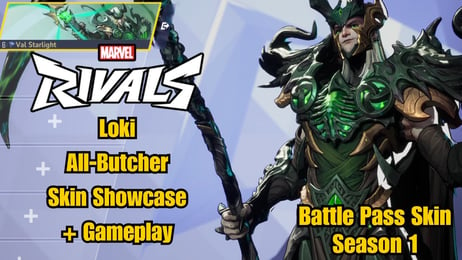
Every season in Marvel Rivals brings a new themed Battle Pass packed with exclusive content. Purchasing the premium Battle Pass track with Lattices gives you access to multiple tiers of rewards as you play matches and complete seasonal missions.
Premium Battle Pass benefits include:- Exclusive Hero Costumes: High-rarity skins depicting comic-accurate uniforms and original alternate-universe variants.- Weapon & Ability FX: Custom visual enhancements and special sound triggers for character abilities.- MVP Cinematics: Signature victory sequences played when your hero earns the match MVP title.- Emotes & Sprays: Tactical team communication markers and expressive hero animations.- Lattice Kickbacks: Earning back Lattices at specific milestones to put toward future seasonal passes or store bundles.
To unlock the premium pass immediately upon season launch, ensure your Lattice balance is topped up on VGTopup beforehand so you begin progressing through the reward tiers from your very first match.
Cross-Platform Support: PC, PlayStation 5, and Xbox Series X/S
Marvel Rivals supports cross-platform play across PC (Steam, Epic Games), PlayStation 5, and Xbox Series X/S. If you play on multiple systems using a linked game profile, your account progression and purchases sync under your unified User ID.
When ordering a Marvel Rivals top up on VGTopup:- Provide your primary in-game numeric User ID regardless of which hardware platform you currently use.- Lattices credited to your UID will reflect on your account when you log in.- If you switch between PC and console, verify that your accounts are linked through the official game publisher account settings so that unlocked hero skins and Battle Pass tiers remain accessible everywhere you play.
Safe Marvel Rivals Top-Up: Account Security with UID-Only Recharges
Account security is essential when buying game currencies online. VGTopup relies strictly on direct-to-UID top-ups, meaning you never have to provide your account password, security questions, or two-factor authentication codes.
Why UID top-ups keep your account safe:- Zero Password Sharing: Your login credentials stay completely private on your personal device.- No Account Takeover Risk: Because no third party logs into your profile, your linked email and payment credentials remain untouched.- Direct Delivery Pipeline: Orders are routed directly to the game server using your player ID string.
Troubleshooting Delayed Deliveries
If your Lattices do not show up immediately after your order status marks as completed, follow these troubleshooting steps:1. Restart the Game Client: Completely close Marvel Rivals and re-open it to force a fresh server sync with your account wallet.2. Verify the Submitted UID: Check your VGTopup order receipt to confirm that the entered User ID matches your in-game profile number.3. Check Connection Stability: Make sure your platform is connected to stable internet and not in offline mode.4. Contact VGTopup Support: If your balance does not update after restarting, reach out to the VGTopup customer support team with your order number for fast assistance.
Marvel Rivals Top Up FAQ
How to topup in Marvel Rivals?
To top up in Marvel Rivals, select your desired Lattice amount on VGTopup, enter your numeric in-game User ID (UID), and complete your payment at checkout. The Lattices will be credited directly to your player account.
Where can I find my Marvel Rivals User ID?
Open Marvel Rivals, click your profile icon at the top of the main lobby screen, and go to the Profile Overview page. Your numeric User ID is listed right below your player name.
Do I need to share my Marvel Rivals password to top up on VGTopup?
No. VGTopup only requires your numeric User ID. You should never share your password, email login, or verification codes with anyone.
What is the difference between Lattices and Units in Marvel Rivals?
Lattices are the premium paid currency used to buy Battle Passes, premium bundles, and store-exclusive skins. Units are the standard in-game currency earned by completing quests, matches, or by converting Lattices.
Can I use purchased Marvel Rivals Lattices on PC, PS5, and Xbox?
Yes. As long as your platform accounts are linked to the same Marvel Rivals player profile, your purchases and unlocks tied to your User ID stay synchronized across PC, PlayStation 5, and Xbox Series X/S.
How long does it take for Marvel Rivals Lattices to arrive after purchase?
Top-up orders on VGTopup are processed promptly once payment clears. In most cases, the Lattices appear in your in-game wallet shortly after order completion. Restarting the game helps refresh your balance.
Can I buy the Marvel Rivals Battle Pass using Lattices?
Yes. The Marvel Rivals premium Battle Pass track is purchased directly inside the game using Lattices. Once you top up your balance on VGTopup, go to the in-game Battle Pass menu and activate the premium track.
Select Denomination
Tax, payment fees and eligible coupons are calculated at checkout.
| Package | Price |
|---|---|
| 100 Lattice | USD 0.83 |
| 500 Lattice | USD 4.12 |
| 1,000 Lattice | USD 8.16 |
| 2,180 Lattice | USD 16.25 |
| 5,680 Lattice | USD 40.55 |
| 11,680 Lattice | USD 81.09 |