
Arena Breakout Top Up: Bonds and Battle Pass Overview
Arena Breakout is an extraction tactical shooter where equipment management and resource preparation determine survival. Bonds serve as the primary premium currency in the game, allowing operatives to obtain critical tactical utility and cosmetic upgrades. You can use Bonds to purchase secure containers, expandable stash crates, weapon finishes, combat bundles, and seasonal Battle Pass upgrades.
Securing a Battle Pass grants access to premium progression reward tracks throughout an active season. As you complete operational missions, seasonal tasks, and extract from raids, your Battle Pass level rises to unlock Koen, equipment vouchers, high-grade armor, tactical rigs, and exclusive operative outfits. To keep your inventory fully supplied and gain access to season-exclusive items, recharging your Bonds and Battle Pass through VGTopup ensures direct delivery to your account.
How to Top Up Arena Breakout Bonds on VGTopup
Recharging your account on VGTopup requires only your numeric Player ID. Follow these steps to complete your purchase:
- Select the specific amount of Bonds or the Battle Pass package you wish to purchase from the product catalog.
- Enter your numeric Arena Breakout Player ID in the designated input field.
- Double-check your Player ID to confirm the numbers match your profile exactly.
- Proceed to the live checkout page to review available payment options and regional pricing.
- Complete the payment process.
- Launch Arena Breakout and collect your purchased Bonds or Battle Pass card directly from your in-game mailbox.
How to Find Your Arena Breakout Player ID
To ensure your Bonds or Battle Pass deliver directly to your operative profile, you must provide your exact numeric Player ID rather than your display name or account Open ID. Use the following steps to locate it:
- Open Arena Breakout on your mobile device and log in to your account.
- From the main lobby screen, tap your profile avatar located in the top-left corner.
- In the profile summary screen, find your numeric Player ID displayed directly below your character nickname.
- Tap the copy icon next to the digits to copy your Player ID to your clipboard.
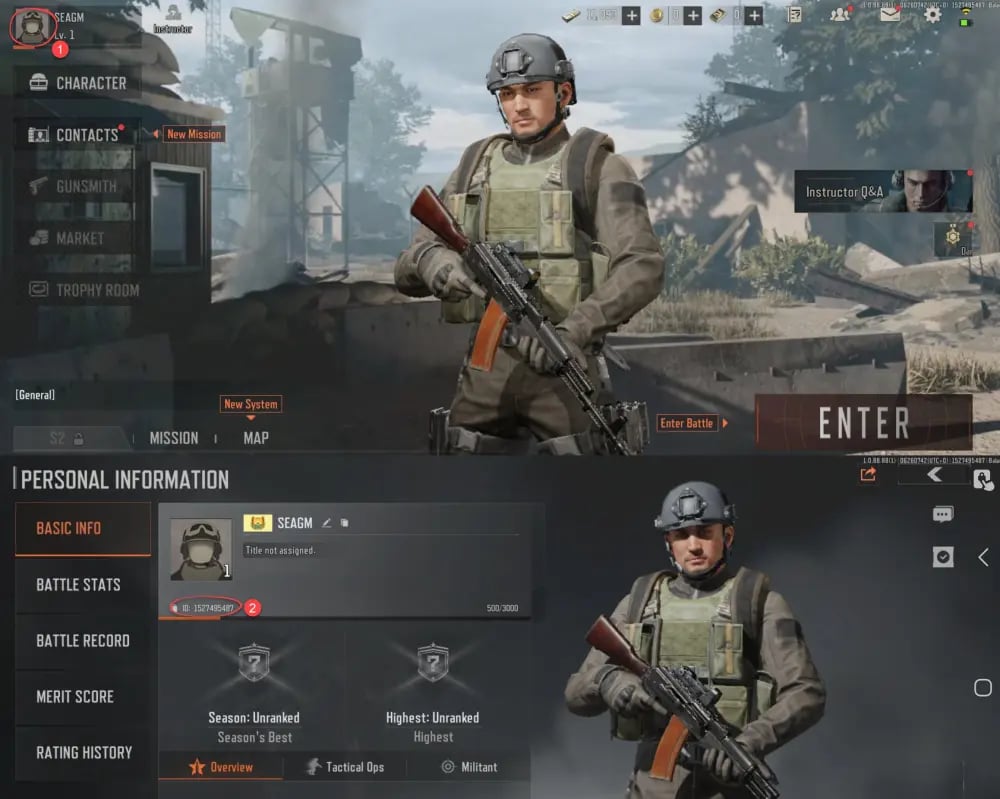
Paste this copied numeric ID directly into the Player ID field on VGTopup before placing your order.
Standard Battle Pass vs Advanced Battle Pass Requirements
Arena Breakout features two Battle Pass tiers during each operational season: the Standard Battle Pass and the Advanced Battle Pass. Both options provide access to the premium seasonal reward track, but they differ in initial tier advancement and bonus cosmetics.
| Feature / Option | Standard Battle Pass | Advanced Battle Pass |
|---|---|---|
| Level Requirement | Character Level 10 | Character Level 10 |
| Tier Progression | Starts at Tier 1 | Includes Instant 30-Tier Boost |
| Delivery Method | In-game Mail (Pass Card) | In-game Mail (Pass Card) |
| Activation Location | Player Stash / Inventory | Player Stash / Inventory |
| Exclusive Seasonal Rewards | Full Premium Track Rewards | Premium Track + Exclusive Cosmetic Bonus |
Battle Pass Activation Steps
When you purchase a Battle Pass on VGTopup, the pass is delivered as an in-game activation card. To activate it on your operative:
- Reach character Level 10 on your Arena Breakout profile to unlock the Battle Pass feature.
- Open your in-game mailbox in the lobby and claim the Battle Pass activation card attachment.
- Go to your stash inventory where the item is stored.
- Select the Battle Pass activation card and tap Use to unlock the premium reward track for the current active season.
- Make sure to activate your card before the scheduled season end cutoff date, as unactivated cards cannot be carried forward to new seasons.
Arena Breakout Mobile vs Arena Breakout Infinite: Platform Differences
Arena Breakout (Mobile) and Arena Breakout: Infinite (PC) run on completely separate game servers and account architectures. It is essential to understand the following platform distinctions before purchasing:
- Currency Separation: Bonds purchased for Arena Breakout Mobile cannot be transferred, shared, or spent in Arena Breakout: Infinite on PC.
- No Cross-Progression for Purchases: Battle Pass activations and cosmetic items unlocked on the mobile version do not sync with PC accounts.
- Target Platform: The direct top-up services on this VGTopup page apply exclusively to the official mobile edition of Arena Breakout.
Always ensure that your numeric Player ID belongs to the mobile version of the game before completing your order.
Why Choose VGTopup for Arena Breakout Direct Top-Ups
- 100% Password-Free Transactions: VGTopup uses direct Player ID recharges. You never need to share your login credentials, social media logins, or passwords.
- Direct In-Game Mail Delivery: Purchased items and pass cards are routed directly to your account mailbox without requiring manual third-party log-ins.
- Transparent Live Checkout: Check exact regional pricing, live currency rates, and available local payment gateways dynamically at checkout.
- Reliable Support: Access dedicated customer service to resolve any order inquiries or delivery questions.
Frequently Asked Questions About Arena Breakout Recharges
How do I purchase Arena Breakout Bonds?
Select your desired Bonds denomination on VGTopup, type in your numeric Arena Breakout Player ID, and proceed to checkout. Once your payment is verified, the Bonds are credited directly to your account.
Where can I find my Arena Breakout Player ID for top-up?
Log in to the game, tap your operative avatar in the upper-left corner of the lobby screen, and locate the numeric sequence under your character nickname. Tap the copy icon next to the number to copy your Player ID.
Is the Arena Breakout Battle Pass a one-time purchase?
A Battle Pass purchase applies only to the active season during which it is purchased and activated. Once a season concludes, a new Battle Pass must be acquired to access the next season's premium rewards.
Why can't I buy or activate the Battle Pass in Arena Breakout?
To activate a Battle Pass, your operative profile must reach character Level 10. In addition, Battle Passes delivered via direct top-up arrive as an item in your mailbox; you must claim the item to your stash and manually tap Use to activate the pass before the season ends.
Do Arena Breakout Bonds transfer between Mobile and PC?
No. Arena Breakout Mobile and Arena Breakout: Infinite (PC) are operated on separate game clients. Bonds, Battle Passes, and inventory items do not transfer across platforms.
Do I need to provide my account password to top up on VGTopup?
No. VGTopup only requires your numeric Player ID to complete the top-up. You never have to provide passwords, verification codes, or personal account access.
Select Denomination
Tax, payment fees and eligible coupons are calculated at checkout.
| Package | Price |
|---|---|
| Beginner Select Pack | USD 0.64 |
| 60 + 6 Bonds | USD 0.70 |
| Monthly Advanced Battle Pass | USD 0.83 |
| Bulletproof Case Access | USD 1.92 |
| Monthly Premium Battle Pass | USD 3.33 |
| 310 + 25 Bonds | USD 3.54 |
| Composite Case Access | USD 5.79 |
| 630 + 45 Bonds | USD 7.08 |
| Quarterly Premium Battle Pass | USD 10.01 |
| 1580 + 110 Bonds | USD 18.22 |
| 3200 + 200 Bonds | USD 35.45 |
| 6500 + 320 Bonds | USD 70.80 |