Name the problem before you file anything
Classify the failure before a single form gets submitted. The three states route to wildly different fixes, and guessing burns time.
A failed transaction never completed, so no funds should have left your account. A declined charge is the bank or gateway rejecting the attempt, and declined cards, per processor behavior reported across game communities, simply don't charge. A pending transaction is the trap in the middle: an authorization hold parks on your account, dressed up to look exactly like a settled charge, except it hasn't settled. Then there's the fourth scenario that sends people spiraling, charged-but-no-Bonds, where the money cleared and the currency never showed.
Now the mechanic that quietly defuses half of these so-called failures. Delivery to the in-game mailbox can lag behind the payment confirmation. The gateway flashes "paid," your wallet still reads empty, the dread sets in, and nothing's broken. The Bonds are mid-flight. Second false alarm: that pending hold. A bank authorization on a declined or stuck card usually auto-voids once the processor's hold window expires (often a few days) with zero refund involved. You watch the "charge" evaporate by itself.
So before anybody touches support: prove it's a real, settled charge with no delivery. Not mailbox lag. Not a phantom hold. That one check kills more pointless tickets than anything else here.
The "just wait" advice expires after a day
Be patient, pending sorts itself out. Solid advice for the first day. Genuinely risky after that.
Inside the first few hours, sitting tight is the right call. A real auth hold on a card that got bounced or stalled releases the moment the processor's window closes. Failed payments don't charge to begin with, so there's nothing to recover. Patience costs you nothing and spares you a ticket.
Past 24 hours pending, though, patience flips from asset to liability. You're rarely staring at a hold that'll clear itself anymore. You're staring at a wedged transaction that needs a human, and every day you let it sit chews into the window where a platform will still hear a refund out. Google Play routes in-app purchase issues to the developer, with Google handling certain eligible cases inside a 48-hour band per Google Play refund policies. Drift past that band and your cleanest lever's gone.
I once sat on a wedged mobile charge "to be safe." The hold never resolved, and by the time I moved, the tidy 48-hour route had already shut. So act early on anything older than a day. That's not impatience, it's protecting an option before it expires.
Where a refund actually exists, and where the ticket dies on arrival
Successful, delivered top-ups are the wall, and the policy isn't shy about it. Per the End User License Agreement, all currency and virtual goods "remain our property, have no monetary value and are not redeemable, refundable, or eligible for any other alternate remedy." A separate clause: no refunds normally, except where the developer expressly authorizes one or where local law forces it.
Stack those two and the verdict's obvious. If your Bonds arrived, a refund request, especially on currency you've already burned, gets denied. The same terms make the spent-currency denial explicit. My steer to anyone reaching for the form here: a successful-delivery refund is an afternoon you'll never get back. Walk in knowing that.
Where you genuinely have standing:
- Charged, nothing delivered (and confirmed it's not mailbox lag). A real service failure. Strongest case on the board.
- Duplicate / double charge. Paid once, billed twice. The extra charge comes back.
- A "failed" payment that still settled. The rare gremlin where a failure actually cleared your account.
None of these are "I changed my mind" refunds. They're billing-error corrections, a category every channel takes seriously. Local consumer law can also punch through a blanket no-refund clause when the goods never arrived: "no refund on virtual currency" is a far flimsier line when the currency never reached you than when you're sitting on a stuffed wallet.
Recovery sequence when you're charged and empty-handed
Run it in order. Skipping rungs is how claims end up denied.
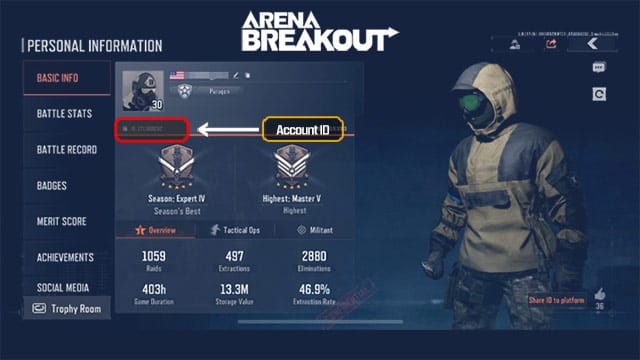
- Open the in-game mailbox and read your Bonds balance. Non-negotiable, and where most "failures" quietly die. Delivery lag means the currency might be sitting there unclaimed. Confirm before you escalate.
- Grab your order ID and receipt now. Find the transaction in your platform's purchase history (Steam library purchase history, Google Play payments, or Apple's reportaproblem page), per platform support docs. Screenshot it. This single thing dictates how fast your claim moves, and it costs ten seconds at checkout versus an hour of archaeology later.
- File with the channel that's actually holding your money. Store purchase goes to that store. Direct or publisher purchase goes to the publisher ticket.
For an official ticket, the publisher wants the specifics up front. Per the Level Infinite support page, you reach the support team (support@levelinfinite.com or the game-specific channel) with your UID, order ID, payment proof, and a description of the failed, pending, or declined issue. A ticket without the order ID just bounces back asking for it, so load everything in on the first pass.
One common, genuinely fixable PC case: community threads on r/ArenaBreakoutInfinite flag Steam payment errors on Bonds tied to the Steam overlay, with players clearing them by toggling the overlay off and retrying. If your purchase keeps erroring before it even closes, try that before assuming disaster.
Steam, Google, Apple, and resellers each run different rules
Where you bought decides who you talk to and how fast resolution lands. Here's the contrast prose can't carry cleanly:
| Channel |
Who to contact first |
Refundable? |
Realistic window |
| Steam (PC) |
Game support first; Steam for genuine errors |
In-game purchases in non-Valve titles generally not refundable via Steam |
Varies; contact support before assuming |
| Google Play (Android) |
Developer for in-app issues; Google for eligible cases |
Case-by-case; Google may handle within a 48-hour band |
~48h fast path, then developer route |
| Apple App Store (iOS) |
reportaproblem.apple.com |
Case-by-case, often recent purchases / issues |
Apple reviews per request |
| Third-party top-up |
Site's customer service with order ID |
Undelivered orders eligible; delivered are not |
Per site after-sales policy |
Sources: Steam Refunds policy (2026); Google Play refund policies (2026); Apple refund request page (2026); BuffBuff top-up page (2026).
A few things the grid compresses. On Steam, per the Steam Refunds policy, in-game purchases in non-Valve games like this one generally aren't refundable through Steam itself, which is precisely why a missing-item problem goes to game support rather than a Steam refund request that gets bounced. On iOS, the Apple refund request page funnels everything through reportaproblem.apple.com, judged case-by-case and weighted toward recent purchases and real issues.
Resellers change one thing that matters: the burden of proof slides onto you. A completed top-up through a reseller is non-refundable after payment, so type your UID with care, because a mistyped UID is your fault, per general third-party top-up guidance. But undelivered orders read differently. Sites usually settle those through customer service against your order number, ID, and payment proof, and some carry an explicit after-sales guarantee on undelivered top-ups. The recovery path for a stuck reseller order stays consistent: confirm ID and server, confirm the payment cleared, relog, then ping the site's online support with order number, ID, and payment proof ready.
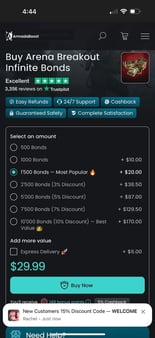
Topping up through a reseller again, the practical edge is record-keeping: services like VGTopup keep your order ID and receipt on file, and as the steps above make plain, that order ID is the gap between a five-minute claim and a brick wall. Disclosure: that's an affiliate link, and the point holds with it stripped out.
How long it really takes, and what drags it
Honest answer: timelines swing by channel, and none publish a guaranteed number for this specific game. What is published is the shape of each path. Google's in-app process is quickest at the front for eligible cases, with that ~48-hour band before it hands you off to the developer. Apple reviews each request individually. Steam routes in-game items to game support instead of a Steam-side clock. Publisher tickets advance on their own queue once you've handed over UID, order ID, and proof.
What stalls all of it is almost always player-side: no order ID, a fuzzy description, or the big one, having waited long enough that the fast platform window slammed shut. Auth-hold cases are the lone exception that needs no timeline at all. A pending hold on a declined card voids itself after the processor's window, and you lift a finger for none of it.
My verdict commits hard, and it splits on problem type, not philosophy. For a pure billing error (double charge, charged-no-delivery, a "failed" payment that still settled), go to the payment platform first, not the in-game ticket. The money's parked in the store's or processor's escrow, the store can reverse it directly, and you sidestep a publisher queue entirely. For billing errors, the platform camp wins.
For anything tangled with your account (delivery disputes, UID problems, any case where the game's own records are the deciding evidence), the publisher ticket is the right lane, because Level Infinite is the only party that can actually see whether the Bonds were issued. For account-side problems, the support-first camp wins.
The one place I won't bend: don't lead with a bank chargeback. Discussion on r/ArenaBreakoutInfinite calls this out directly. Going to your bank before you've exhausted the platform or publisher risks getting your account locked instead of your money refunded. A chargeback is the last resort after the proper channels fail you, never a shortcut. It feels like the fast fix. It's the one that can cost you the whole account.
And the unsexy habit that beats every tactic above: screenshot the order confirmation the second you top up. Every quick resolution here runs on that order ID. Capturing it should be reflex, not afterthought. The players who do it close out fast; the ones who go digging for it afterward burn hours. Check the mailbox, hold the receipt, move inside 24 hours on anything pending, skip the chargeback. That's the whole playbook.
Frequently Asked Questions
Can I get a refund if my Arena Breakout: Infinite Bonds top up failed?
If it truly failed with no Bonds delivered, yes, that's a recoverable billing error through your payment channel or an official ticket. Verify it actually failed first, though. A payment that succeeded and delivered currency is non-refundable per the EULA, and local consumer law usually only overrides that for goods that never arrived.
Why was I charged but didn't receive my Bonds?
Usually it's mailbox delivery lag. The payment confirms before the currency lands in your in-game mailbox, so check there and your balance before calling it a failure. Still missing after that? Then it's a genuine charged-no-delivery case, worth filing with your order ID. On Steam specifically, an overlay glitch can break the purchase mid-flow, and toggling the Steam overlay often clears it.
What do I do if my payment is stuck on pending for hours?
Under 24 hours, wait. A bank authorization hold on a declined or stalled card normally auto-voids after the processor's window with no refund needed. Past 24 hours, stop waiting and move, because you're likely past any auto-clear and burning your platform refund window. Google's eligible-case fast path runs roughly 48 hours per its policy.
What happens if I get double charged on a top up?
The duplicate is recoverable, a clean billing error rather than a change-of-mind refund. Go to the channel that processed it (Steam, Google, Apple, or the reseller) with both transaction IDs so they can see the duplication. Hold onto the receipts. Without the order IDs the claim stalls while support asks you to prove the second charge even exists.
Where do I find my order ID for a refund request?
In your platform's purchase history: Steam library purchase history, Google Play payments, or Apple's reportaproblem.apple.com page, per platform support docs. For reseller top-ups it sits on your order confirmation. Screenshot it at the moment of purchase. It's the single biggest factor in how fast any claim resolves, and far easier to grab then than to reconstruct later.










Comments