
Growtopia Gems Top Up: Fast, Safe, and Direct to Your Account
Growtopia is an expansive 2D sandbox building game where creative freedom, trading, and community interaction drive the gameplay. At the center of this universe is its primary official currency: Gems. Whether you want to expand your inventory, purchase essential locks to protect your creations, or pick up exclusive seasonal items during 2026 in-game events, having a steady supply of Gems is critical.
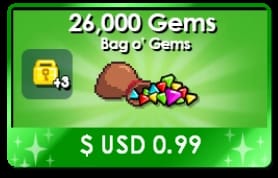
VGTopup offers a direct, secure Growtopia Gems top up service designed for players who want immediate access to in-game currency without hassle. By using only your Grow ID, you can replenish your balance directly without risking account access.
What Are Growtopia Gems and What Can You Buy With Them?
Growtopia Gems are the standard premium currency used inside the official Growtopia Store. Unlike tradeable items that fluctuate based on player market whims, Gems hold steady purchasing power for a wide range of core utilities:
- World Locks and Security Locks: Securing your creations against griefing requires locks. You can buy Small Locks, Big Locks, Huge Locks, and World Locks (WLs) straight from the store using Gems.
- Packs and Starter Kits: Purchase essential item bundles such as the City Pack, Farm Pack, Surgery Pack, and Geiger Counter kits to start specialized jobs and mini-games.
- Megaphones and Broadcasts: Broadcast global messages across active servers to trade, recruit guild members, or announce world openings.
- Weather Machines and Aesthetics: Customize the background, lighting, and environmental audio of your worlds.
- Inventory and Backpack Upgrades: Expand the number of slots available on your character to carry more building blocks, seeds, and clothing.
Step-by-Step Guide: How to Top Up Growtopia Gems on VGTopup
Recharging your Growtopia balance on VGTopup takes only a few moments. Follow these straightforward steps to complete your order:
- Select Your Gem Bundle: Browse the available denomination options. Active pricing is always displayed in real time on the checkout selection screen.
- Enter Your Grow ID: Type your exact Grow ID in the provided field. Make sure not to enter a world name or email address.
- Select Your Payment Option: Choose your preferred payment channel from the available checkout methods.
- Confirm and Pay: Review your Grow ID spelling and finalize the payment.
- Check Your Account: Launch Growtopia on your device and check your updated Gem total at the top of your screen.
How to Find Your Growtopia Grow ID Accurately
Your Grow ID is your permanent, unique account identity within Growtopia. It is distinct from world names, temporary display nick variations, or email login credentials.
To locate your correct Grow ID:
- Open the Growtopia app on your mobile device, PC, or console.
- Log into your account as you normally would.
- Look at the top left corner of the screen or open the main menu wrench icon.
- Your registered Grow ID is the username assigned to your account profile.
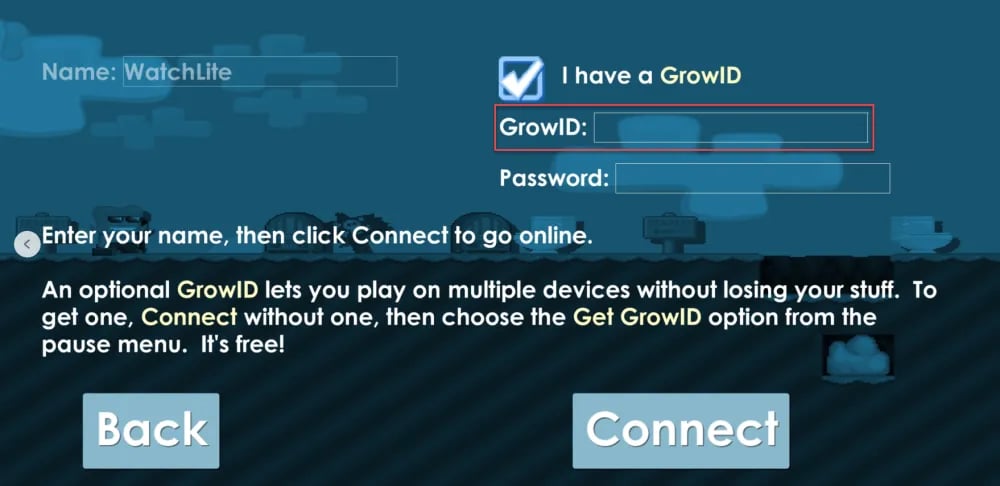
Double-check that you do not include unnecessary symbols, punctuation, or spaces when submitting your order. Accuracy ensures that delivery completes without manual verification delays.
Growtopia Gems vs World Locks: Economy and Trading Overview
Understanding the distinction between Gems, World Locks, and related assets helps you manage your in-game wealth effectively. The table below outlines how these currencies function within the player economy:
| Currency / Asset | Primary Acquisition | Main In-Game Use Case | Player-to-Player Tradeable |
|---|---|---|---|
| Gems | Top-up on VGTopup, tree farming, breaking blocks | In-game Store purchases, inventory upgrades, buying World Locks | No (Directly bound to account balance) |
| World Lock (WL) | Store purchase (2,000 Gems), player trading | Securing full worlds, primary medium of exchange in player trade | Yes |
| Diamond Lock (DL) | Compacting 100 World Locks | High-value market trading, bulk transactions | Yes |
| Subscription Token | Store promotions, special event packages | Unlocks daily Gem claims, exclusive perks, special chat icons | Item-dependent |
While World Locks and Diamond Locks are exchanged through trade menus and drop boxes, Gems provide direct access to fixed-price store inventory, removing the risk of market inflation on core supplies.
Safe Top-Up Best Practices: Why Password-Free Grow ID Recharge Is Essential
Account safety is a top priority in Growtopia. Player accounts are often targeted through phishing worlds, fake trade drops, and fraudulent account-sharing schemes. When you buy Growtopia Gems on VGTopup, your security is preserved through strict processing standards:
- No Passwords Required: You never need to supply your password, security questions, or registered email. Only your public Grow ID is required to route the Gems to your profile.
- Direct Delivery: Gems are credited directly to your account balance. You do not need to enter specific player worlds, pick up items from the ground, or risk scam trades.
- Secure Checkout: All transactions on VGTopup run through encrypted payment processing protocols, protecting your personal financial information.
- Zero Account Sharing: Because top-ups are handled strictly through account identifiers, your login sessions remain uninterrupted and fully under your control.
Troubleshooting Common Growtopia Recharge Issues and Delivery Questions
While most recharges process immediately, occasional delays or questions can occur. Here is how to handle common scenarios:
- Game Client Desync: If your Gems do not show up immediately after order completion, exit Growtopia completely, restart the application, and log in again. This forces your client to refresh its profile cache from the server.
- 2026 Server Maintenance Windows: During official Growtopia server restarts, maintenance periods, or major game updates, delivery queues may temporarily pause. Orders process automatically as soon as game servers reconnect.
- Misspelled Grow ID: If you notice a typo in your submitted Grow ID, reach out to VGTopup customer support immediately with your order reference number. If the order has not yet been processed by the automated dispatch system, our team can adjust the destination ID.
- Checking Order Status: You can check the current status of your transaction at any time by accessing your order history page on VGTopup.
Frequently Asked Questions
How to get more gems in Growtopia?
You can earn Gems by breaking blocks, harvesting high-tier spliced farmables (such as Chandelier or Laser Grid trees), completing daily achievements, or participating in special events. For an immediate balance refill without spending hours farming, you can purchase a Growtopia Gems top up directly on VGTopup.
Do I need to share my Growtopia password to top up Gems?
No. VGTopup will never ask for your Growtopia password, recovery details, or two-factor authentication codes. All Gem orders require only your registered Grow ID.
Where can I find my Grow ID for topping up?
Your Grow ID is visible on your profile menu inside the game client. Log in, open the main menu screen, and read the account username shown on your character profile dashboard.
How long does it take for Growtopia Gems to appear in my account?
Orders placed on VGTopup are handled through automated systems. In most circumstances, the Gems credit directly to your account balance shortly after your payment confirms.
Can I buy World Locks directly with Growtopia Gems?
Yes. Inside the Growtopia Store, 2,000 Gems can be converted into 1 World Lock. You can purchase multiple World Locks in bulk through the store interface once your Gem top-up arrives.
What should I do if I entered the wrong Grow ID during checkout?
Contact the VGTopup 24/7 customer support team immediately with your transaction receipt and the correct Grow ID. Prompt communication ensures support agents can intervene before the transaction routes to the automated dispatch queue.
Select Denomination
Tax, payment fees and eligible coupons are calculated at checkout.
| Package | Price |
|---|---|
| Chest O' Gems | USD 1.28 |
| Gem Fountain | USD 3.37 |
| It's Rainin' Gems | USD 6.74 |
| Royal Grow Pass | USD 6.74 |
| Gem Bounty | USD 20.22 |
| 1 Year Subscription Token | USD 33.71 |
| Gem Abundance | USD 33.71 |