
Blue Protocol: Star Resonance Top Up and Currency Overview
Rose Gems serve as the premium currency in Blue Protocol: Star Resonance, giving you direct access to featured summon banners, character attire, weapon skins, and progression items. Keeping your Rose Gem balance stocked allows you to participate in limited-time events and acquire exclusive mounts without delays.
VGTopup provides a direct recharge service for players who want to buy Rose Gems quickly and safely. Using only your public User ID, orders process directly to your game profile without requiring sensitive login credentials. Check the live product list on VGTopup to view current denominations and real-time pricing before placing your order.
What Are Blue Protocol: Star Resonance Rose Gems and Premium Items
Blue Protocol: Star Resonance uses a multi-tier currency system to manage gameplay progression, gacha banners, and player trade economies. Understanding the differences between these assets helps you spend your resources efficiently.
| Currency / Item | Type | How to Acquire | Primary Utility |
|---|---|---|---|
| Rose Gems | Premium Currency | VGTopup direct recharge / Store purchase | Gacha summons, exclusive cosmetics, bundle purchases |
| Meowlux Wish Coins | Summon Tokens | Exchanged via Rose Gems / Events | Character banners, resonance draws, weapon gacha |
| Luno | Economy Currency | In-game activities / Trading Center conversion | Marketplace player trading, crafting fees, gear upgrades |
| Growth Packs & Passes | Bundles | Direct purchase / Rose Gems | Seasonal milestone rewards, rare materials, mounts |
Rose Gems remain the foundational premium asset because you can convert them into Wish Coins for gacha pulls or trade them for secondary resources required across your adventures.
What You Can Unlock: Gacha, Meowlux Wish Coins, Outfits, and Luno Trading
Recharging your account unlocks several core features across the game:
- Summon Banners and Wish Coins: Top-tier resonance weapons and character unlocks require Meowlux Wish Coins. You can convert your Rose Gems directly into summons to target rate-up characters and legendary equipment.
- Exclusive Outfits and Cosmetics: Fashion plays a significant role in customization. Premium outfits, seasonal costumes, headwear, and dye sets can be purchased from the cosmetic shop using Rose Gems.
- Mounts and Visual Effects: Gain access to rare mounts and unique mobility animations that speed up exploration while standing out in public hubs.
- Luno Trading Economy: The Trading Center allows players to exchange items and resources. Converting Rose Gems gives you the capital needed to buy high-end crafting materials and gear sold by other players.
How to Find Your Blue Protocol: Star Resonance User ID
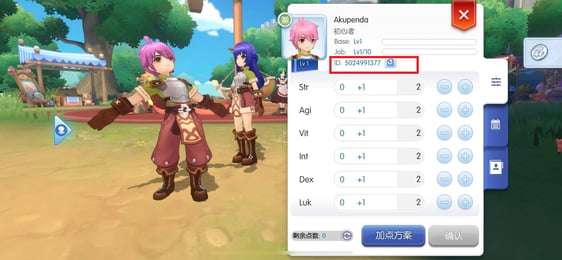
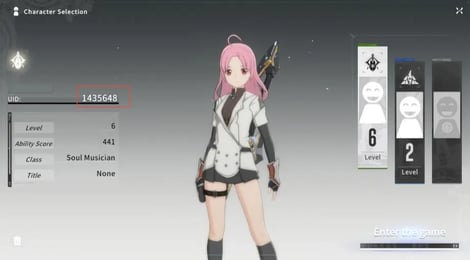
To complete an order on VGTopup, you only need to provide your in-game User ID. Follow these steps to locate your ID correctly:
- Launch Blue Protocol: Star Resonance on your PC or mobile device.
- Log in and enter the game world with your active character.
- Click or tap your Avatar Profile icon located in the top-left corner of the main screen.
- Open your Player Information tab.
- Locate the User ID (UID) number displayed beneath your character name.
- Click the Copy icon next to the number to prevent typing errors.
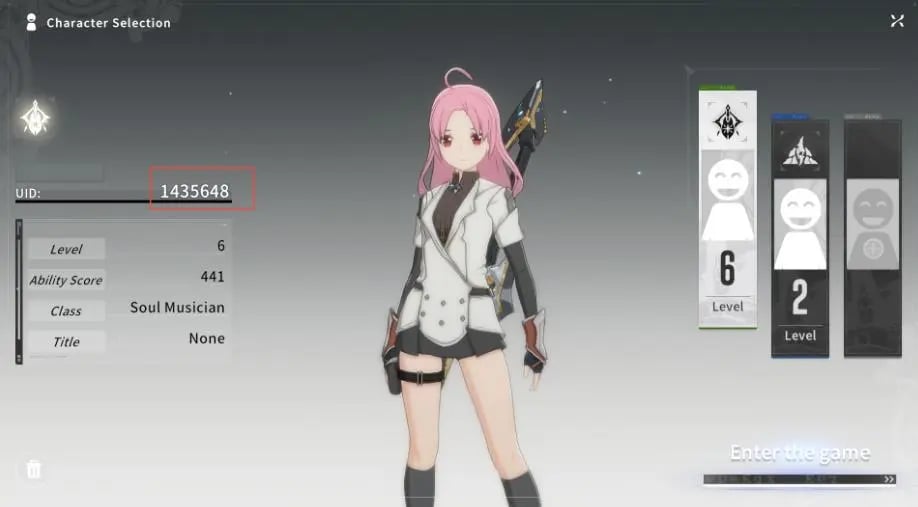
Double-check that the copied ID matches the profile on the correct server before submitting your order.
Step-by-Step Guide: How to Top Up Blue Protocol: Star Resonance on VGTopup
To recharge your account through VGTopup, follow this simple process:
- Select Package: Choose the amount of Rose Gems or the specific pack you wish to purchase from the product catalog.
- Enter User ID: Paste your in-game User ID into the designated field. Verify that the numbers are exact.
- Review Order: Confirm the item count and check the live total price displayed at checkout.
- Complete Payment: Select your preferred payment method and follow the on-screen instructions to finalize the transaction.
- Receive Items: Once payment confirmation is received, the Rose Gems are sent directly to your in-game balance.
Account Safety: Why Direct User ID Top-Up Protects Your Credentials
Account security is essential when purchasing digital items. VGTopup operates using direct User ID fulfillment, which provides distinct security advantages:
- Zero Password Requirements: You never need to share your account password, email login, or two-factor authentication codes.
- No Account Sharing: Your login sessions remain completely undisturbed. You do not need to log out of the game while the recharge processes.
- Direct System Delivery: Purchases are routed directly to your public player profile through verified server pathways, protecting your personal data and account ownership.
- Secure Payment Processing: Transactions on VGTopup are handled through encrypted channels to safeguard your financial details.
Common Delivery Questions and Troubleshooting Rose Gem Purchases
Most transactions complete within moments after checkout. If you encounter a delay or need to verify receipt of your items, follow these troubleshooting steps:
- Check Your In-Game Balance: Open the shop interface or character menu in-game to see if your Rose Gem total has refreshed.
- Inspect the In-Game Mailbox: Certain bundles, first-time purchase bonus tokens, or event packs are delivered directly to your mailbox rather than credited straight to the currency bar. Collect all pending mail.
- Restart the Game Client: If you were actively playing during the transaction, log out to the title screen and reconnect to refresh your account data from the server.
- Verify Your Order Details: Check your VGTopup order confirmation to ensure the User ID submitted matches your character profile.
- Contact Support: If your Rose Gems have not appeared after completing the above steps, reach out to VGTopup customer support with your Order ID for rapid assistance.
Frequently Asked Questions
How to top up in Blue Protocol: Star Resonance?
Select your desired Rose Gem pack on VGTopup, enter your in-game User ID, choose your payment option, and complete the checkout. The currency is credited directly to your account.
Where can I find my Blue Protocol: Star Resonance User ID?
Open the game, click your character avatar in the top-left corner of the screen, and view your Player Information page. Your User ID is displayed under your character name with a quick-copy button.
What are Rose Gems used for in Blue Protocol: Star Resonance?
Rose Gems are used to purchase summon tokens (Meowlux Wish Coins), exclusive character outfits, mounts, battle passes, consumables, and to participate in the in-game Trading Center.
Do I need to share my game account password to recharge?
No. VGTopup only requires your public User ID to deliver Rose Gems. Never share your password or verification codes with anyone.
Can Rose Gems be converted to Luno in the Trading Center?
Yes. Rose Gems can be converted or used within economic systems to acquire Luno, which is required for marketplace trades and crafting fees.
What should I do if my Rose Gems have not arrived after checkout?
First, restart your game client and check your in-game mailbox. If the balance remains unchanged, verify your submitted User ID on your VGTopup receipt and contact VGTopup support with your order number.
Select Denomination
Tax, payment fees and eligible coupons are calculated at checkout.
| Package | Price |
|---|---|
| 60 + 6 Rose Gems | USD 0.57 |
| Street Skater Outfit Pack | USD 0.68 |
| Aironas Special Bundle | USD 2.63 |
| 300 + 30 Rose Gems | USD 3.93 |
| Monthly Card | USD 3.93 |
| Void Pass II - Advanced | USD 7.32 |
| Void Pass II - Upgrade Kit | USD 7.32 |
| 980 + 120 Rose Gems | USD 11.23 |
| Void Pass II - Supreme | USD 14.04 |
| 1980 + 288 Rose Gems | USD 22.46 |
| 3280 + 528 Rose Gems | USD 39.31 |
| 6480 + 1296 Rose Gems | USD 73.38 |