
Arena Breakout: Infinite Bonds Top Up: Fast Delivery for PC Operators
Surviving the high-stakes extraction zones of Kamona requires meticulous preparation, superior firepower, and adequate stash space. Arena Breakout: Infinite brings tactical extraction combat to PC, where every raid puts your hard-earned loadout on the line. Bonds serve as the core premium currency within Arena Breakout: Infinite, allowing players to secure premium utility upgrades, tactical battle passes, secure container rentals, and special cosmetic weapon finishes.
VGTopup provides direct, passwordless top-up services for PC operators. By inputting your unique Player ID, you receive Bonds straight into your in-game account balance without sharing sensitive login details. Current rates and pack options are visible on the live checkout interface, giving you a transparent way to restock your currency before your next deployment.
What Are Arena Breakout: Infinite Bonds and In-Game Uses
While Koen represents standard tactical operational cash earned through raids and market trading, Bonds represent the primary premium currency used for account progression and tactical convenience. Bonds cannot be lost upon death during a raid, making them a permanent asset on your profile.
In the 2026 competitive seasons, Bonds unlock several essential functions:
- Secure Containers: Renting composite secure cases (such as 2x2 or 2x3 containers) guarantees that high-value keys, barter items, and medical supplies survive extraction failure.
- Stash Expansions: Increasing your main storage capacity with extra container slots prevents inventory clogging and allows you to hold surplus armor, rigs, and modified weapons.
- Seasonal Battle Pass Access: Unlocking premium Battle Pass reward tracks provides access to exclusive character outfits, weapon patterns, seasonal Koen packages, and tactical equipment crates.
- Direct Store Packages: Purchasing tactical supply bundles, weapon maintenance materials, and special cosmetics directly from the in-game shop.
Arena Breakout: Infinite (PC) vs. Mobile: Platform Isolation & Currency Rules
Arena Breakout: Infinite (PC) operates on distinct server infrastructure separate from Arena Breakout Mobile. The game clients, balance economies, and account registries do not share cross-platform wallet balances.
Before ordering on VGTopup, verify that you play on the PC client:
| Feature | Arena Breakout: Infinite (PC) | Arena Breakout (Mobile) |
|---|---|---|
| Target Platform | Windows PC (Dedicated Client / Steam) | iOS and Android Devices |
| Currency Identifier | PC Bonds | Mobile Bonds |
| Cross-Platform Sync | Isolated (No Wallet Sharing) | Isolated (No Wallet Sharing) |
| Account ID Type | PC Numeric Player ID / Open ID | Mobile Character ID / Open ID |
| Top-Up Fulfillment | Direct PC Player ID Injection | Mobile App Store / Mobile ID |
Bonds ordered for the PC version cannot be transferred or credited to a mobile account. Ensure your Player ID is sourced directly from your PC game client.
How to Find Your Arena Breakout: Infinite Player ID (Open ID)
Finding your numeric Player ID on PC takes only a few seconds within the tactical lobby.
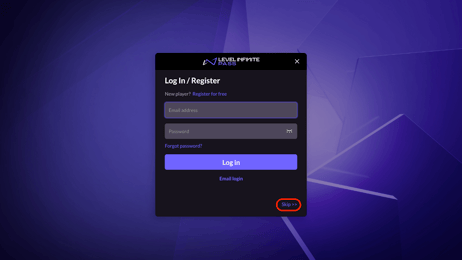
- Launch the Arena Breakout: Infinite PC client and log in to your account.
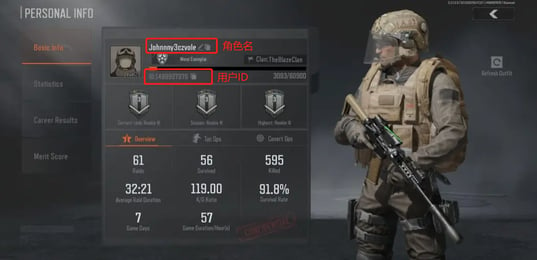
- In the main lobby screen, click your Player Profile Banner / Avatar located in the top-left corner.
- Select the Basic Info tab from your profile overview.
- Locate your numeric Player ID displayed under your operator callsign.
- Click the copy icon next to the digits to copy your ID directly to your clipboard.
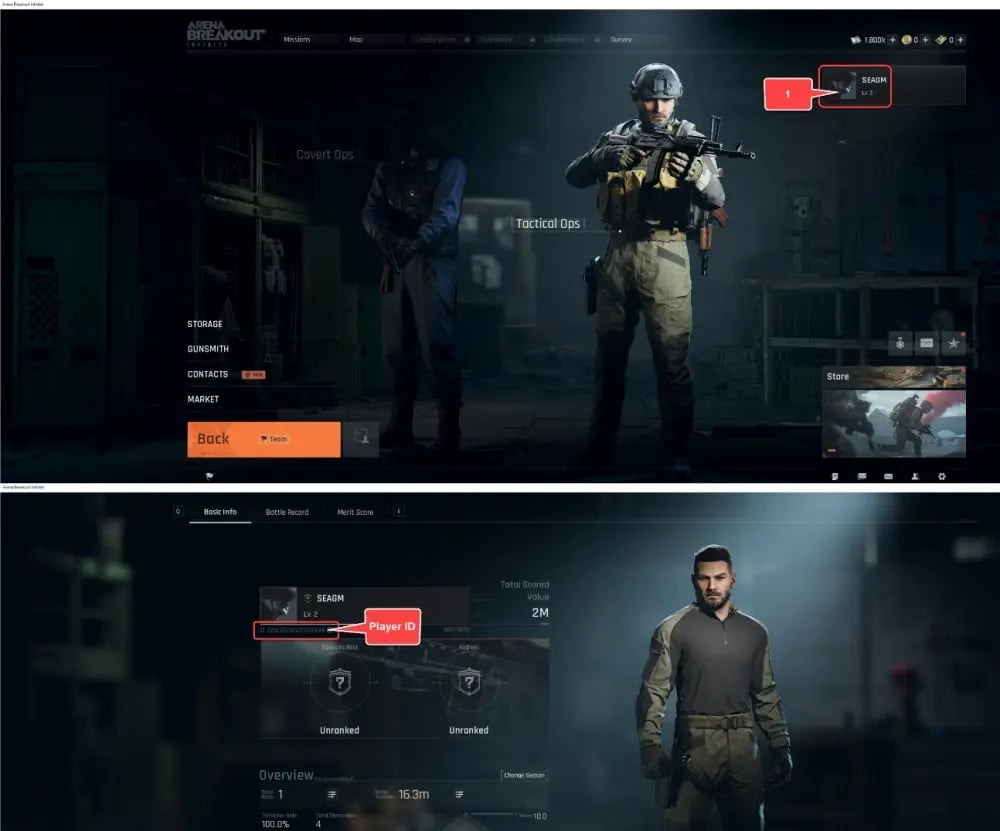
Double-check that the copied sequence contains only numbers and matches your current PC profile.
Step-by-Step Guide to Top Up Arena Breakout: Infinite Bonds on VGTopup
Restocking your Bonds balance on VGTopup is straightforward:
- Select Currency Amount: Choose the Bond denomination that fits your equipment and stash needs from the product list.
- Enter Your Player ID: Paste your numeric PC Player ID into the designated Player ID field.
- Confirm Details: Review the entered ID to verify there are no missing digits or typos.
- Proceed to Checkout: Select your preferred payment option from the live checkout menu.
- Receive Your Bonds: Complete the payment. The order processes automatically, and Bonds are credited directly to your account.
Safe & Secure Passwordless ID Top-Up Protection
Account safety is essential when purchasing gaming currencies. VGTopup uses a direct-to-account Player ID fulfillment model. This method requires only your public numerical Player ID.
- Zero Password Sharing: You will never be asked for your Level Infinite login, password, Steam credentials, or email verification codes.
- Account Protection: Direct ID top-ups keep your account credentials entirely in your own hands, preventing unauthorized access.
- Anti-Ban Compliance: Orders are fulfilled through standard account injection pathways that comply with game security protocols.
Delivery Times and Verifying Your Bonds Balance In-Game
Orders placed on VGTopup are processed quickly through automated systems. Once your transaction is confirmed, your Bonds will reflect in your game account balance.
To verify delivery:
- Return to the main menu of Arena Breakout: Infinite.
- Look at your currency counter in the top-right corner of the lobby screen.
- If your balance does not update immediately, visit the in-game mailbox to collect any system delivery notifications, or restart your game client to force a server refresh.
Common Top-Up Issues, Server Desync, and Support Troubleshooting
If you experience any delay in seeing your Bonds, follow these troubleshooting steps:
- Client Cache Desync: Occasionally, the client lobby requires a fresh connection after an update. Exit to desktop and relaunch the game.
- Mismatched Player ID: If you accidentally entered an incorrect Player ID during checkout, contact the VGTopup 24/7 customer support team immediately with your order number and correct ID.
- Server Maintenance: During major 2026 seasonal patches or client maintenance windows, game servers may queue currency deliveries until maintenance concludes.
VGTopup customer support is available around the clock to track your order status and resolve account queries.
Frequently Asked Questions
How to buy Bonds in Arena Breakout: Infinite?
Select your desired Bond package on the VGTopup product page, enter your numeric PC Player ID, and complete payment at checkout. The Bonds will deposit directly to your PC account without requiring your login password.
Can I transfer Bonds between Arena Breakout: Infinite PC and Arena Breakout Mobile?
No. Arena Breakout: Infinite on PC and Arena Breakout on Mobile maintain completely separated server structures and economies. Bonds purchased for PC cannot be converted or transferred to mobile accounts.
Where can I find my Arena Breakout: Infinite Player ID / Open ID?
Open your PC game client, click your profile banner in the top-left corner of the main lobby, and navigate to the Basic Info tab. Your numeric Player ID is displayed beneath your operator name, along with a quick-copy button.
Do I need to share my Level Infinite account password to top up on VGTopup?
No. VGTopup operates strictly through passwordless Player ID delivery. You only provide your public numeric ID, keeping your account credentials completely secure.
What can I purchase with Bonds in Arena Breakout: Infinite in 2026?
Bonds can be spent on secure container rentals, permanent stash expansions, seasonal Battle Pass upgrades, cosmetic weapon finishes, and special tactical bundles available in the in-game store.
What should I do if my Bonds do not appear in my account immediately?
First, check your in-game mailbox and restart your PC client to refresh the server connection. If your currency balance remains unchanged after a few minutes, reach out to VGTopup 24/7 support with your order ID for immediate assistance.
Select Denomination
Tax, payment fees and eligible coupons are calculated at checkout.
| Package | Price |
|---|---|
| 100 Bonds | USD 0.85 |
| 500 Bonds | USD 4.22 |
| 1,000 Bonds | USD 8.43 |
| 1600 Bonds | USD 13.50 |
| 2,500 Bonds | USD 21.07 |
| 5,000 Bonds | USD 42.14 |
| 10,000 Bonds | USD 84.27 |