
The Division Resurgence Premium Credits Top Up: Essential Agent Guide
Equipping your agent with top-tier tactical gear and exclusive vanity items defines your presence across the streets of post-crisis New York City. The Division Resurgence brings the acclaimed tactical cover-shooter experience to mobile devices, introducing unique narrative campaigns, challenging Dark Zone extractions, and intense competitive modes. To personalize your operative and access seasonal rewards, you need Premium Credits.
A direct The Division Resurgence Premium Credits top up through VGTopup provides an efficient way to acquire currency directly to your account using only your User ID. Live pricing, bundle quantities, and current offers are displayed in real time on the checkout module above, allowing you to select the exact credit package required for your next weapon skin or tactical pass.
What Are The Division Resurgence Premium Credits and How to Use Them
Premium Credits serve as the primary premium currency in The Division Resurgence. Unlike standard soft currencies earned through daily missions and campaign progression, Premium Credits are reserved for store purchases, premium progression tracks, and exclusive customization items.
In-Game Currency Differences
| Currency Type | How to Obtain | Primary In-Game Purpose |
|---|---|---|
| Premium Credits | Direct top up via VGTopup | Premium Battle Pass, weapon wraps, vanity caches, elite apparel |
| E-Credits / Gold | Completing missions, selling gear | Crafting, recalibration, standard vendor purchases, gear upgrades |
| Dark Zone Tech / Credits | Dark Zone extractions, DZ landmarks | Specialized Dark Zone vendor blueprints and tactical gear caches |
Primary Uses for Premium Credits
- Premium Season Pass: Unlocks the paid track of the active season pass, granting access to exclusive agent outfits, high-end materials, and premium weapon blueprints as you level up.
- Apparel and Uniform Bundles: Allows direct purchase of specialized agent uniforms, tactical helmets, tactical vests, gloves, and footwear.
- Weapon Camouflages and Finishes: Customize your primary rifles, SMGs, shotguns, and marksman rifles with custom patterns and animated skins.
- Vanity Crates and Timed Events: Spend credits on limited-time promotional caches featuring rare cosmetic sets and unique patches.
How to Top Up The Division Resurgence Premium Credits via User ID
Recharging your account on VGTopup is simple and requires zero private credentials. Follow these direct steps to complete your order:
- Select Credit Amount: Review the available Premium Credit packages listed on the live checkout interface and choose your desired denomination.
- Enter User ID: Input your accurate in-game User ID into the designated player field.
- Verify Agent Details: Double-check your entered ID to make sure your credits arrive at the correct profile without delay.
- Complete Checkout: Select your preferred payment method and finalize your transaction.
- Check Balance In-Game: Launch The Division Resurgence on your mobile device. Your balance updates automatically in your in-game wallet.
How to Find Your The Division Resurgence User ID in the App
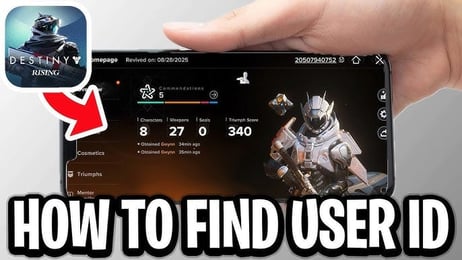
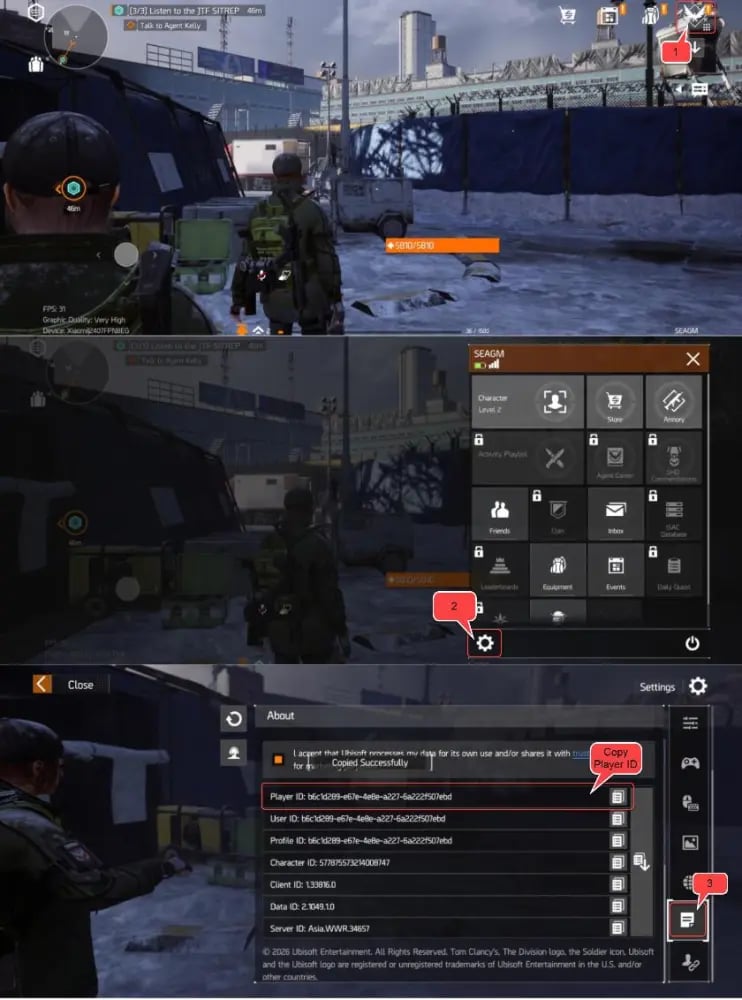
To ensure your Premium Credits are credited to the right account, locate your numeric User ID inside the game client before placing an order.
- Launch The Division Resurgence on your iOS or Android device.
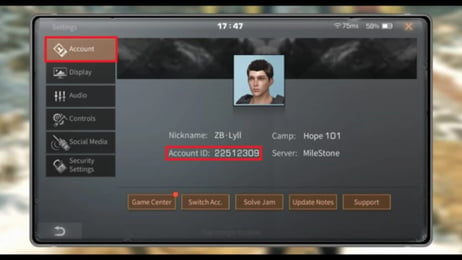
- Tap your Agent Profile Icon located in the top-left corner of the main screen or open the Settings menu from the pause screen.
- Locate the User ID (UID) string displayed directly underneath your agent's display name or within the Account tab.
- Tap the Copy button next to your ID to copy the digits directly to your clipboard.
- Paste the ID into the VGTopup order field.
Safety and Account Security: Why No Login Credentials Are Required
Maintaining account integrity is critical when purchasing mobile gaming currencies. VGTopup utilizes direct UID injection protocols, meaning transactions are fulfilled using only your public player identifier.
- No Passwords Requested: You will never be asked for your Ubisoft Connect password, email credentials, social login tokens, or two-factor authentication codes.
- No Account Sharing: Your account stays in your hands at all times. Third parties never log into your profile, eliminating the risk of unauthorized access or security flags.
- Safe System Integration: Because credits are transferred via official identifier matching, your profile remains fully compliant with game terms.
Best In-Game Items and Cosmetics to Buy with Premium Credits
Optimizing your Premium Credit expenditure helps you maximize value throughout each seasonal cycle in 2026. Here are the top items to prioritize:
1. Active Season Battle Pass
The Premium Battle Pass is widely considered the best return on investment for active players. By completing daily assignments, weekly projects, and seasonal challenges, you unlock vanity crates, crafting materials, and distinctive agent apparel sets that are retired once the season ends.
2. Tactical Gear Sets and Outfits
Individual store bundles often include complete uniform overhauls, such as specialized Rogue Agent outfits, Strategic Homeland Division prototype tactical gear, and environmental hazard suits. These sets allow full visual customization without affecting combat stats.
3. Signature Weapon Wraps
Apply distinct colorways, camo patterns, and high-tier visual finishes to your favorite exotics and high-end firearms to stand out during co-op raids and Dark Zone encounters.
Troubleshooting Delayed Credits and Top-Up Delivery Steps
If your Premium Credits do not reflect immediately in your account balance after purchasing on VGTopup, follow this troubleshooting checklist:
- Restart the Game App: Completely close The Division Resurgence from your recent apps drawer and relaunch it to refresh your server data cache.
- Check Your In-Game Mail: Certain credit bundles or promotional bonuses arrive directly in your in-game mailbox rather than auto-incrementing the header counter. Open your inventory and check the Mailbox tab.
- Confirm Order Status on VGTopup: Review your order history page on VGTopup to verify that the transaction is marked as completed.
- Verify User ID Accuracy: Confirm that the ID submitted during checkout matches the UID on your active profile.
- Contact Support: If the balance remains uncredited after a brief wait and app restart, submit your VGTopup Order ID and in-game UID to customer support for prompt assistance.
Frequently Asked Questions
How do I find my The Division Resurgence User ID?
Open the game, tap your player avatar in the top-left corner of the main hub or enter the Account Settings menu. Your User ID is displayed under your player name with a dedicated copy icon.
What can I buy with Premium Credits in The Division Resurgence?
Premium Credits can be spent on the Premium Season Battle Pass, direct apparel bundles, tactical weapon skins, gear vanity items, and event-specific cosmetic crates.
Do I need to provide my Ubisoft account password to top up on VGTopup?
No. VGTopup requires only your in-game User ID. You should never share your password, login credentials, or verification codes.
How long does it take for Premium Credits to appear in my account?
Deliveries are processed quickly once payment confirmation is received. In most cases, credits are available the next time you open or refresh your game client.
Can I top up Premium Credits for a friend using their User ID?
Yes. You can purchase credits for friends, clan members, or squadmates by entering their specific User ID in the player field at checkout.
Is The Division Resurgence pay to win?
No. Premium Credits are strictly focused on cosmetic items, battle pass reward tracks, and visual customization. Combat effectiveness, weapon damage, and gear stats depend on your gameplay progression, farming, and tactical builds.
Select Denomination
Tax, payment fees and eligible coupons are calculated at checkout.
| Package | Price |
|---|---|
| 125 (120 + 5) Premium Credits | USD 1.57 |
| 315 (300 + 15) Premium Credits | USD 3.92 |
| 645 (600 + 45) Premium Credits | USD 7.82 |
| 1650 (1500 + 150) Premium Credits | USD 19.55 |
| 3450 (3000 + 450) Premium Credits | USD 38.83 |
| 7200 (6000 + 1200) Premium Credits | USD 77.92 |