
RF Online Next Top Up Service on VGTopup
RF Online Next brings the legendary sci-fi faction warfare into a modern Unreal Engine cross-platform experience. Securing your supply of Diamonds is critical to building combat superiority across the Novas sector. Diamonds serve as the core premium currency required to summon powerful Biosuits, craft and refine Sacred Weapons, expand your inventory, and acquire essential supplies for large-scale Faction Wars.
VGTopup provides a direct, secure RF Online Next recharge service designed for high efficiency. You do not need to share your private account credentials, social login tokens, or passwords. By entering your Player ID and selecting your active server cluster, you receive your Diamonds directly in your character account with zero security compromises.
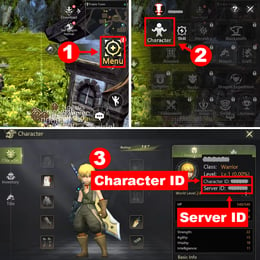
How to Find Your RF Online Next Player ID and Server
To ensure your Diamonds arrive without delay, you must provide your exact in-game Player ID and assign the purchase to your specific server.
- Launch RF Online Next on your PC launcher or mobile device.
- Tap the Menu icon (three horizontal lines or grid) located in the upper-right corner of the HUD.
- Open the Settings menu (gear icon) and select the Account tab.
- Locate your Player ID (Character UID) displayed in the account details section and copy it.
- Check your active server name on the main screen or character selection screen (e.g., Galaxy1, Andromeda3, Orion2, Taurus5).
Make sure to double-check both your Player ID and server before placing your order on VGTopup, as digital top-ups are processed instantly based on the identifier submitted.
Step-by-Step Guide: How to Top Up RF Online Next Diamonds
Recharging Diamonds on VGTopup is straightforward and requires no complicated account handovers:
- Select Your Diamond Package: Choose the amount of Diamonds you need for your next summon, upgrade tier, or battle pass unlock.
- Enter Your Player ID: Paste your numeric in-game Player ID into the designated field.
- Select Your Server: Pick your exact server from the dropdown list covering Galaxy, Andromeda, Orion, and Taurus clusters.
- Check Out: Review your order summary and the price shown on the live checkout screen.
- Complete Payment: Choose from the available payment channels on VGTopup to finalize your transaction.
- Receive Diamonds: Launch RF Online Next and check your diamond balance or in-game mailbox to collect your currency.
Supported RF Online Next Servers
VGTopup supports all active official server clusters across all regional designations. Ensure you choose the exact server group and number where your primary character resides.
| Server Cluster | Available Sub-Servers | Delivery Method |
|---|---|---|
| Galaxy | Galaxy 1, Galaxy 2, Galaxy 3, Galaxy 4, Galaxy 5, Galaxy 6 | Direct Player ID Top-Up |
| Andromeda | Andromeda 1, Andromeda 2, Andromeda 3, Andromeda 4, Andromeda 5, Andromeda 6 | Direct Player ID Top-Up |
| Orion | Orion 1, Orion 2, Orion 3, Orion 4, Orion 5, Orion 6 | Direct Player ID Top-Up |
| Taurus | Taurus 1, Taurus 2, Taurus 3, Taurus 4, Taurus 5, Taurus 6 | Direct Player ID Top-Up |
If you play characters on multiple servers, verify that the Player ID matches the specific server selected before finalizing payment.
Diamond Progression Guide: Biosuits, Sacred Weapons, and Faction Warfare
Understanding how to allocate Diamonds efficiently gives your character a massive tactical edge in both PvE dungeons and open-world Holy Stone Battles.
Biosuit Summoning and Skill Optimization
Biosuits replace standard class limits in RF Online Next, allowing pilots to adapt to heavy assault, ranged artillery, or tactical support roles on the fly. Diamonds allow you to:- Summon high-tier Biosuit frames with superior base stats and scaling potential.- Purchase prototype cores to level up suit skills and unlock specialized combat perks.- Re-tune sub-attributes to align with your faction's frontline combat meta.
Sacred Weapon Enhancement and Crafting
Sacred Weapons are centerpiece armaments capable of swinging high-stakes skirmishes. Diamonds help you secure:- Rare crafting catalysts and stabilization matrices required for high-risk weapon upgrades.- Stat reroll cubes that maximize physical, elemental, and anti-armor penetration.- Repair and recovery items that protect gear integrity during over-enchantment attempts.
Faction Warfare and Battlefield Consumables
The three-way conflict between the Bellato Union, Holy Cora Alliance, and Accretia Empire demands constant battlefield readiness. Stocking up on Diamonds ensures you can buy:- High-tier recovery boosters, radar scans, and combat stims for Chip Wars.- Tactical teleportation permits to respond rapidly to territory defense calls.- Seasonal Battle Passes and progression tracks packed with exclusive cosmetics and enhancement resources.
Safe Player ID Top-Up vs. Account Sharing Risks
When buying Diamonds online, security should always be your top priority. Many unauthorized sellers require buyers to hand over their login emails, Google/Apple tokens, or passwords so a third party can manually log into the account. This practice creates severe hazards:
- Account Theft and Lockouts: Sharing your login exposes your entire gaming profile, payment methods, and connected personal accounts.
- Game Bans: Automated publisher anti-fraud systems frequently trigger permanent bans when an account shows sudden IP hops across continents during unauthorized manual purchases.
- Chargebacks: Unverified sellers frequently use compromised payment methods that lead to negative diamond balances and account suspensions.
VGTopup uses direct Player ID fulfillment. Because you only provide your public Player ID and server name, your credentials remain 100% private. Your account stays safe from bans, phishing, and unauthorized access.
Cross-Platform Compatibility: PC Launcher and Mobile Sync
RF Online Next features full cross-platform progression between the standalone PC launcher and mobile platforms. When you top up your Diamonds using your Player ID on VGTopup:
- Your diamond balance updates across all linked devices automatically.
- Purchases made with Diamonds on PC carry over instantly to your mobile sessions, and vice versa.
- You never have to worry about platform-locked currency as long as you log into the same account and server.
Troubleshooting Top-Up Delays and Server Mismatches
If your Diamonds do not reflect in your account balance right away, follow these diagnostic steps:
- Check the In-Game Mailbox: Some packages and bonus diamond tiers arrive as claimable mail items rather than direct balance increases.
- Relog into the Game: Completely close RF Online Next on PC or mobile, wait 30 seconds, and log back in to force an account server refresh.
- Verify Server Selection: Confirm that you selected the server where your active character was created. Diamond balances belong to the specified server profile.
- Contact Customer Support: If your Diamonds have not arrived after completing these checks, locate your VGTopup order receipt and contact VGTopup support with your order number and Player ID for rapid verification.
Frequently Asked Questions
How do I find my RF Online Next Player ID and Server?
Open RF Online Next, tap the main Menu button in the top-right corner, select Settings (gear icon), and go to the Account tab. Your numeric Player ID is displayed on the screen. Your server name appears on the character selection screen and the main settings dashboard.
Do I need to share my game login password to buy Diamonds?
No. VGTopup only requires your in-game Player ID and your server selection. You never need to provide your password, authentication code, or third-party login credentials.
Which servers are supported for RF Online Next diamond recharge?
VGTopup supports all 24 official server instances across the Galaxy (1-6), Andromeda (1-6), Orion (1-6), and Taurus (1-6) clusters.
What can I purchase with Diamonds in RF Online Next?
Diamonds are used to summon and upgrade Biosuits, craft and enchant Sacred Weapons, unlock seasonal Battle Pass tiers, buy vital PvP consumables for Holy Stone Battles, and expand inventory storage.
Is RF Online Next top up available for global players in 2026?
Yes. In 2026, global players across all supported regions can recharge Diamonds on VGTopup by selecting their active server cluster and inputting their Player ID during checkout.
What should I do if my Diamonds do not appear immediately in-game?
First, check your in-game mailbox or system notifications. If the currency has not updated, close the game client and restart it to refresh your server connection. If you still do not see your Diamonds, reach out to VGTopup customer support with your order number for fast assistance.
Select Denomination
Tax, payment fees and eligible coupons are calculated at checkout.
| Package | Price |
|---|---|
| 109 Diamonds | USD 0.89 |
| 436 Diamonds | USD 3.38 |
| 2,110 Diamonds | USD 16.05 |
| 3,570 Diamonds | USD 26.67 |
| 7,950 Diamonds | USD 57.71 |