The two numbers that route your money — and why one gets ignored
Your UID is the account's fingerprint. The Server ID picks which region's copy of the game that fingerprint lands on. Get either one wrong and the payment either bounces outright or, worse, succeeds straight into a stranger's lap. According to SEAGM Dragon Nest M Classic SEA Top Up, the UID is the unique account identifier while the Server ID picks the region or server, and a mismatch ships diamonds to the wrong account entirely.
Now the bit most guides squash into one line, and it's the expensive bit: the same numeric UID can belong to different accounts across separate servers. UID by itself never routes a payment cleanly. The portal needs the pair. Picture the UID as a house number and the Server ID as the city. "42 Main Street" sits in a hundred cities, and your diamonds need both halves to land on the right doormat.
So here's where I'll argue with the usual framing. Everybody fixates on keying the UID in correctly. But picking the wrong server is both more common and far more invisible, because the transaction reads as done. The money left. Something caught it. Just not you.
| Field |
What it is |
Where to find it |
Failure mode if wrong |
| UID |
Unique account identifier |
Tap avatar icon, top-left of main screen |
Diamonds route to a different account; usually irreversible |
| Server ID |
Region/server selector |
Shown beside your character info |
Payment "succeeds" but never appears for you |
Source: SEAGM Dragon Nest M Classic SEA Top Up (2026); Codashop Dragon Nest M Classic (2026)
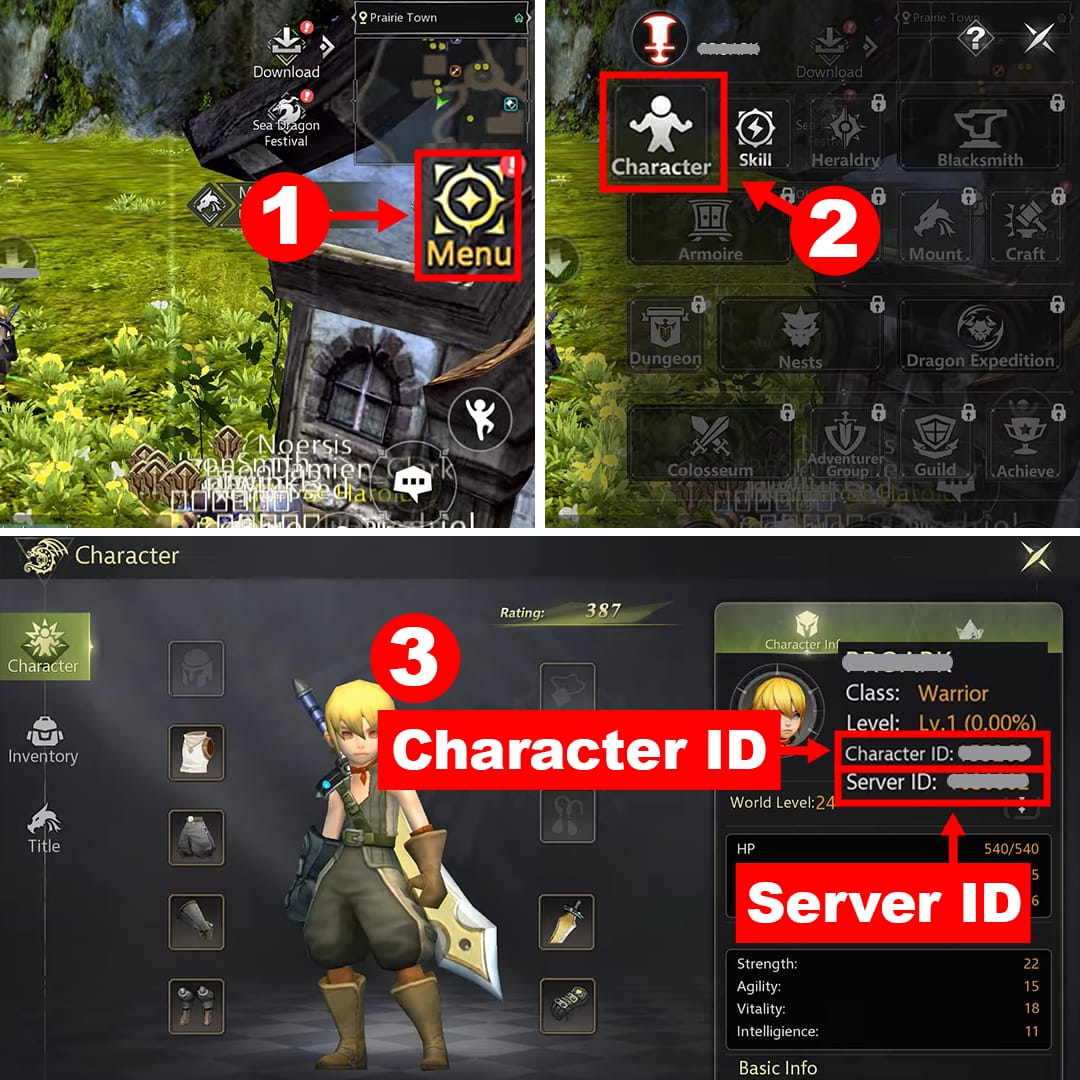
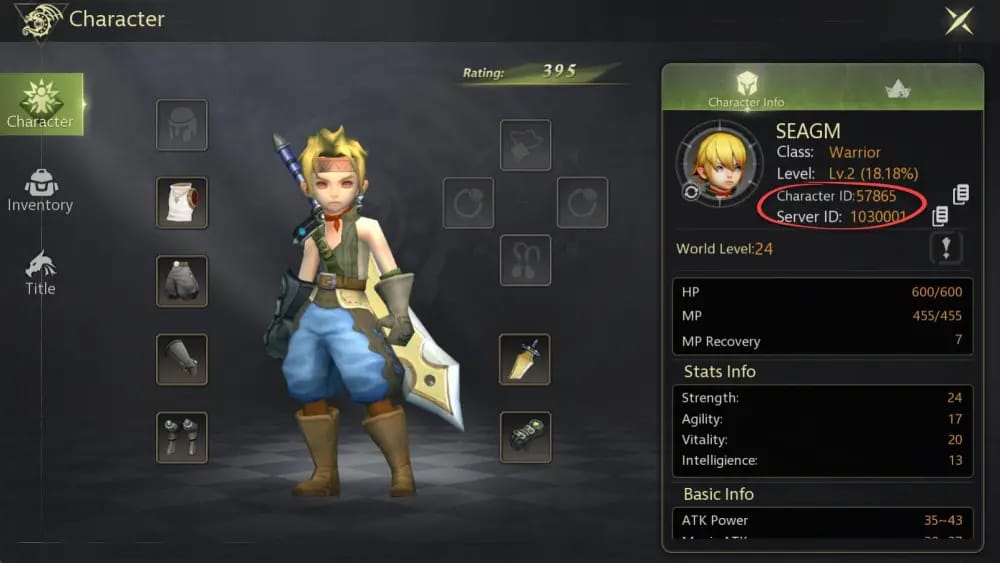
Tap the avatar icon, top-left of the main screen. That panel lays out your User ID and your Server ID together, per SEAGM's top-up guide, and that's exactly what you want. Seeing both at once is half the fight against the mismatch trap.
There's a second route worth knowing if your client arranges things differently. Per Codashop Dragon Nest M Classic, you can open the character information panel on the right side of the in-game character page to pull up a Character ID and Server ID. Mind the wording there: Character ID. This is where the genuine confusion sneaks in. Players keep asking whether the number on the character panel is the same thing the portal's after. For routing a diamond payment, the identifier the portals key on is your account UID. If you ever spot two different-looking numbers, the one tied to your account on the avatar panel is your anchor. When you're unsure, take the avatar-icon route. It's the one described most consistently across these flows.
And the dull little habit that quietly prevents the most carnage: copy, don't type. Lootbar and Moogold both push copy-paste over manual entry for a reason. Typing a UID invites transposition slips. Your eyes read 8073 and your thumbs commit 8037. Beyond that, chatter in Dragon Nest M Facebook groups keeps flagging lookalike characters as a silent killer: a zero against a capital O, a one against a lowercase L or a capital I. These never throw an error. They just route your money somewhere plausible and wrong. If your client lets you long-press and copy the ID, do that, every time. If it won't, read the ID aloud character by character before committing. Sounds paranoid right up until the day it isn't.
The 60-second check I run before every recharge
This is the whole ritual, and honestly I clear it in under a minute now:
- Open your profile through the avatar icon and screenshot it. Per general top-up advice floating around Dragon Nest M Classic groups, skipping the pre-pay screenshot leaves you with zero proof when something goes sideways, and proof is the only currency support takes. Five seconds buys your one real recovery lever.
- Copy the UID straight into the portal field. Then look at it again. Run it character-by-character against the screenshot, eyes on those lookalike suspects.
- Select your region/server FIRST, then enter the UID. The combined flows from SEAGM and Codashop describe picking the correct region/server before the ID goes in. Order matters because it forces the server to the front of your mind instead of leaving it as an afterthought.
- Confirm the character name on the confirmation screen. Hardly anyone mentions this step and it's the best one in the stack. Some confirmation screens display the target character's in-game name. Advice in Dragon Nest groups points out that not confirming that name is precisely how misallocation slips by. If the name on screen isn't yours, stop. You just caught the error for nothing.
That last point fuels a small opinion I hold on the "instant top-up" debate. Faster isn't automatically safer. A flow that makes you confirm your character name catches more slips than a quicker one that jumps straight to payment. Give me a verified flow with a name check over a frictionless one any day, and I'll actively favor portals that show me the character before they charge me.
What actually happens when it goes wrong
Two separate disasters here, and they don't feel alike.
Wrong UID: the diamonds land on whatever account owns that ID. Per top-up portal FAQs and Facebook posts documenting account issues, a wrong UID or server ships diamonds to an incorrect character, and recovery means contacting in-game support with proof. If the UID you fat-fingered happens to be a live account on that server (and on a busy server, plenty of them are), your currency is now sitting in some stranger's mailbox. No automatic clawback.
Wrong server: this is the quiet one, the one that got me. The portal guides are blunt about it. Picking the wrong server with the correct UID fails delivery because accounts are server-specific. Sometimes that's a clean failure. Sometimes the diamonds latch onto a same-UID account on the wrong server, per the documented behavior that the same UID concept can exist across regions but delivery fails without a matching Server ID. Either way, your character shows nothing, the payment shows complete, and you burn twenty minutes convinced the portal's broken when the routing did exactly what you told it to.
On refunds, I'd rather be honest than soothing. Refunds for wrong-account top-ups are limited per the general portal policies referenced across these guides, and any recovery hinges on you producing a transaction receipt plus screenshots. Which is why I keep hammering prevention. The realistic outcome ladder shakes out like this:
- Clean failure (server mismatch, nothing delivered): decent odds the payment gets re-pointed or refunded with your receipt, since no third party caught anything.
- Delivered to a wrong same-UID account on another server: murky, hangs entirely on support and proof.
- Delivered to a genuinely different person's account: the worst case. Treat it as likely unrecoverable and move fast regardless.
Whose fault is the wrong server, anyway? Mechanically, the portal sent diamonds where the inputs pointed. That makes it a user-side verification failure, not a portal bug, which is oddly freeing, because the fix is a habit you own rather than a ticket you sit and wait on.
Recovering a mis-sent top-up — move fast, bring receipts
If it already happened, quit refreshing the mailbox and start gathering evidence. Speed and documentation are the whole game now.
Grab these straight away:
- Your transaction receipt or order ID from the payment.
- A screenshot of your correct profile (UID + Server ID), the one you took before paying if you built the habit. If you didn't, screenshot it now anyway.
- A screenshot of the portal confirmation screen showing exactly what you submitted.
Then take all of it to in-game customer support. Binding your account to Google or Apple genuinely strengthens your case, though per Facebook group posts on account issues, binding alone won't auto-fix a UID or server mismatch. You still file a ticket with proof. Bound or not, the receipt and screenshots are what move the needle.
After any top-up, success or scare, verify delivery the right way. The Lootbar process description tells you to check in-game mail or inventory for the diamonds and confirm they're on the correct character. Don't assume. Open the mailbox and actually look. I've spiraled into a full panic before, only to find the diamonds waiting in the mail tab I forgot to claim.
I don't have an official, citable support-response window to hand you, and I won't make one up. Anyone promising "diamonds in X minutes, refunds in Y days" as a hard guarantee is quoting marketing copy, not policy. Treat delivery as fast-but-not-instant. Treat recovery as slow, manual, and proof-gated. Plan around the gloomy version and you'll never be the one caught flat.
Three motions that close off nearly every top-up error
Screenshot your profile, copy your UID, confirm the character name on the payment screen. Three motions, under a minute. Land those and you've shut the door on the transposition typo, the lookalike-character misroute, the server mismatch, and the no-evidence recovery dead-end, all at once. That's most of the ways this goes sideways, gone.
If I had to crown the single highest-value second in the whole process, it's the character-name check on the confirmation screen. It's the only step that shows you the destination instead of the input, so it catches errors the other steps can't even see. That's also why I lean toward portals that surface it. When you're ready to handle a Dragon Nest M Classic Cash recharge, VGTopup shows your character name on the confirmation screen, so you can match it against your UID and server before paying. A quiet way to catch the mistake while it's still free to catch.
Stop trusting your memory for the UID. Bind the account, bookmark your numbers once, and verify against them every single time. The diamonds you save are your own.
Frequently Asked Questions
Where exactly do I find my UID in Dragon Nest M Classic?
Tap the avatar icon at the top-left of the main screen. That panel shows your User ID and Server ID together, per SEAGM's top-up guide. If your client routes differently, the character information panel on the right of the character page also displays a Character ID and Server ID, per Codashop. For payment routing, anchor on the account UID shown on the avatar panel instead of guessing between two numbers.
Is my UID the same on every server?
No, and that's the trap. The same numeric UID can correspond to different accounts on different servers, so the number alone never uniquely routes a payment. Which is exactly why delivery fails when the UID is right but the server's wrong: the portal can't tell which "copy" of that ID you mean without the matching Server ID. Always treat them as a locked pair.
Can I get a refund if my diamonds went to the wrong account?
Sometimes, but don't bank on it. Refunds for wrong-account top-ups are limited per the portal policies referenced in these guides, and whatever chance you've got rides on producing your transaction receipt and profile screenshots. A clean server-mismatch failure where nothing was delivered carries the best odds. Diamonds that genuinely landed on a stranger's account are the hardest to claw back. Prevention beats the recovery lottery.
My top-up says successful but no diamonds showed up — what now?
First, open your in-game mail and inventory and confirm you're checking the right character. Lootbar's process notes diamonds sometimes wait in the mailbox unclaimed. If they're truly gone, you likely hit a server mismatch where the payment routed to a same-UID account elsewhere. Gather your receipt and screenshots right away and file a support ticket. The longer you sit, the colder the trail.
Does binding my account to Google or Apple protect my top-ups?
Binding helps with account recovery and identity proof, which strengthens any support case. But it won't prevent or auto-correct a UID or server mismatch. Per Facebook group reports on account issues, you still open a ticket with evidence. Bind the account for the safety net, then keep running the pre-pay screenshot-and-confirm routine, because binding isn't a stand-in for verifying before you pay.











Comments