Bind first — it's the gate, not a bonus
Most people bind after the wheels come off. Flip that. Binding alone decides whether a vanished purchase comes back or stays gone, and it asks about two minutes of you.
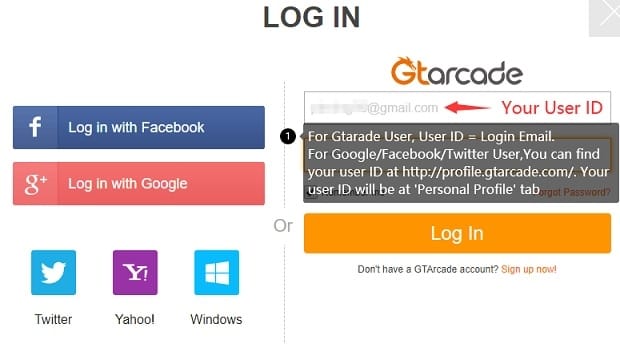
Here's the sequence that actually holds. An Era of Celestials Facebook post from October 2026 lays it out: bind your GTarcade account via Twitter or Facebook, then upgrade and verify it inside Account Security to lock the login down. That verify step is the one everyone breezes past, and a bound-but-unverified account leaves you on weaker footing if you ever have to open a dispute.
- Open Account Security and link your GTarcade account through Facebook or Twitter.
- Upgrade the account (the verification prompt sits in that same menu).
- Add an email or phone recovery path, so a dead device can't lock you out after you've paid.
- Then, and only then, open the diamond store.
One trap worth flagging before you touch a thing: bind the wrong GTarcade account and you'll hit a "server full" error at login, per that same post. So if a server you played yesterday suddenly won't let you in, the odds are overwhelming that you linked the wrong platform account, not that the server fell over. Check the binding before you start mourning your character.
Works when you bind and verify before the store ever opens. Fails when you pay first, run into trouble, and only then learn support has no bound identity to hang the purchase on.
Note your server and role ID before money moves
Diamonds credit to the role and server active at the moment of purchase, not to "your account" in some abstract sense. That's the quirk that misroutes big buys, and it stays invisible right up until it doesn't. Swap characters or servers between paying and crediting, and you can scatter a substantial purchase across the wrong role.
So jot down three things before checkout: your exact server name, your role/character ID, and the region your store's set to. On third-party routes it counts double. Sellers like G2G, OffGamers and MooGold ask for your Character ID and Server outright in order to deliver, per multiple seller product pages (2026). Fumble one digit and the diamonds settle on a stranger's account with no tidy way back.
| Pre-top-up check |
Why it matters |
Time cost |
| Bind + verify GTarcade login |
Determines whether a lost purchase is recoverable at all |
~2 min |
| Record server + role ID |
Diamonds credit to the role active at purchase — prevents misrouting |
~1 min |
| Confirm region/currency match |
Avoids a failed charge or a price you didn't expect |
~30 sec |
Source: Era of Celestials Facebook (2026); seller product pages (2026).
Works when you hold the same role from checkout through crediting. Fails when you queue a buy, nip over to another character to "check something," and let the diamonds chase a role that's no longer active.
What support will actually accept as proof
Payment proof outranks the receipt itself. It's the only leverage you carry into a dispute. A polite, accurate record closes a ticket. A furious message with nothing attached does not. Screenshotting the confusing parts of checkout mid-purchase has rescued more disputes than any refund policy I can name.
The instant a charge clears, capture the lot:
- Transaction ID / order number — the anchor support uses to locate the payment on their end.
- Store receipt — Google Play and the App Store both email one and tuck it into your purchase history, giving you an independent record when the in-game log goes vague.
- A screenshot of the confirmation screen showing the diamond amount, the price, and ideally the role and server it tied to.
- Your character's diamond balance before and after, if you can manage it. It proves the gap.
Why does this weigh so heavily on the large buys? A missing 100-diamond code reward is a mild irritation. A missing 10,000-diamond pack is real money gone, and support won't credit that on your say-so. The transaction ID is what turns "trust me" into "here's the record."
| Issue |
Proof that resolves it |
First action |
| Diamonds not received |
Transaction ID + store receipt + balance screenshot |
Wait for the sync window, then file with proof attached |
| Credited to wrong role |
Order confirmation showing role/server + your correct role ID |
Open a ticket — do not re-buy to "fix" it |
| Double charge |
Two transaction IDs / two receipts |
Attach both; let support reverse one rather than you charging back |
Source: synthesized from official binding/recharge guidance, Era of Celestials Official Site & Facebook (2026–2026).
Run the top-up clean, then check it landed

The buy itself is the easy bit. It's the checkpoints around it that keep a big purchase upright.
- Confirm you're logged into the bound, verified account and sat on the correct role/server.
- Open the official store from the in-game link or topup.gtarcade.com.
- Pick the pack, check the price and currency line up with your region, and pay.
- Before you close anything, screenshot the confirmation screen.
- Hop back into the game and confirm the diamonds landed on the right character.
- Save the transaction ID and receipt somewhere outside the game, like an email folder or a notes app.
That sixth step is the one whales skip and later regret. Cycle through several packs during a recharge event and the order numbers blur into one another fast. A dedicated folder means that when one of five buys goes missing, you can produce that exact transaction ID instead of guessing.
A quick word on price anchoring before you commit. Third-party listings have shown packs running from 100 Diamonds (around $0.98) up to 10,000 Diamonds (around $97.76) as of 2026, per MooGold. Treat that as a rough feel for the going rate, not scripture. Official pricing, bonuses and your region can all nudge the real figure.
Works when you confirm the landing before moving on. Fails when you assume "payment succeeded" equals "diamonds arrived on the right role." Those are two separate events.
When diamonds don't arrive: the ticket that gets resolved

Don't panic-buy a second time. The usual reason a top-up "didn't arrive" is a sync delay, not a lost payment, and a duplicate purchase just hands you a second mess to untangle.
Give it a short wait, then restart the client to force a re-sync. A fresh login will often pull in a balance that credited server-side and simply hadn't shown up yet. Still missing after that? Build the ticket properly:
- Lead with the transaction ID and attach the receipt screenshot.
- State your server and exact role ID.
- Note the timestamp of the purchase and the fact the diamonds haven't credited after a re-sync.
- Keep the tone flat and factual. Tickets succeed on the quality of the proof, not the volume of the outrage.
A ticket carrying a clean transaction ID and a store receipt is a 30-second check on support's side. A ticket reading "I paid and got nothing" with no order number drags on for days. The proof you saved a moment ago is the resolution speed.
Why a chargeback is the priciest "refund" going
Chargebacks belong at the back of the queue, and for an active account often nowhere near it at all. The community likes to treat the chargeback as the ultimate safety net. It isn't. Reversing a charge through your bank or the store regularly trips an account suspension or outright ban, because to the platform a reversed payment reads as theft of goods already delivered. For a whale, the banned account dwarfs whatever diamonds you clawed back.
The honest decision tree:
- Diamonds genuinely never delivered and support won't budge? Exhaust the ticket process first, with full proof, before a chargeback even crosses your mind.
- Changed your mind, or overspent? A chargeback here is the worst available move. You risk the ban and you've no delivery failure to stand on.
- Double charge? Let support reverse the duplicate. That keeps your account clean; a self-initiated chargeback puts it on the line.
Which is exactly why binding and proof matter more than the refund button ever could. Your real safety net is the recoverable account and the record you set up before paying, not a financial reversal that can cost you the very account it was meant to guard.
Staged eligible buys can beat one mega-pack
"Just buy the biggest pack for best value" is the default advice, and it's wrong more often than people admit. First-purchase bonuses and stacked recharge events can let staged buying out-earn a single mega-pack, because a bonus frequently applies per eligible offer, not once per account.
The logic for the big spenders:
- A first-purchase bonus on a fresh eligible offer can hand you bonus diamonds a repeat buy on the same pack won't. Where several offers each carry their own first-buy multiplier, dropping one giant lump on a single SKU leaves the rest going begging.
- Recharge events that stack rebates can make the timing of a large buy worth more than any raw pack discount. The March 13, 2026 version update slotted new items into the Diamond Store, per Era of Celestials Facebook (March 2026), the kind of refresh worth a look before you commit serious budget, since store contents shift with these updates.
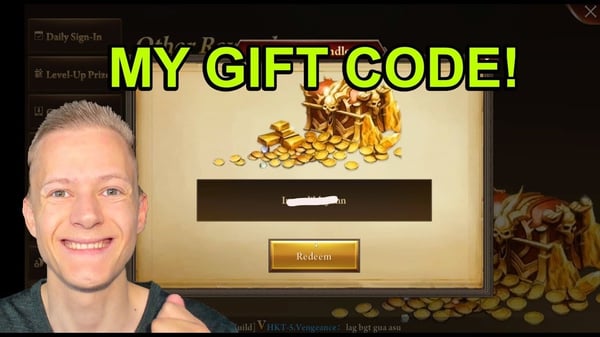
- Free diamonds essentially don't exist here. There's no farmable supply, per a Bluestacks tips guide (2019). Codes are the rare exception: Pocket Gamer's code list (2026) lists entries like Happy7thEOC handing over 100 Diamonds. Pocket change against a 10,000-diamond buy, fair enough, but it's free, so redeem live codes before paying for the equivalent.
My read, for anyone weighing where and how to commit a large budget: map the eligible offers first, redeem any active codes, then choose between one pack and several. The staged route wins more often than the "biggest is best" crowd lets on. If you're comparing channels along the way, Era of Celestials top up via VGTopup is one transparent option to weigh; confirm your server and role ID first, then hang onto the transaction proof either way. (Disclosure: this guide is published by VGTopup; the neutral checks above hold no matter where you buy.)
Works when you check current offers and bonuses before committing. Fails when you dump one lump sum and find out the next day that three eligible first-buy bonuses would've netted you more diamonds per dollar.
How three player types should actually approach this
The right answer genuinely shifts by spend level, so here's the split.
- Mid-spender (~$30/mo): A 2018 r/EraOfCelestials guide steered mid-spenders toward a roughly $30 footing, Diamond Investment plus week and month cards, and that shape still works as a sane baseline. At this tier the recurring-value items tend to beat a one-off diamond dump. Bind, note your role ID, and you're covered. No elaborate proof folder required, just the transaction ID saved per purchase.
- Whale ($200+/mo): Every safeguard here is non-negotiable for you, because your downside is the largest in the room. Verified binding, a dedicated proof folder, role-ID confirmation on every buy, staged purchasing across eligible bonus offers. And never reach for a chargeback while the account's alive.
- Returning veteran wary of account loss: Your first move isn't a purchase at all. It's confirming the binding still points at the right GTarcade account. Hit that "server full" login error and you've found the misbound-account symptom, not a dead character. Fix the binding before you spend a penny.
Troubleshooting quick hits
- Payment failed at checkout? Usually a region/currency mismatch. Confirm your store region matches your payment method before retrying.
- Login shows "server full" after binding? You linked the wrong GTarcade account; re-check the binding rather than writing off the character.
- Diamonds on the wrong character? Don't re-buy. Open a ticket with the order confirmation showing the role it credited to.
- Lost the order number? Pull the receipt from your Google Play or App Store purchase history; it's an independent record support can verify against.
Frequently Asked Questions
Is it safe to do a large diamond top up in Era of Celestials?
Yes, provided you bind and verify your account, pin down the correct server/role ID, and save the transaction ID before anything else. The official GTarcade store linked from the official site is the standard route. Third-party channels are common too, but they lean far harder on you entering an exact Character ID and Server, so accuracy there is everything.
What payment proof should I keep after topping up?
The transaction ID or order number, the store receipt (Google Play and the App Store both park one in your purchase history), and a screenshot of the confirmation screen showing amount, price and the role it tied to. For large buys, a before/after diamond balance shot earns its keep too; it visually proves the gap support is being asked to credit.
What do I do if my diamonds don't arrive?
Wait the sync window and restart the client first; a re-login often pulls in a balance that credited server-side but never displayed. Still missing? File a ticket led by the transaction ID with the receipt attached. Don't re-buy in the meantime, since a duplicate purchase just spawns a second problem to sort out.
Can I get a refund, and is a chargeback ever worth it?
Chargebacks are a genuine last resort. Reversing a charge through your bank or the store regularly trips an account ban, since the platform reads a reversed payment as theft of delivered goods, and for a high-spend account that's far costlier than the refund. Exhaust support with full proof first; for a double charge, let support reverse the duplicate instead.
How do I find my server and role ID for top up?
Both show on your in-game profile; note the exact server name and your character/role ID. Record them before checkout, because diamonds credit to whichever role is active at purchase time. On third-party routes you'll type both in by hand, so double-check every digit. A single wrong character can misroute the whole purchase.









Comments