
How to Top Up Crystal of Atlan SEA on VGTopup
Recharging your account on VGTopup requires only your in-game Player ID. Follow these steps to complete your transaction:
- Select the item or denomination you want to purchase (such as Vouchers, Opals, or monthly passes).
- Enter your Crystal of Atlan Player ID accurately in the designated field.
- Verify that your server selection corresponds to the Southeast Asia (SEA) region.
- Choose your preferred payment method on the live checkout screen.
- Complete the payment process.
- Return to Crystal of Atlan on your PC or mobile device to verify that your resources have been added to your balance or delivered via in-game mail.
Prices, pack quantities, and regional exchange rates are dynamically updated on the live checkout page.
How to Find Your Crystal of Atlan Player ID
Your Player ID (UID) is the unique numeric identifier tied to your character profile on the SEA server. Follow this direct guide to copy it correctly:
- Launch Crystal of Atlan on your mobile device or PC client.
- Log in to your character and enter the game lobby.
- Click or tap your character avatar in the top-left corner of the main screen.
- Open the basic profile tab displaying your character details.
- Locate the numeric string labeled "Player ID" or "UID" under your character name.
- Tap the copy icon next to the number to prevent typing errors during checkout.
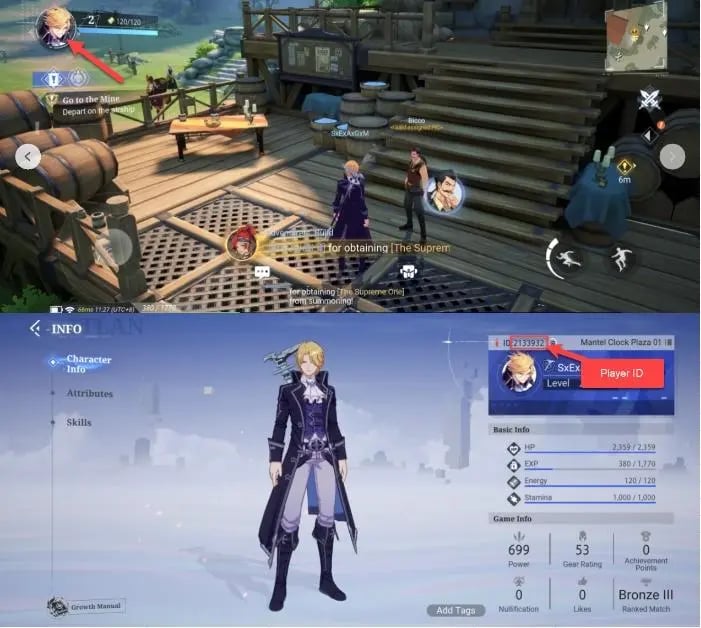
Double-check that you copied the complete numeric sequence before submitting your order on VGTopup.
Crystal of Atlan Currencies: Vouchers, Opals, and Phantasium Pass Explained
Crystal of Atlan uses distinct in-game currencies and premium items for progression, character customization, and gacha pulls. Understanding how each resource functions ensures you select the correct pack on VGTopup.
| Currency / Item | Primary Acquisition | Main In-Game Purpose |
|---|---|---|
| Vouchers | Direct store top-up | Premium store packages, exclusive fashion outfits, direct exchange for Opals |
| Opals | Voucher conversion, quests | Resonances (gacha banners), stamina resets, auction house bidding, skill resets |
| Phantasium Pass | Direct seasonal purchase | Unlocking premium battle pass tiers, gear materials, exclusive cosmetics, mounts |
| Gold / Bound Coins | Gameplay rewards | Gear upgrades, crafting fees, standard merchant items |
Vouchers
Vouchers represent the direct premium store currency in Crystal of Atlan SEA. You receive Vouchers immediately upon completing a direct recharge. Players use Vouchers to buy limited-time cosmetic bundles, character skins, mount upgrades, and specialized resource crates in the cash shop. Vouchers can also be converted directly into Opals at a 1:1 ratio whenever needed for summons or energy replenishment.
Opals
Opals are the primary operational currency required for endgame progression and character builds. You need Opals to purchase Resonance cards (gacha summons) for new weapons and pets. Opals also allow players to refresh daily energy for dungeon farming, reset skill trees, bid on high-tier equipment in the player auction house, and acquire refining catalysts.
Phantasium Pass
The Phantasium Pass functions as the seasonal progression system in Crystal of Atlan. Purchasing the premium track provides instant resources alongside tier-based milestone rewards. By completing daily, weekly, and seasonal combat objectives, pass holders earn exclusive cosmetic armors, weapon skins, rare upgrade materials, and large amounts of Opals throughout the season.
Why Top Up Crystal of Atlan SEA via Player ID Only
Direct ID-based top-ups provide the safest transaction model for online gaming accounts. VGTopup relies entirely on public Player IDs to deliver resources directly through official game distribution channels.
- Zero Account Sharing: You never need to share your game password, Google account, Apple ID, or third-party login credentials.
- No Security Verification Delays: Because login credentials are not involved, you will not encounter two-factor authentication locks, device verifications, or regional login flags.
- Account Integrity: Direct-to-ID delivery maintains the integrity of your account and eliminates risks related to unauthorized logins or account compromises.
- Simple Checkout: Simply paste your copied Player ID, pick your package, and check out without logging into external platforms.
Supported Payment Methods for Crystal of Atlan SEA Top-Ups
VGTopup supports an extensive array of regional and international payment channels to ensure convenient access across Southeast Asia and globally. Available options include:
- Major credit and debit cards (Visa, Mastercard, and regional card networks)
- Popular local e-wallets across SEA regions
- Direct online banking and instant transfer systems
- Secure digital payment platforms
All payment fees, real-time exchange rates, and final amounts appear directly on the live checkout interface before you authorize your transaction.
Crystal of Atlan SEA Cross-Platform Top-Up and Delivery Process
Crystal of Atlan supports cross-platform gameplay, allowing players to use the same character across Android, iOS, and PC. Because your character data resides on the central SEA game server, any recharge completed via Player ID updates your balance across all connected platforms.
Delivery Flow and Verification
- Once payment confirmation is received, your order is routed automatically for delivery to the specified Player ID.
- In most instances, Vouchers or Opals update directly in your balance. Certain bundle rewards or event bonus items may arrive through your in-game mailbox.
- If your balance does not update instantly on an active game client, restart the game or switch zones to refresh the connection to the SEA server.
- Check your in-game mail tab to claim any promotional reward attachments.
Troubleshooting Tips
- Order Status Check: You can track the status of your order anytime through your VGTopup account history.
- Typo in Player ID: If you submitted an incorrect Player ID, reach out to VGTopup 24/7 customer support immediately. If the resources have not yet been dispatched by the automated queue, support agents can help adjust the destination UID.
- Server Maintenance: If the official Crystal of Atlan SEA servers are down for maintenance or patch deployment, resource delivery will finalize as soon as server access resumes.
Frequently Asked Questions
How do I find my Crystal of Atlan Player ID for top-up?
Open Crystal of Atlan, tap your character avatar in the upper-left corner of your screen, and view your profile information. Your numeric Player ID is displayed right under your character name. Tap the copy icon next to the number to copy it to your clipboard.
Do I need to provide my game password to top up Crystal of Atlan?
No. Top-ups on VGTopup require only your public Player ID. You should never share your login password, security codes, or social media login credentials with any top-up service.
What is the difference between Vouchers, Opals, and Phantasium Pass in Crystal of Atlan?
Vouchers are the premium currency purchased directly and used for store packages, skins, or 1:1 Opal conversion. Opals are used for gacha summons, stamina refreshes, and auction house trades. The Phantasium Pass is a seasonal battle pass granting tiered progression rewards and exclusive items.
Can I top up my Crystal of Atlan account on PC using my Player ID?
Yes. Crystal of Atlan SEA shares progress across PC and mobile devices. A top-up sent to your Player ID applies to your account regardless of the device you use to play.
How quickly will the Vouchers or Opals appear in my Crystal of Atlan account?
Deliveries are processed promptly after payment authorization. You will see the currency reflected in your in-game balance or mailbox shortly after checkout completion.
What should I do if I entered the wrong Player ID during checkout?
Contact VGTopup 24/7 customer support right away with your order number. If the order has not yet been processed by the automated dispatch system, our team will assist in updating your details.
Select Denomination
Tax, payment fees and eligible coupons are calculated at checkout.
| Package | Price |
|---|---|
| 60 + 9 Bonus Opals | USD 0.73 |
| 60 + 3 Bonus Vouchers | USD 0.73 |
| Phantasium Pass (15 Days) + 8 Opals | USD 2.01 |
| Phantasium Pass (30 Days) + 14 Opals | USD 3.47 |
| 300 + 60 Bonus Opals | USD 3.56 |
| 300 + 15 Bonus Vouchers | USD 3.56 |
| 980 + 49 Bonus Vouchers | USD 11.22 |
| 980 Opals + 229 Bonus | USD 11.48 |
| 1980 + 499 Bonus Opals | USD 21.51 |
| 1980 + 99 Bonus Vouchers | USD 21.51 |
| 3280 + 965 Bonus Opals | USD 35.84 |
| 3280 + 165 Bonus Vouchers | USD 35.84 |
| 6480 + 2126 Bonus Opals | USD 71.99 |
| 6480 + 326 Bonus Vouchers | USD 71.99 |