UID Versus Display Name: Why Your Permanent Number Matters
New players frequently mix up their public display name with their account UID. When you register your account in Party Star, the setup process prompts you to choose an initial nickname and upload a profile picture. That nickname is what other party members see when you enter a voice room or challenge someone to a match of Carrom or Parcheesi.
You can edit your display name whenever you want—swapping handles weekly for clan tags or events. Because Party Star allows non-unique display names, hundreds of players can share the exact same visible handle across chat lobbies.
Your User ID works differently. As an immutable database primary key assigned at registration, the UID never changes—even if you overwrite your nickname, link a new social account, or swap avatars.
Entering a display name instead of a numeric UID will cause orders to fail when setting up Party Star diamond top-ups for gifts or entrance effects. Automated billing engines query the database using exact numeric keys, bypassing custom text strings that contain emojis, symbols, or duplicate handles.
Review how Party Star differentiates dynamic user-facing profile settings from underlying account records in the table below.
| Profile Attribute | Storage Layer | Duplication Allowed | Role in Third-Party Systems |
|---|
| User ID (UID) | Central server database | No (Unique constraint) | Exact routing key for transactions |
| Nickname / Handle | User profile table | Yes (Depending on casing/symbols) | Display label only; ignored by billing systems |
| Room Identifier | Live session memory cache | No (Temporary active session) | Routes participants to audio broadcasts |
| Device Sandbox ID | Local Android storage | N/A (Device-specific) | Isolates app files on internal storage |
External delivery systems rely exclusively on the unchangeable UID string because display nicknames do not provide a distinct, collision-free database match.
Room ID vs. User ID: Avoiding Costly Diamond Routing Errors
A frequent mix-up happens inside group voice chat rooms. When you host or join an audio party, an ID number appears at the top of the screen. Broadcasters often assume this room number doubles as their user profile ID. It does not.
A Room ID identifies an ephemeral or host-assigned audio space. While some broadcasters maintain a static room number tied to their personal lounge, the Room ID references the broadcast channel rather than the user entity behind it.
If you hand your Room ID to a friend or input it into a balance reload form, the transaction engine cannot verify your player wallet. In worst-case scenarios where a Room ID happens to match an older numeric UID belonging to someone else, your funds could route permanently to an unrelated stranger.
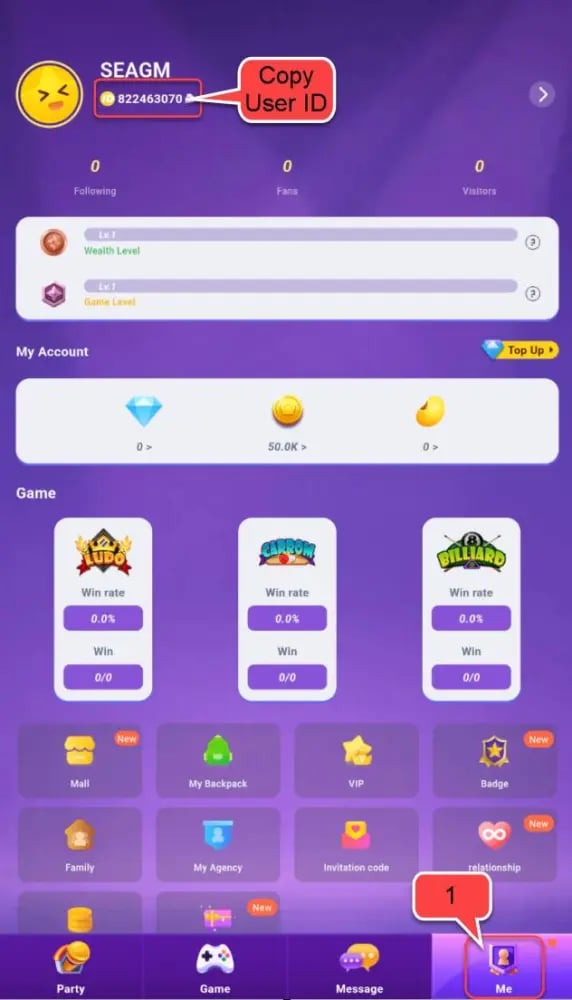
Always exit the voice room or tap out to your main profile screen before copying credentials. If the number you are looking at is visible in the upper corners of a live audio stage alongside microphone controls and seat layouts, you are looking at a Room ID. If the number sits on the dedicated "Me" tab below your personal photo, you have found your actual account UID.
Android Device Profiles and App Account Separation
Android separates user profiles very differently from social apps. If you run multiple device profiles on one phone, understanding storage sandboxing will save you from misplaced logins and apparent data loss.
Stock Android includes a native multi-user system located under Settings > System > Multiple Users. Each OS user profile maintains its own dedicated storage sandbox, meaning apps installed on Profile A do not share cache, login tokens, or data with Profile B. If you launch Party Star under a secondary device user, the app opens as a blank installation, requiring a fresh login.
If you switch between Android OS profiles, background notifications for inactive profiles stop surfacing until that specific profile is unlocked and active in the foreground. If you think your Party Star account disappeared, check your Android quick-settings shade to make sure you are logged into your primary device profile rather than a Guest or secondary profile.
Device manufacturers handle this differently. Samsung Galaxy devices running One UI generally disable standard Android multi-user profiles on smartphones, reserving separation solely for MDM-based Work Profiles or secure folders. Samsung devices also feature a hardware-tied Samsung Account ID, which uses an email format. Your Samsung Account ID has zero connection to Party Star and will never function as a substitute for your in-app UID.
Here is how Android operating system boundaries compare against in-app Party Star credentials across different device environments.
| System Layer | Identification Type | Cross-Profile Data Sharing | Impact on Party Star App |
|---|
| Stock Android Multi-User | Device OS Profile | None (Strictly sandboxed) | App installs run separate account sessions |
| Samsung One UI | Samsung Account (Email) | Work Profile sandbox only | No multi-user switching; single personal sandbox |
| Party Star Application | App Numeric UID | Cloud-synced across logins | Identifies account regardless of host hardware |
| Android File System | UID / Linux Process ID | Blocked by kernel sandbox | Prevents apps from reading other app data |
Managing multiple Party Star accounts requires logging in and out of the app itself or running separate device sandboxes, as system settings do not manage in-app UIDs.
Technical Requirements and OS Considerations for Party Star
Running Party Star without graphical stutter or profile loading errors requires meeting basic operating system baselines. The application specifies a minimum requirement of Android 7.0 (Nougat). Attempting to run the app on Android versions below 7.0 leads to launch crashes and server handshake timeouts that can prevent the profile dashboard from displaying your account numbers.
If you install Party Star via standalone APK files rather than an automated installer, modern Android versions enforce strict permission gates. On Android 9.0 (Pie), 10, 11, 12, and 14+, granting installation access is no longer a global toggle. You must navigate to Settings > Apps > Special App Access > Install Unknown Apps, then manually approve the specific browser or file manager holding the installer package.
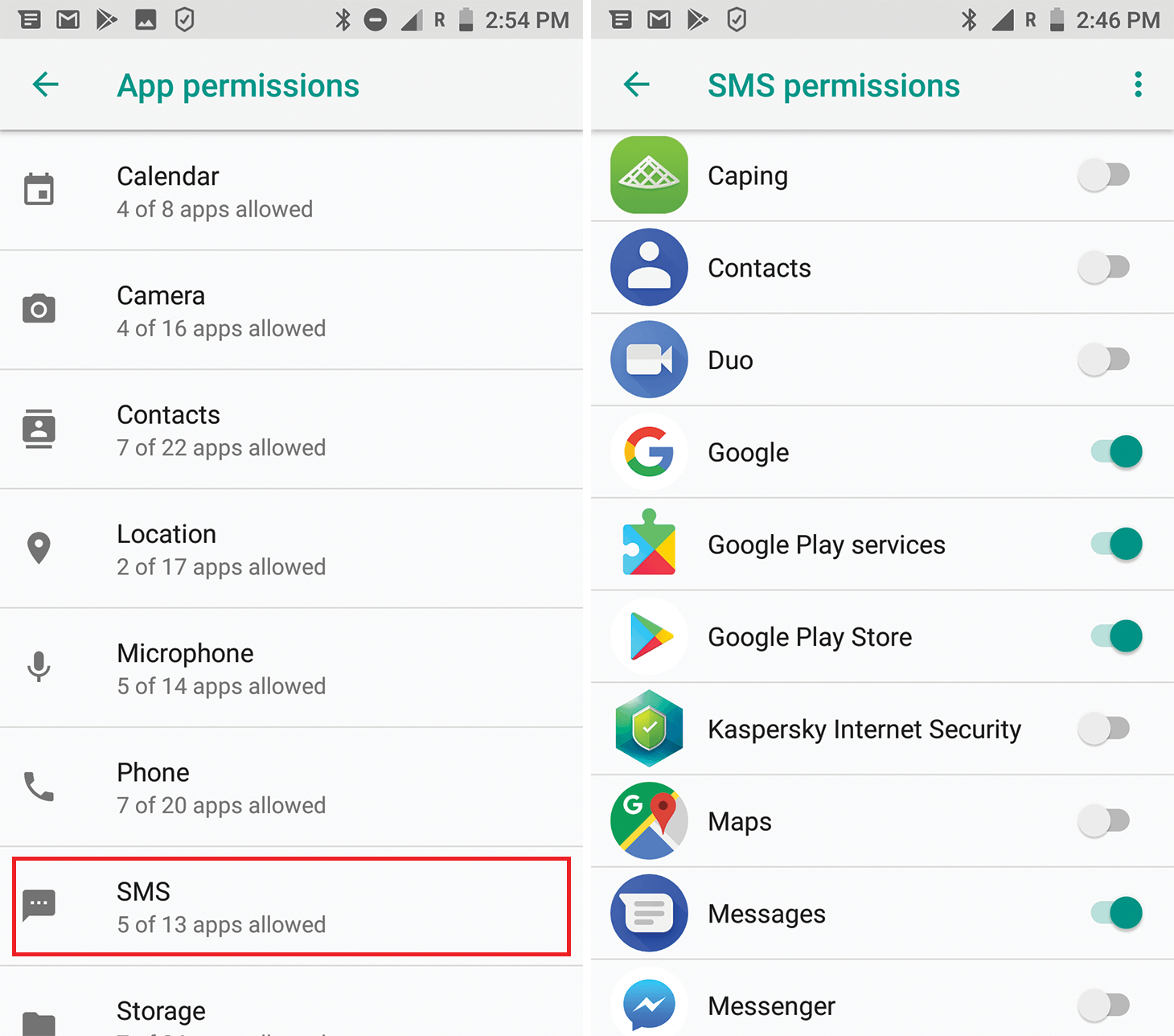
Browser identity federation can also disrupt logins. When accessing Party Star through Google or third-party accounts, Chrome's site settings may block the credential transfer pop-up. Verifying that your browser permits third-party login handshakes ensures your authentication tokens reach the app properly.
Keeping your OS updated ensures stable voice chat streams, and setting up your diamonds for Party Star voice rooms in advance lets you support creators with custom entrance effects without app crashes.
Party Star presents your account UID as a pure numeric sequence without letters or punctuation. When submitting this number to reload forms or support desks, clean formatting prevents transaction errors.
Avoid these common copy-paste errors:
- Accidental Text Labels: When you tap copy, make sure your clipboard only grabs the raw digits. Do not manually type "ID:" or "UID-" in front of the number.
- Trailing Whitespace: Highlighting the number manually with your thumb often grabs an empty space character before or after the digits. Billing verification forms often reject inputs containing spaces.
- Padded Characters: Some backend systems pad numeric identifiers with leading zeros. Never insert leading zeros unless the receiving field specifically requires fixed-length formatting.
Copy the UID using the dedicated clipboard icon next to the digits rather than highlighting the text with your thumb. Pasting the sequence into a basic notes app beforehand lets you confirm no rogue spaces or labels tagged along.
When preparing to top up Party Star diamonds online, paste the exact copied string directly into the field without adding prefixes like "UID:" or leaving trailing whitespace.
Troubleshooting Missing or Unresponsive Profile Data
Occasionally, the Party Star profile screen refuses to load your numeric UID, showing a blank space or an infinite loading spinner. This usually happens because of local caching bugs, network interruptions, or process priority limits set by Android.
If your UID does not show up on your profile screen, run through these diagnostic steps:
Check your network connection first. The profile dashboard pulls account data directly from OLA CHAT servers. If your Wi-Fi or mobile data drops packets, the app might render cached profile graphics while failing to pull your numeric record. Toggle Airplane Mode on for five seconds, turn it off, and refresh the page.
Clear the application cache next. Navigate to Android Settings > Apps > Party Star > Storage & Cache, then tap 'Clear Cache'. Avoid tapping 'Clear Storage' unless you have your login credentials handy, since that deletes stored authentication tokens. A simple cache flush purges corrupt interface assets without signing you out.
Check background process limits on aggressive battery-saving modes. Heavy battery optimization can suspend Party Star's background network requests before server handshakes finish. Whitelist Party Star under Settings > Battery > Battery Optimization so the OS does not freeze active socket connections.
Frequently Asked Questions
Where do I locate my Party Star User ID on Android?
Open Party Star, tap the Profile or "Me" icon in the bottom-right navigation bar, and look directly underneath your display name. Your unique numeric UID is printed next to an "ID:" label, accompanied by a quick-copy button.
Is my Party Star User ID the same as my Android device account?
No, your Party Star UID is a standalone database record assigned exclusively by the app's servers. It shares no link with your Google account email, Android device user profile, or hardware Samsung Account.
Can I change my Party Star numeric User ID?
No, your numeric UID is an immutable database key that remains permanent for the lifespan of your account. You can freely edit your display nickname and avatar, but the underlying account number never changes.
Why is my User ID required for diamond top-ups or gift recharges?
Recharge systems require your numeric UID because display names can duplicate, change, or include unreadable special characters across social channels. The unique numeric UID ensures that purchased diamonds route directly to your specific account wallet without delivery errors.
What Android version do I need to run Party Star in 2026?
Party Star requires Android version 7.0 (Nougat) or higher to install and launch properly. Devices running outdated operating systems cannot establish secure handshakes with the game servers or load profile assets.
What should I do if my Party Star profile shows under a different Android user?
Swipe down your Android quick settings and verify that your device is logged into your primary OS user profile rather than a Guest or secondary profile. Android isolates application data across profiles, so secondary profiles will not display your active Party Star login.
Final Verdict on Securing Your Account Credentials
Your Party Star UID is the single most important credential you have for managing purchases, recovering lost profiles, and receiving gifts across voice rooms. Room IDs change, display names get modified on a whim, and OS profiles isolate data, but your server-assigned numeric ID stays identical from the day you sign up.
Take five seconds to open the 'Me' tab, tap the copy icon, and store the digits in a secure note. Having your UID ready avoids failed recharges, prevents mixing up your profile with a temporary voice stage, and guarantees support can identify your account if you switch phones.









Comments