Trigger the bonus on your smallest pack, never your biggest
Spend small first. The first-charge bonus is a one-time multiplier, and you want it landing on diamonds-per-dollar, not on raw size. I get the instinct to do the opposite: bigger packs carry better base value, so why not park the bonus on a 2999 M-Cash bundle? Because the bonus fires once, per account, on your first qualifying in-game purchase. It isn't a permanent rate boost. After it goes off, every dollar converts at the ordinary rate no matter how much you spent pulling the trigger.
Which means the per-dollar uplift is richest when the qualifying buy is your cheapest one. Think of the bonus as a coupon that doubles whatever it touches, one time only. You wouldn't burn that coupon on the cart you were already going to buy at full efficiency. Isolate it on the smallest cart, then make the bigger value buys afterward at the normal rate.
Here's the published-price ladder for reference. M-Cash converts in-game to diamonds or bundles, with 100 M-Cash at roughly US$1 base.
| Pack |
Price (USD) |
M-Cash |
M-Cash per USD |
| 1499 M-Cash |
20.00 |
1499 |
~75 |
| 1999 M-Cash |
25.00 |
1999 |
~80 |
| 2999 M-Cash |
35.00 |
2999 |
~86 |
Source: Lotkeys (2026)
Look at how base efficiency climbs with size. The 2999 tier hands you more per dollar than the 1499. That's exactly why sequencing matters. Let the bonus hit a small buy, then grab the efficient larger tier at its already-better rate. Stacking the bonus on the big pack does not magically unlock a second bonus on the small one. One trigger. That's all you get.
On the exact multiplier: chatter in the official MLA Facebook group references the familiar "double on first purchase at set diamond levels" mechanic carried over from sibling ML titles, but I wouldn't quote a precise MLA number as gospel. Treat it as a meaningful one-time uplift you shouldn't waste, not a figure you'd bet a $35 purchase on before confirming it in your own client.
M-Cash and diamonds aren't the same thing, and that trips up new players
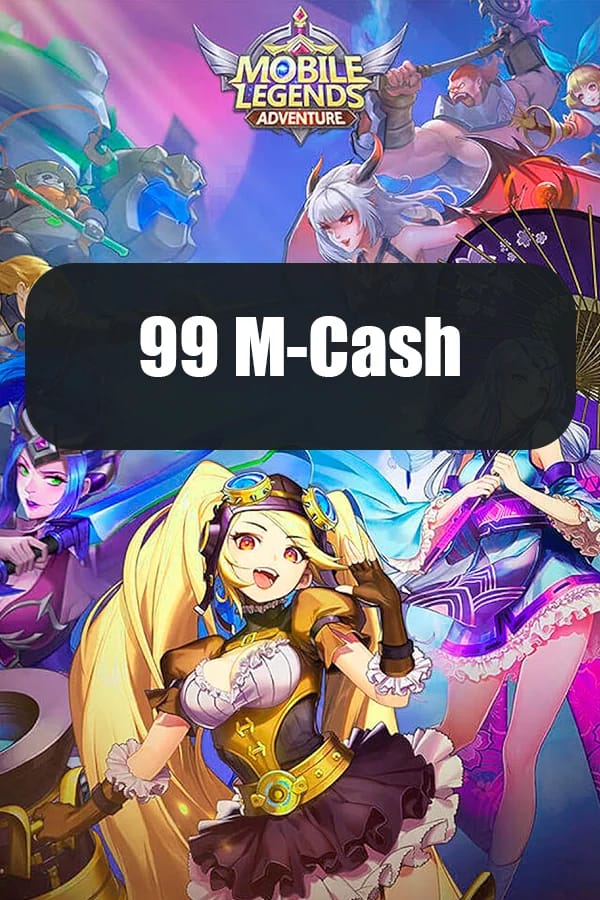
M-Cash is the money you load. Diamonds (and bundles) are usually what you actually spend in-game, and the label on the pack won't always match what lands in your inventory. Fair objection: currency is currency, why care? Because the mismatch breeds real buyer's remorse. You buy something labeled in M-Cash, go hunting for "diamonds" in your bag, and panic that the whole top-up flopped.
Per Mobile Legends: Adventure Wiki, M-Cash "is a currency that equals real cash" used to purchase paid bundles. Picture it as your loaded balance. From there it converts into the stuff you actually consume: diamonds, value bundles, event packs. The shop name is the wallet. The inventory item is the spend. Once that clicks, the "where did my money go" dread mostly evaporates.
It matters most when you're comparing offers. Some packs are priced in M-Cash that converts after purchase, so two listings with different numbers can resolve to similar in-game value. Read what converts to what before judging a deal by its headline figure.
Your Player ID and server together are the real address
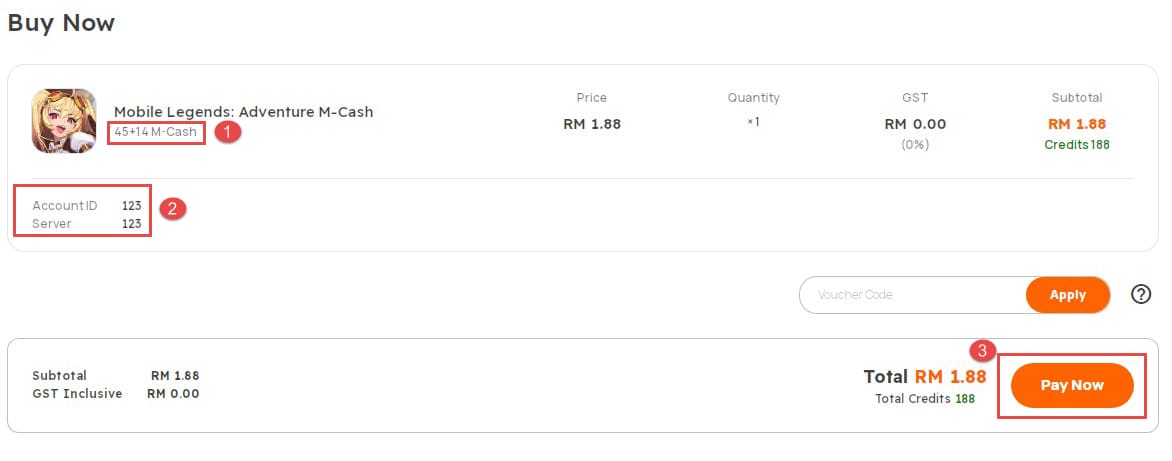
The ID alone won't cut it. The ID and the server form the actual destination, and the same ID number on a different server is a totally different account. People love to blame the top-up platform when a purchase "disappears," but the pattern is clear once you've seen enough of these: wrong-server input, not channel fraud, is what flings currency into the void.
Finding your ID, per Codashop Philippines: tap your avatar in the top-left of the main screen, and your User ID sits below your nickname. The format reads like 110226(33), where the number in parentheses marks the server/region. You enter the complete string, parentheses included, when topping up externally.
That parenthetical is the bit beginners drop or fat-finger, and it's the most expensive slip on this whole page. Type 110226 on server 12 instead of 33 and, if that ID happens to exist there, your diamonds settle into a stranger's account with no clean clawback. The fix is dull and worth doing every single time: open your profile, read the ID and the server off the screen, match both in the recharge form before you tap pay. Thirty seconds of double-checking kills the single most common "not received" complaint there is.
Step-by-step: topping up inside the game versus through a recharge center
Two legitimate routes here, and the right one rides on your payment situation and region, not on one being "safe" and the other "shady." In-game purchases run through Google Play or the App Store, per Google Play listings, which is the frictionless path when your store wallet's already funded and your card's on file. Open the shop, pick a pack, let the platform handle billing.
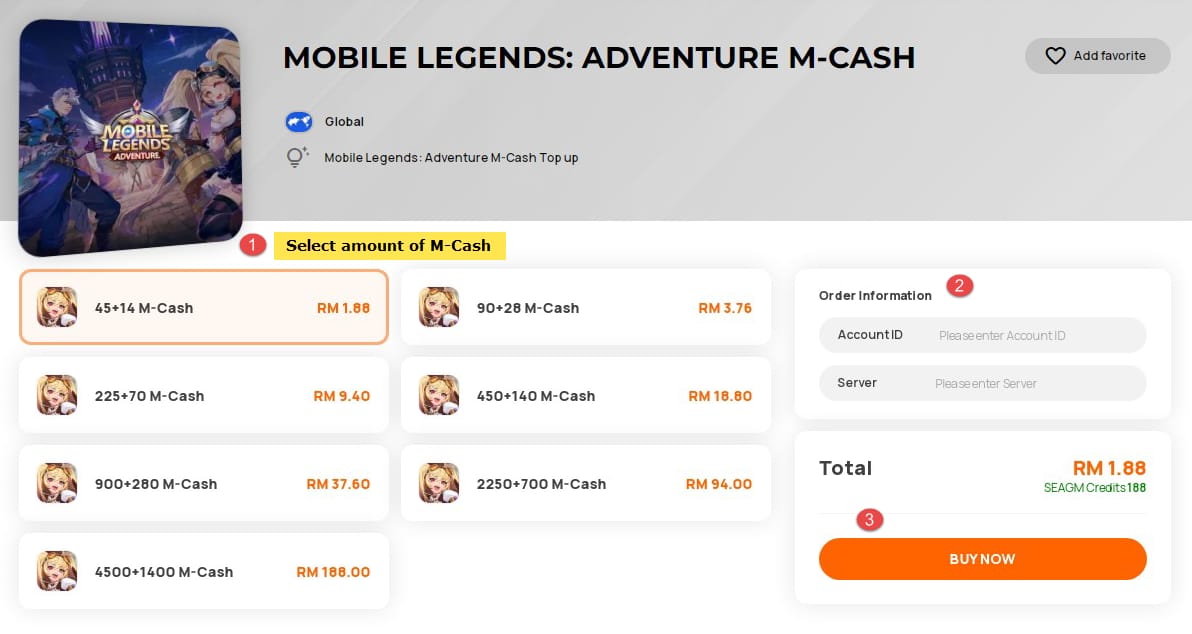
The external recharge route works like this, per Codashop Philippines: punch in your Mobile Legends: Adventure User ID and server ID, choose the M-Cash value, complete payment, and the M-Cash lands immediately. No app-store account needed, which is why it's the go-to for players without a card on file or anyone in a region where local payment methods are simply easier.
So why bother with the external path at all? Pricing. Discussion in that same Facebook group notes third-party top-up is "often cheaper than official due to regional exchange rates," and the conversion gap can quietly tilt in the recharge center's favor depending on where you sit. The first time I lined a recharge center against the in-app price, that exchange angle is what made me read the fine print instead of reflex-tapping the in-game button. Full transparency: this guide is published by VGTopup, itself a recharge platform. So weigh the neutral mechanics over any channel preference (verify ID and server, confirm the order ID) and pick whichever route prices and pays out best in your market. You can stack the Mobile Legends: Adventure M-Cash top up flow against your in-app price and decide from there.
Paying without a credit card is often the safer first move
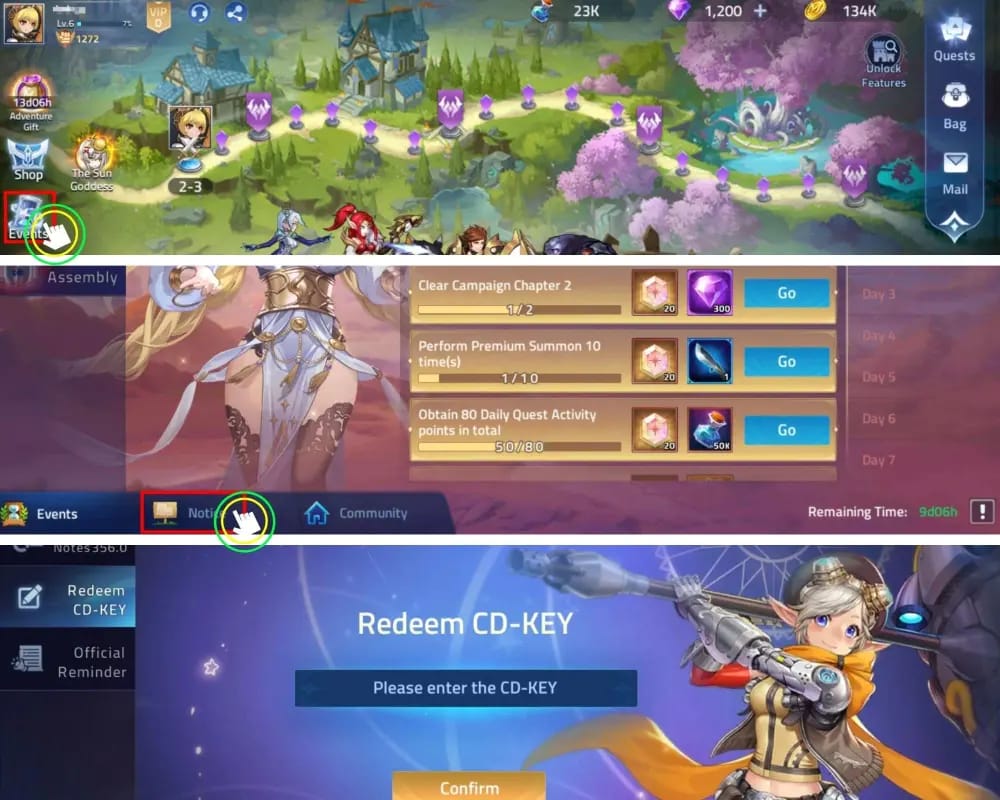
A jittery first-timer should reach for store balance or an e-wallet before typing a card number into anything. The pushback writes itself: cards are universal and instant. True. But for a brand-new account the lower-exposure option buys real peace of mind, and the payment menus support it anyway.
Players without a card can lean on an e-wallet or store balance through Codashop or similar sites for M-Cash. On the in-game side, Google Play or App Store balance loaded from a retail gift card lets a younger or card-less player buy without ever typing card details. Regional coverage holds up across Southeast Asia: Codashop's regional pages support local payments in the Philippines, Indonesia, Malaysia and Singapore, so the e-wallet or store-balance path is a genuine option, not a duct-tape workaround.
My read on the three most common first-spender profiles:
- F2P-curious, dipping a toe in: smallest qualifying pack, paid via store balance. You trigger the one-time bonus, spend a few dollars, and learn the flow with almost no exposure.
- Low-spender, $5–10 first buy: still fire the bonus on a small purchase first if you can, then make your "real" buy at the ordinary rate. Don't waste the one-time trigger on the bigger of two purchases.
- No-credit-card player: e-wallet or store balance through a recharge center or the app store. Gift-card-funded store balance is the cleanest road and needs no card at all.
Time your first purchase against an upcoming bonus window
If an official double top-up or recharge promo is right around the corner, waiting a few days can beat buying today, and there's a concrete reason to glance at the calendar right now. Per Mobile Legends: Adventure Facebook, a Global Anniversary Fest with an M-Cash Giveaway runs from June to October 2026. That same feed has teased an "Official Website Shop M-Cash Recharge Bonus is Coming Soon!" (Mobile Legends: Adventure Facebook, June 2026).
The counter is fair: events go vague on dates, and waiting forever for a promo that never quite lands is its own trap. So the discipline stays narrow. Buy outside a double top-up event only when none's imminent, because per the official posts, doing otherwise torches a one-time bonus you can't reclaim. If the calendar's empty for weeks, buy now and quit agonizing. If a recharge-bonus window sits days out, that's exactly when patience earns its keep. With that anniversary giveaway already live through October, I'd at least crack open the official feed before a first buy.
When money leaves your account but diamonds don't show up
Most "top-up failed but money deducted" scares either resolve on their own or trace back to an input error, not theft, and definitely not a reason to re-buy on the spot. The urge to panic-purchase again makes total sense when you've paid and see nothing. That's also exactly how one failed-looking transaction becomes two very real charges.
Work it in order:
- Confirm the delivery target. Re-open your profile, re-read your ID and server. If you topped up externally, compare them character-for-character against what you entered. A correct ID on the wrong server is the classic culprit; the currency landed somewhere, just not on you.
- Give it a beat, then check inventory. External top-ups add M-Cash immediately per Codashop, but app-store settlement can lag. Hunt for M-Cash in your balance, not "diamonds," since the wallet and the spend are different items.
- Keep your order/transaction ID. That reference is your proof and the fastest lane to a support fix. Don't re-buy before you've verified with it. A duplicate charge is far nastier to unwind than a slow delivery.
The reassuring part under all of this: the channel is rarely the villain. Nail the ID-plus-server pair, hold your order ID, resist the re-buy reflex, and almost every one of these episodes closes cleanly.
The smartest first top-up, in three lines
Buy the smallest pack that triggers the first-charge bonus, confirm your ID and server before paying, and pay with store balance or an e-wallet if a card makes you uneasy. Then make any larger purchase at the ordinary rate, ideally lined up with a live bonus window; the Anniversary Fest runs through October 2026. Bank that one-time bonus on purpose. It's the one move you genuinely can't redo.
Frequently Asked Questions
Where exactly do I find my Mobile Legends: Adventure player ID?
Tap your avatar in the top-left of the main game screen, and your User ID shows directly below your nickname, per Codashop Philippines. It reads like 110226(33), and the parentheses carry your server/region, so copy the whole string, bracketed part and all. If you ever switch servers, remember the same ID number on a different server is a separate account entirely.
Does the first top-up in Mobile Legends: Adventure really give a bonus?
It does. Per Codashop Philippines, your first M-Cash purchase unlocks a first-charge bonus on an in-game purchase. It's a one-time, per-account trigger, so it fires once and won't repeat regardless of how big a later pack gets. The edge most guides skip: isolate it on your cheapest qualifying buy, then make the bigger purchases afterward at the normal rate.
What's the cheapest way to top up Mobile Legends: Adventure?
Depends on your region. The official MLA Facebook group notes third-party recharge is often cheaper than official thanks to regional exchange rates. Across the Philippines, Indonesia, Malaysia and Singapore, Codashop's local-payment support lets you set the recharge-center price beside the in-app price and pick the lower one. There's no single global "cheapest" answer.
Can I top up without a credit card?
Comfortably. Use an e-wallet or store balance on a recharge center, or load Google Play / App Store balance from a retail gift card and buy in-game with zero card details entered, per multiple recharge sites and Google Play listings. For a first-timer or a younger player, gift-card-funded store balance is the lowest-exposure route, and the one I'd default to.
Why didn't my top-up show up in-game?
Usually a wrong-server entry; a correct ID on the wrong server delivers currency to a different account. Check your ID and server against your profile, look for M-Cash in your balance rather than "diamonds" (they're different items), and give app-store payments a moment to settle. Keep your order ID and verify with it before re-buying, so a delayed delivery never snowballs into a duplicate charge.











Comments