
Love and Deepspace Top Up: Crystals & Aurum Pass Direct Recharge
Acquiring Purple Crystals and activating the Aurum Pass allows you to fully experience the story and combat encounters in Love and Deepspace. Whether you are aiming to obtain limited five-star Memories for Xavier, Zayne, Rafayel, or Sylus, having a dependable supply of in-game currency is essential. Premium Purple Crystals convert directly into Diamonds to buy Deepspace Wishes, unlock exclusive companion outfits, obtain accessory packs, and replenish stamina for Protocore farming.
VGTopup provides a direct recharge system designed specifically for Love and Deepspace players. By processing orders using only your numeric Hunter ID, your purchases are credited directly to your game profile without requiring login credentials or sensitive account details. Current package pricing and active offers are displayed in real time on the live checkout interface.
How to Find Your Love and Deepspace Hunter ID
Your Hunter ID is the unique numerical identifier linked to your Love and Deepspace profile. Providing the correct Hunter ID ensures that your Purple Crystals or Aurum Pass are sent to the correct account.
Follow these steps to locate your ID:
- Launch Love and Deepspace on your mobile device and log in to your account.
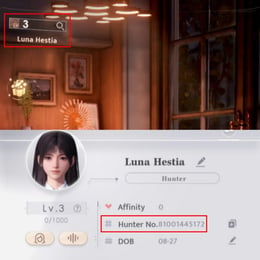
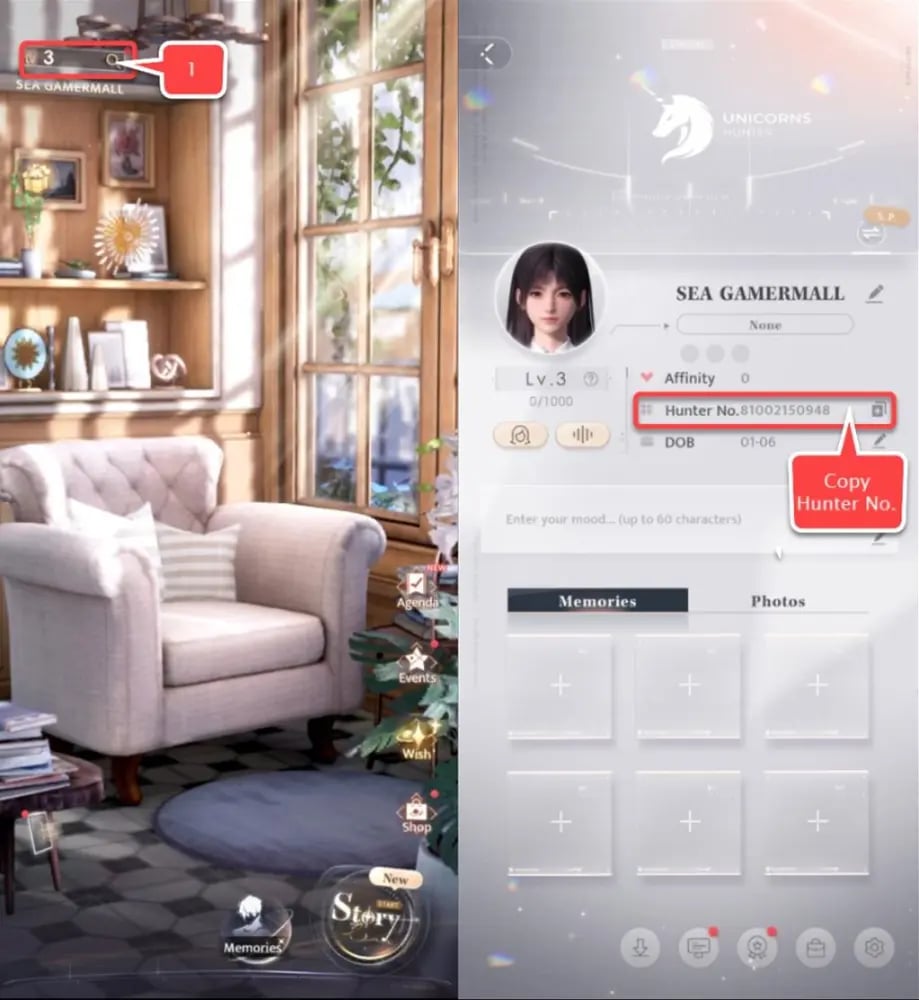
- Tap your profile avatar located in the top-left corner of the main screen.
- Your Hunter profile card will open, displaying your username, level, and Hunter ID directly below your profile picture.
- Tap the copy icon next to your Hunter ID to copy the number to your clipboard.
- Paste the ID into the input field on VGTopup before placing your order.
Always double-check your Hunter ID and ensure you have selected the correct game server region to prevent processing delays.
Step-by-Step Guide to Topping Up Crystals and Aurum Pass
Recharging your account through VGTopup takes only a few moments. Follow this simple process:
- Select Your Item: Choose between standalone Purple Crystal packs or the 30-day Aurum Pass from the product list.
- Enter Account Details: Paste your numeric Hunter ID into the player details field.
- Select Server: Confirm that the target server matches where your character is registered (such as America, Europe, Asia, or TW/HK/MO).
- Complete Payment: Select your preferred payment method on the secure checkout page and confirm your transaction.
- Check In-Game Balance: Open Love and Deepspace to confirm your updated Purple Crystal balance or active Aurum Pass status.
Aurum Pass vs. Direct Crystal Recharge: Value Breakdown
Understanding the distinction between purchasing the Aurum Pass and buying direct Purple Crystals helps you spend efficiently based on your gacha timeline.
| Package Type | Immediate Contents | Daily Rewards (30 Days) | Best Use Case |
|---|---|---|---|
| Aurum Pass (30 Days) | 300 Purple Crystals | 100 Diamonds/day (3,000 total) + Stamina Cap +50 | Long-term wish saving, steady character progression |
| Purple Crystals Pack | Chosen crystal amount instantly | None | Immediate banner pulls, time-limited event packs, outfits |
In-Game Currency Conversion Rules
- Purple Crystals to Diamonds: Purple Crystals convert to Diamonds at a 1:1 ratio. Diamonds are used to purchase Deepspace Wishes (150 Diamonds per Wish) and Empyrean Wishes.
- Exclusive Cosmetics: Certain companion outfits, hairstyles, and background music tracks can only be bought with Purple Crystals directly, making raw crystal packs necessary for cosmetic collectors.
- Aurum Pass Value: If you log in daily, a single 30-day Aurum Pass provides a total of 300 Purple Crystals and 3,000 Diamonds, yielding the highest currency return per dollar spent.
Safe and Secure Top-Up Process Without Account Passwords
Account safety is a top priority for any player investing in their collection. VGTopup operates using direct server-side top-up protocols that require only your public Hunter ID.
- Zero Password Sharing: You never need to share your game password, Apple ID, Google Play credentials, or social media logins.
- Direct Delivery: Crystals and subscription passes are added straight to your account by the game server once payment clears.
- Account Integrity: Because the process uses legitimate external top-up routes, your account remains secure and fully compliant with game guidelines.
In-Game Delivery Verification and Mailbox Collection
Once your transaction on VGTopup is marked as completed, your items are delivered into your game account:
- Purple Crystals: Added directly to your top balance bar. You can view your updated total in the top-right corner of the main lobby or inside the shop interface.
- Aurum Pass: Activates immediately. The 300 instant Purple Crystals will appear in your wallet, while your first daily bundle of 100 Diamonds and extra stamina will be available to claim on the Aurum Pass interface.
- Delivery Delays: Most orders process promptly. If your currency does not show right away, fully close the game app from your device background processes and restart it to refresh your server connection.
Common Top-Up Questions and Troubleshooting
Where can I top up Love and Deepspace Crystals and Aurum Pass?
You can top up directly on VGTopup by selecting your preferred item, providing your Hunter ID, and completing checkout. The currency is credited straight to your game account.
How do I find my Hunter ID in Love and Deepspace?
Tap your profile avatar in the upper-left corner of the main game screen. Your numeric Hunter ID is displayed underneath your name. Tap the copy icon next to it to copy the numbers.
What is the difference between Purple Crystals and Diamonds?
Purple Crystals are the premium paid currency bought with real money. They can be converted 1:1 into Diamonds or used to buy exclusive outfits and packs. Diamonds are the standard gacha currency used to purchase Deepspace Wishes for memory pulls.
What rewards are included with the Love and Deepspace Aurum Pass?
The Aurum Pass grants 300 Purple Crystals immediately upon purchase, 100 Diamonds each day you log in for 30 days (totaling 3,000 Diamonds), an extra 50 maximum stamina capacity, and daily stamina claim bonuses.
Do I need to provide my account login or password to recharge?
No. Top-ups on VGTopup require only your numeric Hunter ID and server selection. You should never share your password or account login credentials.
How long does it take for Crystals or Aurum Pass to appear in-game?
Items are typically delivered shortly after payment confirmation. If you are logged into the game during the transaction, restart the application to refresh your in-game wallet.
Can I stack multiple 30-day Aurum Pass purchases?
Yes, you can purchase additional Aurum Passes to extend your subscription duration. Each additional pass adds 30 days to your remaining active time and grants the 300 instant Purple Crystals immediately, up to the in-game stacking limit.
Select Denomination
Tax, payment fees and eligible coupons are calculated at checkout.
| Package | Price |
|---|---|
| 60 Crystals | USD 0.73 |
| 300 + 30 Bonus Crystals | USD 3.68 |
| Aurum Pass | USD 3.68 |
| 450 + 90 Bonus Crystals | USD 5.15 |
| 980 + 150 Bonus Crystals | USD 11.41 |
| Companionship Pack | USD 13.70 |
| 1980 + 360 Bonus Crystals | USD 22.86 |
| 3280 + 720 Bonus Crystals | USD 36.61 |
| 6480 + 1600 Bonus Crystals | USD 73.71 |
| All-In-One Bundle | USD 154.15 |