Learn how to execute a Mico coins recharge safely in 2026, avoid costly region mismatches, locate your UID, and verify your new wallet balance fast.
Buying virtual currency inside live streaming apps should be simple, but mobile storefront markups and regional catalog splits complicate checkout. MICO Coins serve as the primary virtual currency on MICO Live, used to send gifts, unlock VIP status, and enter interactive broadcast games. Buying directly through iOS or Android app stores means paying higher prices because the platform passes standard storefront fees straight to you.
Direct web top-ups bypass those mobile store surcharges. To recharge successfully, you only need your exact numeric identifier, your account's assigned region, and a bundle matched to your budget. This guide covers every step of a secure Mico Coins recharge portal transaction so your funds land in the right wallet every time.
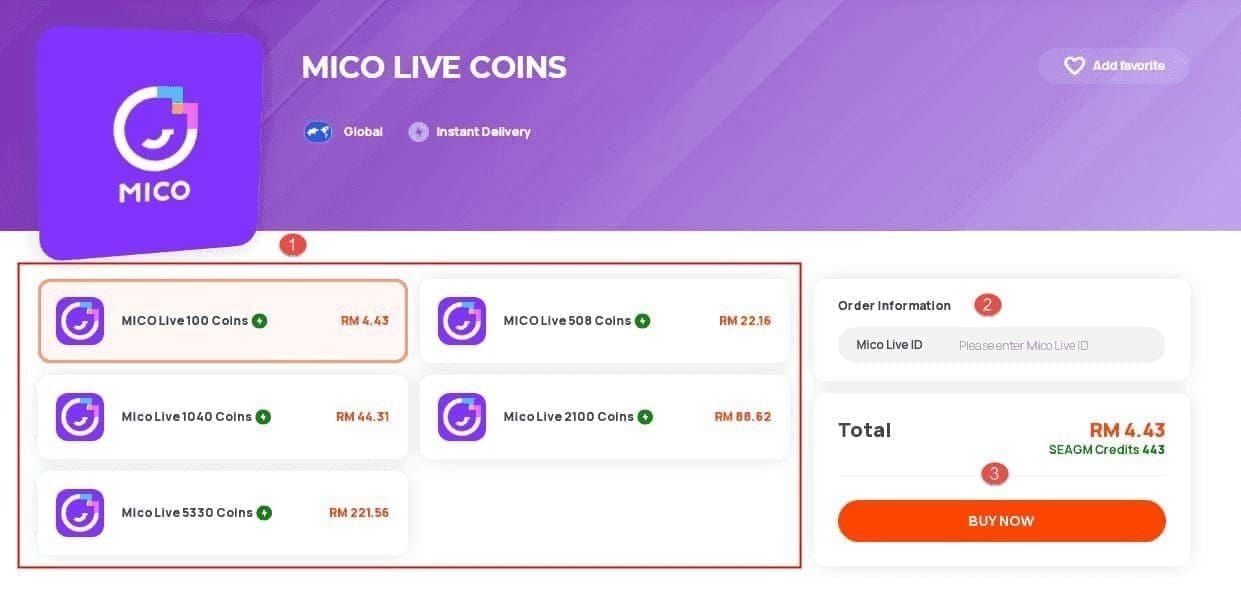
How MICO Coins Work Inside the Ecosystem
Coins are the primary outgoing currency for viewers. When you enter a creator's stream, you spend coins on animated gifts, chat bubbles, and broadcast entrance effects.
Broadcasters do not receive raw coins. Instead, gifts convert into platform rewards like Diamonds or Beans, valued at roughly 50% of the initial coin spend. The host cashes out those rewards, while the remainder covers platform infrastructure.
Purchased MICO Coins never expire. An unused balance sits in your wallet indefinitely, making off-peak stockpiling practical for seasonal events and agency battles.
Live events frequently activate tournament point multipliers. A 2x multiplier on a 1,000-coin gift doubles the streamer's tournament score without raising your coin cost. Tracking these multiplier mechanics lets you maximize event impact on the same coin budget.
Locating Your Numeric MICO User ID
Direct top-ups never require your account password, email, or phone number. The server only needs your numeric User ID (UID) to route coins to your account.
Here is how to locate your UID inside the app:
- Open the MICO Live app on your mobile device.
- Tap the Profile icon located in the bottom-right corner of the main screen.
- Look directly beneath your profile display nickname.
- Locate the 8 to 12 digit numeric string labeled "ID".
- Long-press or tap the copy icon next to the number to save it to your clipboard.
Never type your UID by hand into a checkout form. Transposing two digits sends the balance to an active stranger's account. Because MICO treats all successful coin deliveries as final and non-refundable, always copy and paste the string directly from your profile.
Regional Account Splits: Global vs MENA
MICO divides accounts into Global and MENA (Middle East and North Africa) catalogs at registration, locking each account to a dedicated pricing tier and server pool.
The exchange rate difference between the two catalogs is substantial. Global catalog accounts receive roughly 110 coins per $1 USD, whereas MENA accounts receive approximately 143 coins per $1 USD based on regional pricing structures.
The table below outlines the technical and operational differences between these two platform regions.
| Region Identifier |
Baseline Exchange Rate |
Account Lock Policy |
Delivery Failure Risk |
| Global |
~110 Coins per $1 USD |
Fixed at account creation |
Rejection if buying MENA SKU |
| MENA |
~143 Coins per $1 USD |
Restricted; requires verification |
Missing coins if buying Global SKU |
Catalog exchange rates and regional locks are determined by platform server assignment. Always verify that the top-up SKU matches your account's registered country before completing payment.
Buying a MENA SKU with a Global account triggers server-side order rejections or currency mismatch errors. Turn off any active VPN before checking out. VPN routing can misidentify your IP, load the wrong regional catalog, or trigger automated fraud flags.
Region changes are strictly restricted. MICO permits region updates only once every 12 months, requiring proof of residence, SMS verification, and a 24 to 48 hour manual review. Always buy from the catalog assigned to your account.
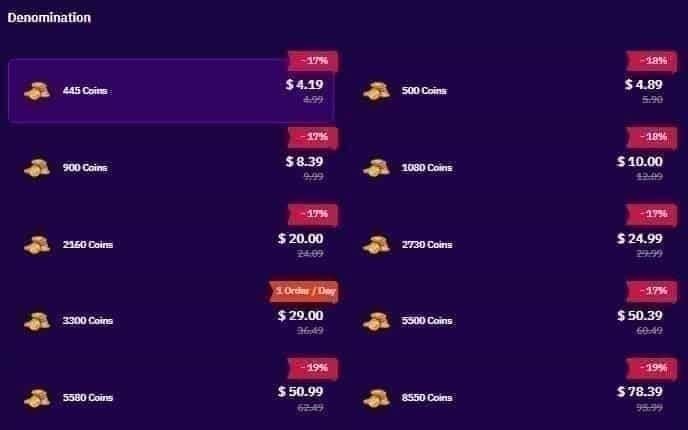
Step-by-Step MICO Coin Purchase Guide
A direct web top-up takes under two minutes once you have your numeric UID ready.
Step 1: Copy Your MICO UID
Open your MICO profile screen and copy your 8–12 digit numeric UID to your clipboard. Ensure no trailing spaces are selected.
Step 2: Choose Your Region and Coin Package
Open the Mico live top up catalog matching your account's region (Global or MENA). First-time buyers can look for introductory tiers offering 20% to 50% bonus coins.
Paste the numeric UID into the User ID field. If you are sending coins to a streamer or friend, enter their numeric UID instead. Deliveries route directly to the submitted ID.
Step 4: Complete Payment
Select your payment method and authorize the transaction. Legitimate portals dispatch your order automatically via direct server APIs.
Step 5: Check In-App Wallet Delivery
Return to MICO, open your profile wallet, and confirm the updated total. Most off-peak orders clear within 5 minutes. During peak streaming hours (7:00 PM to 11:00 PM local time), delivery queues can take 15 to 30 minutes.
Pricing and Package Value Breakdown
Mobile app stores charge steep surcharges on coin bundles to cover platform cuts. External top-up portals pass those savings back through higher coin yields per dollar across entry-level and bulk bundles.
The table below details standard coin bundles, baseline price ranges, and package value characteristics.
| Coin Package |
Average Price Range (USD) |
Target Use Case |
Value Rating |
| 445 Coins |
$4.12 - $4.99 |
Small stream interactions and basic badges |
Entry tier; lowest coin-per-dollar ratio |
| 900 Coins |
$8.04 - $9.99 |
Casual gifting and unlocking basic room effects |
Standard entry bundle |
| 2,200 Coins |
$20.38 - $24.42 |
Regular gifting across multiple streams |
Balanced mid-tier value |
| 5,580 / 5,700 Coins |
$44.88 - $63.27 |
Mid-level broadcast events and room privileges |
High-value tier; frequent promotional target |
| 8,550 Coins |
$79.13 - $89.99 |
Seasonal leaderboard pushes and large animated gifts |
Bulk package with solid volume efficiency |
| 22,000 Coins |
$196.39 - $244.20 |
Competitive agency battles and top-tier gifting |
Heavy volume; significantly reduced per-coin cost |
| 55,000 Coins |
$486.54 - $610.50 |
Major tournament support and ranking dominance |
Maximum volume; optimal coin-per-dollar rate |
Package prices fluctuate slightly based on regional exchange rates and daily currency adjustments. Checking real-time product pages helps you compare live rates for cheap Mico coins before purchasing.
The 110 coins-per-dollar baseline is an average benchmark. Small packages like 445 coins return 89 to 108 coins per dollar, while 22,000 and 55,000 coin packages offer the lowest unit costs. If you gift regularly, one large monthly purchase yields more coins than multiple small top-ups.
Recommended Packages by Spender Profile
Match your package tier to your gifting schedule to avoid overpaying on entry-level rates or leaving idle funds in your wallet.
The Casual Viewer (F2P / Low Spend)
- Monthly Budget: $5 – $15
- Recommended Bundle: 445 or 900 Coins
- Strategy: If you only send occasional greetings or use custom chat text colors, stick to the 900-coin bundle. It covers casual room interaction without tying up extra money.
- Monthly Budget: $25 – $100
- Recommended Bundle: 2,200 to 8,550 Coins
- Strategy: Viewers who support daily streams and community targets gain better per-coin value from the 5,580 or 8,550 coin tiers. These bundles provide enough balance for special events without repeated checkouts.
The Tournament Competitor & VIP Gifter (Heavy Spender)
- Monthly Budget: $200 – $600+
- Recommended Bundle: 22,000 or 55,000 Coins
- Strategy: For agency battles and VIP badge pushes, the 55,000 coin tier gives the highest yield per dollar. Recharge ahead of scheduled battles to prevent peak-hour queue delays.
Safety Protocols: Legitimate Top-Ups vs Scams
Shady third-party sites frequently pitch "unlimited coin generators" or offer discounted packages in exchange for direct account access.
Legitimate external top-ups use direct API delivery and never ask for passwords, social login tokens, or two-factor SMS codes.
- Legitimate Services Ask For: Your numeric MICO UID (8–12 digits), catalog region selection, and standard checkout payment authorization.
- Scams and Phishing Traps Ask For: Your MICO account password, linked Facebook/Google credentials, SMS verification codes, or remote screen-sharing access.
Leave immediately if a site claims an agent must log in to manually credit coins. Sharing login credentials compromises your stored Diamonds, Beans, and linked payment details.
Troubleshooting Missing Coins and Wallet Balance Glitches
When coin delivery stalls, client-side display caching or evening server queues are almost always the culprit.
Fixing In-App Display Lag
MICO's servers update balances immediately upon payment completion, but mobile clients often retain cached balance figures.
To force a cache refresh:
1. Log out of your MICO account.
2. Force close the MICO app completely on your phone.
3. Wait 15 seconds.
4. Reopen the app and log back in.
This 15-second logout-login cycle forces your client to query MICO servers for updated wallet totals.
Device Storage and Network Stability
MICO requires at least 500MB of free local storage and a steady connection to render stream assets and wallet data. Low storage can freeze background sync, causing balances to display as zero.
The diagnostic table below outlines common delivery errors and their direct resolutions.
| Symptom / Error |
Primary Cause |
Immediate Action |
| Balance unchanged after payment |
Client-side wallet cache lag |
Log out, wait 15 seconds, and log back in |
| Order status "Pending" > 15 min |
Peak hour server traffic (7–11 PM) |
Allow up to 30 minutes before contacting support |
| "User ID Not Found" at checkout |
Typo in numeric UID string |
Copy and paste the 8–12 digit UID from profile |
| Currency mismatch / Failed order |
Wrong catalog selected (Global vs MENA) |
Reorder under the correct regional catalog |
| UI freezing on wallet screen |
Low device storage (<500MB) |
Clear app cache and free up local storage space |
Most delivery hang-ups can be diagnosed within 15 minutes by checking your UID accuracy and server peak times. Keep your payment transaction ID handy if you need to submit a ticket.
Once coins credit to a valid UID, platform terms make the transfer irreversible. Third-party buyer protections cover server delivery failures, but delivered coins cannot be refunded or recalled.
Frequently Asked Questions
How do I find my MICO UID for a coins recharge?
Open the MICO app and tap your profile icon in the bottom-right corner of the screen. Your numeric UID is displayed directly beneath your nickname, where you can long-press to copy the 8–12 digit number.
Do I need to give my MICO account password to recharge coins?
No, legitimate third-party top-ups only require your numeric User ID (UID). You should never share your account password, email credentials, or SMS verification codes with any recharge platform.
How long does it take for MICO Coins to arrive after payment?
Most coin recharges credit automatically within 5 minutes of payment confirmation. Deliveries during peak streaming hours (7:00 PM to 11:00 PM local time) can experience minor delays up to 30 minutes due to server queue volumes.
What is the difference between MICO Global and MICO MENA packages?
MICO Global offers roughly 110 coins per $1 USD for international accounts, while MENA regional accounts receive around 143 coins per $1 USD. You must buy the package matching your account's registered country to avoid payment rejections or missing funds.
What should I do if my recharged MICO Coins do not appear in my balance?
Log out of your MICO account, wait 15 seconds, and log back in to force a server-side wallet balance refresh. If the coins do not show up after 30 minutes, contact customer support with your payment transaction ID and numeric UID.
Can I get a refund if I entered the wrong MICO UID during recharge?
No, MICO Coin deliveries to an active account are final and non-refundable once processed. Always copy and paste your numeric UID directly from your profile to prevent manual typing errors.
Can I recharge MICO Coins directly for a friend or streamer?
Yes, you can top up another user's wallet directly by pasting their numeric MICO UID into the checkout form instead of your own. The coins will credit straight to their account balance as soon as payment is confirmed.
Final Verdict on MICO Coin Recharges
Direct UID top-ups cut out mobile store commissions without putting your account credentials at risk. Copy your 8 to 12 digit UID straight from your profile screen, select the catalog matching your account's regional assignment, and avoid services requesting password access. Top up during off-peak hours before major tournament events to bypass server queues, keep your app cache clear, and maximize the value of your gifting balance.








Comments