
Age of Empires Mobile Top Up: Empire Coins and In-Game Currencies
Age of Empires Mobile brings classic strategic empire-building to mobile platforms. To grow your civilization, train powerful armies, and summon iconic historical commanders, having a steady supply of premium currency is essential. An Age of Empires Mobile top up on VGTopup gives you immediate access to Empire Coins and Apex Coins directly credited to your player account.
Understanding the in-game currency structure ensures you get the exact resources needed for your strategic progression:
- Empire Coins: The core premium currency used inside Age of Empires Mobile. Empire Coins allow you to speed up city construction, accelerate military technology research, buy rare materials from the merchant, and recruit legendary heroes to lead your legions.
- Apex Coins: The web recharge denomination used during direct account top-ups. Apex Coins convert directly into Empire Coins or can be spent inside special recharge event interfaces to claim exclusive milestone rewards, daily privilege packs, and growth funds.
| Currency / Pack | Role in Age of Empires Mobile | Primary In-Game Uses |
|---|---|---|
| Apex Coins | Premium direct recharge denomination | Unlocking special store bundles, milestone events, and direct coin exchange |
| Empire Coins | Core in-game premium currency | Speeding up building/research, recruiting commanders, VIP progression |
| Resource & Speedup Packs | Strategic expansion items | Instant troop healing, wall fortification, gathering acceleration |
All live prices, package amounts, and available bonus coin tiers are clearly displayed in the product selection menu above. Choose the package that matches your current campaign goals.
How to Top Up Age of Empires Mobile Empire Coins on VGTopup
Topping up your account on VGTopup requires only your User ID and your active server. Follow these straightforward steps to complete your order:
- Choose Your Package: Browse the available Empire Coins or Apex Coins tiers above and select your desired amount.
- Enter Your User ID: Type or paste your numeric player ID into the User ID box.
- Select Your Server: Open the server dropdown list and pick your exact game server (such as Realm001, Kingdom005, or Empire #150).
- Proceed to Checkout: Click the purchase button and select your preferred payment method on the secure checkout screen.
- Receive Your Coins: Once payment completes, the automated delivery system processes your request and credits the coins directly to your linked profile.
Order Verification Checklist
After your purchase is confirmed, complete this quick checklist inside the game:
- Log into your Age of Empires Mobile account on your mobile device.
- Check your in-game system mail for the official purchase receipt notification.
- Look at your upper dashboard balance to verify that your Empire Coins or Apex Coins have updated.
- If your balance does not reflect the change immediately, exit the application and reopen it to force a fresh data refresh with the game server.
How to Find Your Age of Empires Mobile User ID and Server
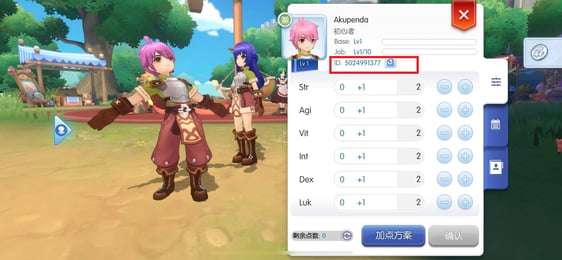
Locating your account details takes only a few seconds. Follow this visual reference and step-by-step walkthrough:
- Launch Age of Empires Mobile and log in to your active game account.
- Tap your Governor Avatar icon located in the upper-left corner of the main city interface.
- In your Governor Profile screen, find your numerical User ID shown under your governor name.
- Tap the small Copy icon next to the number to copy your User ID to your clipboard.
- Note your current Server name (such as Kingdom002 or Empire #078), which is displayed on your profile card and world view screen.

Double-check that you have copied the full numeric User ID before submitting your order on VGTopup to prevent delivery delays.
Why Choose VGTopup for AOEM Top Up: Safe ID-Only Checkout
Account safety and quick delivery are critical when buying game currencies. VGTopup provides a streamlined, secure recharge environment built specifically for strategy gamers.
- 100% ID-Only Transactions: You never need to share your account password, email access, or social login credentials. Your login details remain entirely in your hands.
- Automated Direct Routing: Orders are processed directly to the game server. You do not need to contact third-party marketplace sellers, wait in chat queues, or grant remote account access.
- Protection Against Account Compromise: Platforms that require credential sharing expose your civilization to unauthorized spending, accidental troop loss, or security penalties. Direct UID delivery eliminates these risks completely.
- Clear Live Pricing: You always see the exact price and currency amount on the live store page before you pay, with no surprise processing fees at checkout.
Supported AOEM Servers: Realm, Kingdom, and Empire #001-#500
Age of Empires Mobile organizes players across different server categories. VGTopup supports the complete list of active servers to ensure accurate balance delivery:
- Realm Servers: Dedicated servers including Realm001 and Realm002.
- Kingdom Servers: Numbered servers from Kingdom001 through Kingdom010.
- Empire Servers: The full global network of Empire servers, spanning Empire #001 all the way to Empire #500.
Because player accounts and city progress are tied directly to specific server instances, picking the correct server from the dropdown menu is essential. If you maintain characters on multiple servers under the same account, selecting the exact server name ensures the coins reach the intended civilization.
Frequently Asked Questions About AOEM Recharges
What are Empire Coins and how are they used in Age of Empires Mobile?
Empire Coins are the primary premium currency in Age of Empires Mobile. Players spend Empire Coins to accelerate long construction timers, finish military research instantly, buy VIP prestige points, purchase rare speedups, and summon legendary commanders to lead their armies in alliance wars.
What is the difference between Apex Coins and Empire Coins?
Apex Coins represent the direct external recharge units purchased during top-up transactions. Once added to your account, Apex Coins can be converted into Empire Coins or used directly to activate special in-game recharge events, seasonal milestone bundles, and daily supply packs.
How do I find my Age of Empires Mobile User ID and Server?
Open the game and tap your Governor profile picture in the top-left corner of the screen. Your numeric User ID is displayed under your player name with a copy button beside it. Your server name (such as Realm001, Kingdom004, or Empire #215) is visible on your profile card and world map.
Do I need to share my game account password to top up on VGTopup?
No. VGTopup requires only your User ID and selected server. You should never disclose your password, recovery codes, or linked social media logins for an online top-up.
How long does it take for Empire Coins to arrive in my account?
Delivery is automated. Once your payment is verified at checkout, the system routes the currency directly to your character ID. The coins usually appear in your balance within moments of order completion.
What should I do if my Empire Coins have not arrived after payment?
First, restart the Age of Empires Mobile app to refresh your account connection. Next, check your in-game mailbox for confirmation notices. If your balance has not updated after restarting, verify the User ID and Server entered on your order confirmation, then contact VGTopup customer support with your order number for fast resolution.
Select Denomination
Tax, payment fees and eligible coupons are calculated at checkout.
| Package | Price |
|---|---|
| 400 Empire Coins | USD 0.80 |
| 99 Apex Coins | USD 0.90 |
| 2,100 Empire Coins | USD 3.89 |
| 499 Empire Coins | USD 3.89 |
| 999 Empire Coins | USD 8.24 |
| 4,400 Empire Coins | USD 8.24 |
| 9,200 Empire Coins | USD 16.11 |
| 1,999 Empire Coins | USD 16.11 |
| 24,000 Empire Coins | USD 41.35 |
| 4,999 Empire Coins | USD 41.75 |
| 50,000 Empire Coins | USD 82.74 |
| 9,999 Empire Coins | USD 82.74 |