



Waho Top Up: Instant Coins for Voice Rooms and Social Gaming
Waho is a popular interactive voice chat and social entertainment application where users connect in multi-guest audio rooms, play casual party games, and support their favorite broadcasters. Unlike fitness or bike computer hardware sharing similar names, the Waho app focuses entirely on real-time social interaction and community audio streaming.
To participate in community events, send animated gifts, or customize your profile, you need Waho coins. A direct Waho top up on VGTopup delivers coins straight to your account balance using only your user ID (UID). You get immediate access to your balance without sharing login credentials or waiting for manual voucher codes.
What Are Waho Coins and What Are They Used For?
Waho coins serve as the primary in-app currency for the entire Waho ecosystem. Having an active coin balance allows you to unlock interactive features across live rooms:
- Virtual Gifting: Send special micro-gifts, luxury animations, and themed presents to room hosts and speakers to show appreciation and boost room popularity rankings.
- PK Battles and Room Contests: Support your chosen team or host during live room competitions by contributing gifts during timed challenges.
- Profile Customization: Purchase distinctive avatar frames, animated chat bubbles, and unique room entry effects that announce your arrival when joining audio rooms.
- Interactive In-Room Games: Use coins to join casual mini-games and interactive entertainment features hosted directly inside active voice channels.
- VIP Badges and Tier Status: Accumulating and spending coins increases your account level, granting higher room privileges and exclusive badge displays next to your username.
How to Find Your Waho UID in the App
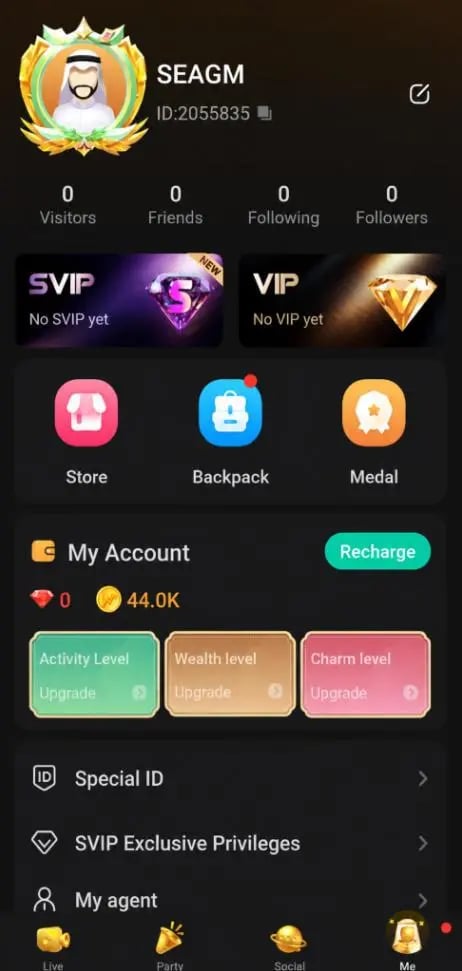
Your Waho UID is a unique numerical identifier assigned to your account upon registration. VGTopup uses this number to credit coins directly to your wallet. Follow these simple steps to find your UID:
- Open the Waho application on your mobile device.
- Tap the Profile (or Me) icon located at the bottom right corner of your screen.
- Look directly beneath your profile avatar and display name to find your numerical UID.
- Tap the copy icon next to your UID to copy the exact numbers to your clipboard.
Always double-check your UID before finalizing your recharge. Recharges sent to an incorrect UID cannot be reversed once processed on the server.
Step-by-Step Guide: How to Top Up Waho Coins on VGTopup
Recharging your Waho wallet on VGTopup is straightforward and requires no account passwords:
- Select Your Coin Amount: Browse the coin options on the product selection menu and pick the package that suits your gifting and gaming plans.
- Enter Your Waho UID: Paste your copied user ID into the designated UID field on the order page.
- Proceed to Checkout: Review your selected package and UID accuracy, then proceed to the payment step.
- Select Payment Method: Pick your preferred payment option from the live checkout screen.
- Confirm and Receive Coins: Complete the transaction. The system will process your order and credit the coins directly to your in-app Waho balance.
Waho Coin Packages and Pricing Breakdown
VGTopup provides flexible package sizes designed for casual chat room visitors as well as dedicated room hosts and active gifters. Live prices and local currency conversions are displayed in real time on the checkout module above.
| Package Tier | Typical Coin Value | Recommended Use Case |
|---|---|---|
| Starter Packs | 70 – 350 Coins | Daily greetings, basic stickers, and small room gifts |
| Standard Packs | 700 – 3,500 Coins | Room entry animations, basic badges, and mid-tier gifts |
| Host Supporter Packs | 7,000 – 35,000 Coins | PK battle support, luxury gifts, and room ranking boosts |
| Elite Leaderboard Packs | 70,000+ Coins | High-tier gifting, VIP level progression, and exclusive profile effects |
All package pricing reflects real-time exchange rates at checkout, giving you clear visibility over your purchase without hidden processing fees.
Safe & Password-Free Recharge: Why Choose VGTopup for Waho
Security is paramount when purchasing digital items for social apps. VGTopup prioritizes player safety with a streamlined process built around UID-only top-ups:
- Zero Password Requirement: You never need to provide your account password, phone number login, or verification codes. Your Waho account remains completely secure in your hands.
- No Account Sharing: Your profile stays active on your phone while the recharge processes in the background. You do not need to log out or transfer account control.
- Fast Automated Processing: Orders are handled through direct fulfillment systems to ensure your coins arrive promptly after payment confirmation.
- Gift for Friends Easily: Because only a UID is required, you can surprise friends, family members, or favorite room hosts by entering their UID directly during checkout.
- Dedicated 24/7 Support: If you ever have a question about an order or payment status, VGTopup customer assistance is ready around the clock to help.
Troubleshooting Waho Top-Up Issues and Balance Delays
While top-ups typically arrive quickly, occasional server delays or connectivity issues can occur. If your balance does not update immediately, follow these troubleshooting steps:
- Restart the Waho App: Completely close the Waho application from your device's recent apps switcher and reopen it. This forces the app to refresh your wallet balance from the server.
- Check Your Internet Connection: Switch between Wi-Fi and mobile data to ensure your device is receiving live data updates from Waho servers.
- Verify Your UID on the Order Receipt: Check the order confirmation email from VGTopup to make sure the UID submitted matches your current Waho profile ID.
- Check Transaction Status: Ensure your payment was successfully completed and that you received an order confirmation number.
- Contact Support: If your coins have not appeared after completing the steps above, reach out to VGTopup customer support with your Order ID and UID for rapid assistance.
Frequently Asked Questions
What is Waho and what are Waho coins used for?
Waho is a real-time voice chat and social community application where users join audio rooms, chat, and participate in casual games. Waho coins are the in-app currency used to purchase virtual gifts, unlock special entry animations, customize profile decorations, and support creators during live room events.
How do I find my Waho UID for top-up?
Open the Waho app, tap the Profile icon on the bottom navigation bar, and view the numerical UID located directly under your profile name. Tap the copy icon next to the number to copy your exact UID.
Do I need to share my Waho account password to buy coins?
No. VGTopup only requires your numerical Waho UID to process coin recharges. You should never share your account password, SMS verification codes, or login credentials with anyone.
How fast will the coins appear in my Waho account after recharge?
Coins are credited directly to your in-app balance shortly after your payment is confirmed. In rare cases of server congestion, a quick restart of the Waho app will refresh your balance.
Can I recharge Waho coins for another user using their UID?
Yes. Because the top-up process only requires a UID, you can enter any valid Waho user ID during checkout to send coins directly to a friend or favorite room host.
What should I do if my Waho coins do not show up after payment?
First, restart your Waho app to force a wallet refresh. If the balance remains unchanged, check your VGTopup order receipt to confirm the UID was correct, then contact VGTopup support with your Order ID for prompt resolution.
Select Denomination
Tax, payment fees and eligible coupons are calculated at checkout.
| Package | Price |
|---|---|
| Waho - Waho*15000 | USD 1.36 |
| Waho - Waho*20000 | USD 1.81 |
| Waho - Waho*25000 | USD 2.27 |
| Waho - Waho*50000 | USD 4.54 |
| Waho - Waho*100000 | USD 9.07 |
| Waho - Waho*500000 | USD 45.37 |
| Waho - Waho*1000000 | USD 90.74 |
| Waho - Waho*10000 | USD 0.91 |

































































