The actual delivery times, sorted by how you paid
Players keep treating "top-up" like one button with one speed. Wrong. The clock depends entirely on how you paid, and you can call it before checkout.
Official in-app purchases (gems or coupons bought right inside the game via Google Play or the App Store) are the quickest. The store runs the transaction, the game credits you, balance moves almost immediately. That's the route people mean when they swear OPM top-ups are instant.
Third-party UID top-ups live in a curious middle ground. SEAGM's product page lists instant crediting after payment, and Razer Gold plus Codashop both run the same 1 USD = 7 Coupons rate, per Razer Gold. Now the part that snags folks: on Codashop, the coupon is "sent by in-game mail after purchase," according to the One Punch Man Mobile SEAEN Facebook. Mail, not balance. The payment cleared instantly. You just couldn't see it.
| If you paid via… |
Typical window |
What to check first |
| Google Play / App Store in-app |
Seconds to ~2 min |
Your coupon/gem balance |
| Third-party UID top-up (instant-credit) |
Seconds to a few min |
Balance, then mailbox |
| Coupon delivered by in-game mail |
Minutes, occasionally longer |
In-game mailbox/inbox |
| Any path during maintenance |
Queued until servers return |
Maintenance notice, then mailbox |
Source: SEAGM (2026), Razer Gold (2026), One Punch Man Mobile SEAEN Facebook (2026).
And that "up to 24 hours" number floating around the forums? Read it as a worst-case ceiling, nothing more. No official support page publishes a hard delivery SLA. Searches in 2026 surfaced no publisher FAQ pinning down exact windows, which means that 24-hour figure is really padding for a gateway hold still chewing on verification, not a timer the game runs every order.
Where the gems and coupons actually drop
Two landing spots, and mixing them up explains a wild number of "my top-up vanished" posts. Direct-to-balance means the currency shows in your total the second it clears. Mailbox delivery means it lands as a claimable item you've got to open.

Third-party coupon orders tend to land in the in-game mailbox or inbox, per the provider guides from SEAGM, Razer Gold, and Codashop. So look there before deciding anything broke. Official in-app buys go straight to balance instead. One quirk worth filing: even on SEAGM, Bonus Funds get added directly to your balance rather than mailed, per a 2026 SEAGM help note. So one order can split two ways, base coupons sitting somewhere different from the bonus.
This is the trap that genuinely bites people. Mail rewards can quietly expire if you never open them. The system already marked them delivered. Balance looks untouched, you fire off a frantic ticket, and the reply lands as "it was in your inbox, and it timed out." Treat claiming mail as the first move after any third-party buy, not a thing you'll get to later.
It's also why fresh players stumble. They're staring at the coupon counter up top, refreshing, force-closing, restarting, while the prize is one tap deep in an inbox nobody opened.
Stuck top-up? Work this list before you spiral
Balance won't move, so attack it in sequence. Most "stuck" reports clear at step one or two.
- Open your in-game mailbox. Biggest single source of false alarms, resolved right here. Coupon-by-mail? It's sitting there.
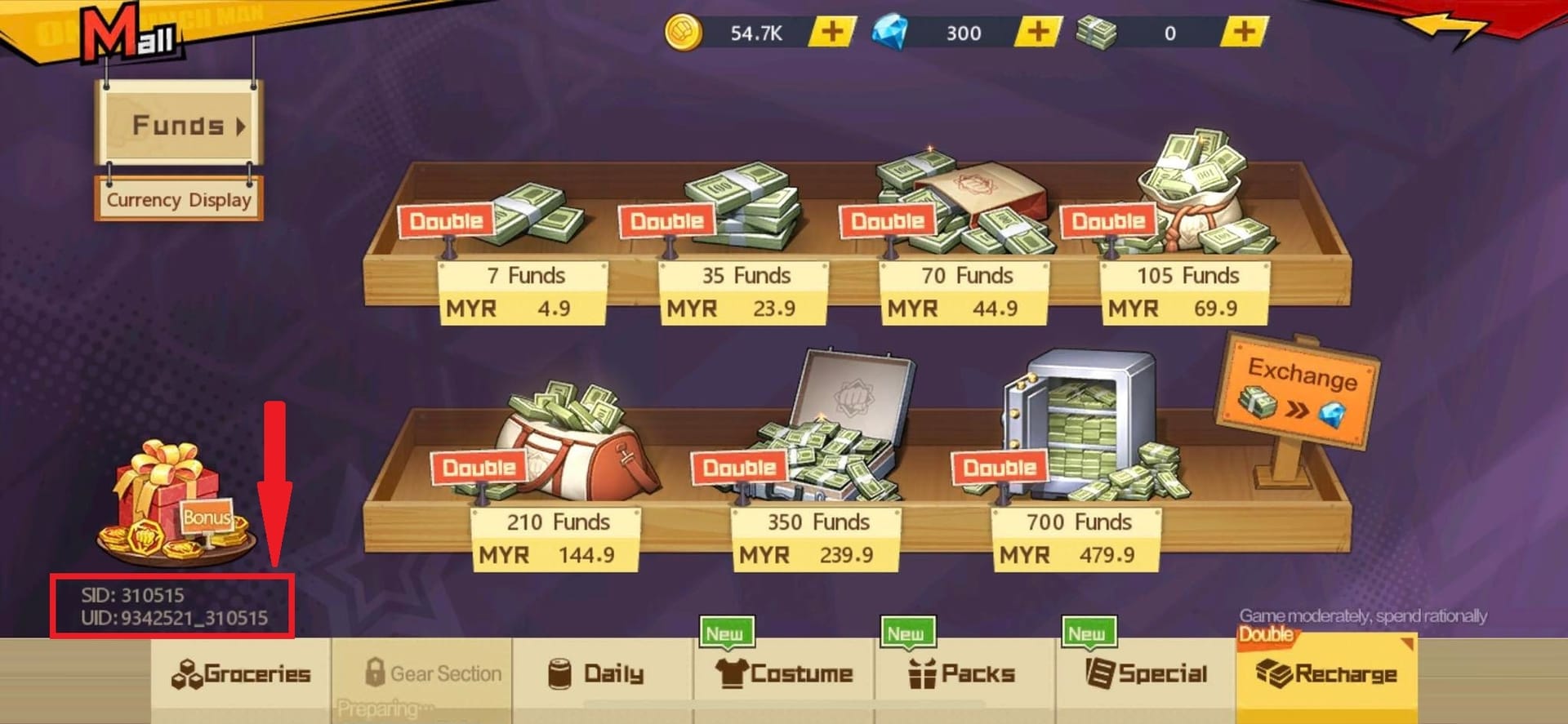
- Confirm the Player ID/UID you typed. Pull the recharge screen in the game mall and cross-check the number you punched in at checkout against your real UID. A wrong Player ID ships your top-up to somebody else's account, per itemku and OffGamers guides, and that's the screwup support usually can't undo.
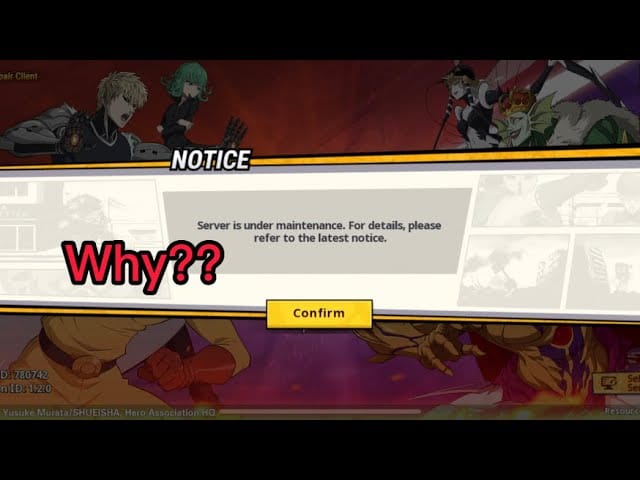
- Look for active maintenance. Official channels post downtime notices. Topping up mid-maintenance can stall delivery until the servers come back, per the game's own Facebook maintenance posts.
- Restart and re-sync. Fully kill the app and reopen it so it re-pulls your account state. A shocking chunk of "missing" balances are just a client that didn't refresh.
- Give it a beat. Gateway-verification hold? Community provider notes suggest 30–60 minutes before you escalate. Most clear inside that span unprompted.
The UID step's the one I won't ever skip. Checking your UID/SID on the recharge screen before you buy, as eneba and SEAGM guides push, is thirty seconds that blocks the only truly unrecoverable failure in this whole mess. A single mistyped digit doesn't refund you. It funds a stranger's coupon balance instead.
What's genuinely behind the lag
If your top-up's actually dragging rather than mis-routed, the cause is nearly always one of three predictable things, and none of them mean the money's gone.
Gateway verification holds. The store or processor is still confirming the charge before the game releases currency. This is the most common real delay, and it's precisely why that worst-case window creeps toward 24 hours on paper even when most orders clear in minutes.
Server load and maintenance queues. Downtime doesn't kill deliveries, it queues them. Pending holds often clear the moment maintenance lifts, not on some fixed countdown. Topped up right as the servers dropped? Likeliest outcome is your coupons popping in when they boot back up. The official Facebook channel announces those windows, so that's the page to watch instead of mashing refresh on your balance every two minutes.
Region and time zone. Different markets route through different stores and processors, and peak-hour pressure shifts by region. But there's no published per-region delivery data, so treat region as background noise, not a prime suspect. If your delay lines up with a maintenance post or a payment hold, you've already found the answer.
Charged but nothing showed: the recovery playbook
You paid. Mailbox empty. UID checked out. No maintenance running. An hour's gone. Now you escalate, calmly, in order.
Step one, lock down proof before opening a ticket: your order ID and the payment receipt. Screenshotted the order ID the second you bought? You're already ahead, and honestly that should just be a reflex. The recovery loop community providers describe is plain enough: check mailbox, restart app, wait 30–60 minutes, then ping support with order ID and receipt ready.
A solid ticket carries the UID you topped up, the exact denomination, the timestamp, the order ID, and the receipt screenshot. That bundle lets support match the transaction in one pass rather than three rounds of back-and-forth.
Now the big "don't": kill the urge to file a chargeback before support gets a swing at it. General mobile-game guidance is blunt here, disputing the charge before contacting support risks an account ban. Weigh it. A verification hold usually fixes itself. A chargeback can lock the very account you were funding, often over a delay that would've cleared on its own. Waiting beats disputing in basically every charged-but-pending case. The chargeback's the move that flips a 20-minute annoyance into a permanent loss.
For the record, no specific OPM chargeback-ban case turned up in 2026 searches, so this is general genre advice, but the risk pattern's consistent enough across mobile games that I wouldn't bet an account to prove it.
What I keep seeing when "missing" reports resolve
That "top-ups are instant" line everyone parrots is both true and slippery. The game's not the variable. The variable is your delivery path and whether a gateway's still checking. Pick the in-app or instant-credit route, claim your mail, double-check the UID, and you'll basically never hit a real delay. The friction lives in two spots you can see coming: verification during peak hours, and maintenance queues.
Want a clean order record and skip the in-app verification friction? A reputable UID-based route works fine. The danger was never speed, it was a wrong-digit slip. Disclosure: services like One Punch Man: The Strongest Coupons top up deliver against your Player ID, so the same UID-accuracy rule applies. Verify before you confirm.
The delay rarely costs anything. The panic does. Open the mailbox, breathe, recheck your UID before you do something you can't take back.
Frequently Asked Questions
Why haven't my gems arrived after paying, even though the payment went through?
Check your in-game mailbox first. Third-party coupon top-ups frequently land there instead of your balance, per SEAGM and Razer Gold guides, and the counter up top won't move until you claim. If the mail's empty too, you're probably in a brief gateway-verification hold that usually clears within minutes.
Does restarting the game deliver a pending top-up?
It can, and it's worth trying early. A full restart forces the client to re-pull your account state from the server, which often reveals a balance that was already credited but never displayed. It won't summon currency stuck behind a payment hold (for that you wait), but it costs nothing and clears the display-lag cases.
How long does coupon code redemption take in OPM The Strongest?
Code-based and Codashop coupon deliveries route through in-game mail rather than straight to balance, per the official SEAEN Facebook, so they're usually a few minutes once the order processes. The lag you feel is almost always the unopened mail, not the redemption. Check the inbox before assuming the code flopped.
Is third-party top-up slower or riskier than buying in-app?
On speed they're comparable. SEAGM lists instant crediting, and the gap is delivery destination, not the clock. The real risk isn't timing at all, it's typing a wrong Player ID and shipping coupons to a stranger, which itemku and OffGamers flag as often irreversible. Verify your UID on the recharge screen first and that safety gap basically closes.
If I topped up during maintenance, is my money lost?
No. Deliveries queue rather than fail during downtime, per the game's maintenance posts, and pending orders commonly land the instant servers come back rather than on some fixed timer. Watch the official channel for the all-clear instead of refreshing your balance, and only escalate with your order ID if it's still missing well after maintenance wraps.











Comments