Play 1: relog before you do anything else
The fastest recovery costs nothing and takes about three minutes. Tokens credit through a backend sync that runs separately from the payment confirmation, and a stale client session is the top reason a paid balance won't refresh. Run the sequence:
- Close the game fully, not into the background. On mobile, swipe it out of recents. On PC, exit the client.
- Reopen and log in on the same account you bought on (more on that trap below).
- Give the home screen 15–30 minutes to pull a fresh server sync before you touch anything else.
Payment platforms process purchases at different speeds and delivery doesn't always land at once, so check pending status before any additional purchases, per R2Games Support Billing Help. That's the official line, and it's why re-buying backfires. Your first order is probably still in flight.
One quieter trick has bailed me out on stubborn mobile cases: force-stop the app and clear only the cache, never the data. A cache-only clear triggers a clean re-sync that can pull in a stalled delivery. Wiping data can log you out of the wrong account. First-time buyers panic at sync lag and relog mid-handshake, so let the server sync settle before you restart again.
Works when the charge posted and the tokens sit un-synced. Fails when the charge is still a pending hold, or the payment landed on a different sub-account.
Play 2: tell a pending hold apart from a real charge
Confirm the charge cleared before you file anything. Plenty of "tokens never arrived" tickets get filed against a payment that never completed: a pending authorization hold can sit on your statement looking like a charge for days, then vanish with no tokens ever owed.
The distinction saves you a wasted ticket:
- Pending / authorization hold — a temporary reserve the processor places to verify funds. It shows on your bank app but hasn't settled. No money has left, and the game owes you nothing yet.
- Posted / cleared charge — settled, money gone, delivery expected.
Verify the charge cleared through your bank or app-store receipt before you contact support. If your statement says pending, wait. Don't relog, don't ticket, don't re-buy. Holds drop off or convert within a couple of days depending on your bank.
Most missing-token guides skip this detail, which is why so many threads end with "never mind, it showed up." You don't have a delivery problem until you can confirm a posted charge.
Works when you check status first and skip a false-alarm ticket. Fails when you treat every pending line as lost money and start panic-buying.
Play 3: fix it by where you actually bought
Your recovery path depends on the purchase channel, and running two paths at once gets accounts flagged. Match your situation to one row and commit to it.
| Channel |
First move |
Evidence to grab |
Refund window |
| Google Play (mobile) |
Relog, then in-game Help Center ticket |
Google order number + receipt email |
Refund request possible within 48 hours, depending on details (per Google Play Help) |
| Apple App Store (mobile) |
Relog, then in-game ticket; App Store "Report a Problem" as fallback |
App Store receipt + transaction ID |
Apple reviews case-by-case |
| PC / web client |
Relog, then R2Games support ticket |
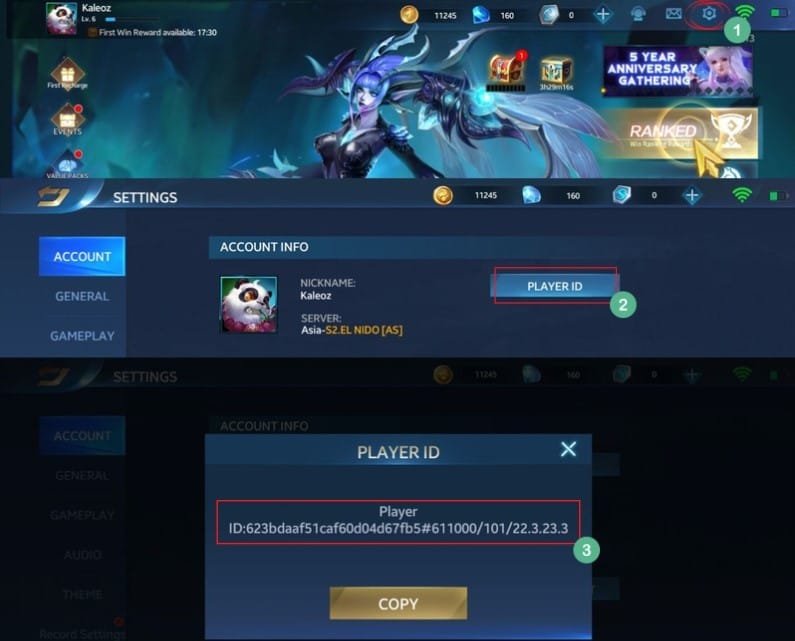
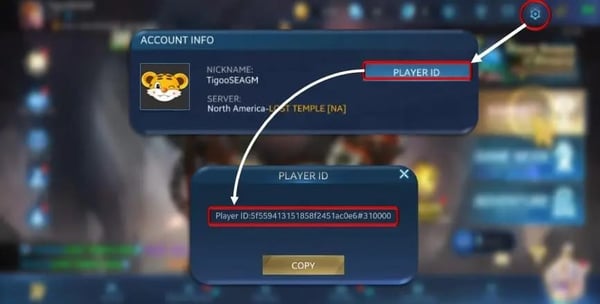
Order ID, Player ID, server, amount |
Through original processor |
| Third-party top-up |
Confirm Player ID was correct, then contact that channel |
Player ID + order confirmation |
Per that channel's policy |
Source: Google Play Help (2026); R2Games Support Billing Help (2026); MooGold Heroes Evolved Top Up (2026).
For the in-game route on any platform, open the Help Center, pick the Payments category, and describe the issue with full transaction details, per the Heroes Evolved Help Center Guide. PC and web buyers route through the official ticket system with Player ID, server, and the amount recharged, per the same R2Games billing channel.
One hard rule: never run a platform refund and an in-game crediting request at the same time. If support credits your tokens while Google or Apple processes a refund, you've been paid twice for one order, and the cleanup, often a clawback or a duplicate-order flag, lands on you. Pick the original purchase channel first. It resolves faster than a generic email and keeps one clean record instead of two conflicting ones.
For third-party purchases, the failure point is rarely the processor. It's a mistyped Player ID. On MooGold, you enter your Player ID, complete payment, and the tokens credit within 30 minutes, per MooGold's product page. If 30 minutes pass with nothing, verify the ID you entered matches the account you're logging into.
Works when you pick one channel and stick to it. Fails when you fire off a refund and a ticket the same hour.
Play 4: build the evidence package that gets you paid
A ticket without a transaction ID sits. Reports across Heroes Evolved mobile groups are blunt about this: a ticket without a transaction ID or receipt cuts your resolution odds, and screenshots alone trigger days of back-and-forth. The transaction ID decides how fast you get your tokens.
Find it here:
- Google Play — open the Play Store → Account → Payments & subscriptions → Budget & order history. The order number starts with
GPA.. Your confirmation email carries it too.
- Apple — check the receipt email from Apple (subject line "Your receipt from Apple"), or Settings → your name → Media & Purchases → Purchase History.
- PC / web — the order confirmation email from the payment processor used at checkout.
- Third-party — the order confirmation screen or email from that channel.
A complete package for a Payments-category ticket runs short but non-negotiable: your Player ID and server, the transaction ID / order number, the amount and currency charged, the date/time, and a screenshot of the in-game balance showing the tokens missing. Attach both the purchase receipt and the screenshots, never one alone.
Support matches a transaction ID against the crediting backend. A screenshot of your bank app proves money left. The order number tells them where it went and lets them push the delivery.
Works when you attach the order number up front. Fails when you lead with screenshots and make support ask for the ID you should've sent first.
Play 5: file the ticket, then set realistic expectations
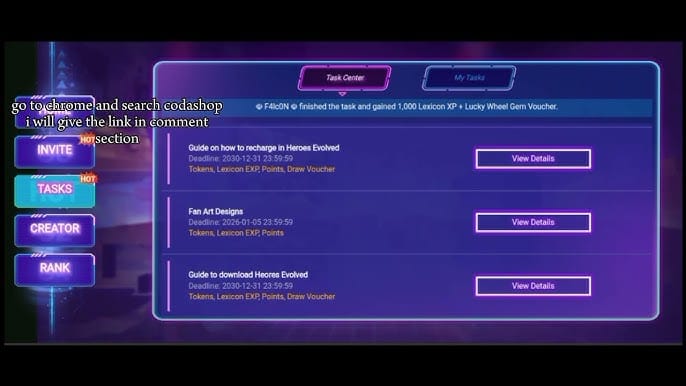
Once you've confirmed a posted charge, relogged, waited the sync window, and gathered proof, the ticket itself moves fast. In-game: Help Center → Payments → describe the issue with the transaction details above. PC/web: the R2Games ticket system with Player ID, server, and amount recharged.
On timing, be honest with yourself. This title publishes no universal resolution clock, and anyone quoting you an exact figure is guessing. The shape of it holds up:
- Relog + sync clears the easy cases in minutes to an hour. Most "lost" tokens never reach a ticket.
- Ticket with full evidence unsticks the stalled deliveries. A clean package with a transaction ID moves; an incomplete one stalls on follow-up.
- Refund routes run on the platform's own clock. Google Play's 48-hour self-service window for in-app purchases is the clearest deadline you control.
The biggest time-saver is never making support ask for anything twice.
Works when your first message is complete. Fails when you open with "I was charged and got nothing" and no order number.
Play 6: handle double charges and the wrong-account trap
Two edge cases drive most of the confusing "charged but not received" reports, and neither is what it looks like.
The double charge. If you see two charges, don't refund both. One is often a posted charge and one a pending hold that'll drop off, back to the pending-vs-posted distinction. If both posted and only one batch of tokens arrived (or none did), file a single ticket listing both transaction IDs and let support reconcile them. Don't open a chargeback to fix it fast. A chargeback is a bank-level dispute that can lock the account it's tied to while it processes. The chargeback-ban fear isn't overblown: the practical risk is your account freezing mid-dispute, the opposite of what you want while recovering tokens.
The wrong sub-account. Few people mention this one and it's a real culprit. If you switched login methods mid-session, say a guest account versus a linked Facebook/Google login, the tokens can credit to the sub-account active at purchase, not the one you logged back into. Symptom: charge posted, no error, balance unchanged, and a relog doesn't help. Fix: log back in through the exact method you used when you paid. If you can't tell which account got credited, flag that in the ticket, because support can trace the delivery target by transaction ID.
Works when you reconcile both charges in one ticket and log in the way you paid. Fails when you chargeback first and ask questions later.
Stop losing top-ups in the first place
A few habits kill most of these incidents before they start. Buy on a stable connection, since a dropped link during the delivery handshake is a classic cause of a cleared charge with no tokens. Confirm you're logged into the correct, intended account before you check out, not a stray guest session. After any purchase, give the balance a sync moment before you assume the worst.
If you want to skip the wait-and-ticket cycle, a delivery-tracked channel changes the math. When you log each order end to end, the "charged-but-missing" window shrinks because you can point at a record instead of a guess. For transparency: Heroes Evolved Tokens top up through VGTopup logs each order that way, useful if your real frustration is the opacity of where a payment went, not the price.
Whatever channel you use, the traceable order is the recoverable order.
Frequently Asked Questions
Why was I charged but didn't receive my Heroes Evolved tokens?
The payment usually cleared and the game's crediting backend hasn't synced yet. Delivery doesn't always happen at once, so check pending status before you do anything, per R2Games support. Less often, a connection drop during checkout or a switched login method routed the tokens to a different sub-account. Relog on the exact account you paid on before you assume the money's gone.
How long do Heroes Evolved tokens take to arrive after payment?
In-app purchases usually credit near-instantly, but a sync lag can hold them for a stretch. Wait 15–30 minutes after a relog before you treat it as a failure. Third-party channels vary; MooGold lists crediting within 30 minutes, per its product page. This title publishes no universal figure, so anyone quoting an exact resolution clock is estimating.
Can I get a refund if my tokens never arrived?
Possibly, but sequence it carefully. Google Play allows a refund request within 48 hours for in-app purchases depending on the details, per Google Play Help; Apple reviews case by case. Never run a refund and an in-game crediting ticket at the same time, because if both succeed you're paid twice for one order and the cleanup falls on you. Try in-game support through the original channel first.
What do I do if I was charged twice?
Check whether one charge is a pending authorization hold that'll drop off, since a hold can mimic a real charge for days then vanish. If both posted, file one ticket listing both transaction IDs and let support reconcile them, rather than opening a bank chargeback that can lock the disputed account while it processes.
Your Player ID and server, the transaction ID or order number, the charged amount and currency, the date, and a screenshot of the missing in-game balance. Tickets without a transaction ID see lower resolution odds, per community reports, and screenshots alone trigger days of follow-up. Lead with the order number, attach the receipt, and you skip the back-and-forth.









Comments